
How to Clean and Maintain Your Kitchen Mama Electric Can Opener

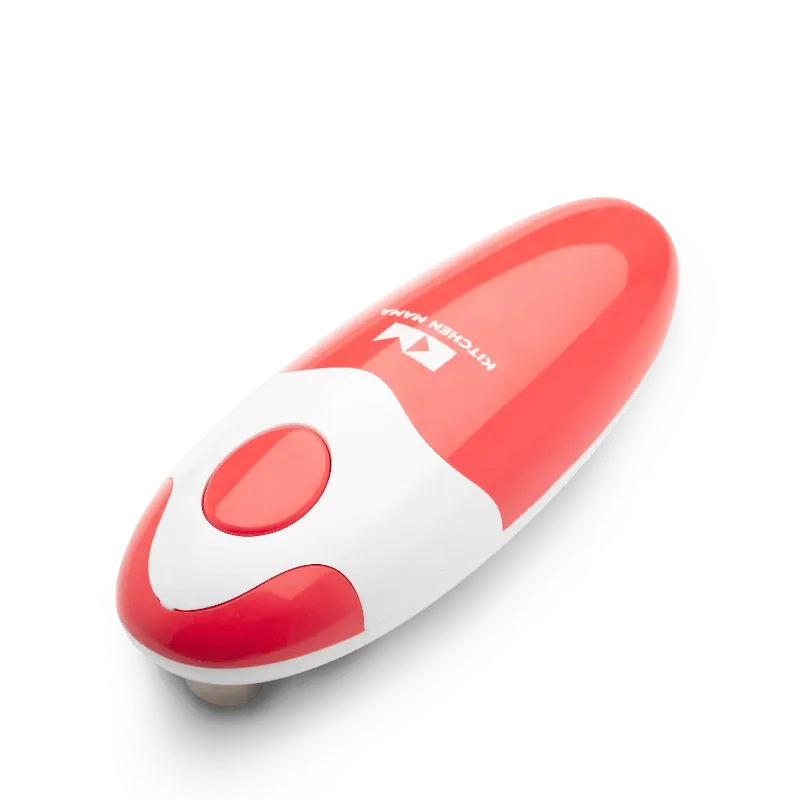
Your kitchen mama can opener stays clean and functional with weekly wipe-downs, proper debris removal after each use, and battery care that prevents corrosion. This automatic can opener has become a viral sensation for good reason, but like any electric kitchen tool, it needs simple maintenance to deliver years of smooth, hands-free performance.
We tested the cleaning process across multiple uses and can conditions to bring you a practical maintenance routine that takes less than two minutes per week.
Why Cleaning Your Kitchen Mama Can Opener Matters
The cutting mechanism on your automatic can opener comes into direct contact with food residue, metal shavings, and liquids from cans. When debris builds up around the blade and drive wheel, you'll notice slower operation, incomplete cuts, or even jamming mid-cycle.
Regular cleaning prevents these issues and extends the motor's lifespan. Metal particles can corrode internal components if left unchecked, while sticky residue attracts bacteria. A clean opener also won't transfer old food particles to fresh cans.
This hands-on review confirms that proper care keeps the unit running like new even after hundreds of cans.
Daily Wipe-Down After Each Use
After opening a can, wipe the cutting assembly immediately before residue dries:
- Hold the opener over a sink or trash can
- Tap gently to dislodge loose metal shavings
- Dampen a paper towel or microfiber cloth with warm water
- Wipe the blade, drive wheel, and magnetic holder in one smooth motion
- Dry completely with a clean towel
Never submerge the unit or run it under flowing water. The motor housing is splash-resistant but not waterproof. For sticky or oily residue from tuna or soup cans, add a drop of dish soap to your damp cloth.
Store the opener in a dry drawer or countertop spot away from steam and splashes. Moisture is the enemy of electric motors and battery contacts.
Weekly Deep Clean for Kitchen Mama Can Opener Performance
Once a week, dedicate five minutes to a thorough cleaning that reaches hidden crevices. You'll need a soft-bristle toothbrush, cotton swabs, rubbing alcohol, and a dry cloth.
Step-by-step weekly maintenance:
- Remove the batteries to prevent accidental activation
- Dip the toothbrush in warm soapy water and gently scrub around the cutting wheel
- Use a cotton swab dipped in rubbing alcohol to clean the blade groove and any tight spaces
- Wipe the battery compartment with a dry cloth to check for corrosion
- Clean the rubber grip and exterior with a damp cloth
- Dry all parts thoroughly before reassembling
Pay special attention to the magnetic lid holder. Food particles can weaken the magnet's grip over time. A quick wipe with alcohol restores full holding power.
If you notice white or green residue in the battery compartment, remove it immediately with a cotton swab dipped in white vinegar, then dry completely. This prevents contact failure that stops the motor.
Kitchen Mama Can Opener Troubleshooting Through Cleaning
Many common performance issues resolve with targeted cleaning rather than replacement. If your opener stops mid-cut, the drive wheel likely has debris blocking smooth rotation. Remove it with a toothpick or brush.
When the unit struggles to puncture the lid, check for a dull or clogged blade. Metal shavings can pack into the cutting edge and reduce sharpness. A thorough alcohol wipe usually restores cutting power.
For motor hesitation or strange sounds, inspect the gears visible near the cutting assembly. A single grain of rice or coffee ground can jam the mechanism. Kitchen Mama's design makes these spots accessible for quick cleaning without tools.
If cleaning doesn't solve the issue, check our troubleshooting guide for warranty information and support resources.
Battery Care and Replacement Schedule
The Kitchen Mama runs on four AA batteries that typically last three to six months with regular home use. Proper battery maintenance prevents leaks that can destroy the unit.
Battery best practices:
- Use alkaline batteries for longest life and leak resistance
- Remove batteries if storing the opener for more than two weeks
- Replace all four batteries at once, never mix old and new
- Check battery contacts monthly for any white residue or corrosion
- Keep spare batteries in a cool, dry place
When you notice slower cutting speed or the motor stopping before completing the cut, replace the batteries even if they're not completely dead. Weak batteries strain the motor and can cause permanent damage.
Some users switch to rechargeable NiMH batteries to reduce waste. These work well but deliver slightly less torque, so expect to recharge more frequently than you'd replace alkalines.
Storage Tips to Extend Lifespan
Where and how you store your electric can opener between uses affects its longevity. Avoid humid areas near the sink or stove where steam and heat accelerate corrosion.
Store upright in a drawer with the cutting assembly facing up so debris falls away rather than settling into the mechanism. If you keep it on the counter, use a clear spot away from splatter zones.
Never stack other tools on top of the opener. Pressure on the plastic housing can misalign internal components and cause binding. Treat it like the precision tool it is, similar to how you'd care for quality silicone oven mitts or other essential kitchen gear.
Before long vacations or seasonal storage, clean thoroughly, remove batteries, and place in a sealed plastic bag with a silica gel packet to control moisture.
When to Replace vs. Repair
With proper cleaning and care, your Kitchen Mama can opener should deliver five-plus years of reliable service. However, some issues signal it's time for replacement rather than continued maintenance.
Replace the unit if you notice a cracked housing, a blade that won't hold an edge after cleaning, or a motor that overheats during normal use. These aren't fixable with home maintenance.
For pricing on a replacement or to grab a backup unit during a sale, visit our Kitchen Mama discount code page where we maintain current offers including 10% off all orders.
The small investment in a new opener every few years costs far less than the hand strain and frustration of manual can openers, especially if you open multiple cans daily.
Frequently asked questions
How often should I clean my Kitchen Mama can opener?
Wipe down the cutting assembly after each use and perform a deep clean with a toothbrush and rubbing alcohol once a week. This prevents buildup that can jam the motor or dull the blade.
Can I wash the Kitchen Mama can opener under water?
No, never submerge the unit or run it under flowing water. The motor housing is splash-resistant but not waterproof. Use a damp cloth to wipe surfaces and dry immediately.
Why does my automatic can opener stop mid-cut?
This usually means debris is blocking the drive wheel or the batteries are too weak. Clean the cutting mechanism thoroughly with a toothbrush and replace all four batteries at once.
What type of batteries work best in the Kitchen Mama?
Use four AA alkaline batteries for longest life and best leak resistance. Replace all four at once when you notice slower cutting speed, and remove them if storing the opener for more than two weeks.
How do I remove metal shavings from the blade?
Tap the opener gently over a trash can to dislodge loose shavings, then use a soft toothbrush dipped in warm soapy water to scrub around the cutting wheel. Finish with a cotton swab dipped in rubbing alcohol for tight spaces.
Where should I store my electric can opener?
Store upright in a dry drawer away from steam and heat sources, with the cutting assembly facing up. Avoid humid areas near the sink or stove, and never stack other tools on top of the unit.