

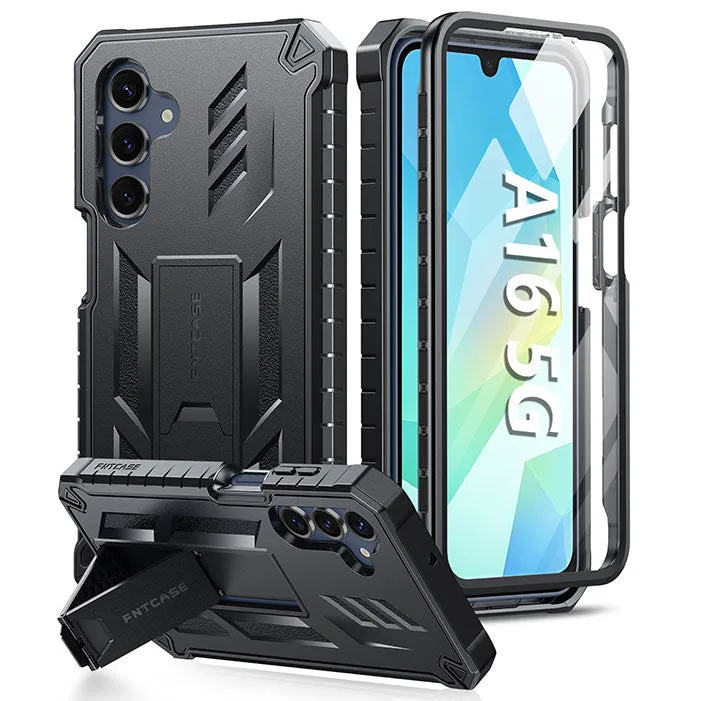
A galaxy a16 case with stiff buttons is almost always a break-in issue, not a defect: the TPU or silicone button bridge is molded slightly thick and needs a few days of pressing to soften into place. If it still feels like a brick after a week, the cause is usually a misaligned cutout or a case built for a different model. Both are fixable, and one of them you should catch before you buy.
We test cases in-house, which means we press a lot of fresh buttons before they loosen up. Here is what actually works.
Why New Galaxy A16 Case Buttons Feel Stiff
Out of the box, the side buttons on a soft case have not been flexed yet. The rubber bridge sits tight against the phone's rocker, and the material has memory from the mold. That stiffness fades with use.
Common causes, in order of how often we see them:
- New material, no break-in. TPU softens after repeated flexing. Give it three to five days of normal use.
- A thick button bridge. Heavy duty covers add material over the buttons for drop protection, which always feels firmer than a slim shell.
- Misaligned cutouts. If the case is sitting a millimeter off, the bridge presses the button at an angle and it feels jammed rather than stiff.
- Debris or a screen protector lip. Dust trapped under the button bridge, or a case that is not fully seated, adds resistance.
- Wrong model. An a17 phone case or a cover for a different A-series phone will fit loosely and press the buttons oddly. Always use the galaxy a16 case made for your exact model.
Safe Ways to Loosen Stiff Buttons
Work through these in order and stop as soon as the button feels right.
- Reseat the case. Pop the phone out, clean the inside with a dry cloth, then press the case on from the bottom corners first. A properly seated case removes most false stiffness.
- Flex the button bridge by hand. With the phone out of the case, press each button bridge in and out twenty or thirty times. This is the fastest legitimate break-in.
- Use the phone normally for a few days. Case materials and durability depend on flex cycles; real use does the job better than any trick.
- Check for trapped grit. A single grain of sand under the bridge makes a soft button feel like a stiff one.
- Try a different case style if it persists. A slimmer shell will always feel lighter under the thumb than a heavy duty phone cover.
What not to do
- Do not sand, cut, or shave the button bridge. You will weaken the drop protection and void any return window.
- Do not heat the case with a hairdryer or lighter. Warped TPU never sits flat again.
- Do not use oil, WD-40, or lubricant under the buttons. It attracts dust and can stain the phone.
Fit and Cutout Checks Before You Blame the Case
A case compatibility guide starts with one number: the exact model name in your phone's settings. Galaxy A16, A17, and other A-series bodies look similar at a glance but differ in button placement and camera cutouts.
Quick check:
- The case should snap on with a firm press and no rocking.
- All four buttons should click at the same depth and travel.
- The camera ring should sit flush, not tilted.
- The bottom edge should not bow away from the phone.
If any of these fail, it is the wrong size, not a stiff button. Use a phone model finder on the store page before ordering.
Materials and Durability: Why Some Cases Stay Stiff
Material choice explains most of the difference in button feel.
| Case style | Button feel out of the box | Best for |
|---|---|---|
| Slim TPU shell | Soft, clicks within a day | Everyday grip and light protection |
| Hybrid (TPU + hard back) | Medium, breaks in over a week | Balanced protection and pocket feel |
| Heavy duty / rugged | Firm, always slightly stiffer | Drops, outdoor work, travel |
Rugged builds deliberately add material over the buttons. If you want maximum protection, accept a firmer press. If button feel matters more, a hybrid is the sweet spot. Our heavy duty phone cover is the one we reach for when a phone is going hiking; the trade-off is that firmer button.
Wireless Charging, Ports, and Everyday Use
Button stiffness is only half of the daily feel test. A good case also needs to pass these:
- Wireless charging support. Thick rugged cases can slow or block a charging pad. If you charge wirelessly every night, test it on day one.
- Port access. The charging port cutout should clear your cable without forcing.
- Grip and pocket slide. Soft TPU grips; hard polycarbonate slides. Neither is wrong, just pick for your habits.
- Customer reviews and ratings. Filter for reviews from buyers with your exact model, not just the star average.
Matching the Case to Your Other Phones
If you are buying for a household, the button feel question repeats across models. The a17 phone case uses the same TPU button bridge design as the A16, so the break-in advice applies exactly. Larger flagships like the s25 ultra phone case tend to have firmer side rails because of the extra thickness around the camera bump, and the s25 fe phone case is closer to the A16 in feel.
For iPhone buyers, the iphone 12 mini cases and the case sized for iphone 15 6.1 inch both need the same reseating check, since small bodies show misalignment more obviously than big ones.
Where to Buy and How to Use the Discount Code
Buy from a listing that names your model exactly, and check the returns and exchanges window before you commit. If the buttons are still stiff after a week of real use and a proper reseat, that is a return, not a repair.
Current pricing and the sitewide offer live on our coupon page, so grab the code before checkout. The 20% off sitewide offer covers the model you need, including the galaxy a16 case. If you are unsure how the code applies at checkout, our walkthrough on how to apply a code covers the field order, and it is worth confirming discount code validity before shipping and delivery, since stacked codes rarely combine.
One last tip: order the case before your phone arrives if you can. A week of use on the phone with the case on is the easiest break-in there is, and you will never notice the buttons were stiff.
 Shopping at FNTCASE? See today's verified FNTCASE discount code
Frequently asked questions
How long does it take for galaxy a16 case buttons to loosen up?
Most soft TPU button bridges soften within three to five days of normal use. Flexing the buttons by hand with the phone out of the case speeds that up considerably.
Is it normal for a heavy duty phone cover to have stiff buttons?
Yes. Rugged cases add extra material over the button bridge for drop protection, so the press is firmer by design. It eases slightly with use but will always feel stiffer than a slim shell.
Can I use an a17 phone case on a Galaxy A16?
No. The A16 and A17 differ in button and camera placement, so a case for one will not seat correctly on the other. Check the exact model name in your phone settings before ordering.
What should I do if the buttons are still stiff after a week?
Reseat the case fully, check for dust under the button bridge, and confirm you have the right model. If it still jams, use the returns and exchanges window rather than modifying the case.
Does a thick case block wireless charging?
It can slow it or stop it entirely. Test your charging pad on day one if your case is a rugged or heavy duty build, and switch to a slimmer hybrid if it interferes.
How do I use the FNTCASE discount code?
Add the case to your cart, then enter the code at checkout before paying. Our store page walks through the field order and lists the current sitewide offer.