
NAVIC Scooter Troubleshooting Guide: What To Do If It Won’t Start, Charge, Or Hold Speed

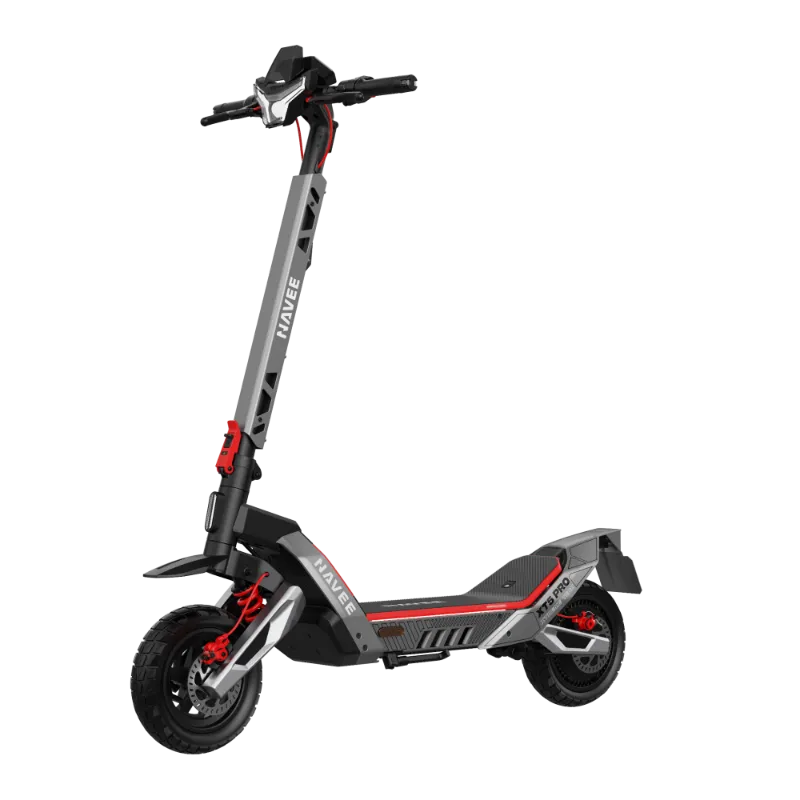
navic electric scooter problems usually come down to power, charging, settings, or a simple mechanical issue you can spot in a few minutes. If your scooter will not start, will not charge, or suddenly will not hold speed, work through the checks below before you buy parts or assume the battery is dead.
We put this guide together for riders comparing options like the navic electric scooter, NAVEE Electric Scooter, and performance-focused navee gt3 pro, because the same core troubleshooting steps apply to most commuter models.
navic electric scooter not starting: check these first
When a scooter appears completely dead, start with the simplest causes first.
- Confirm the battery has charge. A deeply drained pack may not wake the display right away.
- Hold the power button longer than you think. Some scooters need a firm press for a few seconds.
- Check for shipping mode, lock mode, or app lock. If your model uses a navic electric scooter app, an active lock can make the scooter seem broken.
- Inspect the charger connection. Charge the scooter for a while, then try turning it on again.
- Look for a loose cable near the stem or deck. Folding scooters can develop connector issues after repeated folding and unfolding.
If the display still stays off:
- Unplug the charger.
- Let the scooter sit for a few minutes.
- Try a fresh power-on attempt.
- Inspect the charging port for bent pins, dirt, or moisture.
If you are shopping a replacement or comparing a more current commuter model, the navee gt3 and electric scooter commuter are the kinds of models worth checking alongside the brand's latest offers. For current availability and our code, check the latest price.
If it won't charge, isolate the charger, port, and battery
Charging issues are often blamed on the battery, but the charger or port is just as likely.
Quick charging checklist
- Test the wall outlet with another device.
- Check whether the charger light changes color or status when connected.
- Inspect the charging cable for cuts, pinches, or overheating.
- Make sure the scooter is cool before charging after a ride.
- Clean the port gently if you see dust or debris.
A few things riders miss:
- Temperature matters. Very hot or very cold battery packs may refuse to charge normally.
- Loose ports are common wear points. If the plug wiggles excessively, the internal connection may be compromised.
- Water exposure can interrupt charging. Even light moisture around the port can cause charging to fail.
If you need model-specific details, start with the official NAVIC Electric Scooter site or your product manual before opening anything. That is especially important for battery-related problems, because lithium battery systems should be handled carefully.
Why a scooter starts but won't hold speed
If your scooter powers on and moves, but slows down too easily or will not maintain pace, the issue is usually not a mystery. Most speed complaints fall into one of these buckets.
| Likely cause | What it feels like | What to do |
|---|---|---|
| Low battery | Strong at first, then fades | Recharge fully and retest on flat ground |
| Ride mode setting | Scooter feels capped | Check eco, drive, or sport mode in the display or app |
| Tire pressure | Sluggish acceleration and range loss | Inflate tires to the spec in your manual |
| Brake rub | Resistance even when coasting | Spin wheels and inspect brake alignment |
| Load or terrain | Fine on flat ground, weak on hills | Reduce cargo, compare performance on level pavement |
This matters whether you ride a navic scooter, a turboant scooter, or another urban commuter. A scooter that feels weak under load may still be operating normally if the battery is low, the rider is heavy, or the route includes steep grades.
For riders specifically searching navic electric scooter adults or navic electric scooter with seat, remember that added rider weight and accessories can change acceleration and hill performance. If speed drops sharply on flat ground with a full charge, that points more toward brake drag, tire issues, or an electrical fault.
App, firmware, and settings problems riders overlook
A modern scooter can act strangely because of software settings, not hardware failure.
Check these before assuming something expensive broke:
- Ride mode: eco mode can limit speed and acceleration.
- Cruise or lock settings: if enabled or misconfigured, the scooter may behave differently than expected.
- Firmware prompts: if the app offers an update, read the release notes and follow the instructions carefully.
- Units and display settings: some riders think speed changed when the display unit changed.
If your scooter pairs to an app, remove and re-pair it only after basic checks are done. It can help reveal battery status, lock state, and other clues, but it will not fix a bad charger or failing battery by itself.
If you are also comparing brands while troubleshooting an older unit, the NAVEE Electric Scooter is worth a look. And if you want to see today's deal instead of guessing at navic electric scooter price, grab the code.
A quick comparison: normal behavior vs signs of a real fault
Not every complaint means the scooter is defective. Use this simple comparison before you escalate.
| Situation | Usually normal | Possible fault |
|---|---|---|
| Top speed changes with battery level | Yes | No, unless the drop is sudden and severe |
| Charging pauses after a hard ride | Yes | Only if it never resumes after cooling |
| Power cuts on steep hills | Sometimes | More concerning on flat ground |
| Mild motor warmth after riding | Yes | Burning smell, smoke, or extreme heat |
| Slight slowdown with heavy load | Yes | Major slowdown with no obvious cause |
For a broader look at current brand info and buying options, you can also review Navic-Electric Scooters & E-Bikes for Urban Adventures. If repair costs are adding up, it may be smarter to compare replacement options than to keep chasing intermittent faults.
When to stop troubleshooting and get service
Some problems are safe to check at home. Others are not.
Stop riding and seek service if you notice:
- A swollen battery area or unusual bulging under the deck
- A burnt smell from the motor, controller, or charger
- Repeated power cutouts while riding
- Sparks, melting plastic, or excessive charger heat
- Grinding, binding, or wheel lockup
At that point, do not keep test riding. Document the issue with photos, note when it happens, and contact the seller or manufacturer. If your scooter is older and repair support is limited, replacing it with a newer commuter may be the better value.
That is where product comparisons help. A practical city rider may want an electric scooter commuter, while families browsing beyond scooters might also compare options like an electric wagon or childrens electric moped for different use cases. If you decide to buy instead of repair, check the latest price before ordering.
Our bottom line
Most startup, charging, and speed issues trace back to charge level, charger problems, app settings, brake drag, or tire condition, not an instant battery failure. Work from the simple checks to the safety-critical ones, and if the scooter shows heat, swelling, or repeated shutdowns, stop troubleshooting and move straight to service or replacement.
Frequently asked questions
Why won't my navic electric scooter turn on?
Start with the basics: confirm the battery is charged, the charger and port are seated correctly, and the power button is being held long enough to start the scooter. If the display still stays dark, inspect for a tripped breaker, loose cable, or visible water damage before contacting support.
What should I do if my scooter charges slowly or not at all?
Check the outlet, charger brick, charging cable, and charge port first, then let the scooter cool down before charging again. If the charger indicator behaves abnormally or the battery never reaches full, the charger or battery may need service.
Why does a NAVEE Electric Scooter lose speed while riding?
Speed loss often comes from low battery level, underinflated tires, a heavy load, steep hills, or an active eco mode in the app. It can also point to brake rub or a motor/controller issue if the scooter feels sluggish on flat ground.
Can the navic electric scooter app help diagnose problems?
Yes, if your model supports an app, it may show ride mode, battery status, lock settings, or firmware prompts that explain odd behavior. It is worth checking the app before assuming a hardware fault.
When should I stop troubleshooting and use the warranty?
Stop riding if you smell burning, see swollen battery casing, hear grinding from the motor, or notice repeated shutoffs at speed. Those signs suggest a safety issue that should be handled by the brand or an authorized repair source.