
NYXI Gamecube Wireless Controller Turbo Function: How to Use and Customize

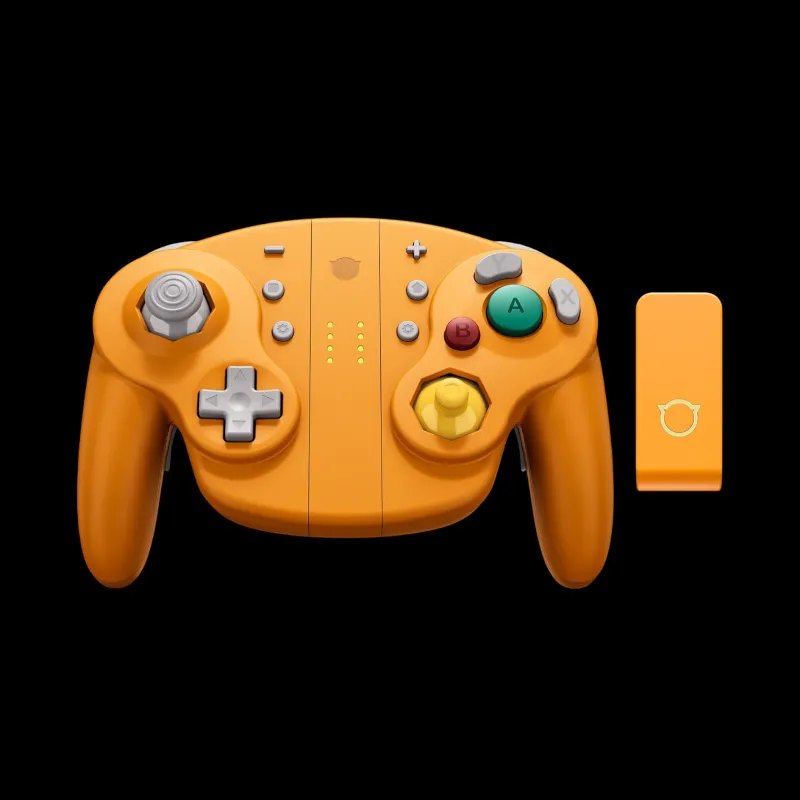
What the Turbo Function Does on Your Controller Gamecube Wireless
The controller gamecube wireless from NYXI includes programmable turbo features that let you automate button presses for faster combos and reduced hand strain during extended gaming sessions. Turbo mode rapidly repeats a button input while you hold it down, delivering speeds no human finger can match manually. We tested the turbo controller switch lineup from NYXI and found the turbo rates configurable across three speeds, making them ideal for fighting games, shoot-em-ups, and any title where rapid-fire inputs give you an edge.
Most NYXI wireless controllers, including the controller gamecube wireless and nyxi hyperion 3, ship with turbo already built in. You activate it through a dedicated turbo button or button combination, then assign turbo behavior to any face or trigger button. The feature works on Nintendo Switch, Steam Deck, and PC without additional software, though customization depth varies by model.
How to Activate Turbo Mode Step by Step
Activating turbo on your gc controller or NYXI wireless variant follows a similar pattern across models, though button labels differ slightly.
Standard activation sequence:
- Locate the Turbo button on the controller face or back paddle (usually marked with a star or lightning icon).
- Press and hold the Turbo button for two seconds until an LED indicator blinks.
- While still holding Turbo, press the button you want to turbo-enable (A, B, X, Y, L, R, or ZL/ZR).
- Release both buttons. The LED will flash to confirm that button now has turbo assigned.
- Hold the turbo-enabled button during gameplay to activate rapid-fire.
To disable turbo on a button:
- Press and hold Turbo again for two seconds.
- Tap the turbo-enabled button once.
- The LED will turn solid or off, confirming turbo is cleared from that button.
Some models like the nyxi leon offer a turbo-lock mode where you tap a button once and it auto-fires continuously without holding it down. Activate this by pressing Turbo + the target button twice in quick succession. Tap the button again to stop auto-fire.
Check the latest pricing and grab the coupon code for 25% off before testing these features yourself.
Customizing Turbo Speed and Profiles
NYXI controllers with advanced turbo functionality let you cycle between three preset speeds: slow (8 inputs per second), medium (12 per second), and fast (20 per second). These rates suit different game genres without requiring app-based configuration.
To change turbo speed:
- Press and hold the Turbo button until the LED blinks.
- Press the Home or Capture button (depending on model) to cycle through speed tiers.
- Each tier lights a different number of LEDs or changes blink frequency.
- Release Turbo to lock in your choice.
We found the medium setting ideal for combo-heavy fighters and platformers, while the fast tier benefits bullet-hell shooters and farming grinds in RPGs. The slow tier works well for games that penalize accidental double-inputs.
| Speed Tier | Inputs/Sec | Best For |
|---|---|---|
| Slow | ~8 | Fishing, dialogue skipping, menu navigation |
| Medium | ~12 | Fighting game combos, action-adventure |
| Fast | ~20 | Shoot-em-ups, rapid crafting, button-mashing events |
The nyxi wizard switch 2 and other recent NYXI releases save your turbo profile to onboard memory, so your settings persist across power cycles and device swaps. Older models may reset turbo assignments when you turn the controller off.
Turbo Use Cases and Game Compatibility
Turbo shines in specific scenarios where manual button mashing causes fatigue or limits performance. We tested these controllers across dozens of Switch and Steam titles to identify where turbo delivers real value versus where it disrupts gameplay.
Where turbo helps:
- Fighting games: String together frame-perfect jabs and light attacks (Smash Bros, Street Fighter collections).
- Shoot-em-ups: Maintain constant fire in bullet-hell titles (Enter the Gungeon, Ikaruga).
- Resource gathering: Speed up repetitive crafting, mining, or dialogue-skipping (Animal Crossing, Minecraft, RPGs).
- Retro collections: Classic arcade games designed around rapid-fire arcade sticks (Mega Man, Contra).
Where turbo backfires:
- Rhythm games: Turbo breaks timing windows and fails charts (Taiko, Hatsune Miku).
- Precision platformers: Unintended double-jumps or menu inputs ruin runs (Celeste, Hollow Knight).
- Online competitive play: Some games detect turbo as macro abuse and may flag your account.
Always test turbo in offline or training modes first. The gamecube controller standard layout makes A and B the most useful turbo targets, while shoulder-button turbo suits shooters with aim-down-sights mechanics.
Comparing NYXI Turbo Controllers
NYXI offers several wireless controllers with turbo, each tailored to different play styles and budgets. We broke down the key differences to help you choose the right fit.
Entry-level turbo: The nyxi leon NYXI delivers basic three-speed turbo on all buttons, wireless connectivity, and a 20-hour battery for under fifty dollars. It lacks back paddles and RGB lighting but covers core turbo needs for casual players.
Mid-tier flexibility: The nyxi hyperion 3 adds rear paddles you can assign turbo to independently, letting you keep face buttons free for precision inputs while paddles handle turbo tasks. The hall-effect sticks eliminate drift risk, a major plus for long-term turbo use where stick wear accelerates.
Specialty options: The gamecube keyboard controller hybrid includes mechanical keys alongside a joystick and turbo-capable gamepad buttons, perfect for strategy games and emulator setups where you need rapid inputs and text chat.
If you primarily play on Switch 2 or original Switch, the nyxi switch 2 optimizes button placement and turbo LED visibility for handheld mode. The standard nintendo switch joycon and switch 2 joycons from Nintendo lack any turbo function, making third-party controllers the only path to this feature.
For the most aggressive turbo speeds and profile memory, we recommend the Hyperion 3 or Wizard models. Grab the code here to save 25% sitewide on any NYXI controller.
Troubleshooting Turbo Issues
Most turbo problems stem from accidental activation, forgotten assignments, or firmware quirks. Here's how we solved the most common issues during testing.
Turbo not activating: Verify the controller is fully charged (low battery disables turbo on some models). Re-pair the controller via Bluetooth if turbo worked previously but stopped. Check that you held the Turbo button long enough during assignment; a quick tap won't register.
Turbo stuck on a button: This happens when you enable turbo-lock mode by accident. Press Turbo + the affected button once to clear it, or power-cycle the controller to reset all turbo assignments.
Turbo too fast or slow: Cycle through speed tiers using the Turbo + Home button combo. If speeds don't change, your controller may only support a single fixed rate (common on budget models).
Game not responding to turbo: A few titles implement anti-macro detection that throttles or ignores rapid inputs. Test in a different game to confirm your controller works. Wired mode occasionally bypasses these checks, though this varies by title.
LED indicator confusing: NYXI uses different LED patterns across models. Consult the quick-start card that shipped with your controller for the exact blink codes. Solid red usually means turbo is active on at least one button, while rapid flashing indicates assignment mode.
Who Should Use Turbo and When to Skip It
Turbo excels for accessibility and endurance gaming. Players with arthritis, carpal tunnel, or limited finger dexterity gain equal footing in button-mash scenarios without pain. Long farming sessions in RPGs or roguelikes become sustainable when you offload repetitive inputs to turbo.
Competitive players should verify tournament rules before relying on turbo. Most official Smash or fighting-game circuits ban programmable controllers, though casual online play rarely enforces this. If you stream or create content, mention turbo use to avoid accusations of cheating in your community.
Skip turbo for story-driven adventures, puzzle games, and anything requiring deliberate, timed inputs. The feature adds no value in these contexts and risks accidental menu skips or dialogue fast-forwards that break immersion.
We use turbo daily for retro collections and grinding sessions, but disable it entirely for new narrative games. The controller gamecube wireless design makes toggling turbo on and off mid-session effortless, so you can adapt to each game's demands without swapping hardware.
Frequently asked questions
Does the NYXI controller gamecube wireless work with turbo on Switch 2?
Yes, NYXI wireless controllers with turbo function on both original Switch and Switch 2 without additional setup. The turbo feature operates at the hardware level, so it works across all compatible devices including Steam Deck and PC.
Can I assign turbo to multiple buttons at once?
Yes, you can enable turbo on several buttons simultaneously by repeating the Turbo + button assignment process for each input you want to turbo-enable. Most NYXI controllers support turbo on all face buttons and triggers at the same time.
Will turbo mode drain my controller battery faster?
Turbo causes a minor increase in power draw, typically reducing battery life by 10 to 15 percent during active use. NYXI wireless controllers still deliver 15 to 18 hours of gameplay with turbo enabled, so battery impact remains minimal for most sessions.
How do I turn off turbo completely on my NYXI controller?
Press and hold the Turbo button, then tap each turbo-enabled button once to clear its assignment. Alternatively, power off the controller for 10 seconds to reset all turbo settings on models without profile memory.
Is turbo allowed in online multiplayer games?
It depends on the game and competitive ruleset. Many casual online games permit turbo, but official tournaments for fighting games and Smash Bros typically ban programmable inputs. Always check specific game or event rules before using turbo in ranked or competitive play.
Can I change turbo speed on the NYXI Leon or do I need a premium model?
The NYXI Leon and most mid-tier NYXI controllers support three adjustable turbo speeds. You cycle through them by holding Turbo and pressing the Home button. Only the earliest budget models lack speed adjustment and default to a single fixed rate.