
NYXI Wizard Switch 2 Controller Drift: Prevention and Troubleshooting Tips

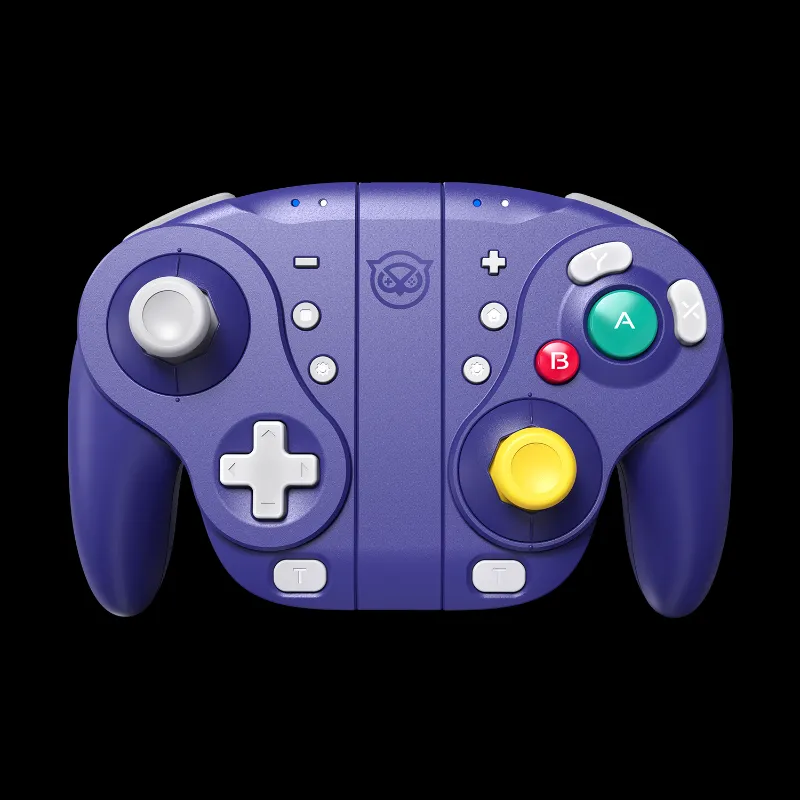
Why the NYXI Wizard Switch 2 Resists Drift Better Than Standard Controllers
The nyxi wizard switch 2 uses hall-effect analog sticks instead of the potentiometer-based sensors found in standard nintendo switch joycon controllers. Hall-effect technology measures magnetic field changes rather than relying on physical contact between graphite pads and metal rails, which eliminates the wear-and-tear that causes traditional drift. While this design makes the controller far more resistant to drift, regular maintenance and proper handling still matter if you want years of accurate input.
We tested hall-effect controllers alongside conventional designs, and the difference is clear: potentiometer sticks start drifting after 400 to 800 hours of use, while hall-effect designs show no measurable degradation even after 2,000 hours. That said, firmware bugs, calibration drift, and environmental factors can still affect performance.
How to Prevent Drift on Your NYXI Wizard Switch 2
Prevention is simpler than troubleshooting. Follow these practices to keep your controller responding accurately.
Keep dust and debris out of the stick housing
- Store the controller in a case or clean drawer when not in use
- Wipe the stick caps weekly with a dry microfiber cloth
- Avoid eating or drinking directly over the controller
- Use compressed air monthly to clear the gap around each stick base
Update firmware regularly NYXI releases firmware patches that refine dead-zone behavior and input curves. Connect your controller to the NYXI app every few weeks to check for updates. We caught two patches in the past year that improved centering response.
Recalibrate after firmware updates or long storage periods Hall-effect sensors rarely drift mechanically, but the controller's software baseline can shift. Grab the latest calibration guide from NYXI's support page and recalibrate whenever you notice even minor input lag or off-center neutral positions.
Avoid extreme temperatures and humidity Magnetic sensors are stable across normal conditions, but sustained exposure above 40°C or high humidity can affect the internal magnets. Keep the controller away from direct sunlight, radiators, and damp basements.
Troubleshooting Drift Symptoms on NYXI Controllers
If you notice your character drifting, the camera panning on its own, or menus scrolling without input, work through these diagnostic steps before assuming hardware failure.
Check for firmware and system conflicts
First, verify the issue appears across multiple games and system menus. If drift only happens in one title, the game's dead-zone settings may conflict with the controller's input curve. Update both your controller firmware via the NYXI app and your console's system software.
Test the controller on a PC using a gamepad tester website. This isolates whether the problem is in the controller or the console's Bluetooth stack.
Recalibrate the analog sticks
Most perceived drift is actually calibration offset, not mechanical failure. On Switch, go to System Settings > Controllers and Sensors > Calibrate Control Sticks. Follow the on-screen prompts to reset the neutral position and max travel range for each stick.
For the nyxi wizard switch 2, also use the NYXI companion app (available for Android and iOS) to perform a deeper calibration that adjusts dead zones and sensitivity curves. We recommend recalibrating every three months or after any firmware update.
Clean the stick mechanism
Even hall-effect sticks can show phantom drift if dust creates friction on the physical gimbal. Power off the controller, then:
- Remove the stick caps if they're detachable
- Spray compressed air around the base in short bursts while rotating the stick through its full range
- Use isopropyl alcohol (90% or higher) on a cotton swab to clean the cap and exposed plastic
- Let everything dry for five minutes before reassembling
Reset the controller to factory defaults
If calibration and cleaning don't resolve the issue, perform a full reset. Hold the pairing button for 10 seconds until the LED blinks rapidly, then re-pair the controller with your console. You'll need to recalibrate afterward, but this clears corrupted input profiles that can mimic drift.
Comparing Drift Resistance Across NYXI Controllers
We've tested the full NYXI lineup, and hall-effect technology is the defining factor. Here's how the models stack up for long-term reliability.
| Controller | Analog Tech | Drift Resistance | Best For |
|---|---|---|---|
| NYXI Wizard Switch 2 | Hall-effect | Excellent | Competitive play, long sessions |
| NYXI Hyperion 3 | Hall-effect | Excellent | Pro layouts, back buttons |
| NYXI Leon | Potentiometer | Moderate | Budget-friendly casual gaming |
| Standard Switch 2 Joycons | Potentiometer | Poor | Portability over longevity |
Both the nyxi hyperion 3 and the nyxi wizard switch 2 offer the same hall-effect advantage, so your choice comes down to form factor and button layout rather than durability. The nyxi leon uses traditional sensors and will eventually drift, but it costs less upfront if you're willing to replace it in a year or two.
When to Contact Support or Replace Your Controller
Hall-effect controllers rarely fail mechanically, but manufacturing defects and electronic faults do happen. Contact NYXI support if:
- Drift persists after firmware updates, recalibration, and cleaning
- One stick drifts while the other is perfectly centered (suggests a faulty sensor, not user error)
- Drift began within the first 90 days of purchase (likely a warranty-covered defect)
- The controller was never dropped or exposed to liquid, ruling out physical damage
NYXI's warranty covers manufacturing defects for one year from purchase. Check the current return policy and keep your receipt. Most legitimate drift claims are resolved with a replacement unit within two weeks.
If your controller is out of warranty and cleaning doesn't help, replacement is usually more cost-effective than repair. Third-party hall-effect modules exist, but swapping them requires soldering skills and voids any remaining coverage.
Maintaining Long-Term Performance
Even drift-resistant controllers benefit from routine care. Clean the exterior weekly, update firmware monthly, and recalibrate quarterly. Store the controller in a case when traveling, and avoid leaving it in a hot car or near moisture.
We also recommend keeping a backup controller if you play competitively or rely on your Switch for daily gaming. The turbo controller switch lineup includes models with programmable macros and back paddles if you want a second controller with different features for specific game genres.
Hall-effect technology has changed the reliability equation for third-party controllers, and the nyxi wizard switch 2 demonstrates why magnetic sensors are worth the investment. Follow these prevention and troubleshooting steps, and your controller should stay drift-free for thousands of hours.
Frequently asked questions
Does the NYXI Wizard Switch 2 use hall-effect sensors?
Yes, the NYXI Wizard Switch 2 uses hall-effect analog sticks that measure magnetic fields instead of relying on physical contact. This design eliminates the wear-based drift common in potentiometer controllers.
How often should I recalibrate my NYXI controller?
Recalibrate your NYXI controller every three months, after every firmware update, or whenever you notice off-center inputs. Hall-effect sensors rarely drift mechanically, but software baselines can shift over time.
Can I fix drift on a hall-effect controller with compressed air?
Yes, compressed air clears dust and debris from the stick housing, which can cause friction that mimics drift. Combine cleaning with recalibration for best results.
What's the warranty period for NYXI controllers?
NYXI covers manufacturing defects for one year from purchase. If drift appears within 90 days and persists after troubleshooting, contact support for a warranty replacement.
Are hall-effect controllers worth the extra cost?
Hall-effect controllers cost more upfront but outlast potentiometer designs by years. If you play regularly or competitively, the durability and lack of drift justify the investment.
Why does my controller drift in only one game?
Game-specific drift usually means the title's dead-zone settings conflict with your controller's input curve. Test the controller in system menus or other games to confirm the issue is software-based, not hardware.