
DJI Osmo Mobile 7 Review: Is This Gimbal Stabilizer Worth the Upgrade?

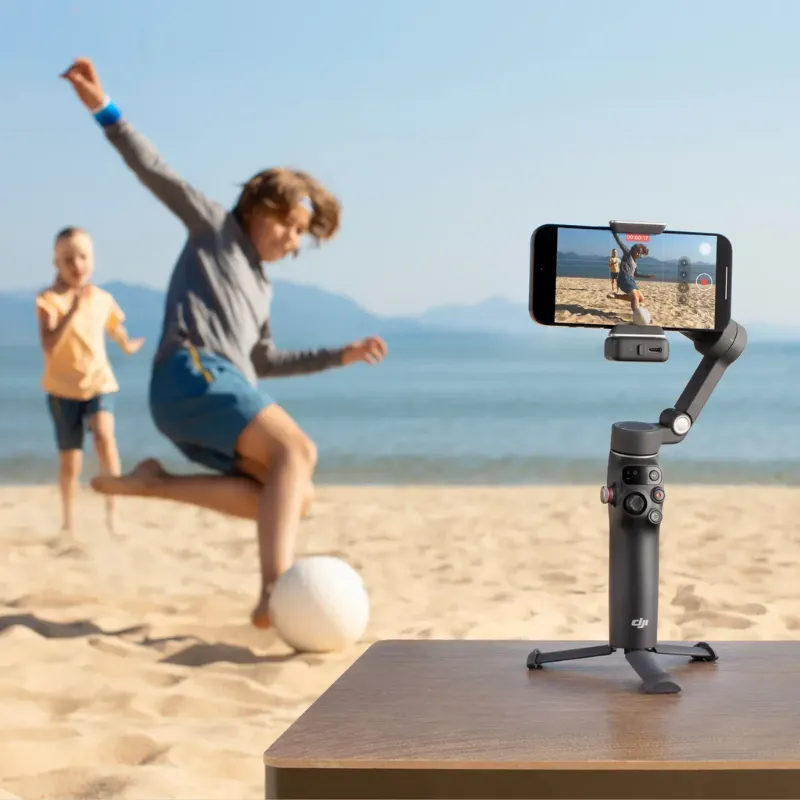
The dji osmo mobile 7 is a three-axis gimbal stabilizer designed for smartphone content creators who want cinema-grade stabilization without carrying a full camera rig. After testing it across different shooting scenarios, we found it delivers reliable performance for vloggers, travelers, and social media creators, though whether you should upgrade from an older model depends on your specific workflow needs.
What Makes the DJI Osmo Mobile 7 Different
The gimbal features a compact folding design that fits into most camera bags, making it more portable than alternatives like the dji osmo pocket 3 handheld camera. The quick-release magnetic phone clamp lets you mount and balance your device in seconds, which matters when you're capturing spontaneous moments or working on tight schedules.
Key hardware improvements include an extended runtime that supports all-day shoots, a status panel for quick setting checks, and improved motor torque that handles heavier phone cases and add-on lenses. The built-in fill light provides adjustable brightness for low-light selfies and close-up work, though it's not a replacement for dedicated lighting gear.
The control layout includes a joystick for manual pan and tilt, a trigger for instant recentering or lock modes, and dedicated buttons for recording and zoom. We found the ergonomics comfortable for extended handheld use, and the grip texture prevents slipping during active movement.
DJI Osmo Mobile 7 Setup and App Integration
The dji osmo mobile 7 setup takes about five minutes for first-time users. Download the DJI Mimo app (the official dji osmo mobile 7 app), pair via Bluetooth, mount your phone in the magnetic clamp, and run the auto-calibration. The official tutorial series walks through advanced features if you need additional guidance.
The app unlocks the gimbal's full potential with shooting modes that include:
- ActiveTrack 6.0 for subject tracking that follows faces and bodies through complex movements
- DynamicZoom for the signature dolly-zoom effect popularized in cinema
- Timelapse and Hyperlapse with motion control for polished time-compression clips
- Panorama modes that stitch wide-angle and 180-degree shots automatically
- Story templates with pre-programmed camera moves and transitions
We tested ActiveTrack while hiking and found it maintained lock even when the subject moved behind foreground obstacles. The recovery time after occlusion was under two seconds, which keeps footage usable without constant manual correction.
For creators who also shoot with action cams, the workflow differs significantly from stabilizers like the dji osmo action 4, which has built-in stabilization and doesn't require a separate gimbal. The Mobile 7 pairs with smartphones for flexibility in app selection and editing on the same device you shoot with.
DJI Osmo Mobile 7 vs Older Models
Comparing the dji osmo mobile 7 vs previous generations helps clarify whether an upgrade makes sense. The dji osmo 3 introduced gesture controls and sport mode, while the dji osmo 4 added the magnetic clamp system that the Mobile 7 refines further.
| Feature | Osmo Mobile 7 | Osmo Mobile 4 | Osmo Mobile 3 |
|---|---|---|---|
| Battery Life | 16+ hours | 15 hours | 15 hours |
| Phone Clamp | Magnetic quick-release | Magnetic clamp | Spring clamp |
| Fill Light | Built-in adjustable | None | None |
| ActiveTrack | 6.0 | 5.0 | 3.0 |
The Mobile 7 offers incremental refinements rather than revolutionary changes. If you own the Mobile 4 and don't need the fill light or slightly better tracking, your current gimbal remains capable. Users upgrading from the Mobile 3 or earlier will notice meaningful improvements in clamp speed, tracking accuracy, and battery endurance.
We haven't yet tested a dji osmo mobile 8 since no official release has been announced, but the Mobile 7 represents the current flagship in DJI's smartphone gimbal line as of early 2025.
Who Should Buy This Gimbal Stabilizer
The gimbal suits content creators who prioritize smartphone shooting over dedicated cameras. We recommend it for:
- Vloggers and influencers who shoot daily content and need quick setup between locations
- Travel filmmakers who want stabilization without the bulk of a full camera rig
- Real estate agents and tour guides capturing smooth property walkthroughs
- Event coverage where switching between photo and video happens frequently
If you already shoot with the dji osmo pocket 3 handheld camera, adding the Mobile 7 makes sense only if you need smartphone-specific apps or prefer a larger screen for monitoring. The Pocket 3 integrates camera and gimbal into one unit, while the Mobile 7 keeps your phone as the recording device.
Drone operators who own models like the dji lito or dji avata 360 drone often add the Mobile 7 for ground-level B-roll that complements aerial footage. The aesthetic consistency across DJI products simplifies color grading when you mix sources in post-production.
Getting the Best Price on DJI Osmo Mobile 7
We track pricing across authorized retailers and regularly update our discount code page with current offers. At the time of writing, you can save $150 sitewide when you grab the code before checking out, which applies to the Mobile 7 and other DJI gear in the same order.
The dji osmo mobile 7 price fluctuates during seasonal sales, with the deepest discounts typically appearing around major shopping events. We recommend checking the latest price and code before purchasing, since bundles that include extra batteries or carrying cases sometimes offer better value than standalone units.
Practical Limitations to Consider
No gimbal eliminates every type of camera shake, and the Mobile 7 works best for walking, panning, and controlled movements. Running or high-impact activities still produce micro-jitters that software stabilization in post may need to smooth further.
The magnetic clamp accommodates most phones but struggles with exceptionally thick cases or pop-socket grips. We removed bulky cases during testing to maintain proper balance, which adds a step to your setup routine if you normally keep protective gear on your device.
Battery life extends beyond 16 hours in standby, but active shooting with continuous tracking drains power faster. Plan for 6 to 8 hours of realistic mixed use, and carry a USB-C power bank if you're shooting all day without access to wall charging.
The gimbal's motors produce a low hum during operation that on-camera mics can pick up in quiet environments. Using wireless lavalier mics or your phone's directional mic in video mode helps minimize motor noise in the final audio track.
Final Verdict on the Upgrade
The dji osmo mobile 7 refines an already strong formula with better tracking, longer battery life, and the convenience of a built-in fill light. For creators upgrading from the Mobile 3 or earlier, the improvements justify the investment. Mobile 4 owners should evaluate whether the fill light and ActiveTrack 6.0 solve specific problems in their workflow before upgrading.
We've found it integrates seamlessly into a multi-device content creation setup alongside drones, action cams, and handheld stabilizers. The consistent control language across DJI products shortens the learning curve when you switch between devices on the same shoot.
For current pricing and to apply our exclusive discount, visit our DJI deals page before placing your order. The Mobile 7 remains one of the most capable smartphone gimbals available, and the right discount timing makes it an even stronger value for serious mobile creators.
Frequently asked questions
How long does the DJI Osmo Mobile 7 battery last during active shooting?
The gimbal provides 16+ hours of standby time, but active shooting with continuous tracking typically delivers 6 to 8 hours of realistic mixed use. Battery drain increases when you use ActiveTrack or the built-in fill light continuously.
Can I use the Osmo Mobile 7 with a thick phone case?
The magnetic clamp accommodates most standard cases, but exceptionally thick cases or pop-socket grips can interfere with proper balance. We recommend removing bulky protective gear before mounting your phone to ensure smooth stabilization.
Is the DJI Osmo Mobile 7 compatible with Android and iPhone?
Yes, the gimbal works with both iOS and Android devices through the DJI Mimo app. ActiveTrack and other smart features function on both platforms, though performance may vary slightly depending on your phone's processing power.
What's the main difference between Osmo Mobile 7 and Osmo Mobile 4?
The Mobile 7 adds a built-in fill light, upgraded ActiveTrack 6.0 for better subject tracking, and slightly longer battery life. The Mobile 4 remains capable for most users, so the upgrade makes sense primarily if you need the fill light or improved tracking accuracy.
Does the gimbal work well for running or high-impact activities?
The three-axis stabilization handles walking and panning smoothly, but running and high-impact movements can still produce micro-jitters. For intense action, a dedicated action camera with built-in stabilization may deliver better results.
Can I control recording and zoom directly from the gimbal?
Yes, the control layout includes dedicated buttons for starting and stopping recording, plus a joystick for manual pan and tilt adjustments. Zoom control is accessible through the side wheel, letting you adjust framing without touching your phone screen.