
Troubleshooting DJI RC-N3 Remote Controller Connection Issues

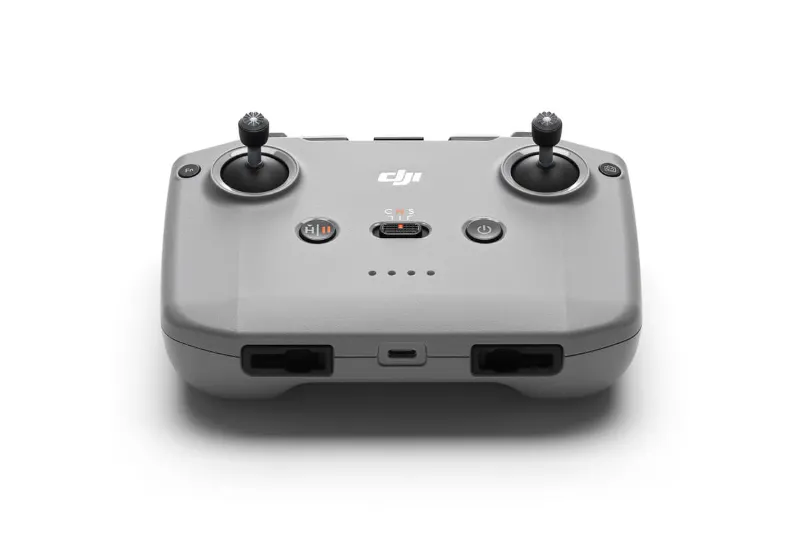
The dji rc-n3 remote controller usually fails to connect due to outdated firmware, loose cable connections, or incomplete pairing sequences. We've tested the RC-N3 with multiple DJI drones and identified the most common fixes that restore reliable control in minutes. This guide walks you through each troubleshooting step so you can get back in the air without sending your controller in for repair.
Check DJI RC-N3 Remote Controller Compatibility First
The dji rc-n3 remote controller works with specific DJI drone models, and trying to pair it with an incompatible aircraft causes persistent connection failures. Before troubleshooting software or cables, confirm your drone appears on the official compatibility list.
The RC-N3 pairs with the DJI Mini 4 Pro, Air 3, Air 3S, and Neo series. If you own an older model like the Mini 3 or Mini 2, you need the dji rc-n2 instead. The avata 360 and other FPV drones typically ship with dedicated goggles and controllers, so double-check your aircraft's manual or the DJI RC-N3 download center for firmware and compatibility updates.
Mismatched firmware versions between controller and drone also trigger connection errors even when hardware is compatible. Always update both devices to the latest release before pairing.
Reset the Pairing Between Controller and Drone
A corrupted pairing profile is the most frequent cause of "no signal" warnings. Re-linking the controller and aircraft clears old Bluetooth or Wi-Fi credentials that may conflict after a firmware update or when switching between multiple drones.
How to re-pair the RC-N3:
- Power on your drone and wait for the status LED to blink slowly.
- Power on the RC-N3 with your phone mounted and the DJI Fly app open.
- In the app, tap the three dots (settings), then Control, then Link Remote Controller.
- Press and hold the Power + C1 buttons on the controller until you hear a beep.
- The drone will emit a rapid beeping sound and the app will confirm the link.
If the pairing times out, move the controller within two meters of the drone and try again. Interference from other 2.4 GHz or 5.8 GHz devices (routers, other pilots) can block the handshake, so perform the reset in a low-traffic area.
After pairing, test the connection by checking live video feed and control response. If the feed drops or lags, proceed to the cable and firmware checks below.
Inspect USB Cable and Phone Mount Connections
The RC-N3 relies on a wired connection between your smartphone and the controller's USB-C or Lightning port. A worn cable, dirty port, or loose grip can break data transfer even when the controller powers on normally.
What to check:
- Cable integrity: Look for frayed insulation, bent pins, or intermittent charging behavior when you plug the cable into another device.
- Port cleanliness: Use a dry toothbrush or compressed air to remove lint and dust from the controller's USB port and your phone's charging port.
- Secure mount: Tighten the phone clamps until the device sits firmly without wiggling. Vibration during flight can disconnect a loose cable mid-session.
We recommend keeping a spare certified USB cable in your gear bag. Third-party cables sometimes lack the data pins required for DJI Fly communication, even if they charge your phone successfully. Swap cables first before assuming a hardware fault in the controller.
Update Firmware on Both Controller and Drone
Outdated firmware creates protocol mismatches that prevent handshake completion. DJI releases regular updates that fix pairing bugs, improve transmission range, and patch security vulnerabilities.
Update sequence:
- Connect the RC-N3 to Wi-Fi through the DJI Fly app (tap the three dots, then About, then check for updates).
- Download and install any controller firmware updates. The process takes 5 to 10 minutes; do not power off during installation.
- Power on your drone and connect it to the app. Check for aircraft firmware updates and install them.
- Restart both devices after updates complete, then re-pair using the steps in the pairing section above.
The DJI RC-N3 download center also hosts firmware packages you can install manually via SD card if your controller won't connect to Wi-Fi. Download the file, unzip it onto a microSD card, insert the card into the drone, and power on to trigger the update.
Always update the controller before the drone to avoid version conflicts that lock you out of pairing mode.
Verify Smartphone Compatibility and App Permissions
The RC-N3 depends on the DJI Fly app running on a compatible smartphone. Older phones with insufficient RAM, outdated operating systems, or revoked permissions cause the app to crash or fail to detect the controller.
Requirements:
- iOS 11.0 or later (iPhone 8 and newer recommended)
- Android 7.0 or later with at least 4 GB RAM
- DJI Fly app version 1.12.6 or later
- Location, camera, and storage permissions enabled
Check your phone's app settings and confirm DJI Fly has permission to access Bluetooth, location services, and local storage. Some Android manufacturers (Huawei, Xiaomi) aggressively kill background apps to save battery, which interrupts the connection. Add DJI Fly to your phone's battery optimization whitelist or "do not disturb" exceptions.
If your phone meets the specs but still won't connect, try a different device. We've seen Samsung Galaxy and iPhone models work flawlessly while budget Android phones struggle with video feed latency even after successful pairing.
Factory Reset the RC-N3 Remote Controller
When pairing resets and firmware updates fail to restore connection, a full factory reset clears corrupted settings and returns the controller to default state. This erases all saved drone profiles, custom button mappings, and calibration data, so treat it as a last resort.
Factory reset steps:
- Power off the controller.
- Press and hold C1 + C2 + Power simultaneously for six seconds.
- Release when the controller vibrates and the status LED flashes red and green.
- Power on and re-pair with your drone using the pairing procedure.
After reset, recalibrate the control sticks by going to Settings > Control > Stick Calibration in the DJI Fly app. Move each stick through its full range of motion and center it when prompted. Poor calibration can cause drift or unresponsive commands that mimic connection loss.
Factory resets do not fix hardware failures like damaged antennas or broken circuit boards. If the controller still won't pair after a reset, contact DJI support or check whether your dji drones discount code covers a replacement unit.
When to Replace vs. Repair Your Remote
Persistent connection issues after trying every troubleshooting step usually indicate hardware damage. Physical drops, water exposure, or worn-out internal components require professional repair or replacement.
Signs you need a new controller:
- Controller won't power on even with a fully charged battery
- Broken antennas or cracked housing
- Intermittent connection that drops every few seconds despite firmware updates and cable swaps
- Error messages like "Controller disconnected" that appear immediately after pairing
The RC-N3 shares its design with the dji rc-n2, so repair parts are widely available. However, labor costs often approach the price of a new unit, especially when the mainboard needs replacement. Check the latest price on a new RC-N3 and compare it against repair quotes before deciding.
If you fly commercially or own multiple drones, keeping a backup controller eliminates downtime when troubleshooting drags on. The RC-N3 works across several DJI models, so one spare covers the Mini 4 Pro, Air 3, and newer releases without buying controller-specific hardware for each aircraft.
We've found that most connection problems resolve with a firmware update and cable swap. Run through the checklist above methodically, and you'll restore reliable control without waiting for a replacement to ship. Grab the code and save on your next DJI purchase while you're troubleshooting.
Frequently asked questions
Why won't my DJI RC-N3 remote controller connect to my drone?
The most common causes are outdated firmware, loose USB cables between your phone and controller, or a corrupted pairing profile. Update both devices, inspect your cable connections, and re-pair the controller using the Power + C1 button combination.
Which DJI drones work with the RC-N3 controller?
The RC-N3 is compatible with the DJI Mini 4 Pro, Air 3, Air 3S, and Neo series. Older models like the Mini 3 or Mini 2 require the RC-N2 controller instead.
How do I update firmware on the RC-N3 remote?
Connect the controller to Wi-Fi through the DJI Fly app, tap the three dots for settings, go to About, and check for updates. Download and install any available firmware, then restart the controller and re-pair it with your drone.
Can I use any USB cable with the DJI RC-N3?
No. The cable must support data transfer, not just charging. Third-party cables often lack the necessary data pins, so use a certified cable or the one included with your controller.
What does a factory reset do to my RC-N3?
A factory reset erases all saved drone profiles, custom button mappings, and calibration data, returning the controller to default settings. It's a last-resort fix for persistent connection issues after other troubleshooting steps fail.
How close does the controller need to be during pairing?
Keep the RC-N3 within two meters of your drone during the pairing process. Interference from other 2.4 GHz or 5.8 GHz devices can block the handshake, so pair in a low-traffic area away from Wi-Fi routers.