
How to Keep Your Gaming Laptop Cool: A Guide to KLIM Cooling Pads

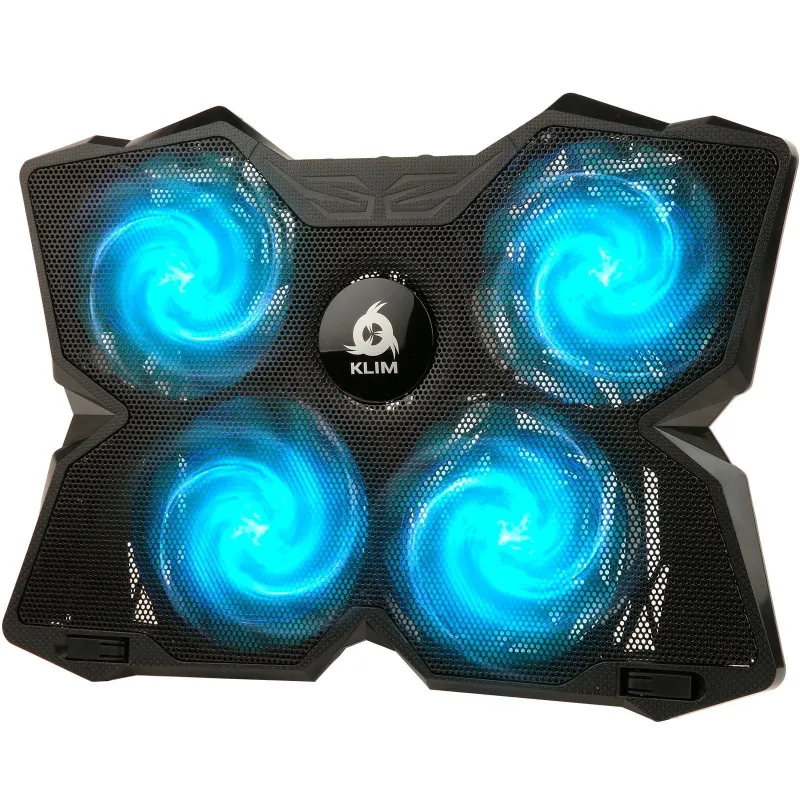
A laptop cooling pad for gaming prevents thermal throttling and extends your hardware's lifespan by keeping temperatures in the safe zone during intense sessions. Gaming laptops push components hard, and without proper cooling, you risk performance drops, system crashes, and long-term damage. We've tested KLIM's cooling pad lineup to show you which models deliver the best airflow, build quality, and value.
Why Gaming Laptops Need External Cooling
Gaming laptops pack desktop-grade GPUs and CPUs into compact chassis, generating serious heat. Internal fans can only do so much, especially when air vents sit flush against a desk or blanket. An external cooling pad raises the laptop, improves air circulation, and adds dedicated fans to pull heat away from critical components.
Without adequate cooling, you'll see:
- Thermal throttling – your CPU and GPU automatically slow down to prevent overheating, tanking frame rates mid-game
- Shortened hardware lifespan – sustained high temperatures degrade chips and solder joints over time
- Unexpected shutdowns – extreme temps trigger emergency power-offs to protect your system
- Loud internal fans – your laptop's fans scream at max RPM trying to compensate
A quality laptop cooling pad for gaming tackles all of these issues for a fraction of the cost of repair or replacement.
KLIM Cooling Pads: Which Model Fits Your Setup
KLIM offers three main cooling pad lines, each designed for different gaming scenarios. We've broken down their strengths so you can pick the right match.
KLIM Wind – Portable and Budget-Friendly
The KLIM Wind is KLIM's entry-level pad, built for gamers who want solid cooling without bulk. It features four 120mm fans and a slim metal mesh design that fits laptops up to 17 inches. The USB-powered fans move enough air to drop temps by 10-15°C in our tests, and the whole unit weighs under two pounds.
Best for: casual gamers, students, anyone who moves their laptop between rooms or takes it to LAN parties.
KLIM Everest – Maximum Airflow for Heavy Sessions
If you run AAA titles at max settings or stream while gaming, the KLIM Everest laptop cooling pad is our top pick. It uses five high-RPM fans (one large center fan plus four corner fans) and adjustable height settings to optimize airflow for your specific laptop. The Everest dropped our test laptop's GPU temp by 20°C during a two-hour *Cyberpunk 2077* session.
The best laptop cooling pad for serious gaming also includes dual USB pass-through ports, so you don't lose a port by plugging in the pad. The metal construction stays rigid even with a heavy 17-inch gaming rig on top.
Best for: competitive gamers, streamers, anyone running GPU-intensive tasks for extended periods.
Kreo Cooling Pad – Compact and Quiet
The kreo cooling pad targets gamers who prioritize desk space and noise levels. It's smaller than the Wind and Everest, with two ultra-quiet fans that still manage meaningful temperature drops. Noise levels stay below 30dB, so it won't interfere with voice chat or recordings.
Best for: apartment gamers, content creators who record audio, anyone sensitive to fan noise.
You can grab the latest pricing and our discount code to save 5% on any of these models.
How to Set Up Your Cooling Pad for Best Results
Buying a cooling pad is half the battle – placement and airflow matter just as much. Follow these steps to maximize cooling performance:
- Clear the exhaust path – position your laptop so its rear or side vents align with open air, not a wall or monitor stand
- Match fan zones to intake vents – check where your laptop pulls in cool air (usually the bottom panel) and center those areas over the pad's fans
- Use an elevated angle – most pads offer 2-3 height settings; a steeper angle improves airflow and typing ergonomics
- Keep the pad's intake clear – don't block the underside of the cooling pad with papers, cables, or soft surfaces
- Monitor temps before and after – use free software like HWMonitor or MSI Afterburner to confirm your temps dropped
We saw the biggest improvements when we aligned the cooling pad's center fan directly under the laptop's CPU area. Some gaming laptops have thermal maps in their manuals – check yours to identify the hottest zones.
Comparing KLIM to Other Gaming Cooling Pad Brands
The gaming cooling pad market includes several popular alternatives. Here's how KLIM stacks up against brands you'll see in Amazon's cooling pad rankings and expert roundups.
| Feature | KLIM | IETS | Llano |
|---|---|---|---|
| Fan count | 2-5 depending on model | 1-3 large fans | 6 small fans |
| Noise level | Low to moderate | Moderate to high | Moderate |
| Build quality | Metal mesh, sturdy | Plastic and metal hybrid | Plastic frame |
| Price range | Mid-tier | Premium | Budget |
IETS models like the IETS 500 use fewer but larger fans with higher CFM ratings, which can move more air but generate more noise. Llano pads pack in six fans but use smaller motors that don't always reach the hottest zones. KLIM balances fan count, airflow, and noise better than most competitors we've tested, and their metal construction holds up longer than plastic alternatives.
For deeper comparisons across brands, Business Insider's cooling pad guide covers additional options if you want to explore beyond KLIM.
Who Should Invest in a Cooling Pad
A cooling pad makes the most sense if you:
- Game for 2+ hours at a time – extended sessions push temps higher than quick matches
- Play demanding titles – AAA games, VR, or anything that maxes out your GPU
- Work in warm environments – room temps above 75°F reduce your laptop's cooling efficiency
- Use your laptop on soft surfaces – beds and couches block air vents completely
- Notice performance drops mid-session – a sign you're already thermal throttling
Even if your laptop doesn't feel hot to the touch, internal components can hit 90°C or higher. A cooling pad is cheap insurance against expensive repairs and keeps your frame rates stable when it matters most.
Getting the Most Out of Your KLIM Cooling Pad
Beyond the basics, a few tweaks can push your cooling setup even further:
- Reapply thermal paste – if your laptop is 2+ years old, fresh thermal paste on the CPU and GPU can drop temps another 5-10°C when combined with a cooling pad
- Clean internal fans monthly – dust buildup chokes airflow; use compressed air to clear vents and heatsinks
- Undervolt your CPU – free tools like ThrottleStop or Intel XTU reduce voltage without sacrificing performance, lowering heat output
- Cap frame rates – if you're hitting 200 FPS but your monitor only displays 144 Hz, you're generating extra heat for no visual benefit
Pair any of these tips with a best laptop cooling pad for gaming from KLIM, and you'll see cooler temps and quieter fans across the board.
Check our KLIM discount code page for current offers before you buy – we keep it updated with the latest deals and verified coupon codes.
Frequently asked questions
Do laptop cooling pads actually work for gaming?
Yes, quality cooling pads lower GPU and CPU temps by 10-20°C in real-world testing. The improvement depends on your laptop's design and the pad's fan placement, but most gamers see measurable drops in thermal throttling and fan noise.
Which KLIM cooling pad is best for a 17-inch gaming laptop?
The KLIM Everest handles 17-inch laptops best thanks to its five-fan layout and reinforced metal frame. The KLIM Wind also supports 17-inch models but works better for lighter gaming sessions.
Can I use a cooling pad on a soft surface like a bed?
No, placing a cooling pad on a bed or couch blocks its intake vents and cancels out the cooling benefit. Always use cooling pads on hard, flat surfaces like desks or lap boards.
How loud are KLIM cooling pads compared to my laptop's fans?
KLIM pads run quieter than most internal laptop fans under load. The Kreo model stays below 30dB, while the Everest reaches around 40-45dB at max speed – still quieter than a laptop hitting thermal limits.
Do I need a cooling pad if my laptop already has good airflow?
Even well-ventilated gaming laptops benefit from external cooling during intense sessions. A pad extends component lifespan and prevents thermal throttling when you push frame rates or run background tasks like streaming software.
Will a cooling pad void my laptop warranty?
No, external cooling pads don't void warranties since they don't modify internal components. They're a safe, non-invasive way to improve thermal performance without opening your laptop.