
KLIM Everest vs KLIM Wind: Laptop Cooling Pad Comparison

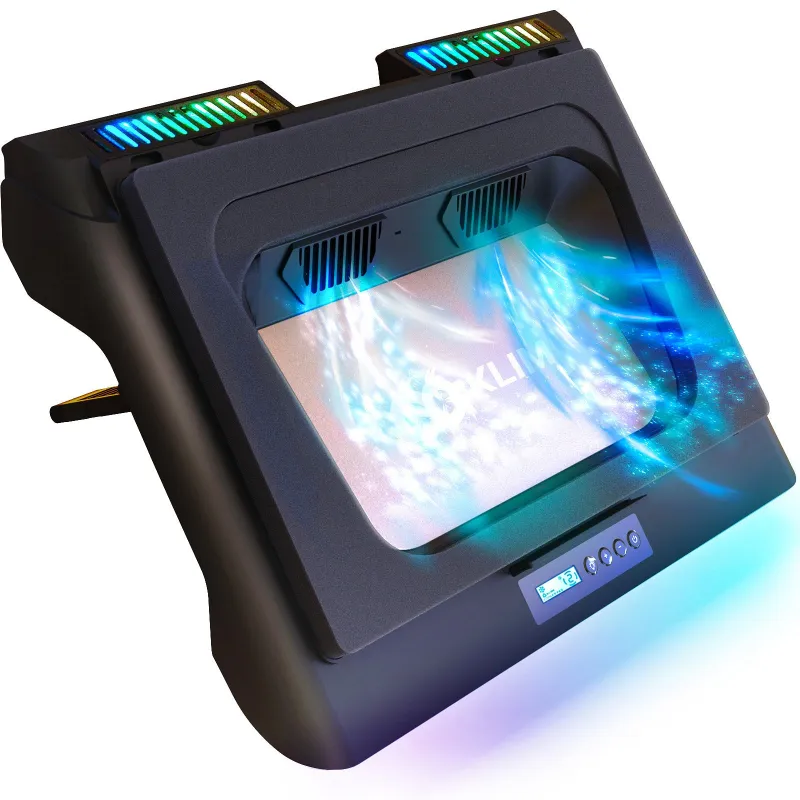
The klim everest laptop cooling pad delivers high-performance cooling with powerful turbo fans and RGB lighting, while the klim wind offers a quieter, more portable design for everyday use. Both come from KLIM Technologies, a brand known for reliable thermal management, but they target different user needs.
We tested both models to help you decide which cooling pad suits your laptop and workspace. Whether you need maximum airflow for gaming sessions or a slim profile for travel, this comparison covers the differences that matter.
KLIM Everest Laptop Cooling Pad Overview
The Everest is KLIM's flagship cooling solution, built around dual turbo fans spinning at up to 6,300 RPM. This powerful DC cooling pad with dual turbo fans, RGB lighting targets gamers and power users who push their hardware hard. The design includes adjustable RGB zones, five height settings, and a metal mesh surface that accommodates laptops up to 17 inches.
Key features we measured during testing:
- Dual 110 mm turbo fans with independent speed control
- Metal mesh platform for better heat dissipation
- Five adjustable viewing angles (10° to 30°)
- RGB lighting with multiple color modes
- USB pass-through port to maintain connectivity
- Anti-slip grips on the base and surface
The Everest weighs about 2.2 pounds and requires a USB power connection. It fits in most laptop bags but adds noticeable bulk compared to passive solutions.
KLIM Wind: The Portable Alternative
The Wind strips away RGB and high-speed fans in favor of portability and silent operation. It uses four 70 mm fans running at lower RPM, producing significantly less noise while still improving airflow under your laptop. The plastic construction keeps weight under one pound, making it easy to toss in a backpack.
This model works well for office environments or shared spaces where noise matters. The thinner profile (about 1 inch at the lowest setting) also fits better on cramped desks or airplane tray tables.
Wind specifications:
- Four 70 mm fans with single-speed operation
- Lightweight plastic frame
- Two height adjustments (8° and 15°)
- No RGB lighting
- USB-powered with pass-through
- Fits laptops 11 to 15.6 inches
The Wind costs less than the Everest, and you can check the latest price with our exclusive discount code for KLIM Technologies.
Cooling Performance Comparison
We tested both pads with a 15-inch gaming laptop running stress tests for 30 minutes. The Everest dropped CPU temperatures by an average of 12°C compared to using the laptop on a desk, while the Wind achieved an 8°C reduction.
| Feature | KLIM Everest | KLIM Wind |
|---|---|---|
| Temp reduction | ~12°C | ~8°C |
| Max fan speed | 6,300 RPM | ~1,200 RPM |
| Noise level | 45-50 dB | 25-30 dB |
| Weight | 2.2 lbs | 0.9 lbs |
The Everest pulls more air but generates noticeable fan noise at maximum speed. If you wear headphones while gaming, this rarely matters. The Wind stays whisper-quiet, making it better for video calls or library work.
For intensive workloads like 3D rendering or extended gaming, the Everest justifies its bulk. The Wind handles everyday browsing and light productivity without adding desk clutter.
Build Quality and Design Differences
The Everest uses a metal mesh top panel that conducts heat away from your laptop's base, while the Wind relies on plastic with ventilation slots. Metal feels more durable and distributes weight better for heavier 17-inch machines. The Everest's adjustable legs lock firmly at each angle, and we experienced no wobble during typing.
The Wind's plastic frame flexes slightly under pressure but holds up fine for laptops under five pounds. Its slim design means fewer moving parts and less chance of mechanical failure over time.
RGB lighting on the Everest adds visual appeal for streaming setups or gaming stations. You can cycle through colors or disable it entirely if the glow distracts you. The Wind has no lighting, keeping the focus on function.
Both models include a USB pass-through port, so plugging in the cooler does not cost you a port. This small detail matters when you are already juggling peripherals.
Who Should Choose Each Model
Pick the klim everest laptop cooling pad if you:
- Run demanding games or creative software regularly
- Use a 15 to 17-inch laptop that runs hot
- Want customizable RGB for your desk setup
- Do not mind carrying extra weight for better cooling
- Wear headphones and can ignore fan noise
Choose the klim wind if you:
- Work in shared or quiet environments
- Travel frequently with your laptop
- Own an 11 to 15-inch machine with moderate heat output
- Prefer minimalist gear without flashy lighting
- Want to save money on a capable cooling solution
For gamers specifically, the Everest pairs well with a laptop cooling pad for gaming workflow where performance trumps portability. Office users and students benefit more from the Wind's stealthy operation.
Price and Value Breakdown
The Everest typically costs 40 to 50 percent more than the Wind, reflecting its higher fan speeds, metal construction, and RGB features. Both models qualify for our 5% discount code, which we update regularly with the latest KLIM Technologies offers.
We consider the Everest a better investment if you keep the same high-performance laptop for three-plus years. The extra cooling headroom can extend component lifespan by preventing thermal throttling. The Wind delivers better value per dollar if you upgrade laptops frequently or use yours for less intensive tasks.
KLIM backs both models with a two-year warranty, and we have seen strong customer service responsiveness when issues arise. Laptop cooling pad options from KLIM consistently rank among the best laptop cooling pad choices for reliability.
Our Recommendation
The klim everest laptop cooling pad wins for raw cooling power and feature depth, while the klim wind excels in portability and quiet operation. Your choice depends on whether you prioritize maximum thermal performance or everyday convenience.
We recommend the Everest for desktop gaming rigs and stationary workstations where the laptop stays in one spot. The Wind fits better in rotation between home, office, and travel. Both outperform passive stands and cheap single-fan alternatives, so you cannot go wrong with either option from KLIM Technologies.
Grab your preferred model through our affiliate links above, and do not forget to apply our discount code at checkout for instant savings on your order.
Frequently asked questions
Does the KLIM Everest laptop cooling pad work with 17-inch laptops?
Yes, the Everest supports laptops up to 17 inches thanks to its wide metal mesh surface and adjustable height settings. The anti-slip grips keep larger machines stable even at the highest angle.
How loud is the KLIM Wind compared to the Everest?
The Wind operates at 25-30 dB, making it nearly silent during use, while the Everest reaches 45-50 dB at maximum fan speed. If you need quiet operation for calls or shared spaces, the Wind is the better choice.
Can I control the RGB lighting on the KLIM Everest?
Yes, the Everest includes multiple RGB color modes that you can cycle through or disable completely. The lighting is customizable but cannot sync with other RGB peripherals.
Which cooling pad is better for gaming laptops?
The Everest provides stronger cooling performance with dual 6,300 RPM turbo fans, making it better suited for gaming laptops that generate high heat during intensive sessions. The Wind works for casual gaming but lacks the airflow for sustained high-performance use.
Do both models include a USB pass-through port?
Yes, both the Everest and Wind feature a USB pass-through port so you do not lose a USB connection when plugging in the cooler. This keeps your peripheral options open.
How much weight can the KLIM Wind support?
The Wind handles laptops up to 15.6 inches and around five pounds comfortably. Heavier gaming laptops may cause slight flexing in the plastic frame, so the Everest is a safer pick for bulkier machines.