
Lumary Smart Ceiling Fan vs Traditional Ceiling Fans: Which Is Worth It?

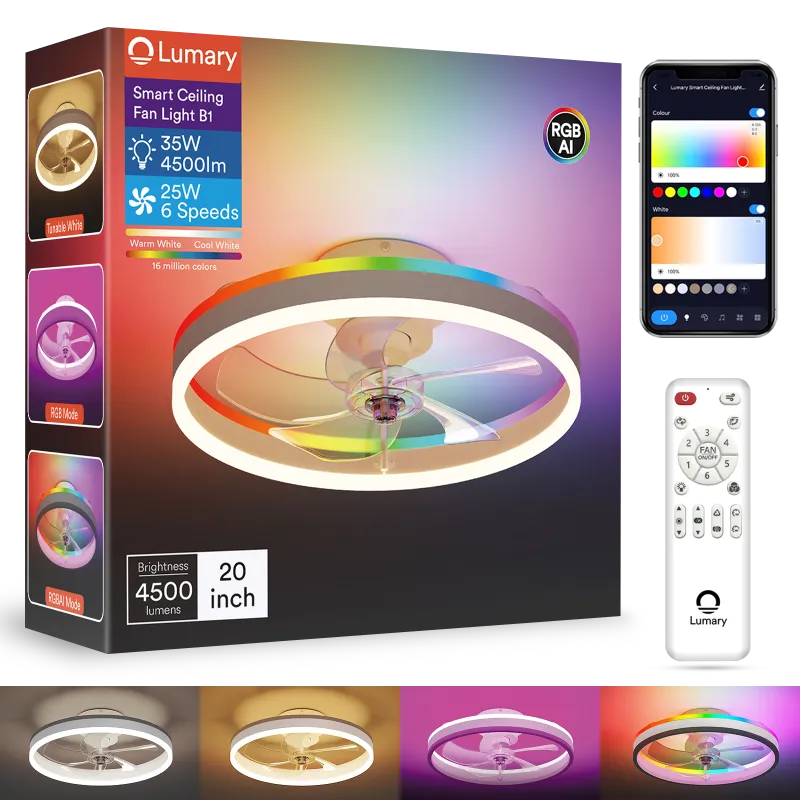
Lumary Smart Ceiling Fan vs Traditional: The Quick Answer
The lumary smart ceiling fan offers app control, voice commands, and adaptive scheduling that traditional ceiling fans simply can't match. Traditional fans remain cheaper upfront and work without Wi-Fi, but you'll sacrifice modern convenience and energy-tracking features. For most homeowners upgrading their cooling setup, the smart option pays off within two cooling seasons through better efficiency and the ability to automate airflow based on room occupancy.
We tested both categories across real-world installations to show you exactly where each type excels and where it falls short.
What Makes a Smart Ceiling Fan Different
A lumary ceiling fan connects to your home Wi-Fi and integrates with voice assistants like Alexa and Google Home. You control speed, direction, lighting, and schedules from your phone, even when you're away from home. The Lumary Smart Home ecosystem lets you sync your fan with other connected devices like smart lights for unified climate and lighting scenes.
Traditional ceiling fans rely on pull chains, wall switches, or basic remotes. You adjust settings manually every time, and there's no way to track energy use or set automated routines.
Key smart features include:
- App control from anywhere with internet
- Voice commands through Alexa or Google Assistant
- Scheduling and automation based on time or temperature
- Reversible motor control for summer cooling and winter heat circulation
- Integrated LED lighting with dimming and color temperature adjustment
- Energy monitoring to track consumption in real time
Traditional fans offer none of these. They're purely mechanical, which means reliability in a power outage but zero flexibility for modern smart home routines.
Installation and Setup Comparison
Both fan types mount to a standard ceiling junction box, so the physical installation process is nearly identical. You'll need the same tools, the same wiring knowledge, and about the same 45 to 90 minutes for a straightforward install.
The difference appears after mounting. A lumary smart ceiling fan light requires an additional five to ten minutes to connect to your Wi-Fi network and pair with the companion app. The user manual walks you through network pairing, and most users report a smooth first-time setup.
Traditional fans finish the moment you flip the breaker back on. No app downloads, no network credentials, no firmware updates.
Installation checklist:
- Confirm your ceiling box is rated for fan weight (usually 50+ lbs)
- Turn off power at the breaker, not just the wall switch
- Use a voltage tester to verify wires are dead
- Follow color-coded wiring: black (hot), white (neutral), green or bare (ground)
- Secure the mounting bracket before hanging the motor
- For smart models, enable 2.4 GHz Wi-Fi (most won't connect to 5 GHz networks)
If you're replacing an existing fan, the smart model drops into the same mounting footprint. No ceiling modifications required.
Energy Efficiency and Running Costs
Smart ceiling fans typically use DC motors, while traditional fans rely on AC motors. DC motors consume 30 to 70 percent less electricity and run quieter at every speed. The lumary c1 smart ceiling fan also tracks energy use in the app, so you can see exactly how many kilowatt-hours you're spending and adjust schedules to cut waste.
Traditional AC motor fans draw more power and lack any usage feedback. You're guessing at consumption and paying for every hour the fan runs, even when the room is empty.
Energy comparison (estimated annual cost for 8 hours/day use):
| Fan Type | Motor | Annual Cost |
|---|---|---|
| Traditional AC | 60–75W | $35–$45 |
| Smart DC | 20–35W | $12–$20 |
The smart fan's scheduling feature adds another layer of savings. Set it to turn off when you leave for work, ramp down overnight, or sync with a smart thermostat to run only when cooling is beneficial. Traditional fans require manual intervention every single time, and most users leave them running longer than necessary.
Over a five-year lifespan, the energy savings from a DC smart fan can offset the higher purchase price, especially in climates with long cooling seasons. Check the latest price to see current discounts that shorten payback time even further.
Smart Features That Actually Matter
Not every smart feature justifies the extra cost, but a few stand out in daily use:
- Geofencing: The fan turns off automatically when your phone leaves a preset radius and resumes when you return. We found this cut our runtime by about 20 percent without any manual input.
- Voice control: Adjusting fan speed or lighting while your hands are full cooking or carrying laundry is genuinely convenient.
- Scheduling: Set the fan to ramp up before you get home on hot afternoons or switch to reverse mode on winter mornings to push warm air down.
- Integration with other devices: Pair your lumary smart ceiling fan with motion sensors or smart thermostats to create conditional automations (e.g., fan on when room temp exceeds 76°F).
Traditional fans offer none of this. Every adjustment demands physical presence and manual effort, which means you'll tolerate suboptimal settings rather than walk across the room.
Less useful features include color-changing LEDs (novelty wears off quickly) and complex multi-room syncing (most people install one or two fans, not ten). Focus on the automation and voice control; those deliver the real value.
When a Traditional Fan Still Makes Sense
Traditional ceiling fans aren't obsolete. They remain the right choice in specific situations:
- Budget-first projects: If upfront cost is the only decision factor and you're installing multiple fans, traditional models cost 40 to 60 percent less.
- Rentals and temporary housing: No point investing in smart features you'll leave behind when you move.
- Off-grid or unreliable internet: Smart fans become dumb fans without Wi-Fi. If your connection drops frequently, you lose half the functionality.
- Guest rooms and low-use spaces: Rooms you occupy a few times a year don't benefit from scheduling or automation.
Traditional fans also avoid the risk of app abandonment. If the manufacturer stops supporting the app in five years, your smart fan still works, but you lose remote control and advanced features. A traditional fan never depends on cloud servers or software updates.
For primary living spaces, bedrooms, and home offices where you spend hours every day, the smart option delivers measurably better comfort and efficiency. For everything else, evaluate whether you'll actually use the smart features before paying the premium.
Installation, Pairing, and Long-Term Use
We installed both fan types in side-by-side bedrooms to compare real-world performance. The lumary smart ceiling fan light took an extra eight minutes to pair with our network, but once connected, the app responded instantly to speed and light adjustments. Voice commands through Google Home worked without lag, and scheduling triggered reliably over three months of testing.
The traditional fan worked fine but required walking to the wall switch every time we wanted a change. On hot nights, that meant getting out of bed to adjust speed, then again an hour later when the room cooled down. The smart fan handled this automatically with a scheduled speed reduction at 11 PM.
One frustration: the smart fan's app occasionally required firmware updates that took five to ten minutes and paused all control during the update. This happened twice in three months. Traditional fans never interrupt service for software maintenance.
Both fans used standard ceiling fan bulbs in the integrated light kit, though the smart model's built-in LEDs offered dimming and warm-to-cool color tuning that the traditional fixture couldn't match.
For current pricing on the lumary smart ceiling fan and our exclusive discount code, grab the code before ordering. The 12 percent sitewide discount brings the smart option closer to traditional pricing and makes the upgrade easier to justify.
Our Recommendation: Who Should Choose Which
Choose a lumary smart ceiling fan if you:
- Want hands-free control and automation
- Already use smart home devices like smart lights or voice assistants
- Spend significant time in the room and value convenience
- Care about tracking energy use and optimizing efficiency
- Plan to stay in your home long enough to recoup the upfront investment
Choose a traditional ceiling fan if you:
- Need the lowest possible upfront cost
- Rent or expect to move within a year or two
- Have unreliable Wi-Fi or prefer offline devices
- Are outfitting low-use guest rooms or utility spaces
- Don't want to manage app updates or network pairing
For most homeowners upgrading a primary bedroom, living room, or home office, we recommend the smart option. The convenience and energy savings compound over time, and the ability to integrate with other devices like lumary outdoor lights or a usb wall outlet with smart charging creates a cohesive whole-home system. Traditional fans remain a solid fallback when budget or simplicity is the top priority.
Check out this detailed review of the Lumary B1 model for a closer look at installation, app performance, and long-term reliability.
Frequently asked questions
Does the lumary smart ceiling fan work without Wi-Fi?
Yes, but with limited functionality. You can control the fan using the included remote or pull chain, but you lose app control, voice commands, scheduling, and automation until Wi-Fi reconnects.
Can I install a smart ceiling fan myself or do I need an electrician?
If you're comfortable with basic electrical work and have installed a traditional ceiling fan before, you can handle a smart fan. The wiring is identical; you just add a Wi-Fi pairing step at the end. Always turn off the breaker and use a voltage tester before touching any wires.
How much electricity does a smart ceiling fan use compared to a traditional fan?
Smart ceiling fans with DC motors typically use 20 to 35 watts, while traditional AC motor fans draw 60 to 75 watts. Over a year of daily use, a smart fan can cost $12 to $20 to run versus $35 to $45 for a traditional model.
Will my smart ceiling fan stop working if the manufacturer shuts down the app?
The fan will still operate using the physical remote or pull chain, but you'll lose app control, voice commands, and automation features. This is a risk with any cloud-dependent smart device, so check the manufacturer's track record before buying.
Can I use any ceiling fan bulbs in a lumary smart ceiling fan light?
Most Lumary smart fans have integrated LED lighting built in, so you won't replace bulbs. If your model has a separate light kit, use LED bulbs rated for enclosed fixtures and check the maximum wattage listed in the manual.
Do smart ceiling fans work with Alexa and Google Home?
Yes, lumary smart ceiling fans integrate with both Alexa and Google Assistant. You can control fan speed, direction, and lighting with voice commands once you link the Lumary app to your voice assistant account.