
How to Mount Your Phone Securely on the Rockbros HW-117 Bike Phone Mount

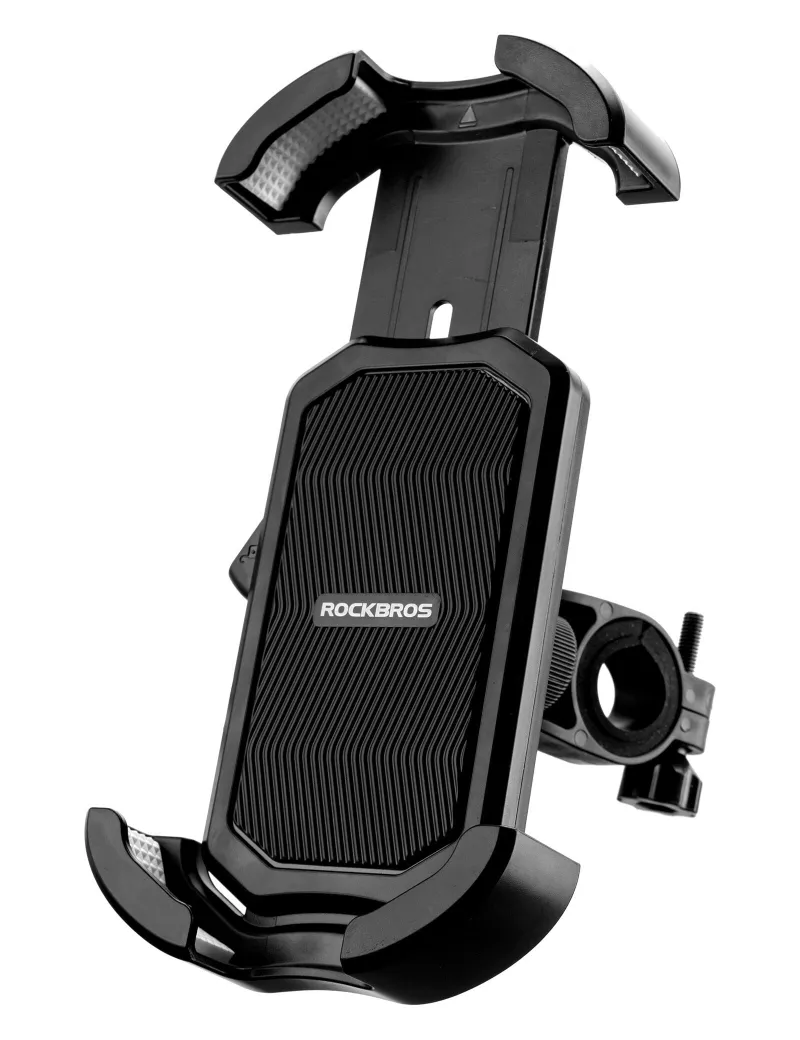
The rockbros hw-117 bike phone mount holds your phone with a one-touch lock and a four-corner silicone grip, so mounting it securely comes down to three things: clamping the base tight on the handlebar, adjusting the arms to your phone's width, and testing the lock before your first ride. Get those steps right and the mount survives potholes, gravel, and corrugated trails without a wobble. Here is exactly how we set it up on our test bikes.
What Comes With the Rockbros HW-117 Bike Phone Mount
In the box you get the handlebar clamp base, the phone cradle with silicone-padded arms, an Allen key, and a set of rubber shims for smaller-diameter bars. The cradle fits phones roughly from 4.5 to 7.2 inches, which covers almost every current model with or without a case.
- The base clamps to handlebars and also works on e-bike and motorcycle mirror stems on some setups
- Silicone corner pads grip the phone without scratching the case or screen
- A quick-release lever lets you pull the phone off with one hand when you stop
If you want to compare the official spec sheet and photos before buying, the ROCKBROS HW-117 E-Bike Cell Phone Holder listing is a good reference, and we keep our current RockBROS discount code updated there too.
Step 1: Clamp the Base to the Handlebar
Pick a position where your thumb can reach the release lever without moving your hand off the grip. Usually that is just inboard of the left grip or centered on the stem faceplate.
- Loosen the clamp bolt with the supplied Allen key and open the clamp fully
- Slide it onto the bar and rotate the cradle so it faces you at a slight upward angle
- Tighten the bolt until the base stops rotating under firm hand pressure, then give it one more quarter turn
- Use the rubber shims if the mount spins on a thinner bar; the shim fills the gap and stops rotation
Do not overtighten on carbon handlebars. Snug is enough on carbon because the silicone pads inside the clamp do most of the grip work. If you service your bars or stem regularly, a rockbros professional bike tool kit keeps the right torque tools in one box.
Step 2: Fit the Cradle to Your Phone Width
This is the step most riders skip, and it is the difference between secure and sloppy.
- With no phone inserted, squeeze the arms fully closed and check the silicone pads are seated in their grooves
- Insert your phone, case included, and adjust the arms so all four corners contact the case evenly
- The one-touch lock should snap shut with an audible click. If it needs a hard push, the arms are set slightly too wide
- Shake the mounted phone sideways and downward. Any slide of more than a couple of millimeters means readjust
Thick rugged cases are fine, but avoid mounts on phones with pop sockets or card wallets on the back because the corners cannot grip flat.
Step 3: Test the One-Touch Lock Before Your First Ride
Press the phone in until you hear the click, then push down on the phone body with two fingers. It should not shift. To release, squeeze the side arms or flip the release lever, and the phone pops free into your palm. Practice this motion a few times in the driveway so it is automatic at traffic lights. For a closer look at the one-touch mechanism in action, the ROCKBROS HW-117 Unisex Bike Phone Mount product page shows the lock cycle clearly.
How the HW-117 Compares to Other Mount Styles
| Mount style | Phone security | One-handed use | Best for |
|---|---|---|---|
| Four-corner cradle (HW-117) | Excellent on rough roads | Very fast lock and release | Mountain biking, e-bikes, commuting |
| Silicone net band mounts | Good, phone flexes under vibration | Slower to insert | Casual road rides |
| Universal friction ball mounts | Moderate, can loosen over time | Moderate | Light city use |
The four-corner cradle wins for rough terrain because nothing relies on a single strap or clamp that can work loose. The trade-off is that the arms need matching to your case width once, which takes two minutes.
Who This Mount Suits
- Commuters who want the phone off and pocketed at every stop
- E-bike riders who need the mount to survive higher speeds and heavier vibration
- Gravel and trail riders who want a locked-in phone that survives drops and chatter
Pair it with a mountain bike bell on the other side of the bar so you keep one hand zone for signaling, and tuck your spare tube and tools in a rockbros saddle bag so the cockpit stays clean.
Care and Long-Term Security Checks
- Re-tighten the clamp bolt after the first week of riding; bolts bed in and lose a little tension
- Rinse the silicone pads occasionally, since grit embedded in the pads can scratch a case
- Check the arms still click closed firmly every month or so, especially after a phone case change
- Store the bike out of direct sun where possible, because UV slowly hardens silicone on any mount
Where to Buy and Get the Best Price
We recommend buying directly through the rockbros hw-117 bike phone mount product page and stacking our RockBROS discount code at checkout for the current sitewide offer. If you are kitting out a whole bike, the same code applies to their sunglasses and folding bikes like the mbs 20-inch folding bike, so it is worth checking the latest price before you order anything else.
Frequently asked questions
Will the rockbros hw-117 bike phone mount fit my phone case?
The cradle is sized for devices from roughly 4.5 to 7.2 inches, and it works with most standard and thick protective cases. Skip it if you use a pop socket or card wallet on the back of your phone.
How tight should I tighten the HW-117 clamp?
Tighten the clamp bolt until the base no longer rotates under firm hand pressure, then add about a quarter turn. On carbon handlebars, stop at snug because the inner silicone pads provide extra grip.
Is the HW-117 secure enough for mountain biking?
Yes. Its four-corner silicone grip and one-touch lock hold the phone firmly through potholes and trail chatter, which is where softer band-style mounts start to slip.
How do I adjust the arms on the mount for a new phone?
Loosen the arms slightly, insert your phone, and adjust until all four corner pads contact the case evenly. The lock should click shut with a light press; if it needs force, widen the arms a touch.
Can I use the HW-117 on an e-bike or scooter?
Yes, the HW-117 is rated for higher vibration and can clamp to e-bike handlebars and suitable mirror stems. Always re-check the clamp tension after the first few rides.
How often should I check the mount for loosening?
Check the clamp bolt after the first week and roughly monthly after that, and rinse the silicone pads occasionally to remove grit. A quick wiggle test before each ride is the best habit.