
Ray-Ban Meta Case and Nose Pads: What You Need to Know Before You Buy

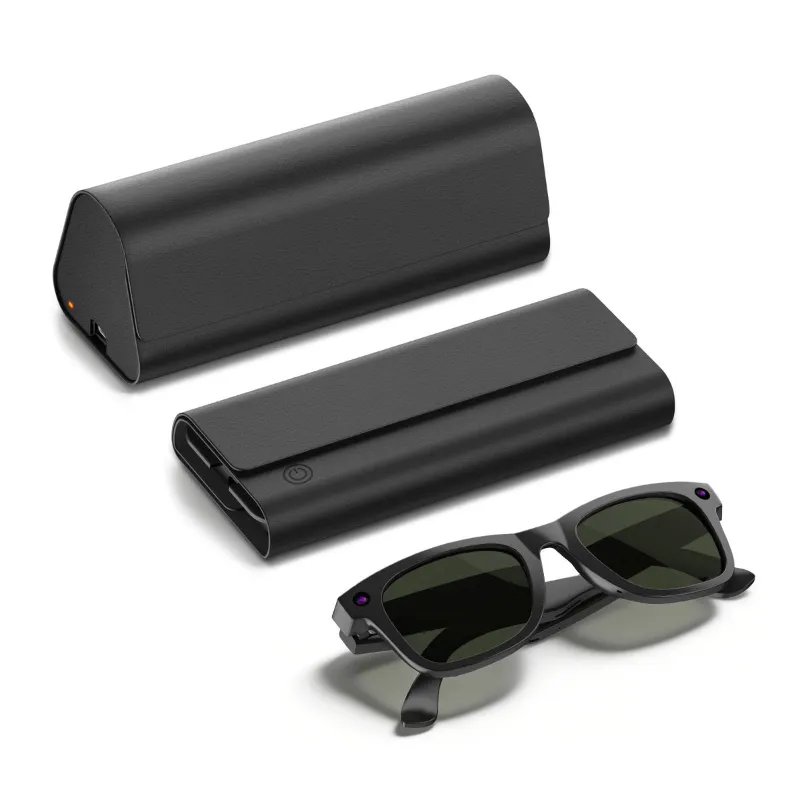
The ray ban meta charging case is more than a carrying case — it doubles as the battery that keeps your Ray-Ban Meta smart glasses alive between wears. If you're researching before you buy, replacing a lost case, or adding accessories like ray ban nose pads, this guide covers everything that actually matters.
What the Ray-Ban Meta Charging Case Actually Does
Most smart glasses cases are passive. The Ray-Ban Meta case is not. It holds a built-in battery that charges your frames every time you close the lid, so you're never scrambling for a wall outlet mid-day.
Key functions at a glance:
- Charges the glasses passively — close the lid and charging begins automatically
- LED status lights on the case front indicate charge level for both the case and the glasses
- USB-C port on the case itself lets you top up the case from any standard charger
- Hard-shell construction protects the frames from drops and pressure
- Magnetic closure keeps the frames seated correctly against the charging contacts
The Ray-Ban META CHARGING CASE in Brown is a good example of how the design blends utility with style — it's one of the few smart-device cases to earn a Red Dot Design Award for product design, which tells you the build quality is taken seriously.
Understanding the Charging Case Lights
The LED indicators on the front of the case are the fastest way to know your glasses' status without opening an app.
- Solid white — glasses are fully charged inside the case
- Pulsing white — glasses are currently charging
- Solid amber / orange — case battery is getting low
- No light — case is depleted or the glasses aren't seated properly
If the lights behave unexpectedly, the most common fix is reseating the glasses so the charging contacts align, then trying a different USB-C cable with the meta glasses charger.
Ray-Ban Meta Case: Gen 1 vs. Gen 2 Differences
Ray-Ban released updated frames (often called Gen 2 or the Meta collection) alongside the original Stories line. The cases are not cross-compatible — the frame shape and contact placement changed between generations.
| Feature | Stories Case | Meta (Gen 2) Case |
|---|---|---|
| Frame compatibility | Stories frames only | Meta frames only |
| USB-C charging | Yes | Yes |
| LED indicator lights | Basic | Improved multi-state |
| Hard-shell design | Yes | Yes |
If you're buying a ray-ban meta replacement case, confirm which generation your frames are before ordering. The product listing for the rayban meta case will specify compatibility — check that first.
Replacing a Lost or Damaged Charging Case
Losing the case is more disruptive than losing a regular glasses case because without it, charging the frames requires a separate meta glasses charger cable rather than the passive case charging. A ray-ban meta charger replacement is worth sourcing quickly.
What to keep in mind when replacing:
- Buy from a verified seller to avoid counterfeit units with misaligned charging contacts
- Check that the replacement case includes the USB-C cable, since some listings sell the case only
- Ray-ban stories charging case replacement pricing varies — check the latest price and grab 10% off with our PrismXR code before buying
- If the case charges but the lights never turn on, the LED board may be faulty — that's a separate warranty issue
Ray-Ban Nose Pads: Fit, Materials, and Replacement
Comfort is the other half of the wearability equation. The ray ban nose pads on Meta frames are swappable, which matters for all-day wear.
Standard nose pads are silicone, which works for most face shapes. If you're finding the frames slip or press unevenly, here's what to consider:
- Silicone pads (stock) — soft, grippy, easy to clean
- Memory foam alternatives — more cushion for extended sessions
- Wider base pads — better weight distribution for narrower nose bridges
- Clear/transparent pads — minimal visual impact if aesthetics matter to you
Replacing nose pads on Ray-Ban Meta frames doesn't require tools — most pop off and click back into the saddle mount. Clean the area before fitting new pads so the adhesive (on stick-on styles) bonds properly.
Pairing the Case With the Right Audio Accessories
If you use Ray-Ban Meta glasses as a daily driver for calls and music, the audio quality matters as much as battery life. The integrated speakers are open-ear, so your listening setup can extend beyond the glasses themselves.
For dedicated listening sessions, consider pairing your Meta setup with purpose-built audio gear:
- prime audio earbuds — a solid in-ear option when you need sound isolation the Meta glasses can't provide
- pc gaming earbuds — if your use case crosses into gaming or desk work
- gaming earbuds — for console or mobile gaming where open-ear audio isn't practical
For a broader extended-reality setup, the clear xr vision pro and meta quest 2 battery pack are worth exploring if you're already invested in the Meta ecosystem — the meta quest 2 battery pack in particular solves the same "battery anxiety" problem that makes the charging case so essential for the glasses.
Who Should Buy the Meta Glasses Case and Accessories
The meta glasses case setup makes the most sense for:
- Daily commuters who need glasses charged and protected without thinking about it
- Remote workers on long video calls who want hands-free audio through the frames
- Travelers who want consolidated gear — glasses, camera, speakers, and storage in one item
- Prescription lens users who hot-swap nose pads to dial in fit across different frame styles
It's less ideal if you only wear the frames occasionally and don't mind plugging in via cable each time.
Where to Buy and How to Save
The easiest way to keep costs down on the case, nose pads, or any Meta accessory is to use our PrismXR discount code for 10% off sitewide. That applies across accessories including the rayban meta case, nose pads, and audio add-ons — worth using if you're buying more than one item in a single order.
Frequently asked questions
Is the ray ban meta charging case the same for all Ray-Ban Meta frame styles?
No. The charging case is specific to the frame generation and shape. Ray-Ban Stories cases and Ray-Ban Meta (Gen 2) cases are not interchangeable because the contact placement and frame geometry differ. Always confirm your frame generation before buying a replacement.
What do the lights on the Ray-Ban Meta charging case mean?
A solid white light means your glasses are fully charged, while a pulsing white light means charging is in progress. An amber or orange light signals that the case battery itself is running low and needs to be plugged in via USB-C.
Can I charge the Ray-Ban Meta glasses without the case?
Yes, but you need a dedicated meta glasses charger cable that connects directly to the frames. The case is more convenient because it charges passively every time you close the lid, but the cable is a viable backup when the case is unavailable.
How do I replace the nose pads on Ray-Ban Meta frames?
Most Ray-Ban Meta nose pads use a saddle-mount or click-in system that doesn't require tools — you press and pop the old pads off, then click replacements into place. Clean the mount area before fitting adhesive-style pads to ensure they bond properly.
What is the difference between a ray-ban meta replacement case and the original?
A genuine replacement case should function identically to the original, with the same LED indicators, USB-C input, and magnetic alignment. Third-party cases vary in quality, particularly in charging contact alignment, so buying from a verified seller is recommended.
Does the PrismXR discount code work on charging cases and nose pads?
Yes. The current PrismXR offer is 10% off sitewide, which applies to the charging case, nose pads, and compatible accessories. Check the coupon page for the active code before checkout.