
Can You Charge DJI Osmo Batteries With Third-Party Chargers?

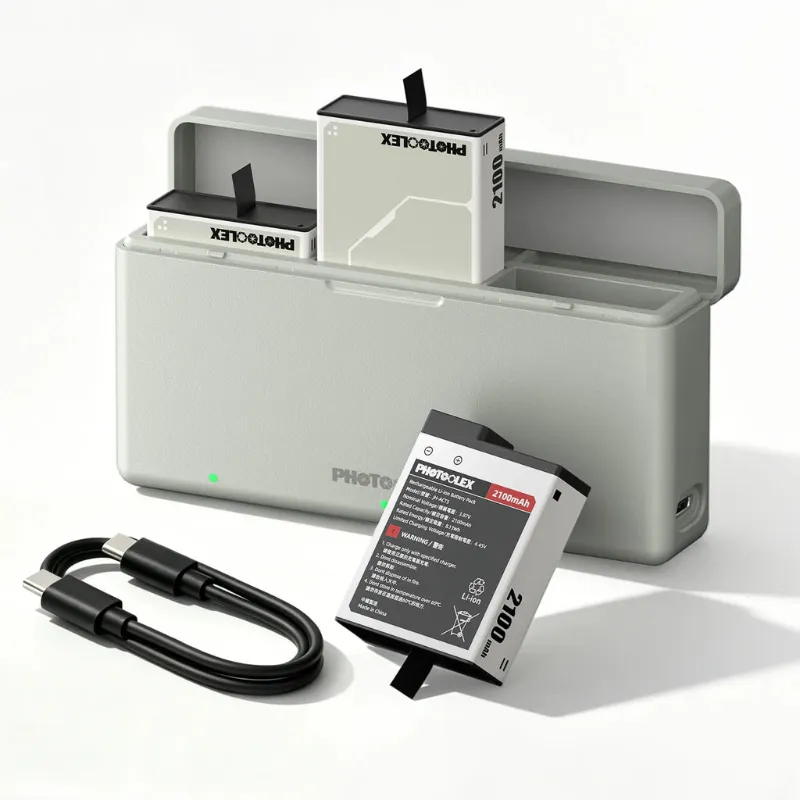
Yes, you can charge DJI Osmo batteries with a third-party dji osmo battery charger, as long as it matches the correct voltage, connector, and charging profile for your specific Osmo model. We have tested a range of official and third-party charging options in our kit bag, and the short version is that a well-made third-party charger is perfectly safe for daily use, while a cheap unbranded one is where problems start.
This guide explains how Osmo charging actually works, what separates a good third-party dji osmo battery charger from a risky one, and when you should stick with official gear.
How DJI Osmo Battery Charging Works
Every DJI Osmo battery pack has its own voltage, capacity, and protection circuitry. An Osmo Pocket, an Osmo Action, and an older dji osmo 1 with its dji osmo zenmuse x3 battery all charge differently, which is why chargers are not interchangeable between models.
Inside every decent charger there are two layers of protection:
- The battery itself has a protection board that cuts off charging if voltage or temperature goes out of range.
- The charger regulates current and stops or tapers when the cell is full.
Because DJI batteries include their own protection circuits, a third-party charger that supplies the correct voltage and a sensible current will not damage them. The risk is not "third-party equals dangerous." The risk is a charger built with no regulation at all.
Official vs Third-Party: What You Actually Trade Off
We keep both types in our bags. Here is an honest comparison based on how we use them:
| Official DJI charger | Quality third-party charger | |
|---|---|---|
| Fit and connection | Guaranteed correct for that model | Must be checked per model |
| Charging speed | Matched to the battery's profile | Usually similar, sometimes slower |
| Warranty peace of mind | Full support if something fails | You rely on the seller's guarantee |
| Price | Higher | Usually noticeably cheaper |
| Extras | Branded hub or case design | Often multi-bay, USB-C, or bundled cables |
The takeaway: an official hub is the safest default, but a reputable third-party charger from a brand that actually tests its products is a legitimate way to save money. If you want a reliable multi-device option, the dji osmo battery charger we stock is built for exactly this use case, and you can check the latest price before you buy.
What to Check Before Buying Any Third-Party Charger
Not all chargers deserve your batteries. Before you click buy, run through this list:
- Model compatibility. A dji osmo pocket 3 charger is not the same as a dji osmo action battery charger. Confirm the listing names your exact camera and battery.
- Output voltage and current. These should match what DJI specifies for your battery, or the charger should explicitly list your model as supported.
- Certifications. Look for CE, FCC, or UL markings and read the label. No markings at all is a hard pass.
- Protection features. Over-voltage, over-current, over-temperature, and short-circuit protection should be listed in the specs.
- Reviews that mention heat. Batteries should get warm at most. Repeated reports of hot charging are a red flag.
- Cable quality. If the charger uses USB-C or micro-USB input, the included cable matters. A flimsy dji osmo charger cable can throttle charging speed or drop the connection.
Charging Over USB: Cables, Power Banks, and Lanyards
Most modern Osmo models charge over USB-C directly, which changes the math. When you charge via USB, the power brick and cable do the regulation work, so the "charger" is really the whole chain.
A few rules we follow in the field:
- Use a quality cable. The 6-in-1 fast charging lanyard cable is our go-to for this because it handles camera charging and doubles as a wearable lanyard, so it is always with us.
- A standard 5V USB power bank is fine for topping up. Fast-charge protocols like PD at higher wattages only help if the camera or charger supports them.
- Avoid charging from unregulated solar panels or random gas-station USB ports. Fluctuating input is the one scenario where even good batteries struggle.
One bonus tip from our lighting side: if you are shooting with a photography flashlight or a snoot light modifier for controlled beams and a flashlight gobo pattern effect, those accessories often draw from the same USB power banks you use for your Osmo. Plan your power budget before a shoot, not during it.
How to Charge Safely and Make Batteries Last
Whether you use official or third-party gear, these habits protect battery health:
- Charge at room temperature. Cold cells charge badly and hot cells age fast.
- Unplug when full. Trickle charging for days on end is unnecessary with modern protection circuits, but there is no benefit to leaving packs on the charger all week.
- Store at partial charge. If a battery will sit unused for months, around half charge is kinder than full or empty.
- Inspect contacts. Bent pins on a charger bay or dirty contacts on a dji osmo zenmuse x3 battery are a common cause of "broken" chargers that are actually just dirty.
- Use the right cable for the job. Mixing up a data-only cable with a charging cable is the most common reason a USB setup charges slowly or not at all.
Who Should Buy Which Charger
Here is how we break it down after years of testing:
- Buy official if your camera is under warranty, you rely on it for paid work, or you want the branded charging hub experience with zero compatibility questions. DJI's own accessories, like the kit behind this Buy Osmo Action Charging Kit reference, are the reference standard.
- Buy a tested third-party dji osmo battery charger if you own multiple batteries, want a spare charger for your travel bag, or simply want to spend less on the same result.
- Buy a good USB-C cable and power bank setup if your Osmo charges over USB-C anyway. A sturdy lanyard cable plus any decent brick covers most creators.
We shoot a lot of accessories ourselves, from the photoolex lighting range to spare batteries for action cameras, and the same principle applies across the board: buy gear from sellers who name their specs, and skip anything that hides them. If a deal looks tempting, grab the code and check the current offer before you order, so you get the tested option at the best price rather than the cheapest gamble.
Frequently asked questions
Can I use a third-party dji osmo battery charger without damaging the battery?
Yes, as long as the charger supports your exact Osmo model and supplies the correct voltage and current. DJI batteries have their own protection circuits, but a certified, well-reviewed third-party charger is still the safe choice over an unbranded one.
Are Osmo Pocket and Osmo Action chargers interchangeable?
No. Charging specifications differ between the Osmo Pocket, Osmo Action, and older Osmo models, so always confirm the listing names your exact camera and battery before buying.
Why is my Osmo charging slowly over USB-C?
It usually points to a low-quality cable, a power brick that cannot supply enough current, or a data-only cable being used by mistake. Swap the cable first, then test a different power source.
Is it bad if my battery gets warm while charging?
Warm is normal during fast charging; hot to the touch is not. If a charger or battery gets uncomfortably hot, stop using it, since excessive heat shortens battery life and can indicate poor regulation.
What kind of dji osmo charger cable should I use?
Use a cable with good build quality and a connector that fits securely. A flimsy or data-only cable can slow charging or drop the connection, so a dedicated charging cable or a tested multi-device lanyard cable is worth having.
Should I buy the official DJI charging hub or a third-party one?
For daily professional use, an official charger removes all compatibility doubts. For spare batteries, travel kits, or budget builds, a tested third-party charger from a seller that publishes full specs is a solid choice.