
Can You Watch 3D Blu-ray in a VR Headset? What Buyers Need to Know

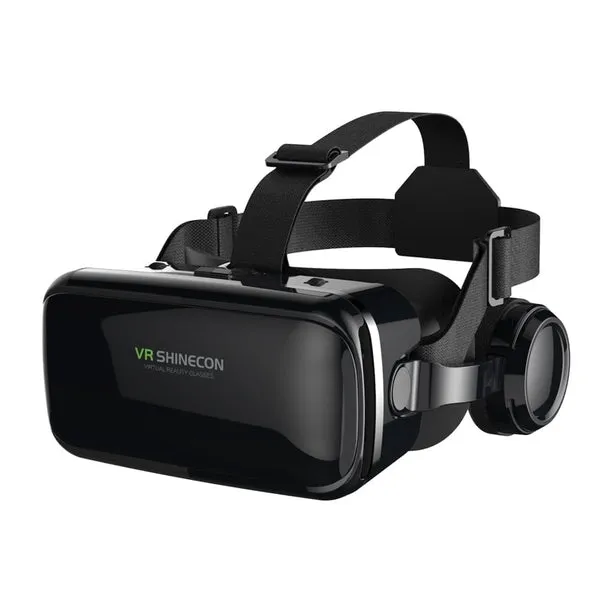
Yes, you can watch 3D Blu-ray in a VR headset, and when you set it up properly, a vr headset blu-ray 3d session looks like a movie theater with a screen the size of a wall. The catch is that most headsets will not play a physical 3D Blu-ray disc directly. You need the right app, a readable file, and a headset that accepts side-by-side 3D video. We test these setups regularly, and this guide walks you through exactly what works, what does not, and what gear makes the difference.
What a VR Headset Blu-ray 3D Setup Actually Requires
Three things have to line up before a 3D Blu-ray movie will play in VR:
- A source. A physical 3D Blu-ray disc itself is tricky, because consumer headsets do not have disc drives and the disc's MVC format is not natively supported. The practical route is a digital 3D file (usually a side-by-side MKV ripped from your disc for personal use, or a purchased 3D download).
- A player app. Most headsets have built-in video players that accept side-by-side (SBS) and over-under 3D formats. VLC and similar media players also run on several headsets and handle MKV files well.
- A headset with adjustable IPD and a decent field of view. This is where a dedicated vr headset blu-ray 3d headset earns its place over basic viewers.
If you already own 3D Blu-rays and a headset that plays SBS video, you are closer than you think. Community threads like this one on watching 3D movies on VR headsets capture the common workflows real users settle on, and they are a good sanity check before you buy anything.
How to Play a 3D Blu-ray Movie in VR, Step by Step
- Get a 3D video file. If you own the disc, rip it to a side-by-side MKV for your own use, or download a 3D title you have purchased. Files of 15 to 25 GB per movie are normal for full-quality 3D.
- Load it onto the headset. SD card, USB-C drive, or local streaming from your PC, depending on your headset's ports.
- Open a VR media player. Set the projection mode to "side-by-side" or "3D SBS." If the image looks doubled or cross-eyed, you picked the wrong mode. Some files are over-under instead, so try that second.
- Adjust IPD and screen distance. Most players let you resize the virtual screen and push it further away. A screen the equivalent of 5 to 8 meters wide feels most cinema-like.
- Sit back in a stable chair. Motion during 3D playback is the number one cause of viewer fatigue, and unlike the movie itself, that part is fully under your control.
Which Headset Works Best for 3D Movies
Not all headsets treat 3D playback the same. Here is how the realistic options compare:
| Option | 3D support | Best for | Watch out for |
|---|---|---|---|
| Dedicated phone vr headset viewer | SBS/over-under via player apps | Casual movie nights on a budget | Resolution depends entirely on your phone |
| virtual reality headset and phone combo kits | Good | First-time buyers who want one box with everything | Phone cooling during long films |
| Standalone vr glasses with built-in players | Good | Cable-free cinema sessions | Storage limits for large 3D files |
| Console VR (e.g. PS VR) | No native Blu-ray 3D | Gaming first | See the well-documented no Blu-ray 3D support for PS VR issue |
That last row matters. Buyers often assume console VR handles 3D Blu-rays because the console has a disc drive, but playback support is a different question from the drive itself. If 3D movies are your main goal, a headset built around media playback is the safer purchase. The big catalog of 3D films formatted for VR headsets and AR glasses is also worth browsing before you rip anything, since a growing share of 3D titles now ship as direct downloads.
Do You Need Headphones for a Good VR Movie Experience?
Yes, and this is where we see buyers underspend. A headset puts a giant screen in front of you, but tinny built-in audio breaks the illusion instantly. A pair of noise cancelling wireless headphones blocks out household noise and keeps the cinema feeling intact, and Bluetooth models pair directly with most standalone headsets. If you prefer wired to avoid pairing delays, the headphones bluetooth range in our store includes wired-capable options too.
We test audio in the same sessions as video, and color choices matter more than you would think for shared households. Our blue headphones, purple headphones, and yellow headphones are popular picks for families where two people want to claim "their" pair. For dedicated Cowinaudio fans, our cowin headphones pair well with movie nights and travel alike. Whichever route you go, check the current Cowinaudio coupon code before ordering, since there is a sitewide discount running.
Comfort and Care: Watching a Whole 3D Movie Without Quitting
A feature film runs 90 to 150 minutes, which is far longer than a typical gaming session. To last the distance:
- Balance the weight. Adjust the rear strap first, then the top strap, so the front is supported rather than clamped to your face.
- Keep the lenses clean. Use a microfiber cloth only. Fingerprints show up badly on bright 3D scenes with high contrast.
- Take a two-minute break at the halfway point. Eye strain builds slowly and you will not notice it until it ruins the ending.
- Store it in the case. Lens coatings on a phone vr headset are surprisingly easy to scratch, and scratched lenses are the most common reason we see headsets retired early.
- Dim the room. Unlike a TV, the virtual screen benefits from a dark physical room for the same reason a cinema does.
Who Should Buy a Headset for 3D Blu-ray Watching
This setup suits you if you already own a stack of 3D Blu-rays that mostly sit unwatched, or if you want a big-screen experience in a small apartment. It is also genuinely good for people who find 3D TV uncomfortable, because per-eye focus in VR is often easier than shutter glasses at a distance.
Skip it if you want plug-and-play disc playback with zero file handling. No consumer headset currently accepts a 3D Blu-ray disc directly, and if that friction is a dealbreaker, a 3D-capable projector or TV remains the simpler path. For everyone else, a vr headset blu-ray 3d setup turns your existing movie collection into something worth rewatching. Compare the models on our store page, apply the code from our Cowinaudio coupon page, and you can be watching in 3D tonight.
Frequently asked questions
Can I put a 3D Blu-ray disc directly into a VR headset?
No consumer VR headset has a disc drive or native support for the MVC 3D format used on discs. The practical method is converting your disc to a side-by-side 3D file for personal use, then playing it in a VR media player app.
Why does my 3D movie look blurry or doubled in VR?
The most common cause is the wrong 3D mode. Side-by-side and over-under files look doubled when played in the wrong projection mode. Switch the player's 3D setting and the image should merge into a single frame.
Is watching a full movie in a phone vr headset comfortable?
Yes. With a comfortable fit, adjustable IPD, and a properly sized virtual screen, many people watch full-length films comfortably. Take a short break halfway through and use headphones rather than the headset's built-in speakers for the best experience.
Does a console VR headset play 3D Blu-rays?
No. PS VR does not support 3D Blu-ray playback even when the console has the drive, which is a known limitation. Standalone headsets with VR media player apps are the better route for 3D movies.
Do I need headphones for VR movie watching?
Yes. Built-in headset speakers break the cinema effect, and a pair of noise cancelling wireless headphones or bluetooth wireless headphones keeps you immersed and blocks household noise during long films.
Which vr headset blu-ray 3d model should I buy first?
Check our Cowinaudio coupon code page for the current sitewide discount, then pick a headset built around media playback with side-by-side 3D support and enough storage for large 3D files.