
Phone VR Headset Care Guide: Cleaning and Storing Virtual Reality Lenses

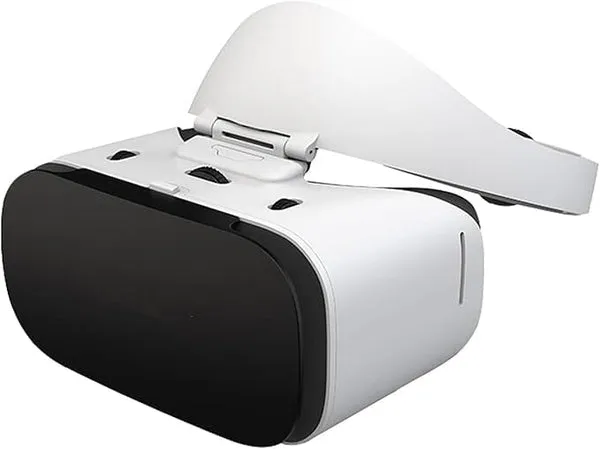
If you use a virtual reality headset and phone together for daily viewing, lens care is the difference between a crisp image and a smeared, foggy mess. The good news: keeping a phone VR headset clean takes about five minutes a week and almost no money. This guide walks you through the exact cleaning routine, the storage setup that prevents lens scratches, and the mistakes that quietly ruin cheap VR glasses. If you are still picking a headset, our review of the best virtual reality headset and phone bundle covers what to buy first.
Why Phone VR Lenses Get Dirty So Fast
Your face does most of the damage. Every session presses warm skin, sweat, and facial oils against the foam padding, and moisture wicks toward the lenses. Phone VR headsets also sit closer to your eyes than console headsets, so even a thin film of oil becomes obvious the moment you look at a bright scene.
Three culprits account for nearly all lens problems:
- Skin oils and sweat transferred from your forehead and eyelashes
- Dust that settles on the lenses between sessions, then drags across the surface the next time you put the headset on
- Fog from temperature changes, which leaves mineral streaks when it dries
Phone screens add their own problem. Because a virtual reality headset and phone pairing means your phone screen sits millimeters from the lenses, a dusty phone back can scratch the lens surface from the inside. Wipe your phone before every insertion and this stops being an issue.
The Safe Cleaning Routine, Step by Step
Do not use alcohol wipes, window cleaner, or paper towels on VR lenses. Most phone VR lenses have an anti-reflective coating that solvents strip away, and paper fibers leave micro-scratches you cannot buff out.
Here is the routine we use on our test units:
- Blow off loose dust first. Hold the headset lenses-down and use a air blower (the kind sold for camera lenses) or a gentle puff from your lips, never your breath directly at close range, since breath carries moisture.
- Dry brush with a microfiber cloth. Use a clean microfiber cloth, the type sold for eyeglasses, and sweep in one direction rather than circles.
- Spot clean with lens spray only if needed. A coating-safe lens spray (labeled safe for anti-reflective lenses) applied to the cloth, never to the lens, handles stubborn oil smudges.
- Wipe the foam pad and phone cradle. Dampen a cloth with water and a drop of mild soap, wipe the facial padding, then let it air dry fully before storing.
- Clean your phone screen and back. Before slotting your phone into a phone vr headset, wipe both sides of the device. Dust trapped between the phone and lens is the number one cause of internal scratches we see.
For heavier smudges on budget models like basic vr glasses, a slightly damp microfiber cloth works without any spray at all. Less product is always safer than more.
How to Store Your Headset So Lenses Stay Clear
Storage is where most people lose their lenses, not cleaning. Three rules cover almost everything:
- Keep lenses away from sunlight. Direct sun through the lenses can damage or discolor them, the same way a magnifying glass works. Store the headset in a drawer, box, or shaded shelf.
- Store it face-down or in a case. A headset resting lenses-up collects dust. A soft microfiber pouch or the original box protects the surface.
- Remove the phone between sessions. Leaving your phone inside a lunettes vr style headset presses dust against the lens and drains your battery. Pop it out and cap the cradle.
Humidity matters more than people expect. In damp climates, a sealed case with a small silica gel packet prevents fog buildup and keeps the foam pad from getting musty. If you share your headset, wipe the padding after each user and let it air out overnight, since shared sweat is how foam padding degrades early.
What Never to Do to VR Lenses
We have destroyed a test unit or two so you do not have to. Avoid these:
- Paper towels, tissues, and shirt sleeves. All three scratch coatings.
- Alcohol, acetone, or disinfectant wipes. These cloud the lens permanently.
- Compressed air at close range. The propellant can spray cold liquid onto the coating.
- Cleaning while the phone is inserted. You will push debris between the phone and lens instead of removing it.
- Breathing directly on the lens to fog it. Repeated condensation cycles degrade coatings over time. Use a blower instead.
If a lens is already scratched, there is no consumer fix. Replacement lens sets exist for some models, which is one reason we recommend checking current pricing and availability before buying, and our coupon page is the place to check the latest price with our code applied.
Cleaning Frequency and Quick Maintenance Kit
How often you clean depends on how often you use the headset:
| Use pattern | Lens wipe | Foam pad wipe | Deep clean |
|---|---|---|---|
| Daily use | Every session or two | Every 2-3 days | Weekly |
| Few times a week | Before each session | Weekly | Every 2 weeks |
| Occasional use | Before each session | Monthly | Monthly |
Your whole kit costs very little: two microfiber cloths, one coating-safe lens spray, a small air blower, and a microfiber pouch for storage. Keep the cloths in the same drawer as the headset so the habit actually happens. The same microfiber cloths double perfectly for cleaning the earcups on your bluetooth wireless headphones, so nothing goes to waste.
Who This Matters Most For
If you share a headset with family, wear makeup, or use your headset after workouts, follow the daily row in the table above. Oils transfer faster than most people assume, and the cost of prevention is seconds per session.
Pairing your headset with a good audio setup also makes long sessions better. Many viewers run a virtual reality headset and phone with over-ear headphones like cowin headphones for private listening, and if noise in the room is the problem, noise cancelling wireless headphones block it out while you watch. Either way, keep the headset's foam pad clean first, because a fresh pad and a clean lens do more for immersion than any accessory.
Before your next purchase or replacement, check the current offer on our coupon page so you are not paying full price. And if you want background reading on how different headset types compare before you invest, The Verge's ultimate VR headset buyer's guide is a solid place to start.
Five minutes of care a week keeps every lens in the house clear. Blow, wipe, store away from sun, and clean your phone before insertion. That is the entire system, and it works.
Frequently asked questions
Can I use eyeglass cleaning wipes on my phone VR headset lenses?
No. Alcohol-based wipes and sprays can strip the anti-reflective coating on VR lenses and cloud them permanently. Use a dry microfiber cloth, or a spray specifically labeled safe for coated eyeglass lenses, applied to the cloth rather than the lens.
How should I store a virtual reality headset and phone between sessions?
No. Direct sunlight passing through the lenses can damage or discolor them, similar to how a magnifying glass focuses light. Store your virtual reality headset and phone separately, in a drawer, box, or shaded shelf.
What is the safest way to remove fingerprints from VR lenses?
Remove the phone, blow off loose dust with an air blower, then wipe in one direction with a clean microfiber cloth. For stubborn oil smudges, use a coating-safe lens spray on the cloth first, never directly on the lens.
How often should I clean the foam padding on my VR glasses?
For daily use, wipe the facial padding every two to three days and let it air dry fully. If you share the headset or use it after workouts, wipe it after each session to prevent sweat from degrading the foam.
Can a scratched VR lens be fixed?
There is no reliable consumer repair for a scratched VR lens. Some models accept replacement lens sets, so it is worth checking whether your specific headset supports them before buying a whole new unit.
Do I need to clean my phone before putting it in a phone vr headset?
Yes. Dust and oil on the back of your phone sit millimeters from the lenses inside the headset and can scratch them from the inside. Wipe both sides of your phone before inserting it every time.