
Industrial Routers vs Mini Routers: Choosing the Right InHandGo Device for Your Setup

# Industrial Routers vs Mini Routers: Choosing the Right InHandGo Device for Your Setup
If you're setting up a network for a workshop, job site, small office, or smart home, one of the first decisions you'll face is whether you need one of the heavy-duty industrial routers or whether a compact mini router will do the job just fine. The difference isn't just about price—it's about environment, workload, uptime requirements, and how much configurability you actually need.
In this guide, we'll break down both categories, show you where each shines, and help you pick the right InHandGo-supported device for your setup—without overspending on features you'll never touch.
What Exactly Is an Industrial Router?
An industrial router is built to keep a network alive in places consumer gear simply can't survive: extreme temperatures, vibration, dust, electrical noise, and remote locations with no IT staff nearby. They typically support wide voltage inputs, DIN-rail or panel mounting, always-on cellular failover, and VPN tunnels for secure remote access.
If you want a vendor-neutral definition, this overview of What is an Industrial Router? – Definition, Types and Uses is a great primer. In short: industrial routers prioritize reliability and remote manageability over raw consumer-style speed.
What Is a Mini Router?
A mini router trades ruggedness for convenience. It's small, quiet, low-power, and usually plug-and-play. For a home lab, a small office, a camper van, or a backup internet connection, a mini router is often all you need. It can even run on a power bank in a pinch, making it a favorite for travel and temporary deployments.
Key Differences at a Glance
| Factor | Industrial Routers | Mini Routers |
|---|---|---|
| Operating temperature | Wide, often -40°C to +75°C | Consumer range (0–40°C) |
| Power input | Wide-voltage DC, redundancy options | Standard wall adapter |
| Cellular support | Dedicated LTE/5G with failover | Often optional USB or built-in LTE |
| Mounting | DIN rail, panel, wall | Desktop |
| VPN & remote management | Core feature (OpenVPN, IPsec, MQTT, etc.) | Basic or community-driven |
| Price | Higher | Budget-friendly |
| Best for | Factories, kiosks, remote sites, fleets | Homes, travel, small offices |
When You Need Industrial Routers
Choose industrial-grade hardware when downtime costs money or safety. Typical scenarios include:
- Remote monitoring: cameras, sensors, and PLCs at unattended sites
- Fleet and mobile assets: buses, trucks, and service vehicles needing constant connectivity
- Harsh environments: workshops with dust, heat, and electrical interference
- Primary + failover internet: when your fiber line drops, LTE takes over instantly
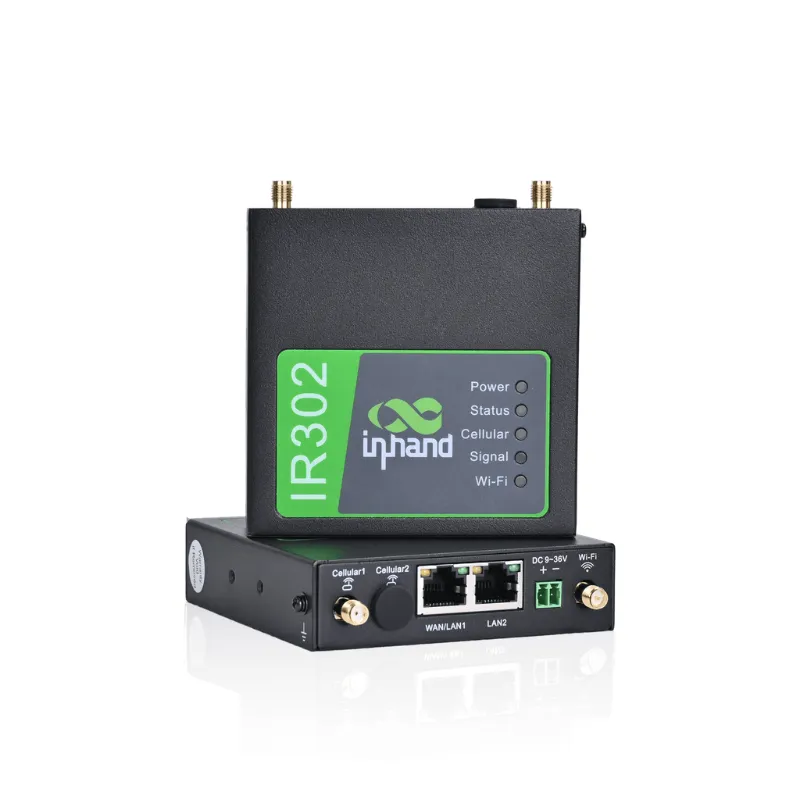
The InRouter300 compact industrial LTE VPN router is a perfect example of this class of device. It packs industrial LTE, VPN support, and remote management into a surprisingly compact body—ideal when you need rugged reliability without a rack-sized chassis. If you're comparing cellular-first options, browsing the broader range of industrial routers will show you how wide the category really is, from 4G LTE workhorses to future-proof 5G models.
For configuration guidance once you've picked your hardware, Cisco's official walkthrough of Industrial Router Configurations covers the fundamentals—WAN setup, firewall rules, and tunnel configuration—that apply to most industrial-grade gear, InHandGo-supported devices included.
And if you're torn between generations of connectivity, this piece on What's the best industrial router—for you? offers a useful framework for matching specs to real-world use cases rather than chasing the biggest spec sheet.
When a Mini Router Makes More Sense
Not every setup needs an armored enclosure. A mini router is the smarter buy when:
- You need a compact travel router for hotels and coffee shops
- You're building a portable lab or homelab node
- You want a low-cost failover device for your home network
- You're running 4g home internet as your primary connection and need something small to share it
Speaking of cellular internet at home: if your area has poor wired broadband, pairing a cellular-ready device with a solid data plan transforms your setup. A dedicated 4g home internet plan (4g home internet) plus the right router can deliver reliable streaming, gaming, and work-from-home performance—no trenching required. Don't forget to apply the current InHandGo coupon code for 5% OFF All Orders on the discount page before checkout.
The Antenna Factor: Why It Matters More Than You Think
Regardless of which router you choose, antennas are the unsung heroes of wireless performance—especially for cellular and long-range Wi-Fi links.
- High gain antennas can dramatically improve signal strength in weak-coverage areas, extending usable range for both cellular and Wi-Fi.
- A quality high gain wifi antenna is often the cheapest performance upgrade you can make—sometimes worth several bars of signal on its own.
- Placement matters: mounting a magnetic wifi antenna nearby a window or elevated surface beats burying it behind a metal cabinet every time.
- For point-to-point links or covering a large property, a directional high-gain antenna can push your signal where an omnidirectional stick can't.
Firmware matters too. Running the latest release—such as 5.0.12—ensures you benefit from the newest stability fixes, security patches, and modem optimizations. Outdated firmware is one of the most common causes of flaky cellular handoffs and dropped VPN tunnels.
Rounding Out Your Network
A router is just the foundation. To build out a complete setup, consider:
- An access point like the eap600 to extend Wi-Fi coverage into dead zones—garages, workshops, or second floors where your main router's signal fades.
- Practical accessories: if you're kitting out a workspace, everything from network gear to g710 irons for the garment corner of your studio shop can often be sourced alongside your networking hardware.
Quick Decision Framework
Ask yourself these four questions:
- Where will it live? Dust, heat, vibration → industrial routers. Desk or shelf → mini router.
- Does downtime cost you? Yes → industrial with LTE failover. No → mini is fine.
- Who maintains it? Nobody on-site → industrial remote management. You, daily → mini is manageable.
- What's your signal like? Weak → budget for high gain antennas before upgrading the router itself.
Final Thoughts
There's no universal "best" router—only the right tool for your environment. Industrial routers earn their price premium in harsh, unattended, or business-critical deployments, while a mini router delivers outstanding value for homes, travel, and light-duty tasks. Whichever way you go, pair it with good antennas, keep the firmware current, and grab your 5% OFF All Orders code from the InHandGo discount page before you buy.
Ready to build your setup? Compare the InRouter300 compact industrial LTE VPN router against a versatile mini router, and don't skimp on high gain antennas—your signal bars will thank you.
Frequently asked questions
What is the main difference between industrial routers and mini routers?
Industrial routers are built for harsh environments with wide temperature tolerance, wide-voltage power inputs, DIN-rail mounting, cellular failover, and robust VPN/remote management. Mini routers prioritize size, low power draw, and affordability, making them ideal for homes, travel, and small offices.
Do I really need an industrial router for a home setup?
If your router will run unattended, sit in a dusty, hot, or vibrating environment, or support business-critical connections where downtime costs money, an industrial router is worth the investment. For desk-based or travel use, a mini router is usually sufficient.
Will a high gain antenna improve my router's performance?
Yes. A high gain antenna can noticeably improve signal strength and range, especially in weak-coverage areas or when mounted near a window. It's often the cheapest performance upgrade you can make—frequently worth trying before replacing the router itself.
Can I use 4g home internet as my primary connection?
Pairing a 4g home internet plan with a cellular-capable router (or a mini router with modem support) can deliver solid speeds for streaming and remote work. Adding an external high gain wifi antenna and keeping firmware like 5.0.12 up to date further improves stability.
Which InHandGo-supported device is best for a first industrial deployment?
The InRouter300 compact industrial LTE VPN router is a great entry point. It combines industrial LTE connectivity, VPN support, and remote management in a compact, budget-friendly package—especially with the current 5% OFF All Orders InHandGo discount code.