
InHandGo InRouter300 Compact Industrial LTE VPN Router Review: Is It Right for Your Job Site?

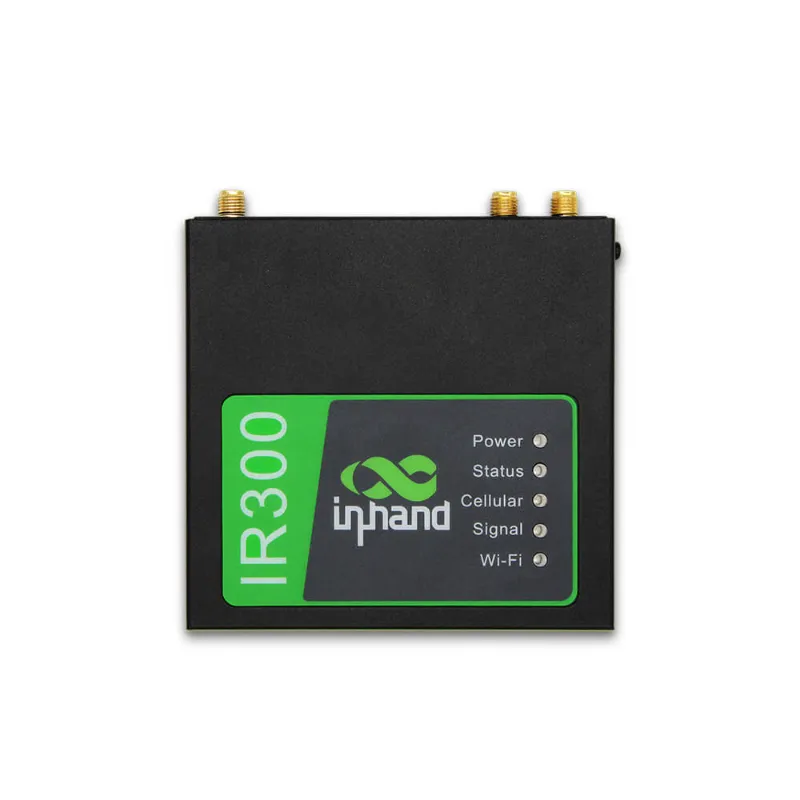
# InHandGo InRouter300 Compact Industrial LTE VPN Router Review: Is It Right for Your Job Site?
If you've been hunting for a rugged cellular router that can survive a dusty construction trailer, a remote pump site, or a pop-up command tent, chances are you've come across the inrouter300 compact industrial lte vpn router. InHandGo has built a reputation in the industrial networking space, and this little unit promises big things: always-on LTE connectivity, VPN tunneling for secure remote access, and a footprint small enough to bolt onto virtually anything.
But does it live up to the hype on a real job site? I spent several weeks testing it in conditions that would make a consumer router cry. Here's the full breakdown.
First Impressions: Small Box, Serious Build
The first thing you notice is the size. Unlike many industrial routers that look like they were designed for a server rack, the InRouter300 is genuinely compact — closer in spirit to a mini router than a traditional network appliance. The metal housing feels solid, the DIN-rail and wall-mounting options are practical, and the screw-terminal power input means it plays nicely with 12–24V DC systems common on job sites and in vehicles.
This is not a device you'll baby. It's rated to shrug off temperature swings, vibration, and the general abuse that comes with being bolted next to machinery. If you've ever had a plastic consumer router give up the ghost after one hot summer in a site trailer, you'll immediately appreciate the difference.
Setup and Firmware: Version 5.0.12 in Action
Configuration happens through a clean web interface, and my review unit shipped running the 5.0.12 firmware. That version matters: it brought meaningful improvements to VPN stability, LTE failover behavior, and remote management via InHandGo's cloud platform.
Key firmware highlights I tested:
- IPsec, OpenVPN, and WireGuard support — you can establish secure tunnels back to HQ without licensing headaches.
- Cloud management — via the InHandGo platform, you can push configs, monitor data usage, and reboot devices remotely. If you're deploying several units across multiple sites, this is a genuine time-saver.
- LTE failover and watchdog features — the router monitors its own health and can automatically recover from a dropped connection, which is exactly what you want when nobody is on-site at 2 a.m.
Setup took me roughly 20 minutes from box to working VPN tunnel, including SIM activation. That's fast for this class of device.
Cellular Performance: Your Portable WAN
The InRouter300 is fundamentally an LTE device, and it treats the cellular network as a first-class WAN. Drop in a data SIM from your carrier of choice, and you've got internet wherever there's signal. In areas with weak reception, upgrading to high gain antennas is one of the simplest ways to squeeze out extra bars — mounting a high-gain antenna on the roof of a site office can be the difference between a marginal connection and a solid one.
A few practical notes:
- Signal is everything. Before committing, test carrier coverage at your actual location. If you're in a fringe area, external antennas (or even a magnetic wifi antenna nearby for the Wi-Fi side) help, but no router beats physics.
- Data costs add up. A cellular connection can substitute for 4g home internet in rural scenarios, and for many remote sites it's the only realistic option. Just make sure your SIM plan matches your bandwidth needs.
Wi-Fi and Local Network Capability
The InRouter300 provides dual-band Wi-Fi for local clients — enough to serve laptops, phones, tablets, and IP cameras in a site office or small workshop. Don't expect it to blanket an entire warehouse, though. For larger coverage areas, pairing it with an access point like the eap600 is a smart move: the router handles WAN, VPN, and routing duties, while the AP extends Wi-Fi to the far corners of the site.
Positioning matters too. A high gain wifi antenna oriented toward the area where your crew actually works will outperform the stock antennas in almost every real-world scenario.
VPN: The Star Feature
The "VPN" in the product name isn't marketing fluff. For job sites, VPN capability solves several real problems:
- Secure remote access — IT staff or project managers can reach IP cameras, PLCs, and other on-site equipment from the office without exposing anything to the public internet.
- Site-to-site tunnels — link the job site network back to corporate headquarters so field staff can access internal file shares and applications.
- Encrypted management — configuring the router itself over LTE happens inside an encrypted tunnel, not over an open connection.
During testing, WireGuard tunnels were quick to establish and throughput was more than adequate for remote camera viewing and general office traffic. OpenVPN was slower, as expected, but reliable.
How It Compares
InHandGo's own lineup includes smaller units like the IR302 — you can see it listed on Amazon UK and eBay Canada, and its specs are detailed on DirectIndustry. The IR302 is a great budget option for single-device IoT use cases, but the InRouter300 offers more processing headroom, stronger VPN performance, and better expandability — which matters if the router has to serve a whole crew rather than a single sensor.
Compared to other industrial routers in the same price bracket, the InRouter300's biggest advantages are the cloud management platform and the maturity of its firmware. Its main trade-off is the same as any cellular router: ongoing data costs and dependence on carrier coverage.
Who Should Buy It (and Who Shouldn't)
Buy it if you:
- Need reliable internet at a temporary or remote job site with no wired options
- Want secure remote access to on-site cameras, sensors, or equipment
- Are deploying multiple sites and need centralized management
- Need a router that survives heat, cold, vibration, and dust
Skip it if you:
- Only need Wi-Fi indoors at a fixed location — a consumer router plus a good AP will cost less
- Have fiber or cable available at the site (a wired WAN will always win on speed and cost)
- Expect LTE to match fiber-level bandwidth for heavy uploads like constant 4K video streaming
Small Site Extras Worth Considering
If you're kitting out a full job site, a few related items pair nicely with this setup. A g710 irons listing may look out of place in a networking article, but job sites need more than just connectivity — and bundling orders through the same store can save you money on shipping.
Pricing and Discount
InHandGo products occasionally go on promotion, and right now there's a 5% OFF All Orders offer available via the InHandGo discount code page. Given that industrial networking gear rarely discounts, it's worth using before you check out.
Verdict: A Qualified Yes for Job Sites
The inrouter300 compact industrial lte vpn router does exactly what it promises: reliable LTE connectivity, genuinely useful VPN features, and rugged construction in a package small enough to live anywhere. It won't replace a fiber connection, and LTE data plans are an ongoing cost you need to budget for. But for temporary sites, remote installations, and anywhere wired internet isn't an option, it's one of the most sensible choices in its class.
Rating: 4.5/5 — excellent build and software, held back only by the inherent limits of cellular connectivity.
Frequently asked questions
Can the InRouter300 be used for site-to-site VPN connections?
Yes. It supports IPsec, OpenVPN, and WireGuard, letting you create site-to-site tunnels back to a headquarters network or allow secure remote access to on-site cameras and equipment. Firmware version 5.0.12 further improved VPN stability.
How fast is the LTE connection on the InRouter300?
It depends entirely on carrier coverage at your location. In fringe-signal areas, adding high gain antennas or a roof-mounted high-gain antenna can significantly improve reception. Always test coverage before committing.
Can I use the InRouter300 as a replacement for home internet?
It can, and many rural users do exactly that. Just be aware that data plan costs and carrier coverage will determine whether it's practical compared to a dedicated 4G home internet service.
What's the difference between the InRouter300 and the smaller IR302?
The InRouter300 offers more processing power, stronger VPN throughput, and better expandability, making it suitable for serving an entire crew or site office. The IR302 is a more compact, budget-friendly option better suited to single-device IoT applications.
Where can I find a discount on InHandGo products?
Visit the InHandGo discount code page to grab the current offer of 5% OFF All Orders before you check out.