
What Is a Jet Fan and Why Buy One? The Kica Jet Fan Explained

What is a kica jet fan?
A kica jet fan is a pocket-sized blower built around a brushless turbine, and the short answer to "why buy one" is simple: it moves air far harder than any regular handheld fan, in a body that fits in a bag or jacket pocket. Where a mini fan gently stirs the air in front of your face, a jet fan concentrates a narrow, high-velocity stream that can blow dust out of keyboards, dry a wet camera lens, bounce light off a reflector, or cool you down at a campsite.
The kica jet fan (and its siblings like the kica jet fan max and kica jetfan 2) use the same principle as a leaf blower scaled down: fewer, faster revolutions and a ducted nozzle. That's the difference between "nice breeze" and "noticeable force."
Kica jet fan vs a regular mini fan: the real difference
We've tested plenty of handheld fans in this category. A standard handheld mini fan like the kica or the kitsa Mini 3 is designed for personal cooling. It's quiet, light, and gentle. A jet fan is a different tool entirely.
| Feature | Regular mini fan | Jet fan |
|---|---|---|
| Airflow | Wide, soft breeze | Narrow, high-velocity stream |
| Best use | Cooling your face | Cleaning, drying, photography, cooling gear |
| Noise | Quieter | Louder under load |
| Size | Ultra pocketable | Pocketable, slightly bulkier |
| Canned air replacement | No | Yes |
If you only want something to keep you comfortable on a commute, a kica or kitsa Mini 3 is the better and quieter buy. If you want one tool that can also blast dust out of a keyboard, dry a dog after a beach walk, or clear water off a bike chain, the jet fan is worth the upgrade.
What you can actually do with one
The reason jet fans took off among photographers and tech reviewers is that they're genuinely multi-purpose:
- Keyboard and gear cleaning. The narrow nozzle hits crevices that canned air struggles with, without propellant or freezing.
- Photography and video. Blow dust off lenses and sensors, or add wind to hair and clothing for shots.
- Drying things fast. Water off a car panel, a wet tent, hair after a swim, or a dog after rain.
- Cooling. Point it at yourself at a desk, or at gear like a laptop or console vents in a pinch.
- Outdoors. Speeding up campfire starts and clearing leaves off a camp table.
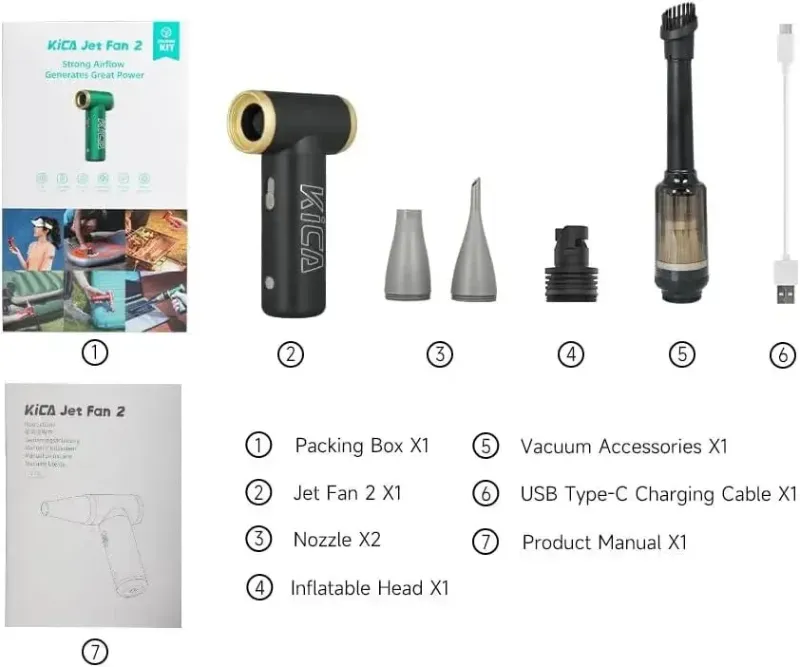
The KiCa Jet Fan 2 kit review from The Gadgeteer is a good deep dive if you want to see the kit attachments and blowing/sucking modes in action.
Which KiCA model should you buy?
KiCA's lineup now covers a few different use cases, so pick by job rather than by spec sheet:
- kica jet fan – the original and still the best all-rounder for most people. Solid power in a genuinely pocketable body.
- kica jetfan 2 – the second-generation model. Refined power and modes, plus a kit version with attachments, and it also supports a reverse (suck) mode for pulling dust into a filter. This is our pick for photographers.
- kica jet fan max – the high-power option. Bigger, stronger, and built for drying, inflating-adjacent tasks, and heavier cleaning jobs where the smaller models run out of puff.
- kica / kitsa Mini 3 – not jet fans, but ideal if you purely want personal cooling and maximum pocketability.
Our advice: if you're torn between sizes, buy the kica jet fan first. Most people never need more power than the base model delivers, and you can always step up to the kica jet fan max later if you find yourself wanting more force for drying jobs.
KiCA publishes detailed specs for the KiCA Jet Fan 2 on its official downloads page, which is worth checking if you want exact airspeed and battery figures before you buy.
Battery life and day-to-day use
Every model here charges over USB-C, which means you can top it up from a power bank, laptop, or car. Battery life varies heavily with speed: at low speeds a jet fan runs for hours, but at full blast expect noticeably less runtime because the brushless motor is working hard. For cleaning sessions that's fine; for all-day cooling you'll want to pace it or pair it with a power bank.
Practical tips we've learned from testing these:
- Use low speed for dusting electronics; high speed can push dust deeper into tight spaces.
- Keep the nozzle a few centimeters back from delicate coatings and sensor surfaces.
- Let the fan run a second after you finish blowing dust out, to clear the nozzle.
- Store it with a bit of charge rather than fully flat, like any lithium battery device.
Is a kica jet fan worth the money?
For most readers, yes, and the honest framing is this: think of it as replacing a can of compressed air every few months plus a small fan you were going to buy anyway. It pays for itself in canned air alone if you clean keyboards, camera gear, or a PC regularly.
The questions worth asking before buying:
- Do you need *force*, or just airflow? If just airflow, buy the kica or kitsa Mini 3.
- Do you want reverse mode? That points you at the jetfan 2.
- Will you use it outdoors on bigger jobs? That's the max's territory.
If you've decided a jet fan fits, check the latest price on our KiCA Care coupon page before you buy. We keep a live code there for 10% off all orders, which applies across the range including the kica jet fan 2 and max, so it's worth grabbing the code before checkout rather than paying full price.
For a longer-form verdict on the two most popular higher-power models, the KICA Jet Fan Max & 2S Review on HL Planet covers real-world airflow tests well and is worth a read alongside this guide.
Frequently asked questions
What's the difference between the kica jet fan and the kica jet fan max?
The max is the high-power model: it moves more air and handles bigger drying and cleaning jobs, but it's larger and heavier. The standard kica jet fan is smaller, more pocketable, and powerful enough for most everyday cleaning and cooling tasks.
Can a kica jet fan really replace canned air?
For most keyboard, camera, and general gear cleaning, yes. It delivers a high-velocity air stream without propellant, so there's nothing to run out and nothing cold or wet hitting your electronics.
Is the kica jetfan 2 worth upgrading to from the original?
The jetfan 2 is the refined second generation, with improved power and modes, and the kit version adds attachments plus a reverse (suck) mode. If you're buying new, start there; if you already own the original and it works for you, there's no urgent need to switch.
How long does the battery last on a jet fan?
It depends heavily on the speed setting. At low speeds a jet fan runs for hours, while full-power blasts drain the battery much faster. All models charge over USB-C, so topping up from a power bank is easy.
Are kica jet fans loud?
At high speed, yes, noticeably louder than a regular mini fan, because the brushless motor spins much faster. At low and medium speeds most people find them fine for desk use.
Where can I get a discount on a kica jet fan?
We keep a current KiCA Care discount code on our coupon page that gives 10% off all orders. Check it before checkout, since it applies across the whole range.