
Kica Jet Fan Not Blowing Full Power? Common Fixes and Troubleshooting Tips

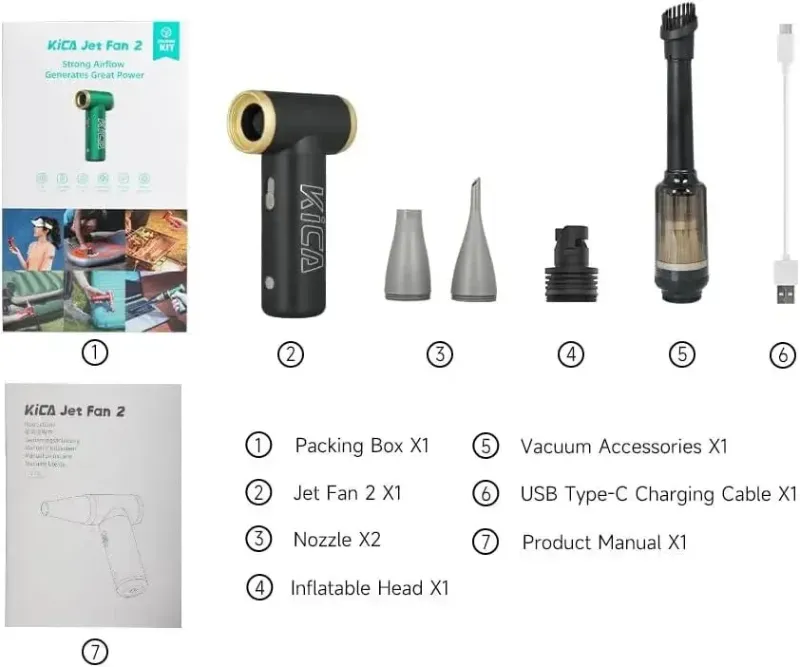
If your kica jet fan seems weak, the cause is almost never a broken motor. In most cases it is a clogged intake, a low battery in a high-power mode, an unseated nozzle, or a firmware/settings quirk that limits RPM. Work through the checks below in order and you will usually get full airflow back in under ten minutes.
We have tested the whole KiCA lineup, from the original kica jet fan to the kica jet fan max and the kica jetfan 2, and every generation has the same handful of failure points. Here is how to diagnose each one.
Why Your Kica Jet Fan Lost Power
Before you take anything apart, rule out the simple stuff. Jet fans like the kica jet fan draw serious current at top speed, and they protect themselves aggressively.
- Low battery. Many models throttle output as the cell drops below a certain charge. If the fan is under about half battery, it may never reach rated RPM. Charge it fully with the original cable before judging performance.
- Clogged intake grille. Pocket lint, pet hair, and dust pack into the intake side over time. This starves the impeller and cuts airflow dramatically, even though the motor still sounds normal.
- Wrong mode selected. Some units start in a low or "cool" mode by default after a restart. Double-check that you are actually in the highest setting.
- Loose nozzle or accessory. A cracked nozzle or a poorly seated attachment leaks air and kills velocity at the tip.
- Heat protection. Running the fan at max for long stretches can trigger thermal throttling. Let it cool for a few minutes and try again.
Quick Checks Before You Assume It Is Broken
Run through this list in order. It takes a few minutes and solves most complaints we hear.
- Charge the fan to 100 percent using the supplied cable and a wall adapter, not a laptop port.
- Toggle through every speed mode so you know the fan is actually reaching top gear.
- Remove any nozzle or attachment and test bare output at the outlet.
- Compare airflow against a healthy unit, like a kica jet fan straight out of the box, so you know what normal feels like.
- Let the fan rest if it has been running hot, then retest.
If output is still weak after a full charge in top mode, move on to cleaning.
Clean the Intake and Impeller the Right Way
The intake grille is where most power problems live. Dust and hair wrapped around the impeller hub act like a brake, and the motor burns extra current fighting them.
- Brush the intake first. Use a soft toothbrush or a dry paintbrush on the intake side while the fan runs briefly on low. Much of the debris will dislodge immediately.
- Use compressed air carefully. Short bursts from the intake side can push debris out the exhaust. Avoid holding the can upside down, which sprays cold propellant.
- Check the impeller for wrapped hair. If you can see strands wound around the hub through the grille, remove them gently with plastic tweezers. Never use metal tools near the impeller.
- Wipe, do not wash. A slightly damp cloth on the housing is fine. Do not run water or rinse the unit, and do not spray cleaner into the grille.
Once clean, charge to full and retest. A surprising number of "weak fan" reports end here.
Battery and Charging Fixes
Jet fans pull hard at full throttle, and batteries age. If your fan runs strong for a moment then sags:
- Try a different cable and adapter. Cheap USB cables are a common culprit. A worn cable can charge slowly or fail to charge fully.
- Do a full cycle. Run the fan down to empty, then charge uninterrupted to 100 percent. This helps the battery gauge recalibrate on some models.
- Avoid charging in extreme heat. A fan left in a hot car will throttle and may charge slowly on purpose.
- Know when it is the cell. If runtime has visibly collapsed over months of use, the battery is simply aging. That is a warranty conversation, not a cleaning one.
Model Differences: Which KiCA Fan Should Deliver How Much Power
Not every KiCA fan is meant to blow at the same intensity, and comparing a mini handheld to a jet fan is a common source of "it feels weak" complaints.
| Model | Best for | Power expectations |
|---|---|---|
| kica | Everyday cooling, desk use | Gentle breeze, not a jet |
| kitsa Mini 3 | Pocket carry, quick cooldowns | Light airflow, compact cell |
| kica jet fan | Dusting, BBQ, car drying basics | Strong focused jet |
| kica jetfan 2 | Heavier debris, workshop use | Noticeably stronger than gen 1 |
| kica jet fan max | Max airflow sessions | Highest sustained output |
If you bought a handheld mini and expected jet-fan velocity, the fan is working as designed. If you own a jet fan and it is underperforming against a friend's identical unit, cleaning and charging are your first two stops. The kica jet fan ultra and kica jet fan 3 naming floating around shopping sites also trips people up; buy from the official store or a listed retailer so you know exactly which generation you are getting, and check the latest price and code before you order.
For a deep dive on what the second generation can do when healthy, this independent KiCa Jet Fan 2 kit review is a good reference for expected performance.
When a Reset or Firmware Update Helps
Newer KiCA units include smart features that occasionally need a reset.
- Power cycle fully. Hold the power button until the unit shuts down completely, wait ten seconds, then restart. This clears temporary mode locks.
- Check the official downloads page. The KiCA Jet Fan 2 support page lists firmware and documentation for the current generation. If your model supports updates, an outdated version can affect speed control.
- Factory reset if offered. Some models have a documented reset combination in the manual. Use it if behavior seems stuck in a limited mode.
If none of this works and the fan is under warranty, contact KiCA support with your order details before opening the case. Cracking the housing yourself can void coverage.
How to Keep Full Power Long Term
A little maintenance keeps a jet fan near its rated output for years.
- Blow the intake out monthly if you use it in the workshop or around pets.
- Store it charged to roughly half in a cool, dry place rather than dead or pegged at 100 percent.
- Use short max bursts instead of long full-throttle runs to reduce heat stress.
- Keep the original cable at your charging spot so you never fall back on a damaged spare.
- Recheck performance after cleaning so you catch slow airflow loss early.
If you are weighing an upgrade because your current unit genuinely cannot keep up, the kica jet fan max is the one we reach for when airflow matters most, and our kica jet fan review notes and current offers live on the coupon page. A working jet fan should feel like a focused wind tunnel, not a desk breeze, and with the steps above yours usually will again.
Frequently asked questions
Why is my kica jet fan blowing weaker than when it was new?
The most common cause is a clogged intake grille or wrapped hair around the impeller. Charge it fully first, then clean the intake with a soft brush and retest on the highest mode.
Does a low battery reduce kica jet fan power?
Many models reduce top speed as the battery drops to protect the cell. Charge to 100 percent with the original cable before judging output, and avoid testing on a tired cell.
Can I take my kica jet fan apart to clean it?
Cleaning dust from the grille and checking firmware or settings is safe and often fixes the issue. Opening the housing is not recommended, since it can void the warranty and risk impeller damage.
Which KiCA model has the strongest airflow?
The kica jet fan max is built for the highest sustained airflow, while the kica jetfan 2 is the refined second generation and the kica handheld and kitsa Mini 3 are gentler mini fans. Match the model to the job rather than expecting jet power from a mini fan.
How do I know if my kica jet fan needs a firmware update?
Check the official KiCA support and downloads page for your model to see whether a firmware update applies, and do a full power cycle before assuming a hardware fault.
Is there a discount code for KiCA fans?
Yes, we list the current discount code for all orders on our KiCa Care coupon page, so check there before buying any KiCA fan or accessory.