

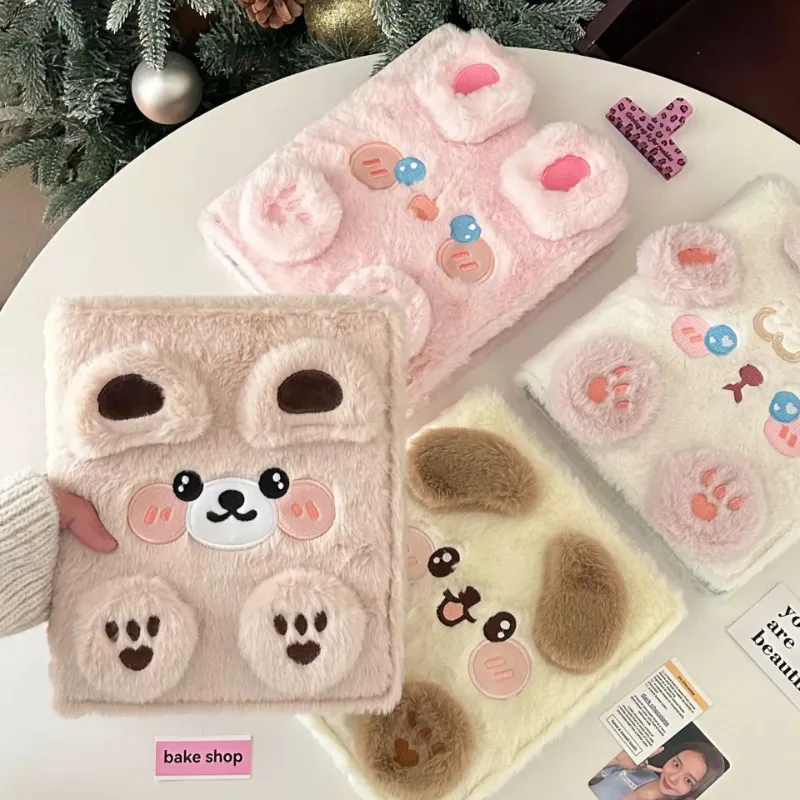
A photocard binder is the single best tool for keeping photocards flat, clean, and scratch-free for years. Done right, your cards stay in pull-list condition whether you are displaying them, trading them, or just admiring your bias. Here is everything you need to know to store photocards properly without accidentally ruining them.
Choosing the Right Photocard Binder
Not every binder sleeve is made equal, and the wrong one can cause more damage than a loose drawer.
- Sleeve material matters most. Look for PP (polypropylene) or acid-free PVC sleeves. PVC that has not been tested as acid-free can leach plasticisers onto card surfaces over time, yellowing prints.
- Sleeve fit. Standard photocards measure 55 × 85 mm (roughly the size of a credit card). Sleeves should be snug but not tight enough to crease the corners when you slide a card in.
- Ring vs. zip closure. Ring binders allow you to swap pages freely; zip binders keep humidity and dust out better. For long-term storage, zip styles win. For active traders, rings are more practical.
- Capacity. A 4-pocket page holds fewer cards per spread but lets you appreciate the artwork; 9-pocket pages maximise space. Many collectors use both.
- Spine rigidity. A soft-cover binder flexes and can warp sleeves under weight. A semi-rigid or hardcover spine prevents bowing.
How to Sleeve and Load Cards Without Damaging Them
Loading is where most damage actually happens.
- Wash and dry your hands before touching cards. Skin oils transfer easily and are nearly impossible to remove from matte finishes.
- Hold cards by the edges only. Never press a thumb across the face of the card.
- Slide, do not force. If a sleeve feels tight, do not push harder. Try a slightly larger sleeve instead of bending the card to fit.
- Top-load vs. side-load sleeves. Top-load sleeves are more common, but side-load sleeves spill cards less easily if the binder is tipped. Choose based on how you carry or display your binder.
- Double-sleeve valuable cards. Insert the card into a perfect-fit inner sleeve first, then into the page pocket. This eliminates micro-scratches caused by cards sliding inside pockets.
- Never overfill a pocket. Two cards per pocket maximum, and only if both sleeves are slim. Overstuffing stresses corners and causes permanent dents.
Storage Conditions That Protect Your Collection
The binder itself is only half the equation.
- Keep away from direct sunlight. UV exposure fades printing within months, especially on holographic finishes. Store your binder spine-out on a shelf, not face-out in a window display.
- Avoid humidity above 50%. Moisture causes cards to warp and sleeves to fog. A small silica gel packet inside your binder pouch or storage box helps significantly.
- Room temperature is ideal. Avoid garages, attics, or anywhere with temperature swings. Consistent cool and dry is best.
- Store vertically, not flat. Flat stacking puts uneven pressure on lower cards; standing a binder upright distributes weight evenly.
- Keep away from food and drinks. Sounds obvious, but collectors who snack while flipping pages risk permanent stains. This applies especially if your desk also holds a cute white mouse pad or cute notebooks that double as a browsing station.
Organising Your Binder: Systems That Actually Work
A disorganised binder leads to unnecessary card handling, which means more wear.
| Organisation Method | Best For | Downside |
|---|---|---|
| By group / artist | Most collectors | Hard to maintain as collection grows |
| By card type (standard, special, unit) | Completionists | Requires consistent categorisation |
| By acquisition date | Traders tracking value | Less visually satisfying to browse |
| Alphabetical | Large multi-fandom collections | Requires relabelling often |
Whichever system you choose, label each divider page clearly and commit to it. Rearranging frequently means sliding cards in and out repeatedly, and that is exactly the motion that scratches surfaces.
Pairing Your Binder with the Right Kawaii Setup
A well-organised collection space makes it easier to handle cards carefully every time. If you are building out your desk or carry setup, a few Kore Kawaii picks pair naturally with a photocard binder habit.
Cute notebooks are ideal for logging your wishlist, trade offers, or checklist of cards still needed. A dedicated notebook keeps you from scribbling on loose paper that ends up near your cards. For display shelf companions, the one piece labubu and raccoon plush make great low-profile shelf-sitters that do not tip over or shed fibres onto sleeves.
If you carry your binder to trading meetups or fan events, a cute backpack with a padded interior panel protects the binder from corner dings in transit. And if you need a gift to pair with a photocard binder for a K-pop fan, the kawaii duck plush or a set of cute stationery rounds out a thoughtful bundle. You can grab the Kore Kawaii discount code to save across all of these in one order.
Common Mistakes That Damage Photocards
Avoid these and your cards will stay pristine.
- Using regular plastic sleeves from an office supply store. These are almost never acid-free and are often too thick, forcing you to cram cards in.
- Writing on sleeve pockets with permanent marker. Marker fumes can transfer to cards inside. Use sticky label tabs on the page edge instead.
- Leaving cards in a hot car. Heat softens adhesive layers in holographic cards, causing permanent wrinkling.
- Pulling cards out by pinching the top edge. This micro-bends the card tip every single time. Use a soft ejector tool or gently push from the back of the sleeve.
- Stacking binders horizontally under heavy books. The combined weight compresses pages and bends cards at sleeve edges.
When to Upgrade or Replace Your Binder
Binders do not last forever, and an ageing binder can become a liability.
- Replace sleeves if you notice fogging, yellowing, or a tacky texture. These are signs of off-gassing that can transfer to card surfaces.
- Retire a binder if the ring mechanism no longer closes flush. Gaps mean pages shift, and shifting pages mean cards slide and crease.
- Upgrade to a larger binder before you start cramming extra cards into already-full pockets. The moment a pocket feels tight is the moment damage begins.
For everything else in your kawaii collection, check the latest prices and the current discount code at Kore Kawaii before you buy. And if your shelves hold more than just cards, browsing titles like vampire knight manga or hana kimi manga alongside your binder display is a genuinely satisfying way to build a themed collection corner. Use our Kore Kawaii code to make it easier on your wallet.
 Shopping at Kore Kawaii? See today's verified Kore Kawaii discount code
Frequently asked questions
What sleeve material is safest for a photocard binder?
Acid-free polypropylene (PP) sleeves are the safest choice. They are chemically stable, resist off-gassing, and will not yellow or stick to card surfaces over time the way untested PVC can.
Can I store multiple photocards in one sleeve pocket?
You can fit two slim-sleeved cards in one pocket at most, but it increases the risk of corner denting and surface scratching. For cards you value highly, one card per pocket is the safest rule.
How do I remove a stuck photocard from a binder sleeve without bending it?
Gently press on the back of the sleeve to push the card upward, or use a soft silicone ejector tool. Never pinch and yank from the top edge, as this micro-bends the card tip every time.
Does a kawaii backpack from Kore Kawaii have enough padding to carry a photocard binder safely?
The cute backpack from Kore Kawaii is designed for everyday carry and includes structured panels that help protect flat items. For extra safety, slip your binder into a slim protective sleeve before placing it in the main compartment.
How often should I replace the sleeves in my photocard binder?
Inspect sleeves every six to twelve months. If you notice fogging, yellowing, or a slightly tacky feel on the inner surface, replace them immediately, as these are signs the material is breaking down and could transfer residue to your cards.
What is the best way to organise a photocard binder for a large multi-group collection?
An alphabetical or group-based system with clearly labelled divider tabs works best for large collections. The key is picking one system and sticking to it so you handle each card as few times as possible.