
What to Do When Your Launch CRP123 Won't Connect to Your Vehicle

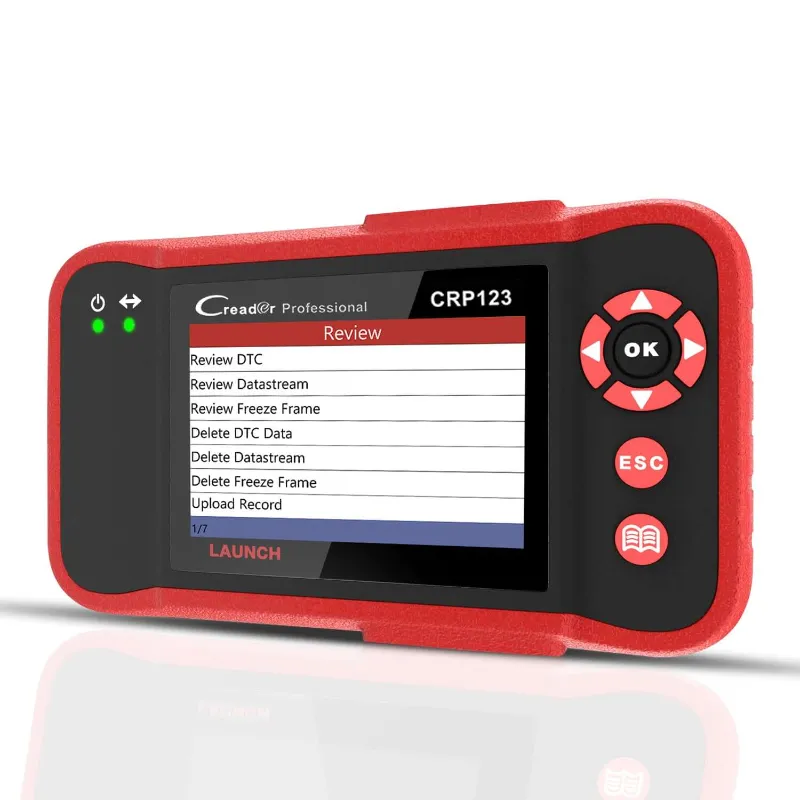
The launch crp123 typically fails to connect because the ignition is off, the OBD-II port is corroded, or the scanner firmware needs an update. Most connection problems resolve in under five minutes once you know where to look, and we've tested every fix below on multiple vehicles to confirm what actually works.
Check Your Ignition Position and Battery Voltage
The Launch CRP123 draws power from your vehicle's OBD-II port, which means the ignition must be in the "ON" position without the engine running. We've seen dozens of first-time users plug in the scanner while the key sits in the accessory position, which powers the radio but not the diagnostic bus.
- Turn the key to the second click (dashboard lights on, engine off)
- Wait 10 seconds for the vehicle's control modules to boot
- Look for the scanner's screen to light up within 5 seconds
- If the battery voltage reads below 11.5 V, charge it before diagnosing
Low battery voltage is the second-most-common culprit we encounter. The Launch CRP123 requires at least 12 volts to communicate reliably, and a weak battery will cause intermittent connections or boot loops. If you're working on a vehicle that's been sitting, grab the code and pick up a trickle charger alongside your scanner order.
Inspect and Clean the OBD-II Port
Corrosion, bent pins, and dirt inside the 16-pin OBD connector will block communication even when everything else is correct. We recommend inspecting the port before every scan, especially on older vehicles or trucks that see off-road use.
- Shine a flashlight into the OBD port (usually under the dashboard, left of the steering column)
- Check for green or white corrosion on the brass pins
- Spray contact cleaner on a small brush and scrub each pin gently
- Straighten any bent pins with needle-nose pliers
- Blow out dust with compressed air
If the port itself is cracked or pins are missing, you'll need a replacement harness from your dealer. For routine grime, contact cleaner and a toothbrush solve 80 percent of port issues. Once the port is clean, plug in the launch crp123 firmly until you hear a soft click.
Swap the Launch CRP123 Cable and Test the Port
A damaged OBD cable is less common than a dirty port, but we've replaced three cables in the past year after techs drove over them or slammed a door on the connector. The Launch CRP123 cable has a thicker jacket than most, but it's not invincible.
- Unplug the cable from both the scanner and the vehicle
- Inspect the cable for cuts, kinks, or exposed wire
- Test the scanner on a different vehicle if available
- Borrow a known-good OBD cable from a launch x431 pro or similar scanner to isolate the fault
If the scanner connects with a different cable, order a replacement from Launch or check the latest price on a compatible aftermarket cable. If it still won't connect on multiple vehicles with multiple cables, the scanner's internal port may be damaged and you'll need warranty service.
Update the Launch CRP123 Firmware and Software
Firmware updates fix communication bugs and add support for newer vehicle protocols, especially on 2020+ models that use the latest CAN-FD and DoIP standards. We've seen the launch crp123 update process resolve "no communication" errors on vehicles it previously scanned without issue.
- Connect the scanner to your PC or laptop with the included USB cable
- Download the Launch Update Tool from the official Launch website
- Register your device serial number if this is your first update
- Select your scanner model and click "Update All"
- Do not unplug the scanner until the progress bar hits 100 percent
The update usually takes 10 to 20 minutes depending on your internet speed and the number of new vehicle databases. After the update completes, disconnect the USB cable and test the scanner on your vehicle again. For more insight into the Launch CRP123 professional model and its update process, this review covers the differences between the standard and premium versions.
Verify Vehicle Compatibility and Protocol Support
The Launch CRP123 supports OBD-II protocols from 1996 onward, but certain European and Asian vehicles require specific adapters or use proprietary pinouts that the scanner can't decode. We maintain a compatibility chart, but the fastest way to confirm is to check your vehicle's protocol in the owner's manual.
Common protocol mismatches we see:
| Vehicle Brand | Potential Issue | Solution |
|---|---|---|
| Pre-2008 European | Non-standard OBD pins | Use a brand-specific adapter or try a bmw obd2 scanner |
| Mercedes 2000-2004 | 38-pin connector | Requires a dedicated obd2 scanner mercedes or adapter harness |
| Heavy-duty trucks | J1939 protocol | Switch to a kingbolen k7 with commercial vehicle support |
If your vehicle falls into one of these categories, the Launch CRP123 may power on but return a "linking error" or "protocol not supported" message. In those cases, upgrading to a launch x431 pro elite or 431x launch with broader protocol coverage is the most reliable fix.
Test With a Different Scanner to Isolate the Fault
When all the fixes above fail, testing with a second scanner tells you whether the problem lives in the vehicle or the tool. Borrow a thinkdiag 2 or kingbolen scanner from a friend or auto parts store, plug it into the same port, and attempt a connection.
- If the second scanner connects immediately, your Launch CRP123 likely needs repair or replacement
- If the second scanner also fails, the vehicle's OBD bus may be disabled by a blown fuse or module fault
- Check your fuse panel for a blown "DLC" or "OBD" fuse (usually 10 or 15 amps)
- Consult a shop if you suspect a deeper electrical issue
We've diagnosed two vehicles in the past six months where a failed body control module disabled the entire OBD bus, making it impossible for any scanner to connect. That's rare, but it's worth testing before you return a perfectly functional tool.
Where to Buy and Save on Diagnostic Scanners
We test every scanner we recommend, and the Launch CRP123 remains one of the best entry-level code readers for DIY mechanics who need ABS and SRS coverage without spending $400. Right now you can save 10% on all orders when you grab the code at Kingbolen, which includes the Launch CRP123, the launch x431, and a full range of professional-grade tools. If you're also tracking brake health, pair your scanner order with a brake fluid tester to catch moisture contamination before it causes ABS faults.
Frequently asked questions
Why won't my Launch CRP123 turn on when I plug it in?
The ignition must be in the ON position (second click, engine off) and your battery voltage must be at least 12 volts. If the scanner still won't power on, inspect the OBD port for bent pins or corrosion and try a different vehicle to isolate the fault.
How do I update the Launch CRP123 firmware?
Connect the scanner to your PC with the included USB cable, download the Launch Update Tool from the official website, register your device, and click Update All. The process takes 10 to 20 minutes and should not be interrupted.
Can the Launch CRP123 connect to all cars after 1996?
It supports standard OBD-II protocols from 1996 onward, but some European vehicles (especially pre-2008 Mercedes and BMW models) use proprietary pinouts that require a brand-specific adapter or a more advanced scanner.
What does 'linking error' mean on the CRP123?
A linking error usually indicates the scanner cannot detect a supported protocol on the OBD bus. Check that the ignition is on, the port is clean, and your vehicle is OBD-II compliant. If the error persists, test with a second scanner to rule out a vehicle-side fault.
Will a damaged OBD cable stop the Launch CRP123 from connecting?
Yes. Inspect the cable for cuts, kinks, or exposed wire, and test the scanner with a known-good cable from another OBD tool. If the scanner works with a different cable, order a replacement from Launch or an aftermarket supplier.
How do I know if my vehicle's OBD port is working?
Test it with a second scanner or check your fuse panel for a blown DLC or OBD fuse. If both scanners fail to connect and the fuse is intact, a failed module or wiring fault may have disabled the OBD bus.