
Lexus Apple CarPlay and NX 300H CarPlay: What to Check Before Buying a Road Top Upgrade

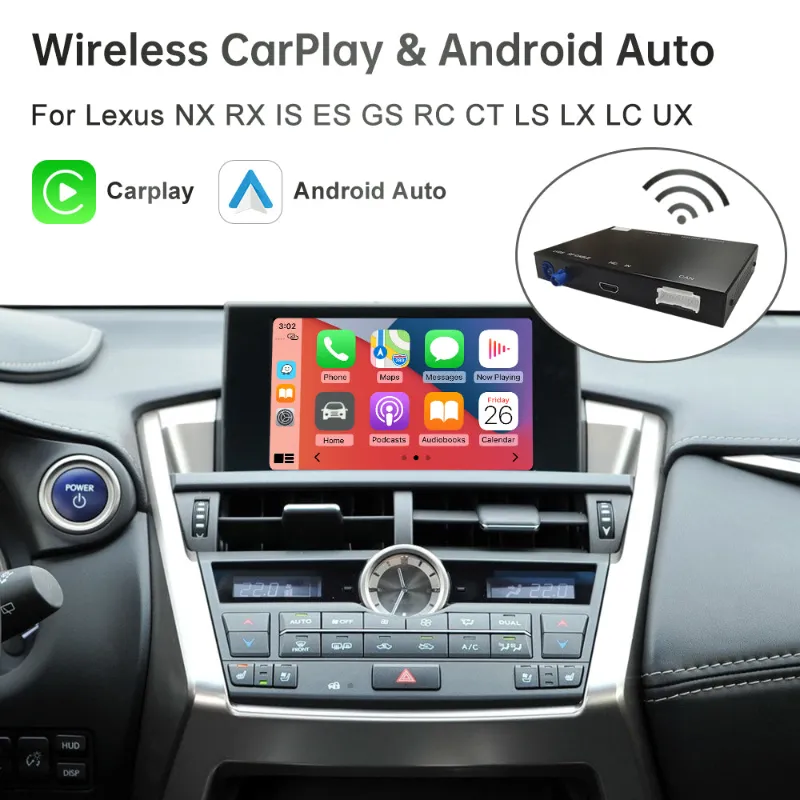
lexus apple carplay upgrades are worth considering if your Lexus has a good factory screen but lacks the phone features you actually use every day. For NX 300H, RX, ES, and similar Lexus models, the key is not just whether a Road Top kit adds CarPlay, but whether it keeps your factory controls, camera, audio path, and screen behavior working cleanly. We would start by checking the lexus apple carplay listing, then confirming model year, screen type, and install comfort before ordering.
What a Road Top Lexus Apple CarPlay Retrofit Actually Adds
A Road Top retrofit is usually designed to sit behind the factory infotainment system rather than replace the whole dashboard. That is the main appeal for Lexus owners: you can add Apple CarPlay and often Android Auto while keeping the OEM look.
In practical use, that means you are shopping for:
- Navigation from Apple Maps, Google Maps, or Waze on the factory display
- Music and podcast control through the Lexus audio system
- Siri voice control for calls, messages, and directions
- Wired or wireless connection depending on the kit and phone setup
- Continued use of original Lexus menus, camera, and steering wheel controls when compatible
Before buying, read the product fitment notes carefully and compare them against your car’s exact trim and display. Lexus model names alone are not enough. Two NX 300H vehicles from nearby years can have different screen sizes, controllers, or factory interface behavior.
For background on factory support and setup basics, Lexus has an official Apple CarPlay FAQ that is useful for understanding how CarPlay should behave once connected. A retrofit is different from factory equipment, but the expected user experience is similar.
NX 300H Fitment Checks Before You Buy
The NX 300H is a common candidate for a lexus apple carplay upgrade because many owners like the vehicle but feel the infotainment has aged faster than the rest of the car. The biggest mistake is assuming every NX screen uses the same interface.
Check these details before you buy:
- Model year: Road Top fitment pages usually separate kits by year range.
- Screen size: Measure or verify the factory display, not just the trim name.
- Controller type: Joystick, touchpad, knob, and factory button layouts can affect compatibility.
- Camera setup: Confirm whether your reverse camera and parking guidelines are expected to remain functional.
- Audio input path: Some systems use AUX, USB, Bluetooth, or a factory media path differently.
- Factory navigation: Cars with and without OEM navigation may require different wiring or settings.
If anything is unclear, contact the seller with photos of your dashboard, software screen, and rear of the head unit if you already have it apart. It is much easier to verify fitment before ordering than to troubleshoot a half-installed module.
Road Top Options Compared for Lexus, Toyota, and Other Cars
Road Top sells more than one type of upgrade, and not every product is aimed at Lexus. The best choice depends on whether you want an integrated retrofit, a portable display, or a kit for a different brand in the household.
| Option | Best For | What To Check |
|---|---|---|
| rx-es road top | Lexus RX and ES shoppers looking for a model-specific retrofit | Year range, screen size, OEM controller, camera retention |
| Road Top 0&3 | Buyers comparing general Road Top accessory options | Exact vehicle compatibility and included harnesses |
| wireless carplay screen | Drivers who want CarPlay without opening the dash | Mounting, power cable routing, audio output |
| carplay toyota | Toyota owners wanting a similar upgrade path | Toyota model year, screen type, factory radio layout |
For an NX 300H, we would favor an integrated Lexus-specific listing when compatible, because it is more likely to preserve the original cabin look. A separate wireless carplay screen can make sense if you lease the car, do not want to remove trim, or want a simpler install, but it will not feel as factory as a retrofit module.
If you are also shopping across brands, Road Top has listings for systems like ford sync 2, porsche pcm, road top mercedes, road top bmw-i3, road top glacla, and road top bmw 3 hdscreen. Do not use those names as substitutes for a Lexus kit. They are useful comparisons, not fitment proof.
Wired vs Wireless CarPlay in a Lexus
Many shoppers search for lexus apple carplay wireless because they want the phone to connect automatically without plugging in. Wireless is convenient, but it also adds more variables: phone battery level, Bluetooth handshake, Wi-Fi connection, and interference can all affect startup.
Choose wireless if you:
- Take frequent short trips and want automatic connection
- Prefer keeping your phone in a pocket or bag
- Already use wireless charging or do not need constant charging
- Are comfortable troubleshooting pairing if it occasionally fails
Choose wired if you:
- Want the most stable connection possible
- Drive long distances and need phone charging anyway
- Share the car with multiple drivers and want predictable handoff
- Have had issues with wireless accessories in the past
A good retrofit should offer a practical way back to the original Lexus interface. That matters when you need vehicle settings, service menus, or factory audio controls. We also like kits that make it clear how to switch between OEM and CarPlay modes rather than relying on vague button combinations.
Installation: DIY-Friendly, But Not Plug-and-Pray
A Lexus Apple CarPlay retrofit is often described as plug-and-play, but that does not mean risk-free. You still may need to remove trim, access the factory head unit, route a microphone or USB cable, and set DIP switches or software options.
A realistic install checklist looks like this:
- Confirm the car is powered down and protect trim surfaces.
- Remove panels slowly with plastic trim tools.
- Photograph every factory connector before unplugging it.
- Connect the Road Top harness exactly as shown in the instructions.
- Test CarPlay, sound, steering wheel buttons, reverse camera, and OEM menus before reassembling.
- Secure the module so it does not rattle behind the dash.
- Reinstall trim only after a full function check.
If you searched how to install apple carplay in lexus rx 350, much of the process can look similar, but do not assume an RX guide applies directly to an NX 300H. Dash disassembly, connector access, and screen hardware can differ. Use the instructions for your specific kit and car.
If you are not comfortable removing interior panels, paying an experienced installer can be the better value. A careful install protects clips, avoids connector strain, and reduces the chance of chasing small problems later.
Troubleshooting: Not Showing Up, No Sound, or Connection Drops
Most complaints around lexus apple carplay not working come down to fitment, phone settings, audio routing, or installation details. Start with simple checks before assuming the module is defective.
If CarPlay is not showing up:
- Make sure Siri is enabled on the iPhone.
- Try a known-good cable if using wired mode.
- Delete old CarPlay pairings and pair again.
- Confirm the kit is set to the correct display and vehicle mode.
- Check that the USB or wireless antenna connection is fully seated.
If there is no sound:
- Confirm the Lexus audio source is set as required by the kit.
- Raise volume while audio is actively playing.
- Check AUX or media settings if the kit depends on them.
- Recheck harness connections before closing the dash.
If wireless drops:
- Restart the iPhone and forget the car connection.
- Remove duplicate Bluetooth pairings.
- Avoid pairing several phones at the same time during setup.
- Test in wired mode to separate phone issues from module issues.
The phrase lexus apple carplay not showing up often points to a setup issue rather than a failed unit. Still, if the kit never displays after wiring is verified, document the install with photos and contact support promptly.
Where We Would Buy and How to Use the Code
Because fitment is the whole game, buy from the product page that matches your Lexus and keep screenshots of the compatibility notes. For current pricing and the active Road Top offer, check the latest price before you order rather than relying on an old post or forum thread.
Our practical buying advice:
- Pick the Lexus-specific kit first, then compare alternatives.
- Do not buy based only on a product photo.
- Match year, screen, controller, and head unit details.
- Read the install notes before assuming DIY is easy.
- Keep packaging until every feature is tested.
Road Top’s current coupon page lists $15 OFF Sitewide, and you can grab the code when you are ready to checkout. We would use the discount only after fitment is confirmed, not as a reason to rush the wrong kit into your cart.
For NX 300H owners, the sweet spot is an integrated retrofit that keeps the cabin looking original while adding the phone interface modern drivers expect. If your car, screen, and comfort level match the kit, Road Top can be a sensible way to extend the life of an otherwise excellent Lexus infotainment setup.
Frequently asked questions
Will a Road Top kit work with my NX 300H factory screen?
It depends on the model year, screen size, controller style, and factory head unit. Match those details against the Road Top listing and ask support with photos if the fitment notes are not clear.
Is lexus apple carplay wireless with Road Top?
Some Road Top kits support wireless CarPlay, but you should confirm it on the exact product page before buying. Wireless is convenient, while wired mode is often the safer choice if you want the most stable connection.
Can I install a Lexus retrofit myself?
Many owners can install one if they are comfortable removing trim and checking wiring carefully. If you dislike dashboard disassembly or need guaranteed clean cable routing, a professional installer is a better choice.
Why is Apple CarPlay not showing up after installation?
Common causes include an incorrect vehicle setting, loose harness connection, disabled Siri, a bad cable, or old phone pairings. Test before reassembling the dash so you can reach every connector easily.
Should I buy a wireless carplay screen instead of an integrated Lexus kit?
A wireless carplay screen is easier to add and can be good for leased cars or no-disassembly installs. An integrated Lexus kit usually looks cleaner and is more likely to feel like part of the original infotainment system.