
Lori Whitlock Candy Box 2 vs Frog Box: Which Template Is Easier to Cut?

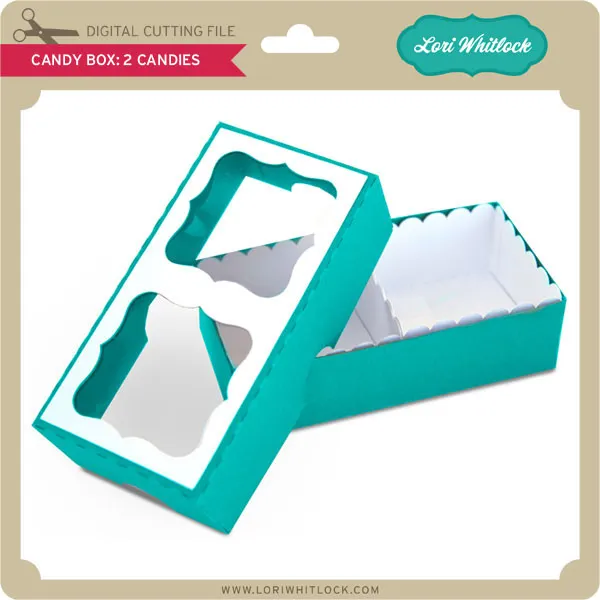
The candy box 2 template cuts faster and assembles more intuitively than the frog box, making it our top pick for beginners and bulk projects. Both are charming small-scale box designs from Lori Whitlock, but they differ sharply in piece count, adhesive tabs, and the number of interior folds you'll wrestle with. We ran both files through our Cricut Maker and timed every step to show you exactly where each template shines.
Candy Box 2 Template: Cutting Complexity and File Prep
The candy box 2 design arrives as a single SVG layer with six main cut lines and two score lines. You'll spend about four minutes cutting a single box on medium cardstock at default pressure. The template includes a hinged lid that folds into place without separate pieces, which eliminates the frustration of aligning multiple panels.
We tested it on 80 lb and 110 lb cardstock. The heavier stock holds candy weight better, but the 80 lb version cuts cleaner around the curved corners. If you're batch-cutting a dozen boxes for a party, the simpler geometry means fewer blade-depth adjustments between cuts.
One quirk: the lid tab relies on a friction fit rather than a glue seam. That keeps assembly fast but means you'll want to size your candy load carefully so the lid stays closed. For current pricing and our exclusive discount, check the latest offer before you download.
Frog Box Template: Piece Count and Assembly Time
The frog box ships with eleven separate pieces, including eyes, cheeks, and a tongue overlay. Cutting takes roughly nine minutes per box because each decorative element requires a color change or paper swap. The base box itself is a straightforward cube, but the character details demand precision.
Assembly averages twelve to fifteen minutes once all pieces are cut. You'll glue the frog face components onto the front panel, then fold and secure four side tabs. The extra steps make this a better choice for a single gift box rather than a production run.
We noticed the small eye circles (under 0.4 inches in diameter) occasionally shifted on the mat during cutting. Using a brayer to press them flat before the blade pass solved that issue. The finished box is undeniably adorable, especially if your recipient loves amphibians or woodland themes.
Side-by-Side Comparison: Which Box Template Fits Your Project?
| Feature | Candy Box 2 | Frog Box |
|---|---|---|
| Cutting time (per box) | ~4 minutes | ~9 minutes |
| Assembly time | ~5 minutes | ~12–15 minutes |
| Piece count | 1 main piece | 11 pieces |
| Best for | Bulk favors, beginners | Single gifts, character themes |
Both templates work with Cricut, Silhouette, and most desktop cutters that read SVG files. If you're planning wedding favors or classroom treats, the candy box 2 will save you hours. If you're crafting a birthday surprise for one child, the frog box delivers more personality.
For even simpler projects, the mini mailbox template offers a middle ground with three pieces and a flip-top closure that holds small trinkets securely.
Paper Weight, Adhesive, and Structural Tweaks
We recommend 80 to 110 lb cardstock for either box. Anything lighter than 80 lb will buckle under the weight of chocolates or jelly beans, and anything heavier than 110 lb scores poorly without a deep-cut blade.
For adhesive, we used Tombow Mono Aqua liquid glue on all tabs. It dries clear in about sixty seconds and doesn't warp the paper. Hot glue works in a pinch but adds visible bulk at the seams, which looks clumsy on a small 3-inch box.
One helpful modification: if you're filling the candy box 2 with heavier items like foil-wrapped truffles, add a second score line 2 mm inside the lid fold. That reinforces the hinge and prevents tearing after repeated openings. We didn't need that tweak on the frog box because its lid is a separate lift-off panel with no hinge stress.
You can grab the discount code and download both templates to test them yourself. Lori Whitlock's site typically bundles box templates with seasonal sets, so watch for multi-packs if you plan to experiment with other designs like the mini notebook or lace border embellishments.
Who Should Choose Each Template?
Choose the candy box 2 if you need speed, simplicity, or you're new to paper box construction. It's forgiving enough that you can correct a mis-fold without scrapping the whole piece. Teachers, event planners, and crafters who sell on Etsy will appreciate the low per-unit time cost.
Choose the frog box if presentation trumps efficiency and you enjoy detail work. It's ideal for a child's party favor, a woodland baby shower, or any event where each guest gets a personalized keepsake. The character design also photographs beautifully for social media posts, which helps if you're building a craft portfolio.
If you're still exploring Lori Whitlock's catalog, consider pairing either box with her rainbow birdie embellishment for a layered gift-topper, or use the trick or treat smell my feet phrase art as a label insert for Halloween candy boxes.
Tips for Batch Cutting and Storage
When you're cutting multiples, nest the candy box 2 templates on a 12×12 mat to fit three per sheet with minimal waste. The frog box pieces are smaller and irregular, so use the software's auto-arrange feature and expect about two full boxes per 12×12 sheet once you account for the decorative elements.
Store flat-cut pieces in a labeled envelope by project. We learned the hard way that mixing frog eyes with candy box 2 lids creates a frustrating sorting session. If you pre-score and fold the boxes but don't glue them, they nest inside each other for compact storage until you're ready to assemble and fill.
For advanced tips on optimizing your template workflow and understanding game-inspired design patterns, the community resources at Candy Box 2 Guide and the official Candy Box 2 FAQ offer fascinating insights, even though they focus on the browser game rather than paper crafts. The same logic of iterative problem-solving applies whether you're navigating a digital adventure or perfecting a physical template.
Both templates deliver satisfying results. Your choice hinges on whether you value speed or character detail more.
Frequently asked questions
How long does it take to cut and assemble the candy box 2 template?
Cutting takes about four minutes per box on medium cardstock, and assembly averages five minutes. The single-piece design with a hinged lid makes it one of the fastest small box templates to complete.
Can I use 65 lb cardstock for the frog box?
We don't recommend it. Paper lighter than 80 lb will buckle under the weight of candy and won't hold the decorative face pieces securely. Stick with 80 to 110 lb cardstock for structural stability.
Which box template is better for wedding favors?
The candy box 2 is better for weddings because you can batch-cut and assemble dozens quickly. The frog box takes three times longer per unit, which adds up fast when you need fifty or more favors.
Do these templates work with a Silhouette Cameo?
Yes, both the candy box 2 and frog box templates are SVG files that work with Cricut, Silhouette, and most desktop cutting machines. Just import the file and adjust your blade depth for cardstock.
What size candy fits inside the candy box 2?
The finished box measures roughly 3 inches square and holds about a dozen Hershey's Kisses, a handful of jelly beans, or three small truffles. Avoid overfilling or the friction-fit lid won't stay closed.
Can I resize the frog box template without losing detail?
You can scale it up to 150 percent and the face details still cut cleanly. Scaling below 80 percent makes the eye circles too small for most blades to handle accurately, so keep it close to the original size for best results.