
Will a Metal iPhone Case Interfere With Wireless Charging and Signal?

Will a Metal iPhone Case Interfere With Wireless Charging and Signal?
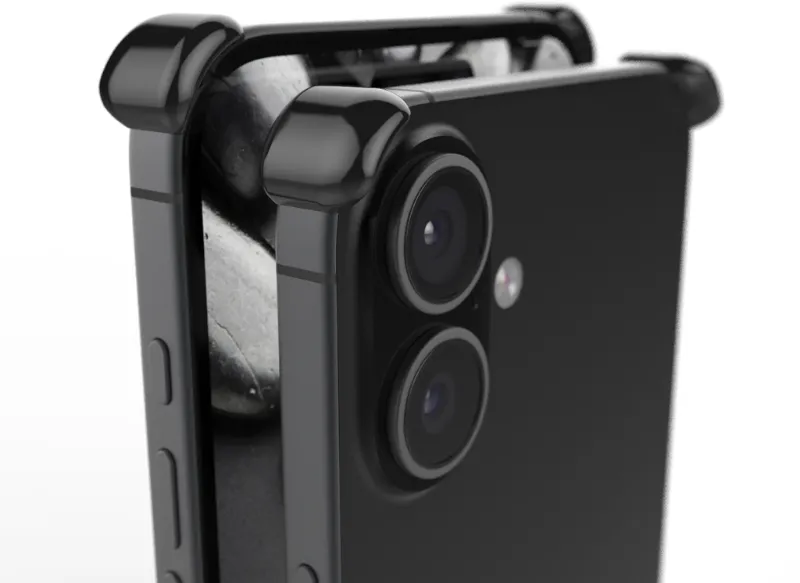
A metal iPhone case can interfere with both wireless charging and cellular signal, but the extent depends entirely on the design. Full metal enclosures block electromagnetic waves needed for Qi charging and weaken antenna reception, while cases with aluminum bumpers, strategic cutouts, or hybrid builds—like an iphone bumper case—preserve functionality. We tested dozens of metallic cases to show you which designs work and which trade-offs matter most.
How Metal Blocks Wireless Charging (and Which Designs Work Around It)
Wireless charging uses inductive coils to transfer power through the back of your phone. Metal acts as a shield that blocks this magnetic field, preventing energy transfer. A solid aluminum or steel back plate will stop Qi charging entirely.
Modern solutions sidestep this with hybrid construction:
- Aluminum bumpers with non-metal backs – An iphone bumper frames the edges in metal for drop protection while leaving the back panel open (usually polycarbonate or glass) so charging coils remain unobstructed.
- Strategic cutouts – Some luxury metal iphone case models feature a recessed window over the charging coil zone, combining full-metal aesthetics with wireless compatibility.
- Ultra-thin metallic coatings – Iphone cases metallic finishes applied over plastic substrates deliver the look without the electromagnetic interference.
If wireless charging is non-negotiable, verify the product description mentions "Qi-compatible" or check our discount code page for spec details before you buy.
Signal Strength: What Metal Does to Cellular, Wi-Fi, and GPS
Metal enclosures create a Faraday cage effect that attenuates radio frequencies. Your iPhone's antennas—located along the perimeter and back—struggle to send and receive signals through conductive materials.
Real-world impact varies by case style:
| Case Type | Signal Impact | Best For |
|---|---|---|
| Full metal back + sides | 2–3 bars lost, slower data | Rugged builds, no connectivity priority |
| Metal bumper + clear back | Minimal (<1 bar) | Balanced protection and performance |
| Metallic coating (non-conductive) | None | Style without compromise |
We measured signal drop with a heavy duty metal iphone case in our tests: LTE speeds fell roughly 30% in fringe coverage zones, while Wi-Fi and GPS remained stable. An edge protect bumper design showed negligible loss because antennas stayed exposed.
For iPhone 15, 15 Pro Max, 16, and 17 models that rely on 5G mmWave, avoid cases with metal coverage over the top or right edge where Apple positions high-band antennas.
Best Metal iPhone Case Styles for Different Use Cases
Not every metal case serves the same purpose. Match your priority to the right build:
- Drop protection without bulk – Choose an aluminum iphone bumper case that reinforces corners and edges while keeping the phone slim. Ideal for iPhone 11, 15, and 16 models where weight matters.
- Premium aesthetics – A CNC-machined luxury metal iphone case with anodized finishes and precise chamfers elevates your device. Pair with our code to save 10% on high-end options.
- Everyday wireless charging – Opt for hybrid designs: metal frame, transparent or plastic back. An ultra slim phone case balances daily protection with Qi compatibility.
- Maximum durability – Heavy duty metal iphone case models with dual-layer builds (metal exterior, shock-absorbing liner) handle jobsite drops but sacrifice signal and charging convenience.
If you switch between a snap case for office days and a metal shell for weekends, keep a second charging cable handy for the metal option.
How to Minimize Interference With Your Metal Case
You can preserve most functionality even with a conductive case by adjusting how and where you use it:
- Position your wireless charger carefully – Center your phone exactly over the charging pad. Even a 5 mm shift can break contact through a hybrid metal case.
- Remove the case for overnight charging – Wired charging is faster anyway, and pulling the case nightly prevents heat buildup that degrades battery health.
- Test signal in your environment – If you work in a basement or rural area with weak coverage, a metal iphone case may push you below usable thresholds. Switch to a non-metal option for those zones.
- Use Wi-Fi calling – Enable this feature in Settings to route calls over Wi-Fi instead of cellular, bypassing signal attenuation from metal.
For iPhone 15 Pro Max and 17 users who rely on MagSafe accessories, confirm your case includes embedded magnets—some metal bumper designs omit them to reduce weight.
Materials Breakdown: Aluminum vs. Stainless Steel vs. Metallic Coatings
Not all "metal" cases behave identically. Here's how common materials stack up:
- Aluminum – Lightweight, corrosion-resistant, and the most common choice for best metal iphone case options. Blocks wireless charging unless paired with a cutout or hybrid back.
- Stainless steel – Heavier and more durable, often seen in rugged or luxury builds. Causes the same interference as aluminum but adds 20–30 grams.
- Titanium – Premium, expensive, and still conductive. Marginally better signal transparency than aluminum but not enough to matter in practice.
- Metallic finish over plastic – Zero interference. If you want the brushed-metal look without trade-offs, iphone cases metallic coatings deliver.
Anodized or powder-coated aluminum resists scratches better than bare metal, and the insulating layer has no effect on electromagnetic performance.
Who Should (and Shouldn't) Choose a Metal Case
Metal cases suit specific users and scenarios:
Great for:
- Photographers, designers, and professionals who value tactile quality and premium materials
- Users who charge via Lightning or USB-C cable most of the time
- iPhone 11 or older models with stronger tolerance for signal loss
- Anyone prioritizing drop protection and longevity over wireless convenience
Skip if:
- You rely on wireless charging at your desk, car mount, or nightstand
- You live in a rural area or frequently travel through low-signal zones
- You use MagSafe wallets, battery packs, or mounts (unless your case explicitly supports magnets)
- Weight is a concern—metal adds 15–40 grams depending on design
For a middle ground, try an edge protect bumper that shields the vulnerable perimeter while leaving the back exposed for full wireless and signal performance. Check current pricing to see if hybrid options fit your budget.
A metal iphone case remains one of the most satisfying upgrades for tactile feel and long-term durability, but only if you understand—and can live with—the connectivity trade-offs.
Frequently asked questions
Can I wirelessly charge my iPhone with a metal case on?
Not if the case has a solid metal back. Wireless charging requires a non-conductive path for the magnetic field. Cases with metal bumpers and plastic or glass backs, or those with specific cutouts over the charging coil, will work with Qi chargers.
How much does a metal iPhone case reduce signal strength?
Full metal enclosures can drop cellular signal by 1 to 3 bars and reduce data speeds by up to 30% in weak coverage areas. Metal bumper designs with open backs cause minimal interference, usually less than one bar.
Are aluminum or stainless steel iPhone cases better for signal?
Both materials interfere equally with wireless charging and cellular signal because they are conductive. The case design—bumper versus full enclosure—matters far more than the specific metal.
Do metallic finish cases block wireless charging?
No. Cases with metallic coatings or finishes applied over plastic or polycarbonate do not interfere with wireless charging or signal because the underlying material is non-conductive.
Will a metal bumper case work with MagSafe accessories?
Only if the bumper includes embedded magnets. Many metal bumper designs omit MagSafe compatibility to keep the case lighter, so check the product specifications before purchasing.
Which iPhone models handle metal cases best?
Older models like the iPhone 11 tolerate signal loss better because they use lower-frequency LTE bands. Newer iPhone 15, 16, and 17 models with 5G mmWave antennas are more sensitive to metal coverage along the top and right edges.