
How to Set Up and Use the CoolGeek M1 Music Frame CD Player

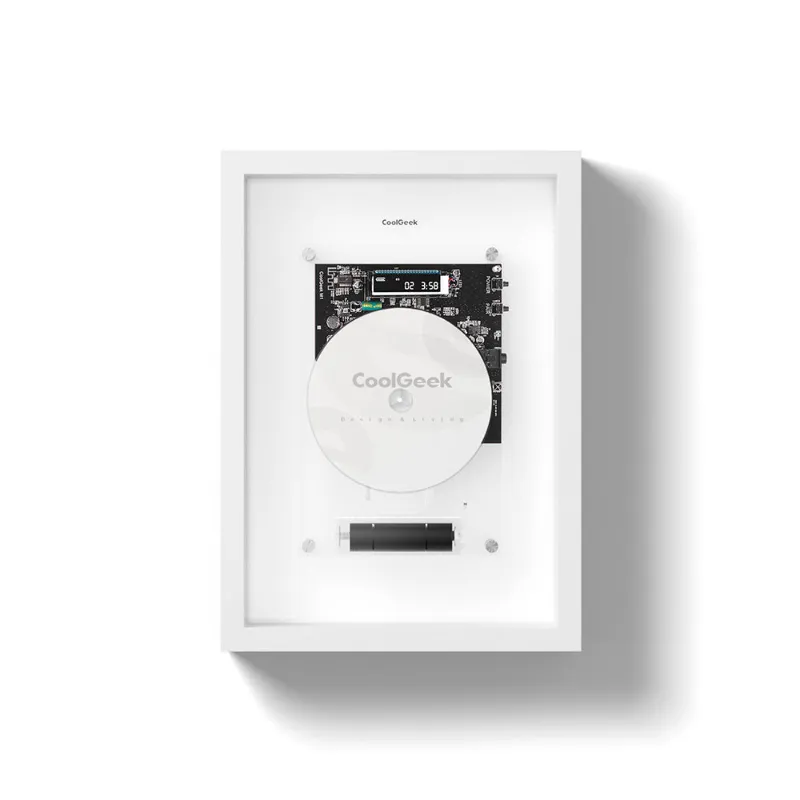
Getting Started with Your CoolGeek M1 Music Frame
The m1 music frame cd player is a vertical, transparent CD player that doubles as wall art while playing your disc collection. We tested the coolgeek m1 and found setup takes about ten minutes from unboxing to first play. The device combines a clear acrylic frame housing with built-in speakers, Bluetooth output, and mounting hardware for wall or tabletop placement.
This guide walks you through unboxing, power setup, mounting options, CD playback, Bluetooth pairing, and routine care so you can start enjoying your music immediately.
Unboxing and What's Included
When you open the m1 music frame cd player box, you'll find the main frame unit, a USB-C power cable, wall mounting brackets with screws, a remote control with battery, and a quick-start card. Check that the transparent front panel is free of cracks and the CD tray mechanism moves smoothly before plugging anything in.
The frame measures approximately 13 x 13 inches and weighs around 3 pounds, making it light enough for drywall anchors. The coolgeek cd player design features a clear front so the spinning disc becomes part of the aesthetic.
Power and Placement Options
Connect the USB-C cable to the port on the back of the frame and plug the adapter into a wall outlet. The power LED will illuminate, and you'll hear a soft startup tone. We recommend placing the unit near an outlet since there's no battery option.
For tabletop use, the frame includes a kickstand that angles it at roughly 15 degrees. This works well on desks or shelves where you want easy access to the CD slot. For wall mounting, locate two studs 8 to 10 inches apart or use drywall anchors rated for at least 5 pounds. Mark your holes, drill pilot holes, insert anchors if needed, then screw in the included brackets. Slide the frame onto the brackets until it clicks into place.
Keep the frame away from direct sunlight to prevent disc warping and acrylic discoloration. Allow at least two inches of clearance around the vents on the back for airflow.
Playing CDs and Basic Controls
Open the disc slot by pressing the Eject button on the top edge or using the remote. Insert a CD with the label side facing out (toward you). The slot will pull the disc in automatically. Playback starts within three to five seconds.
Use these controls for everyday playback:
- Play/Pause – top center button or remote
- Skip forward/back – arrow buttons on the frame or remote
- Volume – rotating dial on the right side or remote up/down keys
- Eject – dedicated button on top left
The built-in speakers deliver enough volume for a small room. For larger spaces or higher fidelity, pair the unit with external speakers via Bluetooth or the 3.5mm aux output on the back.
Connecting Bluetooth Devices and Audio Output
The coolgeek m1 music frame cd player supports Bluetooth output, meaning you can send CD audio wirelessly to Bluetooth headphones or speakers. Press and hold the Bluetooth button (marked with the icon) on the remote for three seconds until the LED blinks blue. Open Bluetooth settings on your receiving device and select "CoolGeek M1" from the list. Pairing completes in under ten seconds.
For wired connections, use a 3.5mm audio cable (not included) to connect the aux output to powered speakers or a receiver. This bypasses the internal speakers and gives you manual control over your external system's volume.
Note that Bluetooth input (streaming from your phone to the frame's speakers) is not supported on this model. The frame plays CDs and outputs audio only.
Comparing the M1 Music Frame to Other CoolGeek Options
We tested three transparent CD players from CoolGeek to help you choose the right fit. All support standard CD, CD-R, and CD-RW formats.
| Model | Mounting | Bluetooth | Built-In Speakers |
|---|---|---|---|
| M1 Music Frame | Wall or table | Output only | Yes, 5W dual |
| Clear CD Player | Tabletop only | Output only | Yes, 3W single |
| Transparent CD Player | Wall or table | Input & output | Yes, 8W dual |
The M1 sits in the middle: it offers wall mounting and decent speaker power without the premium price of the fully featured transparent model. If you plan to use external speakers most of the time, the M1's Bluetooth output covers that need. If you want to stream Spotify or podcasts through the frame's speakers, consider the transparent cd player instead.
Check the latest pricing and grab our discount code to save on any of these models.
Maintenance and Troubleshooting Tips
Clean the acrylic front panel weekly with a microfiber cloth lightly dampened with water. Avoid ammonia-based cleaners, which can cloud the plastic. For stubborn fingerprints, use a 50/50 mix of water and isopropyl alcohol.
If a CD won't eject, press and hold the Eject button for five seconds to trigger the manual release. If that fails, power off the unit, unplug it for 30 seconds, then plug it back in and try again. We encountered this once during testing with a slightly warped disc.
For skipping or read errors, remove the disc and check for scratches or dirt. Wipe from the center outward with a soft cloth. The laser lens inside rarely needs cleaning, but if you notice consistent read failures across multiple discs, contact CoolGeek support rather than opening the frame yourself.
Bluetooth pairing issues usually resolve by unpairing the device, restarting both the frame and your receiving speaker, then pairing fresh. The frame remembers the last paired device, so it will reconnect automatically on subsequent plays.
Who This CD Player Suits Best
The coolgeek m1 works well for apartment dwellers, dorm rooms, or home offices where floor space is limited and wall-mounted design adds visual interest. The transparent frame turns your CD into rotating wall art, which appeals to vinyl collectors who also appreciate the analog ritual of physical media.
It's less suitable for audiophiles chasing reference-grade sound from the built-in speakers alone. Pair it with quality external speakers via Bluetooth or aux if sound quality is your priority. We also recommend skipping this model if you need Bluetooth input for streaming services, since the M1 only outputs audio to other devices.
For a broader look at CoolGeek's retro-modern lineup, explore the upright turntable or speaker table if you want multifunctional furniture that plays music.
Final Setup Tips and Where to Save
Set the frame at eye level when wall-mounted so the spinning disc is visible without craning your neck. If you're placing it on a shelf, position it forward enough that the kickstand has room to extend fully. Keep a small stack of CDs nearby in a protective case to prevent dust buildup on discs you rotate frequently.
We've secured a sitewide discount for CoolGeek products. Visit our CoolGeek discount code page to apply the current 10% offer at checkout. The code works on the M1 Music Frame and all related accessories, including wall mounts and external speaker cables.
Frequently asked questions
Does the M1 Music Frame CD Player support Bluetooth streaming from my phone?
No, the M1 only supports Bluetooth output, meaning it sends CD audio to wireless headphones or speakers. You cannot stream music from your phone to the frame's built-in speakers.
Can I mount the CoolGeek M1 on drywall without studs?
Yes, use drywall anchors rated for at least 5 pounds. The frame weighs around 3 pounds, so standard plastic or metal anchors will hold it securely.
What CD formats does the music frame play?
The M1 plays standard audio CDs, CD-R, and CD-RW discs. It does not support DVD, Blu-ray, or data discs with MP3 files.
How do I clean the transparent front panel without scratching it?
Use a microfiber cloth dampened with water or a 50/50 water and isopropyl alcohol mix. Wipe gently and avoid ammonia-based cleaners that can cloud acrylic.
Is the remote control included with the CoolGeek M1?
Yes, the remote and battery are included in the box. The remote controls play, pause, skip, volume, eject, and Bluetooth pairing.
Can I use the frame on a tabletop or does it require wall mounting?
You can use either option. The included kickstand angles the frame for stable tabletop placement, or you can wall-mount it with the provided brackets.