
How to Set Up the Slacker System on Your Mountain Bike

What Is the Slacker System and Why Use It
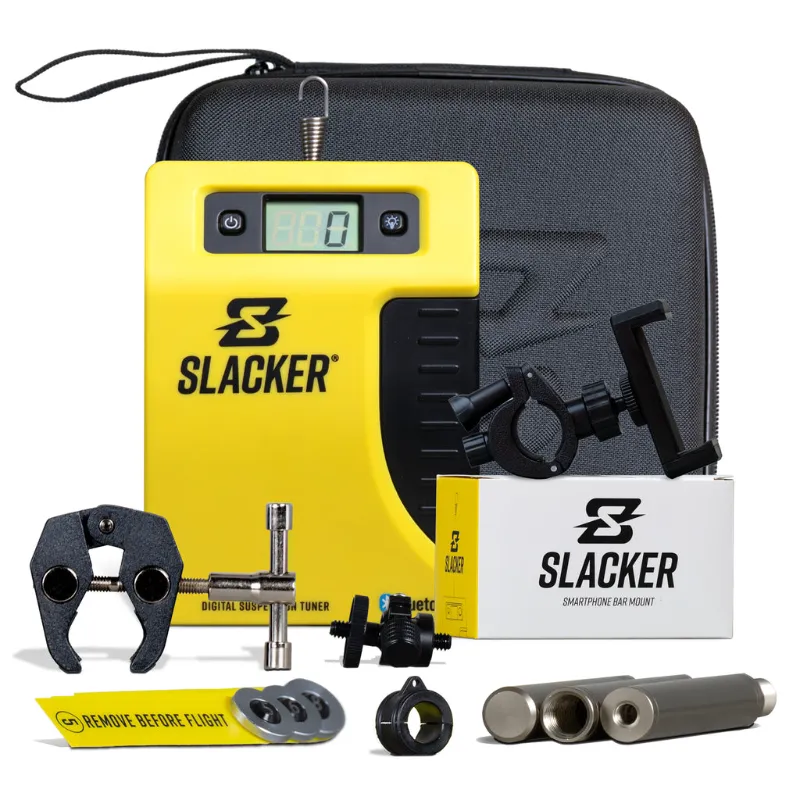
The slacker system is a digital sag measurement tool that eliminates the zip-tie-and-ruler method by giving you precise suspension readings in millimeters through a wireless remote and smartphone app. We use it on every test bike because it cuts setup time by half and catches small errors that manual measurement misses. Slacker inc designed the slacker system originally for motocross but adapted it perfectly for mountain bike forks and rear shocks, where 2-3mm of sag difference changes how your bike corners and absorbs chatter.
The system consists of a digital scale unit that mounts to your shock or fork, a wireless remote, and a companion app that logs every measurement. You'll get consistent readings across multiple bikes, share data with your mechanic, and track how suspension settles over a season.
What You Need Before You Start
Gather these items before mounting the slacker sag tool to avoid interruptions:
- The slacker digital scale kit with mounting hardware
- A fully inflated fork or shock at manufacturer recommended pressure
- Slacker smartphone bar mount or phone holder for easy app access
- 3mm and 4mm hex keys
- Clean shop rag
- Your riding gear (full weight setup matters)
Check your shock or fork has enough clean mounting surface. Most modern mountain bike rear shocks work with the standard hardware, but older or proprietary designs may need adapter spacers. The mtb suspension tuner package includes common adapters for RockShox, Fox, and Öhlins units.
Step-by-Step Installation on Your Fork or Shock
Mounting the Scale Unit
Clean the shock shaft or fork stanchion where the scale will sit. Any dirt or oil creates false readings. Thread the included zip-tie or bracket mount through the scale body and loosely position it on the shock shaft about mid-stroke. The digital display should face outward where you can see it while sitting on the bike.
For rear shocks, mount the sag tool on the shock shaft between the air can and rear triangle. For forks, attach it to one stanchion just above the lower casting. Tighten the mount snug but not crushing—overtightening warps the sensor.
Pairing the Remote and App
Power on the scale unit by pressing the side button for two seconds. Download the Slacker app from your app store and enable Bluetooth. Open the app, tap "Add Device," and hold the remote near your phone. The dirt bike sag tool uses the same pairing process, so if you've used the motocross version the interface feels identical.
Once paired, the app displays live stroke readings in millimeters. Grab the current discount code before you buy—we've seen 40% off site-wide, which makes the investment much easier.
Taking Accurate Sag Measurements
Zero the Scale
With no weight on the bike, extend the suspension fully by lifting the rear wheel or front end. Press the zero button on the wireless remote. The display should read 0.0mm. This baseline matters—if you skip zeroing, every measurement runs high or low by the same error.
Measure Rider Sag
Put on your helmet, pack, and gear exactly as you ride. Stand next to the bike, place both hands on the bars, and carefully mount without bouncing. Settle into your normal riding position with weight centered, pedals level, and arms slightly bent. Have a friend hit the remote button or use the slacker smartphone bar mount to trigger measurement yourself.
The app records the reading. Dismount carefully without compressing the suspension further. Check the app—most trail bikes run 25-30% sag, which translates to 30-38mm on a 130mm-travel fork or 15-19mm on a 60mm-stroke shock. Motool Releases Auto Zero Slacker and Software Upgrade details explain how the auto-zero feature speeds up repeat measurements.
Measure Free Sag
With no rider weight, the bike should settle slightly under its own mass. Lift and let the bike compress naturally, then take a reading. Free sag typically sits around 5-10mm. If free sag exceeds rider sag, your spring rate is too soft or your shock needs service.
Adjusting Air Pressure Based on Readings
If your rider sag reads too low, release 5-10 PSI and re-measure. If too high, add air in 5 PSI increments. The slacker suspension tool stores your last twenty readings, so you can compare adjustments side by side without writing anything down. We find this especially useful when testing different pressures for climbing versus descending.
For coil shocks, sag adjustment requires swapping springs rather than adjusting air pressure. The digital readout still helps you confirm the new spring rate hits your target before you ride.
Common Setup Mistakes to Avoid
Measuring without gear. A 4kg pack and 1kg of water shifts sag by 5-8mm. Always measure as you ride.
Bouncing onto the bike. Dynamic loading compresses the suspension past true sag. Mount smoothly and settle for two seconds before measuring.
Skipping free sag. If the bike doesn't settle under its own weight, friction in the seals or bushings is stealing travel. The sag scale dirt bike version includes friction diagnostics that flag binding.
Taking one measurement. We take three rider sag readings and average them. Variations over 2mm suggest technique inconsistency or a sticky shock.
Check the latest pricing and our exclusive code to see current bundle deals that include the remote, scale, and app unlock.
Maintaining Accurate Readings Over Time
Recalibrate your sag tool every five rides or after any crash. Dirt intrusion or temperature swings can shift the zero point by 1-2mm. Store the scale indoors and remove it before transporting your bike in a truck bed or bike rack—road vibration and UV exposure degrade the sensor.
Battery life runs about 40 hours of active measurement. The remote uses a common CR2032 coin cell. Swap it when the app warns of low battery rather than mid-session.
Clean the mounting surface and scale contact points with isopropyl alcohol monthly. Chain lube, suspension oil, and frame protectant create a film that causes drift. The digital display is water-resistant but not waterproof—remove it before pressure washing.
Who Benefits Most from Digital Sag Measurement
Racers who chase tenth-of-a-second gains need repeatability the zip-tie method can't deliver. Heavier or lighter riders outside the "average" 75kg range struggle with factory sag recommendations, and precise measurement helps dial custom pressure curves. If you ride multiple bikes or swap between trail and enduro setups, the app's stored profiles eliminate guesswork.
Home mechanics appreciate the objectivity—instead of arguing whether sag "looks right," you have millimeter data to guide adjustments. Suspension services cost $150-300, and confirming sag before you ship a shock to the tuner often reveals the problem was just air pressure.
Tips for Using the App Features
The Slacker app logs date, temperature, and bike profile for every measurement. Tag entries with trail names or setup notes so you remember what worked six months later. Export CSV files to share with your suspension tuner or coach.
Graph view overlays multiple measurements to show trends. We've caught slow air leaks by noticing sag creeping up 2mm per week even though the shock pump showed stable pressure. The app also calculates recommended PSI based on your weight and riding style, though we treat that as a starting point rather than gospel.
Use the remote's quick-measure button for trailside adjustments. If you add or remove a token, you can verify the change in real time without pulling out a notebook. The Tool - Motool Slacker Wireless Remote offers extended range for garage setups where your phone stays on the workbench.
Some riders mount the scale permanently and leave it on for entire rides to log suspension usage through rough sections. This advanced technique maps how much travel you actually use versus how much you think you use, which informs volume spacer and compression tuning decisions.
Final Setup Checklist
Before your first ride with dialed sag, confirm these steps:
- Zero reading with bike unweighted
- Three consistent rider sag measurements within 2mm
- Free sag between 5-10mm
- Mounting hardware snug but not over-torqued
- App profile saved with bike name and date
- Remote battery above 50%
Suspension setup transforms bike handling more than any other adjustment. The precision a digital sag tool provides removes one variable so you can focus on rebound, compression, and ride height with confidence your sag baseline is accurate. Visit our coupon page to save on the complete system and start measuring like the pros.
Frequently asked questions
How accurate is the slacker system compared to zip-tie measurement?
The digital scale measures to 0.1mm resolution, while zip-ties typically have 2-3mm of reading error from parallax, tie compression, and ruler alignment. Repeated measurements with the Slacker system show under 0.5mm variation.
Can I leave the sag tool mounted during rides?
The scale is designed for measurement sessions, not permanent installation. While it's durable enough for short test laps, leaving it on during aggressive riding risks impact damage and drains the battery.
Does the slacker sag tool work on inverted forks?
Yes, it mounts to the inner stanchion on inverted designs the same way it attaches to conventional forks. Just ensure the mounting surface is clean and the display faces outward for visibility.
What happens if I forget to zero the scale before measuring?
Your readings will be offset by whatever pre-load was on the suspension when you powered on. Always zero with the bike fully extended and unweighted to establish an accurate baseline.
Can I use the same tool for both my mountain bike and dirt bike?
Yes, the hardware and app work across both platforms. The dirt bike version includes longer mounting straps for larger shock bodies, but the measurement process and wireless remote function identically.
How often should I check my sag settings?
Measure every 5-10 rides or when you notice handling changes. Temperature, seal break-in, and slow air leaks gradually shift sag, and catching drift early prevents suspension performance loss.