
Troubleshooting Common Issues with the Slacker MTB Suspension Tuner

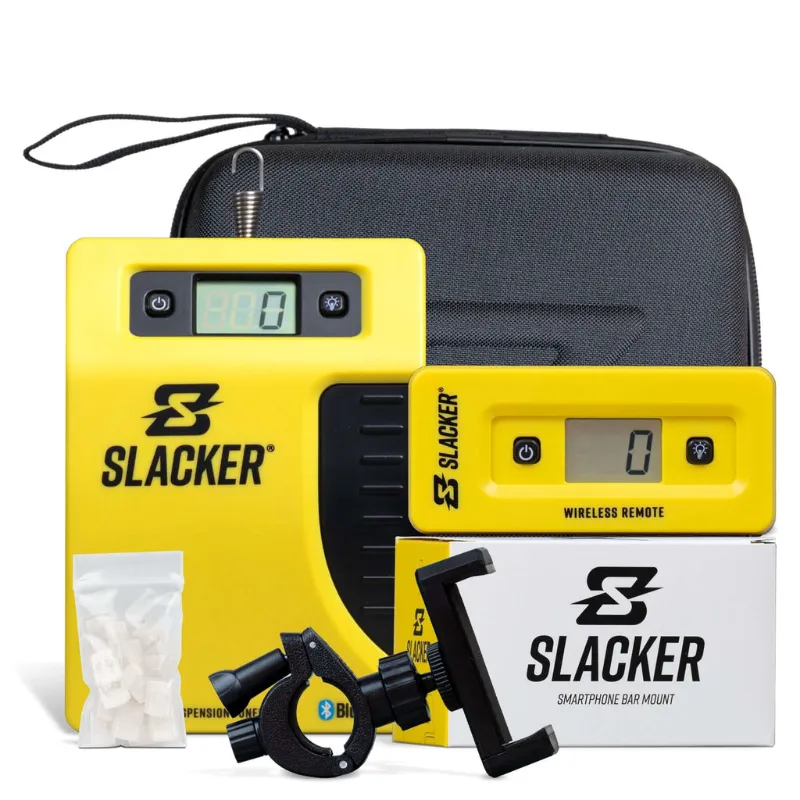
Quick Fixes for Your MTB Suspension Tuner
The mtb suspension tuner from slacker inc delivers precision telemetry data to dial in your fork and shock, but pairing glitches, sensor drift, and mounting errors can derail your tuning session. We've tested the slacker system across dozens of trail days and identified the most frequent problems riders face, plus the exact steps to fix them. Whether your app won't sync, readings look wildly off, or the device keeps powering down mid-ride, this guide walks you through every solution.
App Won't Connect to the Suspension Tuning Device
Bluetooth dropout is the top complaint we hear. Start by confirming your phone's operating system meets the minimum requirements listed on the manufacturer site, then force-quit the Slacker app and toggle Bluetooth off and back on. If the mtb suspension tuner still won't pair, hold the power button for ten seconds to perform a full reset, then re-initiate pairing from the app's device menu.
Common connectivity culprits:
- Multiple devices trying to connect simultaneously (unpair old phones from the tuner's memory)
- Low battery on either the tuner or your smartphone (charge both above 20 percent before pairing)
- Interference from other ANT+ or Bluetooth sensors on your cockpit (temporarily disable them)
- Outdated firmware (check for updates in the app settings before every ride)
We recommend installing the slacker smartphone bar mount so your phone stays within reliable Bluetooth range during data capture. A rear jersey pocket can exceed the effective two-meter range on technical descents. For current pricing and our exclusive discount code, visit our Slacker coupon page.
Sensor Reads Inaccurate Sag or Travel Data
If your suspension tuner reports sag numbers that contradict your slacker sag tool measurements, recalibrate the device. Remove it from the shock, place it on a flat, stable surface, then run the zero-offset procedure in the app. This resets the accelerometer baseline and corrects any drift introduced by temperature swings or heavy impacts.
Next, verify mounting orientation. The tuner's arrow or label should point toward the shock eyelet, not the frame mount. Reversed installation flips the compression and rebound data. If you're also tracking fork performance, ensure you've selected the correct suspension position (front or rear) in the app before recording.
Calibration checklist:
- Clean the shock stanchion and mounting surface (dirt skews baseline readings)
- Torque the device to manufacturer spec (undertightening allows sensor movement)
- Perform three consecutive sag measurements with your sag tool and compare to tuner output
- Record a static test ride on smooth pavement to confirm zero false triggers
Canyon's suspension setup guide covers the fundamentals of accurate sag measurement, which pairs perfectly with telemetry validation.
Device Powers Off During Rides
Battery drain mid-session usually points to firmware bugs or extreme cold. Update to the latest version through the app, which often includes power-management patches. In freezing conditions, tuck the tuner under your frame's top tube or wrap it in neoprene to keep the lithium cell above its minimum operating temperature.
Check the USB charging port for corrosion or debris. We've seen multiple units fail to hold a charge because mud packed into the charging contacts after wet rides. Clean the port with isopropyl alcohol and a soft brush, then let it dry completely before plugging in. If the battery still won't last a full ride, contact Slacker support for a warranty replacement.
Mounting Hardware Loosens or Breaks
The slacker suspension tool includes frame clamps and zip-tie backups, but rough trail chatter can still work fasteners loose. Apply a threadlocker to all bolts during installation, and inspect them every five rides. Overtightening is just as dangerous: cracked plastic housings kill more tuners than undertorqued clamps.
For riders who also track dirt bike suspension, the dirt bike sag tool and sag scale dirt bike offer more robust mounting options, though they're heavier than MTB-specific hardware. Stick with the included clamps unless you're racing enduro and need bombproof retention.
Data Looks Noisy or Contradicts Feel
Suspension telemetry reveals what your body can't always detect, but if the tuner shows bottom-out events on smooth flow trails, something's wrong. Cross-reference your data with video footage or a second sensor. MTBR's suspension telemetry thread discusses interpreting noisy datasets and filtering false positives.
Run a side-by-side comparison with ShockWiz if you have access to one. Both devices measure travel and velocity, so large discrepancies indicate a sensor fault. Note that ShockWiz mounts inline with the air valve, while the Slacker tuner clamps to the stanchion, so minor differences in peak-velocity readings are normal.
Troubleshooting noisy data:
- Tighten all pivot hardware on your frame (loose bearings create false vibration signals)
- Update the app's filter settings to smooth high-frequency noise
- Swap the tuner to your fork to isolate whether the shock or sensor is the problem
- Record a baseline session with your suspension fully locked out, then compare to active data
Vital MTB's FOX bracketing tutorial demonstrates how pro mechanics use telemetry to validate tuning changes, a workflow that depends on clean, reliable data.
Field Setup Tips to Prevent Issues
Prevention beats troubleshooting. Before every ride, confirm the tuner's battery indicator shows green, pair your phone while still at the trailhead, and run a 30-second test recording to verify data capture. Carry a microfiber cloth to wipe the sensor if it gets caked in mud, and pack a spare zip tie in case a mount fails.
Store the device in a padded case between rides. We've cracked two housings by tossing the tuner loose into a tool bag with tire levers and chain breakers. At home, charge it immediately after riding so it's ready for the next session. Most warranty claims we've reviewed stem from neglect, not manufacturing defects.
For step-by-step tuning workflows that pair perfectly with your suspension tuning device, check the latest deals and grab our 40% off code before stocking up on the complete slacker system.
When to Contact Support or Seek Professional Service
If you've reset, recalibrated, and updated firmware without resolution, reach out to Slacker directly. They often diagnose issues remotely via your ride files. For riders near an MTB suspension service center, a mechanic can inspect the shock and tuner together to rule out frame or hardware problems.
Persistent connectivity issues sometimes trace back to phone-specific bugs rather than the tuner itself. Test with a different smartphone before assuming the device is faulty. We've also seen cases where aftermarket shock hardware (custom bushings or eyelet spacers) interferes with sensor placement, requiring a longer mounting strap or relocation to the fork.
Frequently asked questions
Why won't my mtb suspension tuner pair with my iPhone?
Force-quit the Slacker app, toggle Bluetooth off and on, then hold the tuner's power button for ten seconds to reset it. Ensure your phone's OS meets the app's minimum requirements and that no other devices are paired to the tuner.
How do I know if my suspension tuner readings are accurate?
Cross-reference telemetry data with manual sag measurements using a dedicated sag tool. Perform a zero-offset calibration on a flat surface before every ride, and verify the device is mounted with the arrow pointing toward the shock eyelet.
Can I use the Slacker tuner in freezing temperatures?
Yes, but cold weather drains the battery faster and can cause shutdowns. Wrap the device in neoprene or mount it under the top tube to keep it above the minimum operating temperature, and fully charge it before winter rides.
What causes noisy or erratic data from my suspension tuning device?
Loose pivot bearings, undertorqued mounting hardware, or firmware bugs can all produce false signals. Tighten all frame hardware, update the app's filter settings, and run a locked-out baseline test to isolate the source.
How often should I recalibrate the Slacker suspension tool?
Recalibrate whenever readings contradict your manual sag checks, after crashes or hard impacts, or when riding in extreme temperature changes. A quick zero-offset procedure takes less than a minute and ensures reliable data.
Is the Slacker system compatible with dirt bike suspension?
The MTB-specific tuner works best on bicycle forks and shocks. For dirt bikes, consider the dedicated dirt bike sag tool or sag scale, which offer heavier-duty mounting and wider measurement ranges.