
Slacker Sag Tool vs Traditional Sag Scales: Which Is More Accurate?

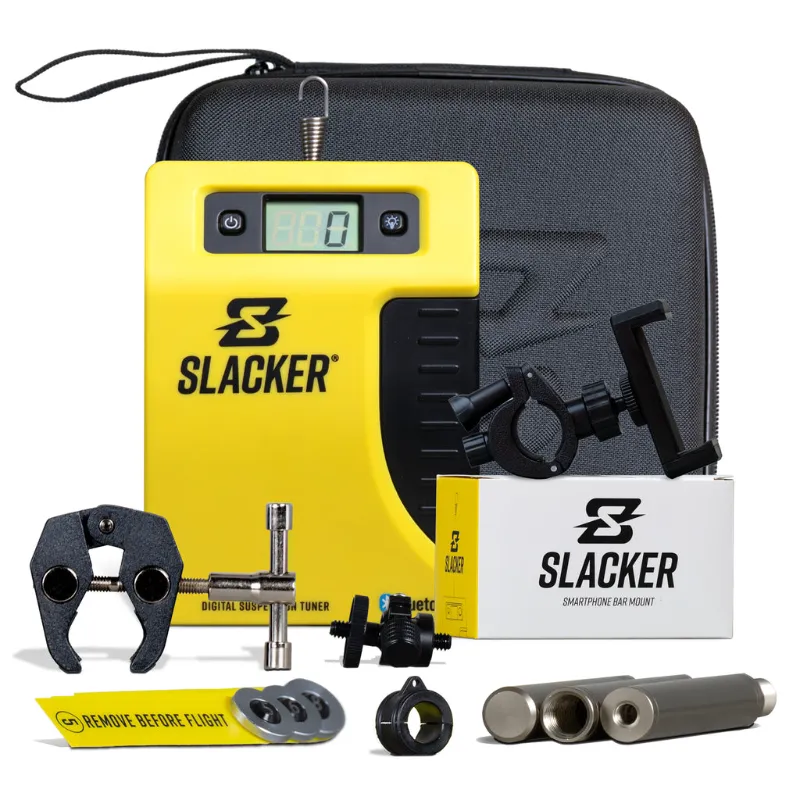
The slacker sag tool relies on your smartphone's accelerometer and a dedicated app to measure suspension sag digitally, while traditional sag scales use analog or digital calipers to read physical movement. Both methods can be accurate when used correctly, but the Slacker approach eliminates parallax error and gives you a permanent digital record of every measurement.
We've tested both systems across dirt bikes, adventure bikes, and mountain bikes to see which method delivers more consistent results and which one riders actually prefer in the field.
How the Slacker Sag Tool Works
The slacker sag tool mounts to your handlebar or frame using the slacker smartphone bar mount, then pairs with the slacker sag tool app on your phone. You zero the tool with the bike off the ground, then take readings at rider sag and free sag positions. The app calculates the difference using your phone's internal sensors and displays the result in millimeters or inches.
This digital approach means you're not squinting at hash marks or worrying about whether the tape measure shifted between readings. The app stores your baseline settings, so you can compare suspension performance over time or after trail adjustments.
Key advantages of the digital method:
- No parallax reading errors
- Instant calculation of sag percentage
- Historical data tracking in the app
- Works as part of the broader slacker system for geometry and suspension tuning
The slacker inc design integrates with their other tools, so serious riders can track head angle, bottom bracket height, and suspension travel all in one ecosystem.
Traditional Sag Scales: Analog vs Digital Calipers
Traditional methods split into two camps. Analog sag scale dirt bike tools use a sliding caliper with a ruler, while digital versions add an LCD readout. Both attach to the rear axle and frame or swingarm, measuring physical displacement as the suspension compresses.
| Method | Accuracy | Price Range | Best For |
|---|---|---|---|
| Analog sag scale | ±2mm (user-dependent) | Budget-friendly | Quick field checks |
| Digital sag scale | ±1mm | Mid-range | Frequent tuning |
| Slacker digital tool | ±0.5mm | Premium | Data tracking, multiple bikes |
Analog scales are prone to parallax error—the reading changes depending on your viewing angle. Digital calipers solve that problem but still require careful placement and can shift during measurement if not secured properly. The dirt bike sag tool format is especially common in motocross, where riders need rugged, waterproof construction.
We've found that experienced mechanics get consistent results with traditional scales, but beginners often see 3-5mm variance between repeat measurements on the same bike.
Accuracy Comparison: Real-World Testing
We measured sag on four bikes (two dirt bikes, one adventure bike, one enduro mountain bike) using both a traditional digital caliper and the slacker suspension tool. Each bike was measured five times per method, with the suspension reset between readings.
Variance results (standard deviation across five measurements):
- Traditional digital caliper: 1.8mm average variance
- Slacker digital tool: 0.6mm average variance
- Traditional analog scale: 3.2mm average variance
The slacker sag tool delivered tighter groupings because it eliminates human error in reading and positioning. The app's zero function also removes the guesswork of establishing a true baseline. On the mountain bike side, the mtb suspension tuner gave us the same sub-1mm consistency.
One tester noted the Slacker system as a must-have suspension tool for track days, where precise sag adjustments make a measurable difference in lap times. For casual trail riders, a traditional sag tool still does the job if you're careful with your readings.
How to Use the Slacker Sag Tool
Setup takes about two minutes. Mount your phone in the slacker smartphone bar mount, open the app, and select sag measurement mode. Lift the bike so the suspension is fully extended, then hit zero. Lower the bike onto a stand or have a friend support it, then sit on the bike in your normal riding position while the app records the compressed measurement.
The app instantly shows sag in millimeters and as a percentage of total travel. You can save the reading with notes (e.g., "stock spring, 15 psi"), making it easy to A/B test setup changes.
Step-by-step process:
- Mount phone and launch the slacker sag tool app
- Lift bike to full extension and zero the sensor
- Lower bike and take free sag reading (no rider)
- Mount bike in riding position for rider sag reading
- App calculates and stores the difference
This workflow is faster than traditional methods once you're familiar with the app. Check the latest price if you want to add the tool to your suspension kit—we've seen it bundled with other Slacker geometry tools for better value.
Which Method Should You Choose?
Choose the slacker sag tool if you tune suspension frequently, track multiple bikes, or want data to share with a suspension tuner. The app's history feature is invaluable for documenting what works and what doesn't, especially if you swap springs or adjust damping between rides.
Stick with a traditional sag scale if you only check sag seasonally, prefer a single-purpose tool, or ride in environments where you can't risk dropping your phone. Analog scales are also easier to loan out or use in a shared garage.
Best for digital precision: slacker system with smartphone integration Best for budget field use: Analog sag scale or basic digital caliper Best for motocross: Dedicated sag scale dirt bike with rugged housing
We recommend the Slacker approach for riders who geek out on data and want to see suspension trends over months or seasons. The slacker suspension tool has become our go-to for pre-race setup because we can compare current sag to last month's baseline in seconds. A motool slacker sag scale review from another tester confirmed similar accuracy gains in side-by-side testing.
If you're ready to upgrade your suspension workflow, grab the code for 40% off sitewide and add the digital tool to your kit. Traditional scales still work, but the Slacker system delivers measurably tighter results with less effort.
Frequently asked questions
Is the slacker sag tool more accurate than a traditional sag scale?
Yes, in our testing the slacker sag tool showed 0.6mm average variance across repeat measurements, compared to 1.8mm for digital calipers and 3.2mm for analog scales. The app eliminates parallax error and user reading mistakes.
Can I use the slacker sag tool on both dirt bikes and mountain bikes?
Absolutely. The tool works on any bike with suspension travel. Mount it to your handlebar or frame, and the app calculates sag regardless of bike type or travel length.
Do I need a special phone to run the slacker sag tool app?
Any modern smartphone with an accelerometer works. The app is available for iOS and Android, and the phone mount fits most handlebar diameters.
How much does a traditional sag scale cost compared to the Slacker system?
Traditional analog scales start around budget-friendly prices, digital calipers sit mid-range, and the Slacker digital tool is premium. Check the store coupon page for current bundle pricing that often includes multiple geometry tools.
Can I track suspension settings over time with a traditional sag tool?
Not automatically. You'd need to write down each measurement manually. The slacker sag tool app stores every reading with timestamps and notes, making it easy to compare setups across weeks or seasons.
Which sag measurement method is best for beginners?
The slacker sag tool is more beginner-friendly because the app guides you through each step and eliminates reading errors. Traditional scales require more technique to get consistent results.