

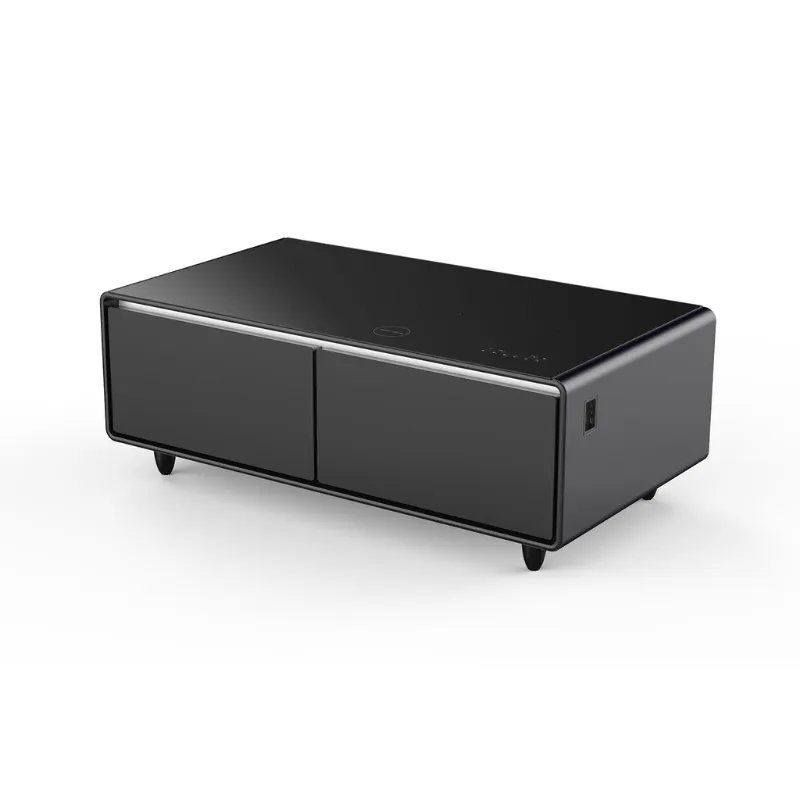
A smart table integrates charging, cooling, and cable management into a compact footprint, while a creator desk offers expansive surface area and modular accessories for multi-monitor setups. Both are Livtab workstations designed for tech-heavy workflows, but they solve different problems. We tested both to clarify which layout, feature set, and price point suits your space and work style.
What Makes the Smart Table Different
The smart table embeds tech directly into the furniture. You get built-in wireless charging pads, USB-C and USB-A ports woven into the desktop edge, and hidden cable channels that route power and peripherals through the legs. Livtab also includes a snap-on phone or tablet holder and an optional under-desk drawer that slides into the frame. The tabletop measures 47 inches wide, which fits a laptop and a single monitor comfortably but leaves little room for dual screens or a drawing tablet spread.
The real standout is the cooling system. A quiet intake fan pulls air through vents on the side and exhausts it behind the table, preventing laptop throttling during renders or long Zoom calls. If you need even more airflow for a desktop tower, the desktop wind tunnel pairs well as a secondary cooling unit that sits on the surface.
Weight capacity is 150 pounds evenly distributed, and the steel frame feels stable even when you lean forward to type. Assembly takes about 45 minutes with the included hex wrench. Check the latest price to see if the built-in tech justifies the premium over a standard desk.
What the Creator Desk Prioritizes
The creator desk strips out embedded charging and cooling in favor of surface area and flexibility. The desktop spans 63 inches wide and 31 inches deep, giving you room for dual monitors, a mechanical keyboard, a mic arm, and a graphics tablet without overlap. The frame uses a modular rail system along the back edge where you can snap accessories like monitor arms, cable trays, headphone hooks, and even a multiport charging station that slides into the rail and powers up to six devices.
Livtab ships the creator desk as a flat pack with pre-drilled holes and a color-coded assembly guide. Setup takes about an hour, and the adjustable feet let you level the desk on uneven floors. The tabletop is a laminate-coated MDF with a matte finish that resists fingerprints and minor scratches, though it will dent if you drop a heavy tool.
Weight capacity is 220 pounds, so it handles a full gaming rig, dual ultrawides, and studio monitors without sagging. The modular rail accepts third-party VESA mounts and standard quarter-twenty threads, so you can mix Livtab accessories with gear you already own. Grab the code for a discount that typically stacks with Livtab's bundle offers.
Feature Comparison: What You Gain and Lose
| Feature | Smart Table | Creator Desk |
|---|---|---|
| Surface area | 47" × 28" | 63" × 31" |
| Built-in charging | Wireless + USB-C/A | None (add via rail) |
| Cooling | Integrated fan | None |
| Weight capacity | 150 lbs | 220 lbs |
| Modular rail | No | Yes |
The smart table wins if you want a plug-and-play setup with zero visible cables. You sit down, drop your phone on the charging pad, and your laptop stays cool without a separate fan. The trade-off is less desktop real estate and no easy way to add monitor arms or upgrade components later.
The creator desk wins if you need space for a complex rig or plan to expand your setup over time. You can start with a simple monitor and keyboard, then snap in a dual-arm mount, a cable sleeve, and a charging dock as your workflow grows. The downside is that you'll spend more on accessories and deal with visible cables unless you route them carefully through the optional cable tray.
Who Should Choose Each Workstation
Choose the smart table if you work on a laptop or all-in-one PC, move apartments frequently, or share a room where a compact footprint matters. It suits freelancers who jump between video calls, light editing, and writing without needing three monitors. The built-in cooling and charging eliminate dongle clutter, and the smaller size fits bedrooms or studio apartments where a full desk would dominate the floor plan.
Choose the creator desk if you run a desktop tower, use dual or triple monitors, or work in photo editing, 3D modeling, streaming, or music production. The extra width and depth let you spread reference materials, MIDI controllers, or a drawing tablet without stacking devices. The modular rail future-proofs the desk so you can swap out or add accessories as your tools change.
Also consider your budget for peripherals. The smart table includes charging and cooling out of the box, so your upfront cost covers the essentials. The creator desk requires separate purchases for monitor arms, cable management, and a charging hub, which can add another hundred dollars but gives you control over each component's quality and layout.
Pairing with Other Livtab Gear
Both desks work well alongside Livtab's secondary products. If you choose the smart table and still need more ports, a multiport charging station sits neatly on the corner without blocking the wireless pad. If you pick the creator desk and run a hot GPU, the desktop windtunnel mounts to the rail or sits on the desktop to exhaust heat away from your screens.
For small-space setups, pairing either desk with a nightstand fridge keeps drinks and snacks within arm's reach without a kitchen trip, which is especially useful during long render queues or deadline sprints. Livtab designs these products to share the same matte finish and steel accent color, so mixing them looks intentional rather than mismatched.
Making Your Decision
The smart table delivers an all-in-one workstation for single-screen workflows and tight spaces, while the creator desk offers the flexibility and surface area that power users and multi-monitor setups demand. Measure your available floor space, count how many devices you need to connect, and decide whether you value built-in convenience or modular upgrades. Both ship with a two-year warranty and free returns within thirty days, so you can test the fit at home. Visit the store to see current bundle deals and apply the sitewide discount before checking out.
 Shopping at Livtab? See today's verified Livtab discount code
Frequently asked questions
Can the smart table handle a desktop PC or only laptops?
The smart table supports a desktop PC up to 150 pounds total, but the 47-inch width limits monitor space. If you run a tower and dual screens, the creator desk's 63-inch surface is a better fit.
Does the creator desk come with any charging ports?
No, the creator desk has no built-in charging. You snap accessories like Livtab's multiport charging station into the modular rail or use your own USB hub.
How loud is the cooling fan in the smart table?
The fan runs at about 30 decibels under load, quieter than a typical laptop fan. You'll notice airflow but it won't drown out voices on calls.
Can I add a monitor arm to the smart table?
The smart table has no modular rail, so you'd need a clamp-style arm that attaches to the desktop edge. The creator desk's rail system makes monitor arms much easier to install.
What is the current Livtab discount code?
Livtab currently offers one hundred dollars off sitewide. Check the coupon page for the active code and any bundle promotions that stack with the discount.
Which desk is easier to move or disassemble?
The smart table is lighter and smaller, so it disassembles and moves faster. The creator desk requires more time to detach rail accessories and pack the larger frame.