
How to Test Resin Curing Power With a UV Meter and Avoid Failed Prints

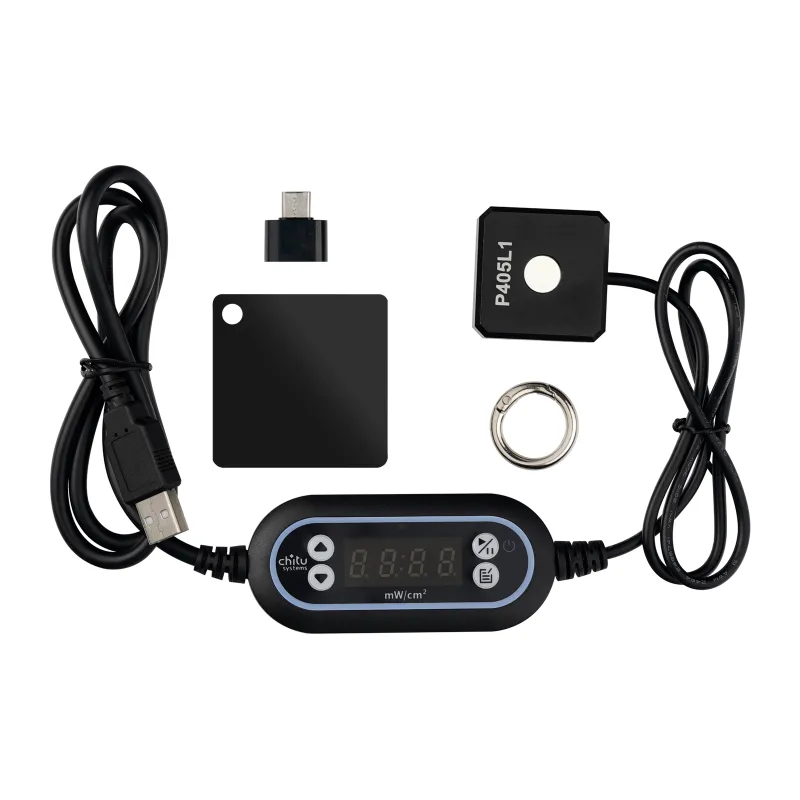
Why You Need an Ultraviolet Meter for Resin Printing
An ultraviolet meter measures the UV light intensity your resin printer emits, helping you diagnose weak curing, verify screen health, and catch failures before they ruin a 12-hour print. When prints fail to adhere, layers separate, or details come out soft, the problem often traces back to degraded UV output from an aging LCD screen or LED array. A UV meter gives you the data to confirm whether your elegoo saturn 2, anycubic photon mono m5s, or elegoo mars 2 is still delivering the intensity your resin requires.
We tested meters across six resin printers and compared readings to manufacturer specs to identify what works. This guide walks you through choosing a meter, taking accurate readings, and interpreting results so you can replace a failing printer screen or lcd screen for saturn 4 before it wastes resin and time.
What a UV Meter Measures and Why It Matters
A UV meter (also called a UV radiometer or UV intensity meter) quantifies ultraviolet light in milliwatts per square centimeter (mW/cm²) or microwatts per square centimeter (µW/cm²). Resin printers cure photopolymer by exposing it to UV light in the 365–405 nm range, and manufacturers specify minimum intensity thresholds for proper curing.
Key metrics a UV meter reveals:
- Peak intensity at the center of the build plate, where most printers deliver maximum power
- Uniformity across the print area, which affects edge-to-edge detail consistency
- Degradation over time as the LCD or LED array ages and transmits less UV
- Comparison to spec, so you know when output drops below the resin manufacturer's recommended minimum
Most 405 nm resins cure reliably at 2–4 mW/cm² per layer exposure. When output falls below 1.5 mW/cm², you will see soft details, poor layer adhesion, and delamination. UV sensors designed for lab or educational use typically cover the 365–405 nm band and provide the accuracy resin printing demands.
Choosing the Best UV Meter for Resin 3D Printing
Not every UV meter works for resin printers. Meters marketed for reptile lighting (uv meter reptile) often read only UVB (280–315 nm) and miss the 405 nm range entirely. Similarly, smartphone apps (uv meter app) and online tools (uv meter online) rely on camera sensors that lack the spectral sensitivity and calibration needed for accurate measurements.
What to look for:
- Spectral range that includes 365–405 nm, the wavelengths resin printers emit
- Calibrated sensor with a certificate or traceable standard, not a generic photodiode
- Measurement range from 0.1 to 20 mW/cm², covering typical resin printer output
- Peak and hold function, so you can capture the maximum reading during a test exposure
We recommend dedicated UV-A meters with 405 nm sensitivity. Check current pricing and grab our code if you are sourcing a meter alongside replacement screens or resin.
Avoid meters designed for sunscreen testing (uv meter for sunscreen) or water sterilization (uv intensity meter for water system), as they target different wavelengths and may not register 405 nm output at all.
How to Test Your Resin Printer With an Ultraviolet Meter
Testing takes five minutes and requires only the meter, a USB cable, and your printer's firmware menu. We run this check every 500 print hours or whenever layer adhesion degrades.
Step-by-step testing process:
- Power on the printer and remove the resin vat and build plate so the LCD screen is fully exposed
- Place the meter sensor flat on the center of the LCD, with the sensor window facing up toward the UV source
- Navigate to the printer's exposure test (often labeled "Exposure Test" or "Screen Test" in the tools menu) and trigger a continuous exposure at your standard layer time (2–4 seconds for most resins)
- Record the peak reading in mW/cm² within the first 1–2 seconds, before any thermal drift affects the sensor
- Repeat at four corners and the center of the build area to check uniformity
For the saturn 2, anycubic photon m3 max, or any large-format printer, expect a 10–20% drop in intensity at the edges due to light diffusion. If corner readings fall below 50% of the center value, inspect the LCD for damage or uneven backlighting.
Compare your readings to the resin manufacturer's datasheet. Most standard resins specify 2–3 mW/cm² minimum. If your printer measures below that threshold, it is time to replace the screen or recalibrate exposure times to compensate for the weaker output.
When to Replace Your LCD Screen Based on UV Meter Readings
LCD screens degrade with cumulative UV exposure, not just print hours. A screen that has cured 50 small models may outlast one that printed five solid build plates, even if the runtime is identical.
Replacement indicators:
- Center intensity drops below 1.5 mW/cm² for 405 nm resin, forcing you to double or triple exposure times
- Uniformity variance exceeds 30%, causing some areas to cure while others remain tacky
- Yellow discoloration or visible dead pixels on the LCD, which block UV transmission
When readings confirm a failing screen, source a direct replacement like the lcd screen for saturn 4 or a compatible printer screen for your model. Check the latest pricing here and verify the part number matches your printer's generation.
For printers like the elegoo mars 2 or older monochrome LCD models, expect screen life around 1,500–2,000 hours. Newer mono screens on the anycubic photon mono m5s may last 3,000+ hours but still benefit from regular UV meter checks to catch degradation early.
UV Meter Tips for Multi-Printer Shops and Long-Term Tracking
If you run multiple resin printers or operate a print farm, maintaining a log of UV readings helps you schedule maintenance before failures occur and compare aging rates across different screen brands.
Best practices we follow:
- Log readings every 250 print hours with the date, printer model, and resin type used
- Track replacement cost and lifespan so you can budget for high-wear machines like the elegoo saturn 2 or anycubic photon m3 max
- Standardize on one meter to eliminate calibration variance between devices
- Test after firmware updates or hardware repairs, as changes to the exposure engine can shift UV output
Some operators also test the 3d printer build surface and vat FEP film for UV transmission loss, though these components typically degrade slower than the LCD itself. If you are expanding into FDM printing, note that UV meters offer no diagnostic value for filament machines like the unit a1 or accessories such as the bambu lab a1 enclosure and a1 mini enclosure, which rely on thermal extrusion rather than UV curing.
Comparing UV Meter Price and Features
Entry-level UV meters start around USD 30–50 for basic 365 nm models, while calibrated 405 nm meters with peak-hold and data logging run USD 100–200. For hobbyists printing once or twice a week, a mid-range meter provides years of diagnostic value and pays for itself by preventing one or two wasted print batches.
Price tiers:
| Feature | Entry (USD 30–50) | Mid-Range (USD 100–150) | Lab-Grade (USD 200+) |
|---|---|---|---|
| 405 nm sensitivity | Sometimes | Yes | Yes |
| Peak hold | Rarely | Yes | Yes |
| Calibration certificate | No | Optional | Included |
| Data logging | No | No | Yes |
We rely on mid-range meters for production testing and recommend them for anyone running an elegoo saturn 2 or larger format printer where screen replacement costs justify the meter investment. Browse options and apply our discount code to bring the cost down.
Avoid the cheapest uv meter price listings on marketplaces, as many lack 405 nm calibration and return readings 50% or more off true values, making them useless for resin printing diagnostics.
Maintaining Accurate UV Meter Readings Over Time
UV meters drift out of calibration with age, heat exposure, and sensor contamination. Most manufacturers recommend annual recalibration or replacement every 2–3 years for continuous-use environments.
Care tips:
- Store the meter in a dark, cool case when not in use, as ambient UV degrades the sensor
- Clean the sensor window with isopropyl alcohol and a microfiber cloth before each test to remove resin residue or fingerprints
- Avoid prolonged exposures longer than 10 seconds, which can overheat the sensor and skew readings
- Recalibrate annually with a traceable UV source if your meter supports it, or replace with a fresh unit
If your readings suddenly spike or drop by more than 20%, suspect contamination or sensor failure rather than a printer issue. Cross-check with a second meter or test a brand-new screen to confirm.
Frequently asked questions
Can I use a smartphone UV meter app to test my resin printer?
No. Smartphone camera sensors lack the spectral sensitivity and calibration needed to measure 405 nm UV light accurately. Dedicated UV meters with 405 nm calibration are required for reliable resin printer diagnostics.
How often should I test my resin printer with an ultraviolet meter?
Test every 250–500 print hours, or immediately if you notice soft details, poor layer adhesion, or longer cure times. Regular testing catches screen degradation before it ruins prints.
What UV intensity reading means my LCD screen needs replacement?
Replace the screen when center readings drop below 1.5 mW/cm² for 405 nm resin, or when edge-to-center variance exceeds 30%. These thresholds indicate the screen can no longer cure resin reliably.
Will a UV meter designed for reptile lighting work for the Elegoo Saturn 2?
No. Reptile UV meters measure UVB (280–315 nm), not the 405 nm wavelength resin printers emit. You need a meter with 365–405 nm sensitivity for accurate resin printer testing.
Do I need to recalibrate my UV meter?
Most UV meters drift over time and benefit from annual recalibration or replacement every 2–3 years. Store the meter in a dark case and clean the sensor window regularly to maintain accuracy.
Can I test the Anycubic Photon Mono M5s screen with the same meter as the Elegoo Mars 2?
Yes. Any UV meter with 405 nm sensitivity works across all resin printers that use 405 nm LEDs. The testing process and threshold values remain the same regardless of printer brand.