

The best accessories for a bambu lab h2d pro 3d printer are the ones that remove friction between the idea and the finished part: good slicing software, a 3D mouse, spare build plates and nozzles, a filament dryer, and a handheld 3D scanner if you want to copy real objects. You do not need all of them on day one. We sort them by the job they actually do, so you can buy in the right order.
If you are still choosing the machine itself, the bambu lab h2d pro 3d printer is the anchor of this whole setup, and our store page carries the current offer while stock lasts.
Start With Software, Because a Slicer Upgrades the Printer You Already Own
Most people buy hardware first and software last. We would flip that. A capable 3d slicer changes how you orient parts, place supports, and control temperature, and those three decisions move print quality more than a new nozzle ever will.
- Calibration and flow control. Run the built-in calibration routines before you judge print quality. A slightly over-extruding profile looks like a bad printer and is usually a bad setting.
- Profiles per material. Keep separate profiles for PLA, PETG, and anything abrasive. Reusing a PLA profile for a filled filament is the fastest way to clog a hotend.
- Preview, always. Scrub through the layer preview before every long print. Support placement and seam position are cheaper to fix there than on the plate.
If you are running a second machine from the same desk, the bambu labs 3d printer line shares the same software ecosystem, which keeps profiles consistent across both.
A 3D Mouse Is the Cheapest Upgrade to Your Workflow
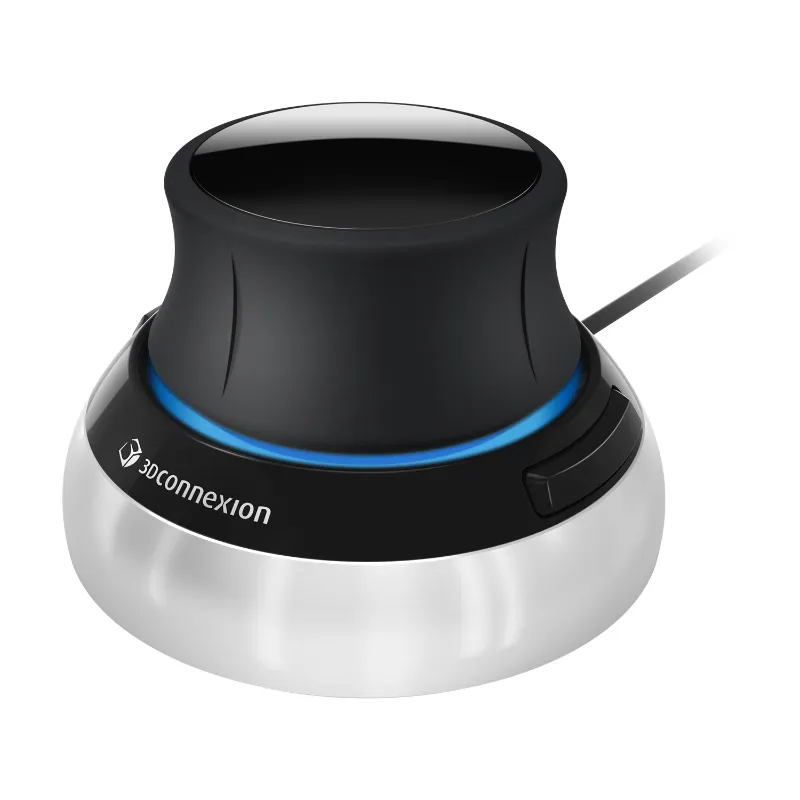
If you spend any time in CAD or in a slicer, a 3dconnexion spacemouse compact is the accessory most people wish they had bought sooner. A mouse orbits, pans, and zooms with one hand while your regular mouse handles selection, which cuts the endless click-drag-rotate loop out of modelling. For anyone doing product design, repair parts, or fixture design, a 3d connection space mouse pays for itself in a week of modelling.
Cheap alternatives exist. The reason we still point people to the branded 3D mouse is driver support and how the device behaves in slicers, not the hardware novelty.
Hardware That Earns Its Bench Space
Printers are consumables businesses. The parts that touch plastic wear out, and having spares on the shelf is the difference between a two-hour fix and a two-week wait.
| Accessory | Job it solves | Skip if |
|---|---|---|
| Spare build plate (smooth + textured) | Surface finish variety, faster turnaround between prints | You only print one material |
| Nozzle and hotend kit | Clogs, abrasive filament wear, nozzle swaps | You never change material |
| Filament dryer | Wet filament causing stringing and weak layers | You print one spool a month in a dry room |
| Deburring tool and calipers | Real dimensional checks, clean edges | You print display pieces only |
We would add a small parts tray and a lint-free cloth to that list. Both are almost free and both get used every week.
- Textured plate for PETG and parts you want a matte base on.
- Smooth plate for a mirror finish and for adhesion checks on small footprints.
- Calipers so "it fits" is a measurement, not a hope.
Handheld 3D Scanner Basics for Copying Real Parts
The moment you want to reproduce a broken bracket or a discontinued knob, a handheld 3D scanner becomes the most useful thing on the bench. It is also the accessory people get wrong most often, so treat the next few points as a buying checklist.
- Scan accuracy and detail set the ceiling. A printer that resolves fine detail cannot print what the scan never captured. Match the scanner's resolution to the smallest feature you care about.
- Computer system requirements matter more than the spec sheet. Scanning is GPU and USB heavy. Check the supported operating systems and port types before you buy, and plan on a machine that is not already running your slicer at full tilt.
- Included scanning software is part of the price. Some scanners ship with a full pipeline, others charge for the good module. Read what is bundled.
- Scanning small objects needs a different approach than large ones. Small parts want a turntable, marker targets, and a stable lighting setup. Large objects want tracking markers placed at irregular intervals and a plan for moving around the part.
- Setup and calibration are not optional. A quick calibration on day one saves hours of noisy meshes later.
Accessories and mounts are the quiet budget line here: a sturdy tripod, a magnetic mount, and spare marker dots cost little and improve scan consistency a lot. Once you have a mesh, drop it into the slicer, repair the shell, and print.
Warranty, Returns, and Delivery Questions to Ask Before You Buy
Accessories are usually where warranty coverage gets murky, so ask two things before checkout: what the return window is on consumables, and whether a non-standard nozzle or plate voids coverage on the printer. Keep the original packaging for the first month, especially for anything with a lens or a moving sensor.
Shipping and delivery matter more for scanners and dryers than for filament. Large items ship in bigger boxes, and delivery windows stretch around holidays. Order early if a project has a hard deadline.
- Confirm what the seller covers on returns for opened software.
- Check whether spare-part bundles are covered individually.
- Keep invoices. Warranty claims without proof of purchase stall.
When you are ready to buy, check the latest price and apply the current offer at checkout. It is the same place we send readers who want to confirm what is in stock before ordering a printer, a plate, or a scanner in one go.
Who Each Accessory Suits
- Home hobbyist printing on one machine: spare plate, filament dryer, calipers. Stop there.
- Designer or engineer: 3D mouse, calibrated slicer profiles, then a scanner.
- Small shop doing repairs: scanner first, then duplicate plates so the printer keeps running while one is cleaned.
- Educator or shared workshop: labelled spares, a locked filament cabinet, and a printed setup checklist on the wall.
Buy in that order and you will not have a drawer full of accessories you never touch. Start with what blocks you today, then expand when a real job demands it. If you want the printer itself alongside the add-ons, the bambu lab h2d pro 3d printer is the model we would build this bench around.
 Shopping at EINSTAR? See today's verified EINSTAR discount code
Frequently asked questions
Do I need a 3D mouse to use a bambu lab h2d pro 3d printer?
No, it is optional. A 3D mouse speeds up CAD modelling and navigation in the slicer, but the printer works fine with a standard mouse. Buy one only if you spend real hours modelling or orienting parts.
What is the first accessory I should buy for a Bambu Lab printer?
A spare build plate and a filament dryer. Wet filament and a worn plate are the two most common causes of print problems we see, and both fixes are cheap compared with new hardware.
Can a handheld 3D scanner pair with a 3D printer for replacement parts?
Yes, and it is one of the most practical uses. Scan the broken part, clean and scale the mesh in the included scanning software, then slice and print it in a suitable material.
Does the 3dconnexion spacemouse compact work with slicing software?
It works with most major slicers and CAD packages, but confirm driver support for your exact operating system before buying. The value comes from driver support, which is why we suggest the branded 3D mouse over generic alternatives.
What computer do I need for scanning and slicing?
Check the scanner maker's listed system requirements for GPU, RAM, and USB port type, then add headroom for slicing. Scanning is the heavier task, so match the machine to the scanner, not to the printer.
Will a third-party nozzle or plate affect my warranty?
It can, depending on the seller's terms. Ask before checkout, keep your invoice, and hold onto the original packaging for the first month in case you need to return anything.