
Desk Mat vs Mouse Pad: Which Size Do You Actually Need for Gaming and Work?

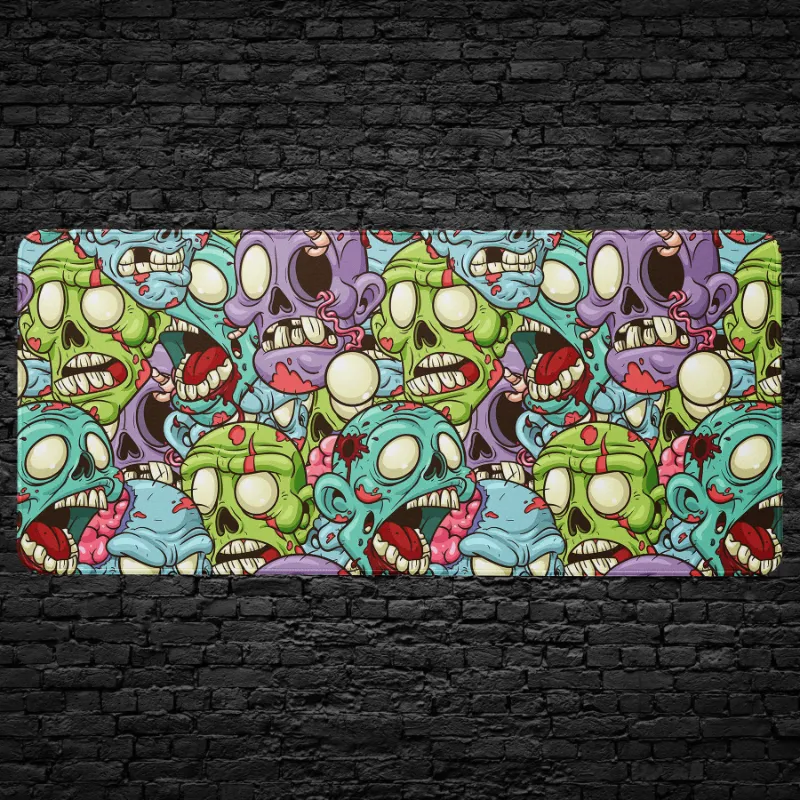
A mosaic desk mat gives you a full-surface workspace that protects your desk and accommodates your keyboard, mouse, and wrist movements, while a traditional mouse pad only covers the area directly under your mouse. The right choice depends on your setup, whether you game with low-sensitivity settings, and how much desk real estate you want to protect.
We tested both formats across gaming sessions, design work, and daily productivity tasks. Here's what actually matters when you're deciding between a full desk mat and a compact mouse pad.
Surface Area: How Much Space Each Format Covers
Desk mats typically measure 800×300mm or larger, covering the zone from your monitor stand down to the edge of your desk. A mosaic desk mat or graffiti desk spans enough room for a full-size mechanical keyboard, mouse, and even a notepad or phone.
Standard mouse pads range from 250×210mm up to 450×400mm for extended gaming models. Our flower mouse pad and samurai mouse pad fit neatly under your hand and mouse, leaving the rest of your desk exposed.
Desk mat advantages:
- Unified surface reduces friction differences between keyboard and mouse zones
- Protects wood or laminate desks from scratches, spills, and wear
- Keeps your keyboard from sliding during intense typing or gaming
- Creates a cohesive aesthetic across your workspace
Mouse pad advantages:
- Takes up minimal desk space, ideal for small or crowded surfaces
- Easier to clean or swap out for seasonal designs
- Lower cost if you only need mouse tracking improvement
- Portable for LAN parties or office hot-desking
The fishfish keyboard mini mat splits the difference, covering just your keyboard tray if you use a separate traditional mouse pad.
Material and Tracking Performance
Both formats typically use a cloth top layer over a rubber base, but surface texture varies by design. We found that printed desk mats like the anime desk or desk graffiti use dye-sublimation printing that doesn't affect glide, while cheaper screen-printed designs can feel slightly tacky.
For optical and laser mice, tracking works identically on a desk mat and a dedicated mouse pad when the weave density is similar. The mouse pad computer monster uses a fine weave optimized for low-friction flick shots, which you'll also find on gaming-focused full desk mats.
What we noticed in testing:
- Stitched edges prevent fraying on both formats and last longer than heat-sealed edges
- Rubber bases with a waffle or honeycomb grip stay put better than flat rubber
- Thicker mats (3-4mm) cushion your wrists more than thin (1.5-2mm) travel versions
- Decorative designs like a floral desk mat perform the same as solid colors when the base material is identical
If you already own a high-end mouse pad you love, adding a desk mat underneath won't improve tracking but will protect the rest of your desk and unify the look.
Gaming vs Work: Which Format Suits Your Use Case
Low-sensitivity FPS gamers need the extra real estate of a desk mat. If you're running 400 DPI and making 30cm swipes to turn 180 degrees in Valorant or CS2, a compact mouse pad will have you repositioning constantly. A full desk doodle mat or similar 900mm-wide option gives you the runway for those sweeping movements.
High-DPI office users who keep their mouse at 1600+ DPI and rarely move more than 10cm can work comfortably on a standard mouse pad. The samurai mouse pad is plenty for web browsing, spreadsheet work, and design tasks with a pen tablet.
Streamers and content creators benefit from a desk mat's uniform background in webcam shots and the cable-management space it provides. The edge-to-edge coverage hides desk clutter and creates a clean frame.
Hot-deskers and laptop users traveling between spaces will find a rolled-up mouse pad like the flower mouse pad easier to pack than a full desk mat, though compact desk mats (600×300mm) are still portable.
| Use Case | Best Format | Typical Size |
|---|---|---|
| FPS gaming, low DPI | Full desk mat | 800×300mm or larger |
| Office work, high DPI | Standard mouse pad | 250×210mm to 350×250mm |
| Hybrid work and gaming | Extended desk mat | 700×300mm |
| Travel and hot-desking | Compact mouse pad | 300×250mm, rollable |
You can check the latest price on CruArt's current lineup to see which dimensions fit your budget and desk.
Care and Longevity: Cleaning and Replacement Cycles
Desk mats collect more dust, crumbs, and skin oils simply because of their surface area, but they're also easier to clean in one go. We hand-wash ours every 4-6 weeks with lukewarm water and a drop of dish soap, then air-dry flat. The larger format means you can spot-clean spills without removing your entire setup.
Mouse pads need the same washing routine but dry faster and weigh less when wet. If you eat at your desk, a mouse pad computer monster or similar compact option is simpler to toss in the sink after a coffee spill.
Maintenance tips we follow:
- Use a lint roller weekly to grab dust and hair before they embed
- Avoid machine washing unless the product page explicitly allows it; the rubber backing can separate
- Never use bleach or fabric softener, both degrade the surface texture
- Replace when the stitching frays or the rubber loses grip, usually after 18-36 months of daily use
The initial cost difference matters here. If you're rotating designs seasonally, buying three mouse pads over two years costs about the same as one quality desk mat that lasts the full period. Grab the code if you're stocking up on multiple designs to rotate.
Aesthetic and Desk Setup Considerations
A desk mat frames your workspace and hides cable clutter, scratches, or mismatched desk finishes. Designs like a mosaic desk mat or graffiti desk become the visual anchor of your setup, especially in streams or social media photos.
Mouse pads offer more flexibility if you like changing your theme frequently or if your desk aesthetic is minimalist. You can match a floral desk mat to your wallpaper for a cohesive look, or go with a neutral desk surface and let a bold anime desk mat make the statement.
Consider your desk material:
- Glass desks benefit more from a full mat's rubber grip and noise dampening
- Wood desks need the scratch and moisture protection a large mat provides
- Laminate or metal desks work fine with just a mouse pad if you don't mind the cold surface under your wrists
Some users run both: a neutral full desk mat for protection and a smaller, decorative mouse pad on top for personality. This setup works but adds thickness that may feel awkward under your wrist.
Which Size We Recommend for Your Setup
Go with a full desk mat if:
- You game at low DPI or play FPS titles that require large mouse movements
- Your desk surface scratches easily or you want to hide wear and stains
- You use a mechanical keyboard that slides during typing
- You want a unified aesthetic in your workspace or stream background
Stick with a mouse pad if:
- Your desk is under 100cm wide and every centimeter counts
- You already have a keyboard wrist rest and prefer separate accessories
- You change your setup design every few months
- You primarily work at high DPI with minimal mouse movement
For most hybrid setups where you game a few hours a week and work the rest, we lean toward a desk mat. The desk graffiti or similar 800×300mm option covers both use cases without compromise, and the added desk protection pays for itself if you're renting or plan to resell your desk later.
If you're still unsure about dimensions, measure your keyboard width plus 40cm for mouse movement, then add 5cm on each side for comfort. That total will tell you whether a compact extended mouse pad or a full desk mat fits your actual needs. You can compare the full range and check the latest price to see what fits your setup and budget.
Frequently asked questions
Can I use a mosaic desk mat with a wireless charging mouse pad?
Yes, as long as the wireless charging pad sits on top of the desk mat and isn't buried under thick fabric. Most charging pads need direct contact with your mouse, so place the charging zone where your mouse rests naturally.
How often should I wash my desk mat or mouse pad?
Every 4-6 weeks for regular use, or immediately after spills. Hand-wash with lukewarm water and mild dish soap, then air-dry flat. Weekly lint-rolling between washes keeps dust from building up.
Do desk mats interfere with keyboard tilt feet?
No, the 3-4mm thickness of most desk mats is thin enough that keyboard feet work normally. If your keyboard has very short feet, the mat may reduce the tilt angle slightly, but we haven't found this affects typing comfort.
Will a printed design like graffiti or anime wear off over time?
Dye-sublimation printing bonds ink into the fabric fibers and lasts as long as the mat itself. Screen-printed designs can crack or fade, so check the product details before buying if longevity matters to you.
Can I cut a desk mat down to fit a smaller desk?
Technically yes, but cutting exposes the fabric edge, which will fray quickly without stitched edging. It's better to buy the size that fits your desk or choose a compact mouse pad instead.
Do I need a separate wrist rest if I use a full desk mat?
Not necessarily. A 3-4mm cushioned desk mat provides light wrist support, though dedicated memory foam or gel rests offer more elevation if you have wrist pain. Many users find the desk mat alone comfortable enough for all-day typing.