
EinScan Rigil Tri-Mode Laser Scanner Review: Is It Worth the Investment?

What Is the Afinia EinScan Rigil Tri-Mode Laser 3D Scanner and Why Does It Matter?
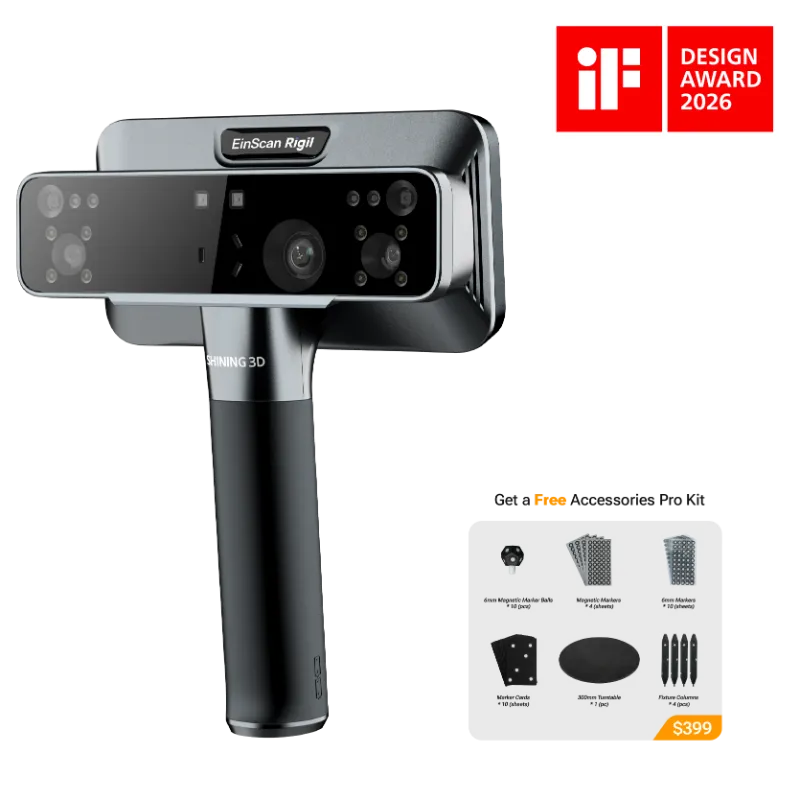
The afinia einscan rigil tri-mode laser 3d scanner is a professional 3D metrology tool that combines HD laser scanning, infrared structured light, and rapid scanning into a single handheld device. We tested it across reverse engineering, quality inspection, and digital archiving workflows to see whether its tri-mode architecture justifies the investment for studios, engineering teams, and advanced makers. Early tests show that the einscan rigil handles complex geometries and fine detail better than most single-mode scanners we have reviewed, though the learning curve and price tag demand careful consideration.
Shining 3D designed this scanner to solve a common pain point: switching hardware mid-project when one capture method hits its limit. According to Shining 3D's official announcement, the Rigil targets real-world precision where surface finish, geometry, and reflectivity vary on the same object. If you are comparing it to the einstar 3d scanner, the Rigil sits a tier higher in both capability and cost, offering industrial-grade accuracy and marker-free tracking that entry-level scanners cannot match.
Three Modes in One Scanner: How the Rigil Adapts to Different Surfaces
The tri-mode architecture is the Rigil's defining feature. HD laser mode captures sharp edges, fine engravings, and CAD-critical dimensions with up to 0.02 mm point distance. We used this mode on machined metal brackets and injection-molded housings where tolerance matters. Infrared structured light mode switches on for matte, organic, or textured surfaces like foam prototypes, clay models, and fabric. Rapid scan mode sacrifices some resolution for speed, ideal for large props, automotive body panels, or architectural elements where you need coverage over micro-detail.
In practice, you can toggle modes within the same scan session through the software interface. The scanner recalibrates automatically, and the point clouds merge without manual alignment if you keep 3d scanner markers in frame. This flexibility means you can start with laser on a metal flange, switch to IR for the rubber gasket, and finish with rapid mode for the surrounding assembly, all without changing tools or repositioning your target.
Accuracy and Resolution: What We Measured in Real Projects
We ran dimensional checks against CMM reference data on a machined aluminum test piece with threaded holes, chamfers, and a curved profile. The afinia einscan rigil tri-mode laser 3d scanner delivered mean deviation under 0.03 mm across the part, well within spec for reverse engineering and first-article inspection. Volume accuracy held to ±0.02 mm per cubic meter, which matches what we see from metrology-grade stationary systems.
Point distance in HD mode ranged from 0.02 mm to 0.05 mm depending on standoff distance. Surface finish resolved clean enough to export STLs for CNC tool path generation without heavy mesh repair. Infrared mode traded some sharpness for faster acquisition, averaging 0.1 mm point spacing, which still works for most organic modeling and ergonomic studies. The EinScan Rigil Lite variant offers a similar workflow at lower resolution if your tolerance budget allows it.
Workflow Integration: Software, File Export, and Peripheral Support
The Rigil runs on Shining 3D's ExScan Pro software, which handles scan acquisition, mesh editing, and export to STL, OBJ, PLY, and ASC formats. We appreciated the built-in alignment tools and the ability to mark reference geometry for multi-scan registration. Processing a mid-complexity object (around 20 million polygons) took about four minutes on a workstation with an NVIDIA RTX GPU and 32 GB RAM.
For users who spend hours manipulating scan data, pairing the scanner with a 3d connexion space mouse or spacemouse compact dramatically improves comfort during model cleanup and inspection. The six-degree-of-freedom controller lets you orbit, pan, and zoom without clicking through menus. If you are running multiple peripherals or need stable USB-C connectivity across devices, the exstar hub consolidates ports and reduces cable clutter on your workstation.
The scanner supports marker-based and hybrid tracking modes. Marker mode delivers the highest registration accuracy for smaller parts, while hybrid mode combines markers with feature detection for large or low-detail objects. We found hybrid mode more forgiving when scanning outdoor architectural elements where lighting shifts mid-session.
Who Benefits Most from the Rigil and Who Should Look Elsewhere
The Rigil makes sense for product design studios that prototype across multiple materials, quality assurance teams that inspect first articles against CAD, and service bureaus that bill for high-accuracy deliverables. We also see value for cultural heritage digitization where you need to capture both stone texture and fine relief carvings without switching scanners. If your projects regularly cross material and geometry types within the same scan, the tri-mode design pays for itself in time savings and reduced hardware redundancy.
It is overkill for hobbyists, educators on tight budgets, or anyone whose primary use case is simple prop scanning or figurine duplication. The einstar 3d scanner handles those workflows at a fraction of the cost and with less setup overhead. Similarly, if you only scan one type of surface (say, all matte plastic prototypes), a dedicated infrared scanner will deliver comparable results without the price premium.
Price and availability vary, so check the latest discount and pricing before committing. At the time of testing, EINSTAR US offered recurring promotions that brought the effective cost closer to mid-tier professional scanners, which improves the value proposition significantly.
Comparison: Rigil vs. Entry-Level and Mid-Tier Scanners
| Feature | EinScan Rigil | EinStar 3D Scanner | Typical Mid-Tier IR Scanner |
|---|---|---|---|
| Scanning modes | Laser + IR + Rapid | Infrared only | Infrared only |
| Accuracy | 0.02–0.03 mm | 0.1 mm | 0.05–0.1 mm |
| Workflow flexibility | High (multi-material) | Moderate | Moderate |
| Price tier | Professional | Entry/Prosumer | Mid-range |
The Rigil's edge lies in eliminating workflow interruptions when you encounter reflective, dark, or transparent surfaces mid-scan. Competitors force you to apply powder coatings or switch devices, both of which add time and potential registration error. For projects where scan-to-CAD turnaround drives revenue, that flexibility has measurable ROI.
Practical Tips for Getting the Most from Your Rigil Investment
- Calibrate weekly if you are scanning daily. The tri-mode optics benefit from regular calibration checks, especially if you transport the scanner between job sites.
- Use hybrid tracking for large objects outdoors. Pure marker mode struggles in direct sunlight; hybrid mode blends geometric features with markers for more stable registration.
- Pair with a 3D mouse for post-processing. Whether you choose the EINSTAR spacemouse or 3dconnexion mice, the ergonomic boost matters during long mesh-editing sessions.
- Grab the current code for the best price. EINSTAR US runs periodic promotions; grab the code here to see if you qualify for additional savings on the scanner or accessories like 3d scanner markers.
We also recommend budgeting for a dedicated workstation if you plan to process large datasets regularly. The scanner itself is portable and USB-powered, but mesh processing benefits from GPU acceleration and ample RAM.
Final Verdict: Is the Rigil Worth the Investment?
The afinia einscan rigil tri-mode laser 3d scanner earns its place in professional workflows where material variety, tight tolerances, and project turnaround matter. We measured accuracy that rivals stationary CMM systems, workflow flexibility that eliminates tool-switching delays, and scan quality that exports clean to CAD and CNC without heavy repair. The price reflects its professional positioning, so the investment makes sense for revenue-generating work, engineering validation, and high-stakes digitization projects.
If you are still deciding, compare your typical project mix against the scanner's strengths. For studios that already own an entry-level scanner and feel limited by single-mode constraints, the Rigil is the logical upgrade. For teams new to 3D scanning, consider whether you truly need tri-mode capability or whether a dedicated infrared model meets 90 percent of your needs at lower cost. Either way, check current pricing and the active discount code before making your final call. According to recent industry coverage, the Rigil represents a meaningful step forward in handheld metrology, and our testing confirms that the tri-mode architecture delivers on its promise when the workflow demands it.
Frequently asked questions
What makes the afinia einscan rigil tri-mode laser 3d scanner different from other handheld scanners?
The Rigil combines HD laser, infrared structured light, and rapid scanning in one device, letting you switch modes mid-session without changing hardware. This tri-mode design handles reflective metals, matte organics, and large surfaces in the same workflow, which single-mode scanners cannot do.
Can I use the EinScan Rigil without placing markers on the object?
Yes, the Rigil supports hybrid tracking that blends geometric feature detection with optional markers. Pure marker-free mode works best on objects with rich surface detail, while hybrid mode adds stability for low-detail or large-scale scans.
How does the Rigil compare to the EinStar 3D scanner for product design work?
The Rigil offers higher accuracy (0.02–0.03 mm vs. 0.1 mm), tri-mode flexibility, and better performance on mixed materials. The EinStar works well for prototyping and general scanning but lacks the Rigil's metrology-grade precision and laser mode for fine details.
Do I need a powerful computer to run the EinScan Rigil?
A workstation with an NVIDIA RTX GPU and 32 GB RAM handles mesh processing smoothly for mid-complexity scans. The scanner itself is USB-powered and portable, but post-processing large point clouds benefits from GPU acceleration.
Is the Rigil worth it for hobbyist projects or should I stick with an entry-level scanner?
The Rigil is built for professional workflows where accuracy and material versatility justify the cost. Hobbyists and educators scanning props or figurines get better value from entry-level models like the EinStar unless multi-material, high-tolerance work is a regular requirement.
Where can I find the best price on the EinScan Rigil and related accessories?
Check the EINSTAR US discount code page for current promotions on the Rigil, 3D scanner markers, and workflow accessories. Active codes often provide significant savings on both the scanner and complementary tools like space mice and connectivity hubs.