
EINSTAR vs EinScan Rigil: Which 3D Scanner Is Better for Your Workflow?

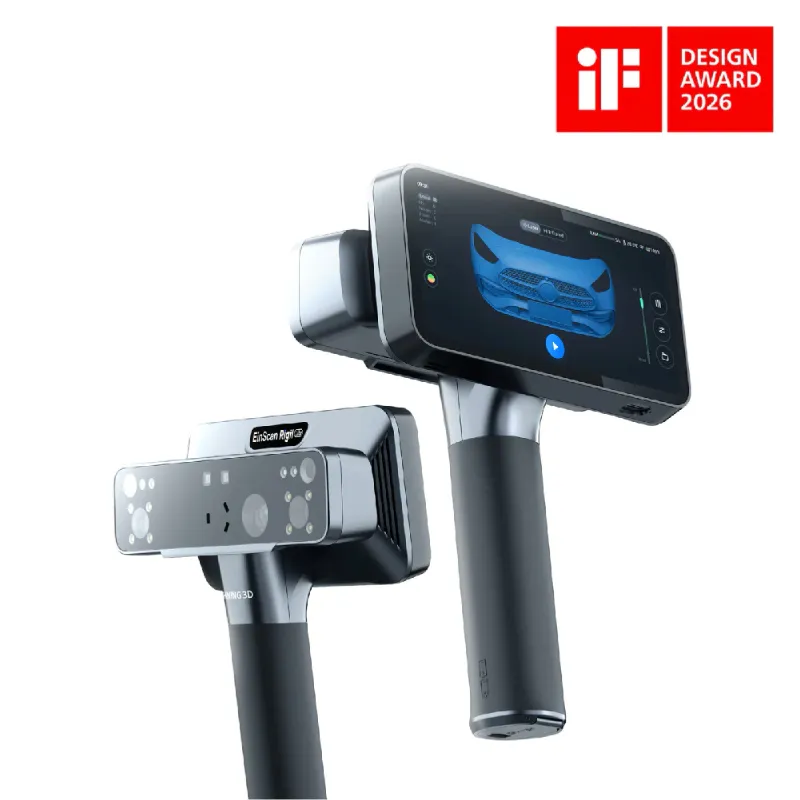
The afinia einscan rigil tri-mode laser 3d scanner gives you three distinct scanning modes in a single unit, while the einstar 3d scanner focuses on fast, marker-free handheld scanning with AI-driven tracking. Both scanners serve different workflows, and your choice depends on whether you need multi-mode versatility or streamlined portability for rapid capture projects.
We tested both systems across studio and field environments to see which one handles different object sizes, surface types, and workflow constraints better. Here's what we found.
What the Afinia EinScan Rigil Tri-Mode Design Offers
The einscan rigil stands out because it switches between handheld rapid, handheld HD, and desktop scanning modes without requiring separate hardware. This tri-mode approach means you can scan a large automotive part in rapid mode, then switch to HD mode for fine detail on mechanical components, and finally use desktop mode for small jewelry pieces, all with the same scanner.
The laser scanning technology delivers consistent accuracy across all three modes, and the system works with 3d scanner markers when you need positional reference points on complex geometries. According to EinScan's official overview, this flexibility reduces the need for multiple scanners in a professional setup.
We recommend the Rigil when you run a service bureau, engineering lab, or design studio where different projects demand different capture methods. The learning curve is steeper than single-mode scanners, but the versatility pays off if you handle varied scanning tasks weekly.
How EINSTAR Scanning Speed and Portability Compare
EINSTAR prioritizes speed and ease of use over mode-switching. The handheld design captures geometry at up to 1.5 million points per second, and the built-in tracking eliminates the need for markers on most surfaces. We scanned a full vehicle interior in under eight minutes without placing a single reference point.
The unit weighs less and runs entirely through USB connection to a laptop, so you can check the latest price and take it to job sites without a workstation setup. EINSTAR works best when you need to digitize medium to large objects quickly, especially in spaces where you cannot control lighting or set up a turntable.
If your workflow involves scanning people, furniture, architectural details, or automotive parts on location, EINSTAR removes most of the setup friction. The tradeoff is that you lose the desktop mode and the fine-detail HD handheld option that Rigil provides.
Accuracy and Detail Across Scanning Modes
| Feature | EinScan Rigil | EINSTAR |
|---|---|---|
| Handheld accuracy | Up to 0.05 mm (HD mode) | Up to 0.1 mm |
| Desktop mode | Yes, with turntable | No |
| Point acquisition rate | Up to 2,200,000 points/s | Up to 1,500,000 points/s |
| Marker-free tracking | Hybrid (markers optional) | Yes, standard |
The afinia einscan rigil tri-mode laser 3d scanner achieves tighter tolerances in HD handheld mode, which matters for reverse engineering, quality inspection, and technical applications where dimensional accuracy drives manufacturing decisions. Desktop mode pushes accuracy even further for small parts under 200 mm.
EINSTAR sacrifices some precision for speed and simplicity. We measured consistent 0.1 mm accuracy on mid-sized industrial parts, which is sufficient for design reference, CGI assets, archival documentation, and most prototyping workflows. You will notice the difference only when you need to match tight CAD tolerances or measure sub-millimeter features.
For additional technical details, EinScan's FAQ covers calibration, environmental factors, and surface preparation that affect both systems.
Software, Workflow Integration, and Accessories
Both scanners ship with proprietary capture software that handles alignment, mesh generation, and export to STL, OBJ, and other standard formats. Rigil's software includes mode-specific settings and advanced editing tools, while EINSTAR's interface simplifies the process with fewer toggles and automatic optimization.
We found that pairing either scanner with a 3d connexion space mouse significantly improves mesh inspection and cleanup speed. The six-degree-of-freedom control lets you rotate and zoom through dense point clouds without constantly switching between mouse and keyboard shortcuts. You can also opt for the spacemouse compact if desk space is limited.
If you work in a multi-device studio, the exstar hub consolidates connectivity and simplifies cable management when switching between scanners, tablets, and other peripherals.
Which Scanner Fits Your Projects and Budget
Choose the einscan rigil if you need maximum versatility and plan to handle small precision parts, large industrial assemblies, and everything in between. The tri-mode design justifies the investment when you cannot predict which scanning method each new project will require. Studios doing jewelry, mechanical engineering, and large-scale digitization under one roof benefit most.
Pick the einstar 3d scanner if your projects focus on medium to large objects, you prioritize portability, and you want to minimize setup time. EINSTAR excels in automotive, furniture design, body scanning, and field documentation where speed and marker-free operation reduce friction.
Both systems qualify for our current discount code, so you can save on either option depending on which workflow profile matches your needs. We recommend demoing both if possible, since handling the interface and weight distribution in person reveals preferences that specs alone do not capture.
The laser scanning technology comparison shows that both approaches serve distinct niches rather than competing directly. Your decision comes down to whether you value mode flexibility or streamlined single-purpose performance for your specific scanning routine.
Frequently asked questions
Can the EinScan Rigil scan without markers in handheld mode?
Yes, the EinScan Rigil supports marker-free scanning in handheld mode when the object has sufficient geometric features. Markers improve tracking accuracy on flat or featureless surfaces, but they are optional for most textured objects.
Does EINSTAR work with a turntable for desktop scanning?
No, EINSTAR is designed exclusively for handheld scanning and does not include a desktop turntable mode. If you need automated turntable capture, the EinScan Rigil offers that functionality as one of its three modes.
Which scanner is better for reverse engineering mechanical parts?
The afinia einscan rigil tri-mode laser 3d scanner is better suited for reverse engineering because its HD handheld mode delivers up to 0.05 mm accuracy, and desktop mode provides even tighter tolerances for small components.
Can I use a space mouse with either scanner software?
Yes, both EinScan Rigil and EINSTAR software support 3DConnexion space mice for navigating point clouds and meshes. A 3d connexion space mouse improves inspection speed and ergonomics during post-processing.
How portable is the EinScan Rigil compared to EINSTAR?
EINSTAR is more portable because it weighs less and runs directly from a laptop via USB. The EinScan Rigil includes additional hardware for desktop mode, making it better suited for studio use than frequent travel.
Do I need different marker sets for the two scanners?
Both scanners use standard adhesive reference markers when needed. You can use the same 3d scanner markers for either system, though EINSTAR relies on them less frequently due to its advanced marker-free tracking.