
EKSA E900 vs E900 Pro vs E1000: Which Gaming Headset Should You Buy?

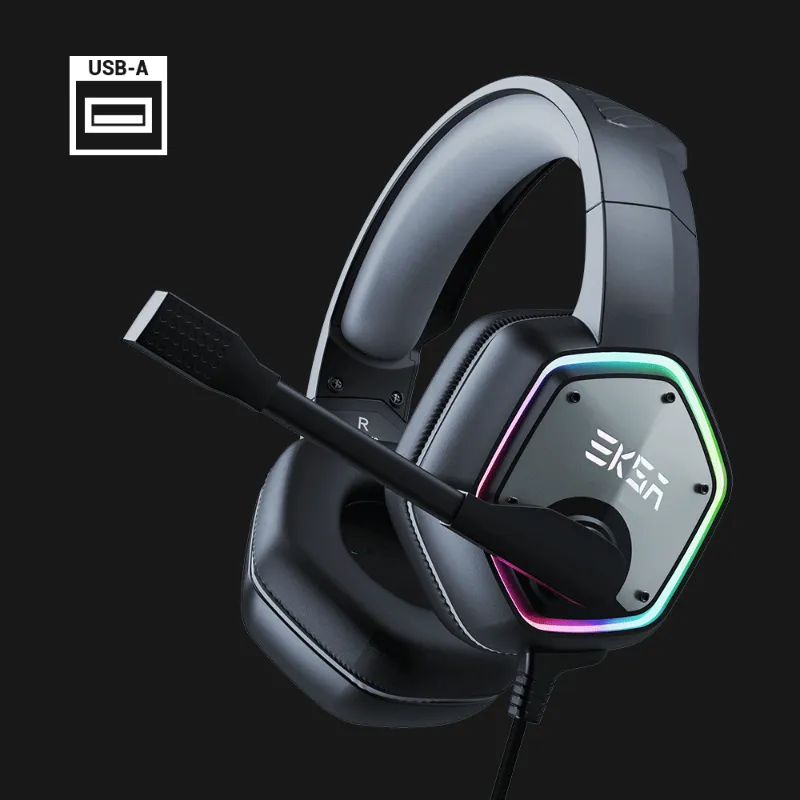
The eksa headset E1000 is built for immersive PC and console gaming with USB-powered 7.1 surround sound, while the eksa e900 and eksa e900 pro use traditional 3.5 mm jacks for universal compatibility. We tested all three models to help you choose the right fit for your setup, budget, and audio priorities. Before you decide, grab the latest discount code to save on your order.
EKSA Headset E1000: USB 7.1 Surround for PC and PlayStation
The eksa e1000 connects via USB and uses software-driven virtual surround to position footsteps, gunfire, and ambient cues in 3D space. This makes it ideal for competitive shooters and open-world titles where directional audio matters. The USB connection also powers RGB lighting on the ear cups and inline controls for volume and mic mute.
Key features
- Virtual 7.1 surround audio over USB
- 50 mm neodymium drivers
- Detachable noise-canceling boom mic
- Memory-foam ear cushions with leatherette covers
- RGB lighting zones on each ear cup
- In-line USB control module
Because it relies on USB, the E1000 works with PC, PlayStation 4, and PlayStation 5 but not Xbox or Nintendo Switch without an adapter. If you game primarily on PC or PlayStation and want spatial audio out of the box, the E1000 delivers without extra software purchases. For current pricing, check the EKSA coupon page.
EKSA E900: Budget 3.5 mm Analog Headset
The eksa e900 strips away USB features and RGB to focus on core analog audio. It connects via a single trrs audio plug that carries stereo audio and mic on one 3.5 mm jack, making it compatible with every platform: PC, Mac, Xbox, PlayStation, Switch, and mobile.
What you get
- Stereo analog audio through 3.5 mm TRRS
- 50 mm drivers (no surround processing)
- Fixed boom mic with basic noise reduction
- Lightweight plastic headband
- Cloth-covered ear pads
- No in-line controls beyond a mic mute switch
The E900 is lighter and more portable than the E1000, but you lose surround sound and in-line volume control. It's a solid pick for casual players, younger gamers, or anyone who switches between console, handheld, and mobile devices regularly.
EKSA E900 Pro: The Middle Ground
The eksa e900 pro sits between the E900 and E1000 in both features and price. It keeps the universal 3.5 mm connection of the E900 but upgrades the materials, mic quality, and cable design.
Upgrades over the E900
- Braided cable with reinforced strain relief
- Detachable boom mic (swappable or removable for travel)
- In-line control module with volume wheel and mic toggle
- Thicker memory foam in the ear cushions
- Metal-reinforced headband sliders
The E900 Pro also ships with a Y-splitter adapter that converts the single TRRS plug into separate headphone and mic jacks (TRS and TS) for older PC motherboards or USB sound cards. If you need cross-platform flexibility with better build quality than the base E900, the Pro model is the sweet spot. You can find all three models listed under our gaming headsets collection.
Feature Comparison Table
| Feature | E900 | E900 Pro | E1000 |
|---|---|---|---|
| Connection | 3.5 mm TRRS | 3.5 mm TRRS + splitter | USB 2.0 |
| Surround sound | Stereo only | Stereo only | Virtual 7.1 |
| Mic | Fixed boom | Detachable boom | Detachable boom |
| In-line controls | Mute switch | Volume + mute | Volume + mute + RGB toggle |
| RGB lighting | None | None | Yes |
| Platform support | All (3.5 mm) | All (3.5 mm) | PC, PS4, PS5 |
Which EKSA Gaming Headset Should You Buy?
Choose the eksa e900 if you need a budget eksa headset that works everywhere. It's perfect for younger players, casual mobile gaming, or as a backup pair. The fixed mic and lack of in-line volume control are the main trade-offs, but the universal 3.5 mm plug means you'll never need adapters.
Pick the eksa e900 pro if you game across multiple platforms but want sturdier materials and a detachable mic. The braided cable, metal sliders, and in-line volume wheel make it feel more premium than the base E900, and the included Y-splitter ensures compatibility with any PC audio setup. Independent reviewers at Audiostance and Home Studio Basics have also tested similar EKSA models and note that the Pro build quality holds up well over time.
Go with the eksa headset E1000 if you play on PC or PlayStation and want virtual surround sound for competitive advantage. The USB connection limits platform flexibility, but the 7.1 processing, RGB lighting, and detachable mic make it the most feature-rich option in this lineup. Headphonesty's overview highlights the E1000's spatial audio as a key differentiator for FPS and battle-royale titles. Check current pricing and apply our code to save before you order.
Cable and Connectivity Notes
All three models use standard audio connectors, so replacement cables and adapters are easy to find. The E900 and E900 Pro use a trrs audio plug (four-pole: left, right, ground, mic), while the E1000 relies on USB-A. If you need a spare trs cable for the Y-splitter setup on the E900 Pro, we stock those separately.
For Xbox Series X|S, the E900 and E900 Pro plug directly into the controller's 3.5 mm jack. The E1000 requires a third-party USB adapter or a controller connection workaround, which adds extra cost and complexity.
Comfort and Fit Across All Three Models
The E900 is the lightest at around 240 grams, making it comfortable for long sessions but less isolating due to thinner padding. The E900 Pro adds 30 grams with thicker memory foam, and the E1000 tops out near 300 grams with USB hardware and RGB components inside the ear cups.
All three use an adjustable steel or reinforced-plastic headband with notched sliders. The E1000 and E900 Pro offer better clamp-force distribution thanks to larger, denser ear cushions. If you wear glasses, the E900 Pro and E1000's memory foam compresses more gradually and reduces pressure on the temples.
Final Recommendations
We recommend the eksa e900 pro for most buyers. It balances universal compatibility, solid build quality, and a detachable mic at a mid-tier price. The E900 is ideal if you need the lowest cost or prioritize ultra-light weight, and the eksa headset E1000 is the top pick for PC and PlayStation players who want immersive surround audio and RGB customization. Compare all options in our full gaming headsets guide, and don't forget to apply the current 10% discount through our EKSA coupon page.
Frequently asked questions
Does the EKSA E1000 work with Xbox?
The E1000 uses USB, so it does not connect directly to Xbox consoles. You would need a third-party USB adapter or use the controller's 3.5 mm jack with a separate analog headset like the E900 or E900 Pro.
Can I replace the cable on the E900 and E900 Pro?
The E900 has a fixed cable. The E900 Pro features a detachable boom mic, but the main audio cable is still hardwired to the left ear cup. You can replace the Y-splitter adapter separately if it gets damaged.
Is the surround sound on the E1000 true 7.1 or virtual?
The E1000 uses virtual 7.1 surround, which means it simulates positional audio through stereo drivers using software processing. It does not have individual drivers for each channel.
Which EKSA headset has the best microphone?
The E1000 and E900 Pro both feature detachable boom mics with better noise cancellation than the E900's fixed mic. The E1000's mic includes a pop filter and slightly larger capsule for clearer voice capture.
Do I need extra software to use the E1000's RGB lighting?
No, the E1000's RGB cycles automatically when you plug it in via USB. You can toggle lighting modes using the in-line control button, but EKSA does not require separate driver software for basic lighting and audio.
Can I use the E900 Pro on a Nintendo Switch?
Yes, the E900 Pro works with Nintendo Switch by plugging the TRRS jack directly into the console's headphone port or into a Pro Controller with a 3.5 mm jack.