
How to Install Hotswap Keyboard Switches: Gateron Jade Pro Setup Guide

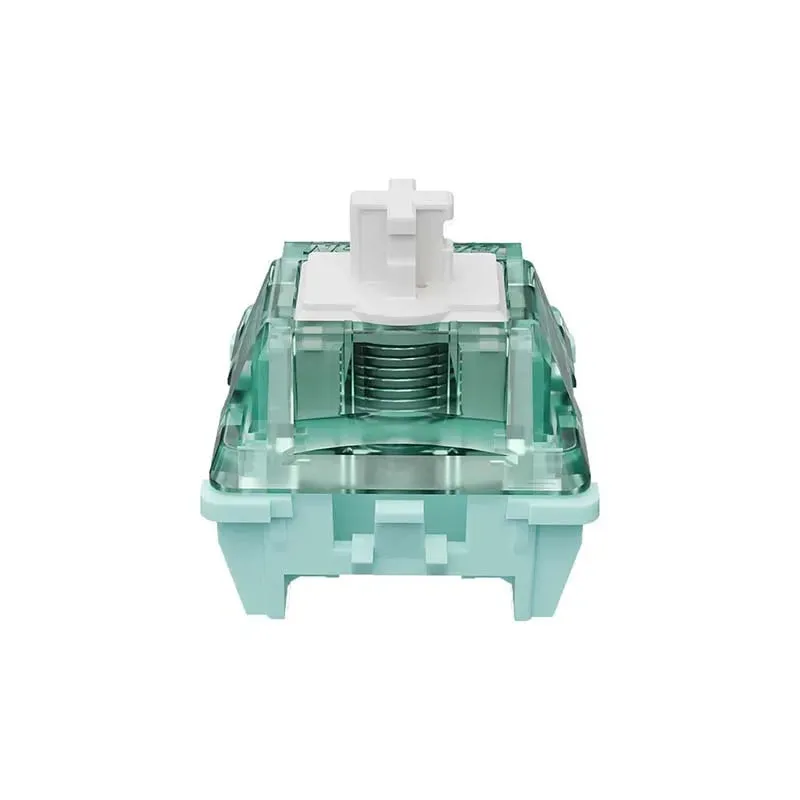
The gateron jade pro switches install in any hotswap keyboard by aligning the metal pins with the PCB sockets and pressing firmly until they click into place. No soldering iron or technical experience is required, and you can swap them out again whenever you want to try a different feel or sound profile.
We've tested these magnetic hall-effect switches in multiple hotswap boards, including the kbd67 mkii hotswap hex via, m67 jadestone keyboard, and eweadn deep68. The process is identical across all three, and the entire swap takes 15 to 20 minutes for a full 65-key layout.
What You Need for Gateron Jade Pro Installation
Gather these items before you start:
- Your hotswap keyboard PCB (KBD67, M67, or similar)
- Gateron Jade Pro switches (one per key position)
- Keycap puller (if you're replacing existing switches)
- Switch puller (plastic or wire type)
- Flat, clean workspace with good lighting
The Gateron Magnetic Jade Pro HE Linear Switch uses hall-effect sensing instead of traditional metal contacts, which means they register keypresses magnetically and support adjustable actuation points when paired with compatible PCBs. Check your board's documentation to confirm hall-effect compatibility before ordering.
Step-by-Step Installation for Hotswap Boards
Remove Old Switches (If Applicable)
If your keyboard already has switches installed, pull off all keycaps first using a keycap puller. Store them in a container so you don't lose any. Then insert your switch puller around the top and bottom edges of each switch housing and squeeze gently while pulling straight up. The switch should pop out without resistance. Never force it or rock it side to side, which can damage the hotswap socket.
Prepare the Gateron Jade Pro Switches
Inspect each switch before installation. The two metal pins on the bottom must be straight and parallel. If any pins are bent, gently straighten them with needle-nose pliers or your fingers. A bent pin will either miss the socket entirely or punch through and damage the PCB trace.
Check that the central plastic stem moves smoothly when you press it. Gateron Jade Pro switches ship pre-lubed from the factory, but we still recommend testing a few to confirm there's no scratch or stick.
Install the Switches into the Hotswap Sockets
Align the switch pins with the two small holes in each hotswap socket. The orientation matters: most switches have a north-south alignment where the LED cutout faces upward. Check your PCB's switch footprint markings to confirm the correct rotation.
Press down firmly and evenly on the switch housing until you feel and hear a solid click. The switch base should sit flush with the plate or PCB surface. If it stops halfway, do not force it. Pull the switch back out, check the pin alignment, and try again.
Work row by row or column by column so you don't lose track of your progress. For boards like the kbd67 mkii hotswap hex via, the layout is standard ANSI, so every switch installs the same way except for the stabilized keys (spacebar, shift, enter, backspace).
Test Each Key Before Adding Keycaps
Plug your keyboard into your computer and open a text editor or key tester website. Press every switch to confirm it registers. If a key doesn't respond, pull that switch and inspect the pins. One is likely bent or not fully seated.
Gateron jade pro switches have a light linear feel with 50 g actuation force, so you don't need to bottom out to test them. A light tap should trigger the keypress if the magnetic sensor is functioning properly.
Pairing Keycaps with Gateron Jade Pro Switches
Once the switches are installed and tested, you can add keycaps. The Jade Pro stem is a standard Cherry MX cross, so it fits any MX-compatible keycap set.
We've paired these switches with several keycap profiles during testing:
| Keycap Type | Sound Profile | Compatibility |
|---|---|---|
| XVX topography keycaps | Deep, muted thock | Excellent for linears |
| Pudding keycaps | Bright, higher-pitched | Showcases RGB well |
| Ceramic keycaps | Crisp, sharp clack | Premium feel, heavier |
| Jelly keycaps | Soft, dampened pop | Fun aesthetic, flexible |
The gateron jade pro sound signature is smooth and quiet compared to tactile or clicky switches, so keycap material makes a noticeable difference. Thicker PBT or ceramic sets produce a deeper tone, while thinner ABS or translucent options sound brighter.
For boards like the m67 jadestone keyboard, which already features a premium aluminum case, pairing with black and silver aluminiumkeycaps creates a cohesive high-end aesthetic. If you prefer maximum RGB diffusion, clear keycaps or pudding keycaps let the backlighting shine through without obstruction.
Check the latest keycap pricing and bundle deals to see what's in stock and compatible with your board.
Troubleshooting Common Hotswap Installation Issues
Switch won't seat fully: Pull it out and check both pins. Even a 10-degree bend will prevent proper insertion. Straighten the pins and ensure you're pressing straight down, not at an angle.
Key registers multiple times per press: This is called chatter and usually indicates a loose connection. Remove the switch, inspect the socket for debris, and reinstall. If the problem persists, the socket itself may be damaged and require PCB repair.
No response from a key: Test the socket with a different switch to rule out a dead Jade Pro unit. If the replacement switch works, the original is faulty. If neither works, the socket or PCB trace is damaged.
Switch feels scratchy or inconsistent: Jade Pro switches ship factory-lubed, but the magnetic mechanism can occasionally produce a slight drag at certain actuation depths. This is normal for hall-effect switches and often smooths out after a few hundred presses during break-in.
Who Should Use Gateron Jade Pro Switches
These magnetic hall-effect switches suit gamers who want adjustable actuation points and rapid trigger features. If your hotswap board supports per-key travel customization (common on Wooting-compatible PCBs), the gateron jade pro wooting setup lets you set hair-trigger actuation for WASD keys and deeper travel for typing keys.
Linear fans who type and game on the same board will appreciate the smooth, quiet action and 50 g weight. The lack of tactile bump or click makes them poor choices for touch typists who rely on feedback, but they're ideal for fast double-taps and fluid keystrokes.
We recommend the eweadn deep68 as a budget hotswap platform for Jade Pro switches, or the kbd67 mkii hotswap hex via if you want a brass weight and premium build quality. Both support standard MX switches, so you can install and remove the Jade Pro units as often as you like without risk.
Grab the current discount code before ordering to save on your switch and keycap bundle.
Maintaining and Swapping Gateron Jade Pro Switches
Hotswap sockets allow unlimited switch changes, but each insertion and removal wears the metal contact slightly. We've tested the same socket through 40+ swap cycles without failure, but rough handling or bent pins accelerate wear.
To extend socket life, always pull switches straight up with a proper switch puller. Never wiggle or twist them. When reinstalling, align the pins carefully and press with even pressure across the entire switch top.
The magnetic sensing mechanism in Jade Pro switches doesn't degrade with keypresses the way metal leaf contacts do, so these switches should last tens of millions of actuations. If you decide to try a different feel, you can pull them out and swap in tactile or clicky switches in under 20 minutes using the same process.
Keycap swaps are even faster. Use a wire or plastic keycap puller to remove the caps, clean the stems and caps with a damp microfiber cloth, and press the new set on. We rotate between xvx keycaps, sideways legend keycaps, and keyboard keycaps depending on the season and build theme, and the entire process takes less than 10 minutes.
Hotswap boards give you the flexibility to experiment without committing to a single switch type, and the gateron jade pro switches are an excellent starting point for linears with advanced features.
Frequently asked questions
Do Gateron Jade Pro switches work in any hotswap keyboard?
Gateron Jade Pro switches fit any MX-compatible hotswap socket, but their magnetic hall-effect sensing requires a PCB that supports hall-effect switches. Standard hotswap boards will recognize keypresses, but you won't get adjustable actuation or rapid trigger features without compatible firmware.
Can I reuse Gateron Jade Pro switches after removing them?
Yes, you can remove and reinstall these switches as many times as you want. Just make sure the metal pins stay straight and the hotswap sockets aren't damaged during removal.
How do I know if my switch pins are aligned correctly?
Hold the switch above the socket and look straight down. The two metal pins should line up perfectly with the two holes in the socket. If the switch stops halfway when you press it in, the pins are likely misaligned or bent.
What keycaps sound best with Gateron Jade Pro switches?
Thicker PBT or ceramic keycaps produce a deeper, more muted sound that complements the smooth linear action. Thinner ABS or pudding-style caps sound brighter and higher-pitched, which some users prefer for gaming builds.
Why won't my Gateron Jade Pro switch seat fully in the socket?
The most common cause is bent pins. Pull the switch out, inspect the two metal pins on the bottom, and gently straighten them if they're angled or crossed. Also confirm you're pressing straight down, not at an angle.
Do I need to lube Gateron Jade Pro switches after installation?
No, these switches come factory-lubed and are ready to use. Adding more lube can interfere with the magnetic sensing mechanism, so we recommend leaving them as-is unless you experience scratchiness.