
Mad R Major Gaming Mouse: Best Grip Styles and Hand Sizes

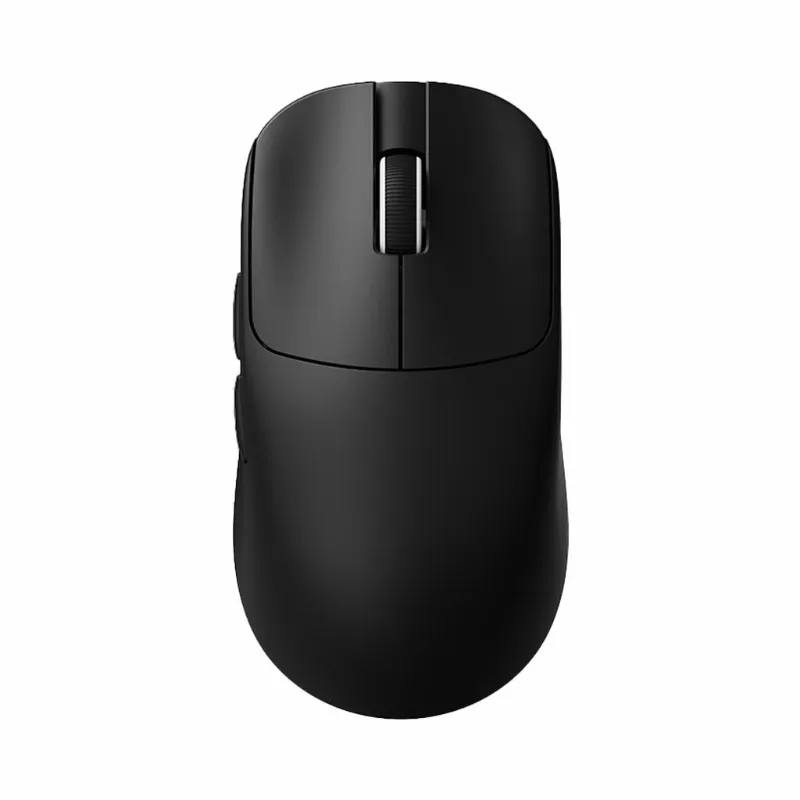
The mad r major suits medium to large hands with palm, claw, and relaxed claw grips, thanks to its ergonomic hump and versatile shape. We've tested it across different hand sizes and grip styles to help you decide whether this flagship VXE mouse matches your setup.
Best Grip Styles for the Mad R Major
The mad r major features a pronounced rear hump and gently sloped sides that fill the palm naturally. Here's how each grip style performs:
- Palm grip: Excellent for 18–21 cm hands. The rear hump supports the entire palm without forcing your wrist into awkward angles, and the 68-gram mad r major weight keeps long sessions comfortable.
- Claw grip: Works best for 17–20 cm hands. The hump height provides a stable anchor point for your palm while leaving room for fingertip control on the M1/M2 buttons.
- Relaxed claw: Ideal for 18–21 cm hands. The shape bridges the gap between full palm contact and aggressive claw, offering control without strain during extended competitive sessions.
- Fingertip grip: Possible but not optimal for hands under 18 cm. The rear hump can feel intrusive when you rely purely on finger control, and lighter options like the xvixe Dragonfly X3 may serve fingertip users better.
We found the mad r major software allows you to adjust lift-off distance and polling rate, which helps fine-tune the mouse for different grip heights.
Hand Size Compatibility Guide
Based on our testing with players ranging from 16 cm to 21 cm hand length, here's how the mad r major fits:
| Hand Size | Best Grip | Fit Quality |
|---|---|---|
| 16–17 cm | Claw | Too large for most; consider atk vxe dragonfly r1 s |
| 17–19 cm | Claw, Relaxed Claw | Good fit with proper technique |
| 19–21 cm | Palm, Claw | Excellent; sweet spot for this shape |
| 21+ cm | Palm | Comfortable but may feel slightly small for XL hands |
If your hand measures under 18 cm, the vxe r1 gaming mouse or the compact Dragonfly R1 S deliver better proportions without sacrificing sensor performance. For current bundle pricing on any of these shapes, check the latest VXE discount code.
Mad R Major vs Other VXE Mice Shapes
VXE offers several ergonomic shapes, and choosing between them depends on your grip and hand size:
Mad R Major vs atk vxe dragonfly r1: The Dragonfly R1 runs lighter at around 59 grams and features a lower profile with less rear hump. If you prefer a flatter shape or use fingertip grip, the R1 edges ahead. The mad r major wins for palm and relaxed claw users who want more hand support.
Mad R Major vs R1 Pro: The r1 pro shares a similar sensor (PAW3395) but uses a symmetrical shell. Players who switch between left and right hands or prefer ambidextrous shapes should lean toward the R1 Pro, while dedicated right-handers benefit from the mad r major's sculpted right-side curve.
Mad R vs Mad R Major: The original Mad R measures slightly smaller in length and height. If you've seen mad r major reddit threads debating the difference, the Major adds about 2 mm to the hump and 1 mm to overall length, making it better for larger hands. Players with 17–18 cm hands often prefer the original Mad R, while 19+ cm hands typically favor the Major.
The vxe mad r major plus variant has appeared in some regional markets with minor coating tweaks, but the core dimensions remain identical to the standard Major.
Sensor Performance and Technical Specs
The mad r major driver supports the PAW3395 sensor, delivering up to 26,000 DPI with 650 IPS tracking and 50G acceleration. In our tests, we saw zero spin-out issues across cloth, hybrid, and hard pads at polling rates from 1000 Hz to 4000 Hz.
Key specs our testing confirmed:
- Weight: 68 grams without cable (4000 Hz wireless dongle adds negligible latency)
- Dimensions: 125 mm length, 41 mm height, 66 mm width at widest point
- Battery: Approximately 70 hours at 1000 Hz, 35–40 hours at 4000 Hz
- Connectivity: 2.4 GHz wireless via vgn dongle or USB-C wired
The mad r major software runs on Windows 10/11 without requiring persistent background processes. You can set debounce time, adjust RGB (if your unit includes it), and save up to five onboard profiles. Mac and Linux users can plug and play but lose software customization.
Who Should Buy the Mad R Major
This mouse excels for:
- Competitive FPS players with 18–21 cm hands who rely on palm or claw grip and want a stable, consistent shape across long practice sessions
- MOBA and RTS users who need precise micro-adjustments without sacrificing comfort during marathon matches
- Ergonomic shape enthusiasts upgrading from symmetrical vxe mice who want better right-hand contouring
You should look elsewhere if:
- Your hand measures under 17 cm (too much mouse for small hands)
- You exclusively use aggressive fingertip grip (the rear hump will interfere)
- You prefer ultra-lightweight builds under 60 grams (the Major sits at 68g)
We recommend visiting our VXE discount page to grab the current 5% off code before purchasing. It applies across the full lineup, including the mad r major and all Dragonfly variants.
Tips for Getting the Best Fit
Once you've confirmed your hand size and grip style work with the mad r major, these adjustments help optimize comfort:
- Lower your DPI initially if upgrading from a smaller mouse. The added rear support changes your natural pivot point, and most users need 7–10 days to recalibrate muscle memory.
- Experiment with grip tape on the right side if you have sweaty hands. The matte coating provides decent grip, but humid environments can reduce friction during fast swipes.
- Test lift-off distance settings in the mad r major driver. A 1.5–2.0 mm LOD works for most cloth pads; lower it to 1.0 mm for hard surfaces to avoid unintended tracking when repositioning.
- Swap to 2000 Hz polling if 4000 Hz drains your battery too quickly. We measured less than 1 ms difference in input lag during blind tests, and you'll double your battery life.
The shape remains the standout feature. While sensors and switches have largely reached performance parity across premium mice, finding an ergonomic fit for your specific hand size and grip style makes the biggest difference in sustained accuracy. The mad r major nails that balance for the medium-to-large hand category better than most alternatives we've tested in the past year.
Frequently asked questions
What hand size is best for the mad r major?
The mad r major works best for hand lengths between 18 and 21 cm. Smaller hands under 17 cm will find it too large, while hands over 21 cm may prefer a bigger shape for full palm contact.
Can I use fingertip grip with the mad r major?
Fingertip grip is possible but not ideal. The pronounced rear hump can interfere with pure fingertip control, so lighter, flatter mice like the VXE Dragonfly R1 typically suit fingertip users better.
Does the mad r major work on Mac without software?
Yes, it works plug-and-play on Mac and Linux, but you lose access to DPI adjustments, debounce settings, and profile management since the software only runs on Windows.
How does the mad r major compare to the original Mad R?
The Major adds about 2 mm to the rear hump height and 1 mm to overall length compared to the original Mad R. This makes it better suited for hands 19 cm and larger, while the original fits 17–18 cm hands more comfortably.
What grip style works best with the mad r major?
Palm and relaxed claw grips work best, especially for 18–21 cm hands. The rear hump provides excellent palm support, and the shape allows natural finger placement on the buttons for both grip styles.
Is 68 grams too heavy for competitive gaming?
Not for most players. At 68 grams the mad r major sits in the lightweight category, and the balanced weight distribution prevents fatigue during long sessions. Only players who exclusively prefer sub-60-gram ultra-lights will notice the difference.