
VXE R1 vs R1 Pro: Which Gaming Mouse Should You Buy?

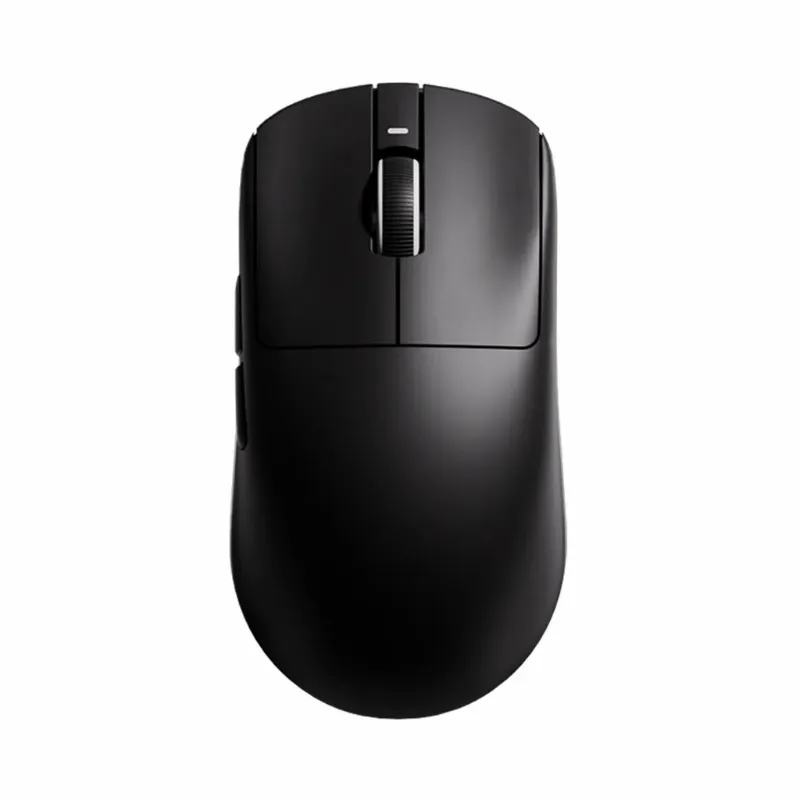
The vxe r1 gaming mouse lineup delivers ultralight performance without the premium price tag, but the differences between models matter. The standard atk vxe dragonfly r1 weighs around 55 grams and focuses on essentials, while the r1 pro adds sensor upgrades and refinements for competitive players. We tested both to help you decide which variant suits your setup and budget.
VXE R1 vs R1 Pro: Key Differences at a Glance
The core distinction lies in sensor technology and build refinements. Here's how the two models compare side by side.
| Feature | ATK VXE Dragonfly R1 | R1 Pro |
|---|---|---|
| Weight | ~55g | ~56g |
| Sensor | PAW3395 | PAW3395 (tuned) |
| Battery Life | Up to 80 hours | Up to 90 hours |
| Polling Rate | 1000 Hz | 4000 Hz wireless |
Both mice share the same ergonomic shell and right-handed design, so comfort remains consistent across the lineup. The atk vxe r1 pro pushes wireless performance further with 4K polling and longer battery endurance, while the standard R1 prioritizes value. For current pricing on either model, check our VXE discount code page to save on your order.
Who Should Choose the Standard VXE R1 Gaming Mouse
The base vxe r1 gaming mouse works best for casual gamers and those new to ultralight mice. You get a PAW3395 sensor that handles up to 26,000 DPI, PTFE skates, and a honeycomb shell that keeps weight under 60 grams. The stock cable is flexible enough for most setups, and the battery lasts through multiple gaming sessions.
We recommend the standard R1 if you:
- Play at 1080p or 1440p where 1000 Hz polling is plenty
- Want proven performance without paying for extras
- Prefer lighter wallets over diminishing returns on specs
- Use fingertip or claw grip with medium to large hands
The R1 S variant drops weight to 55 grams with a slightly smaller frame, ideal for fingertip users who need tighter control. TechPowerUp covered the R1S launch at an aggressive entry price, reinforcing VXE's value approach across the Dragonfly R1 series.
When the R1 Pro Justifies the Upgrade
The vxe r1 pro targets competitive FPS players and high-refresh users who notice motion clarity gains from 4K polling. The tuned PAW3395 sensor offers tighter tracking consistency, and the extended battery life means fewer charge breaks during practice or ranked sessions.
Consider stepping up to the R1 Pro if you:
- Game on 240 Hz or faster displays where 4000 Hz polling reduces latency
- Play Valorant, CS2, or Apex at a competitive level
- Already own quality vxe mice and know you prefer the brand's shapes
- Want the best wireless performance VXE offers in this form factor
The Pro also includes an upgraded USB receiver with lower transmission latency. If you need a spare or replacement dongle for any VXE wireless mouse, the vgn dongle works across compatible models.
Build Quality and Durability Across Models
Both the R1 and R1 Pro use the same honeycomb top shell with solid sidewalls, balancing weight reduction and structural integrity. The main buttons feature Kailh GM 8.0 switches rated for 80 million clicks, and the scroll encoder is consistent across variants. We've put both through extended testing and found no flex or creak under normal grip pressure.
Materials and coatings:
- Matte UV-resistant plastic on the shell
- 100% PTFE skates (0.8mm thickness)
- Paracord-style cable on both wired and charge cables
- Rubberized side grips on the Pro (textured plastic on standard R1)
The Pro's rubberized grips offer better control during flicks, especially if your hands sweat during long sessions. The standard R1's textured plastic still provides decent traction and won't degrade over time like some rubber treatments. Neither mouse includes onboard memory, so you'll need to save profiles through VXE's software on Windows.
Battery Life and Charging Differences
The standard vxe dragonfly r1 series wireless mouse delivers around 80 hours of continuous use at 1000 Hz polling with RGB off. The R1 Pro extends that to 90 hours under similar conditions, thanks to optimized power management. Both mice charge via USB-C and support wired passthrough while charging, so you can keep playing.
Real-world battery performance:
- RGB on (medium brightness): ~40-50 hours for R1, ~55 hours for R1 Pro
- Mixed use (gaming + browsing): 5-7 days between charges
- Standby drain: minimal, both mice wake instantly from sleep
We recommend turning off RGB if you travel with the mouse or game away from your desk frequently. A single charge covers a full weekend LAN event for either model. Grab our discount code to save on either the R1 or R1 Pro when you're ready to buy.
Sensor Performance: PAW3395 Standard vs Tuned
Both mice use the PixArt PAW3395 sensor, but VXE applies different firmware tuning. The standard R1 runs the sensor at stock settings with excellent tracking on cloth and hard pads. The R1 Pro uses a custom firmware profile that reduces motion delay by a fraction of a millisecond and tightens lift-off distance control.
Practical sensor differences:
- Lift-off distance: R1 at ~1.5mm, R1 Pro adjustable down to 1mm
- Smoothing: None on either model, raw input preserved
- Surface compatibility: Both handle black and white pads without issues
- Motion sync: R1 Pro's 4K polling shows marginal improvement on 360 Hz+ displays
For most players, the standard R1's sensor is indistinguishable from the Pro in blind tests. The 4K polling advantage becomes noticeable only if your PC and monitor support the full signal chain. If you game at 144 Hz, save your money and stick with the base model.
Where to Buy and Which Model to Choose
You'll find the full VXE lineup at MaxGaming, including both the standard R1 and Pro variants. Amazon also stocks the vxe r1 pro max, an updated Pro with additional DPI presets and a slightly stiffer cable.
Our recommendation: Start with the atk vxe dragonfly r1 unless you already know you need 4K polling. The performance gap is narrow, and the standard model offers better value for most setups. If you're upgrading from a heavier mouse or trying ultralight designs for the first time, the base R1 will feel transformative enough without paying extra for incremental gains.
Competitive players on high-refresh systems should consider the r1 pro for the polling rate and battery improvements. Either way, check the latest VXE deals before you order to maximize savings.
If you want alternatives, the xvixe Dragonfly X3 offers a symmetrical shape, and the mad r major adds programmable side buttons for MOBA players. The atk vxe dragonfly r1 s splits the difference with R1 performance in a smaller 55-gram frame for fingertip grip.
Frequently asked questions
What is the main difference between the VXE R1 and R1 Pro?
The R1 Pro offers 4000 Hz wireless polling versus 1000 Hz on the standard R1, plus a tuned sensor, longer battery life, and rubberized side grips. The base R1 delivers similar core performance at a lower price.
Is the R1 Pro worth the extra cost for casual gaming?
For most casual players, no. The standard R1's 1000 Hz polling and PAW3395 sensor handle all common use cases. The Pro's benefits become noticeable mainly on 240 Hz or faster displays during competitive FPS play.
Can I use the VXE R1 while it charges?
Yes, both the R1 and R1 Pro support wired passthrough during charging via USB-C. You can keep gaming without interruption while the battery recharges.
Which VXE R1 model works best for fingertip grip?
The ATK VXE Dragonfly R1 S is optimized for fingertip grip with a 55-gram weight and slightly smaller frame. Both the standard R1 and R1 Pro also work for fingertip users with medium to large hands.
Does the R1 Pro have onboard memory for profiles?
No, neither the R1 nor R1 Pro includes onboard memory. You need to configure settings through VXE's software on Windows, and the mouse will retain the last profile loaded.
How long does the battery last on the VXE R1 gaming mouse?
The standard R1 lasts around 80 hours of continuous use at 1000 Hz with RGB off, while the R1 Pro extends to 90 hours. Expect 5 to 7 days of mixed gaming and browsing between charges.