
Does the Maono AU-A04 Kit Work Well for Podcast Recording?

Does the Maono AU-A04 Work for Podcasting?
The maono au-a04 delivers clear, broadcast-quality audio for podcast recording and works especially well for solo hosts and interview formats on a budget. This condenser microphone kit includes everything you need to start recording: a cardioid capsule that rejects room noise, a scissor arm stand, a pop filter, and USB connectivity that works with any computer. We tested the AU-A04 for vocal clarity, ease of setup, and real-world podcasting scenarios to see how it stacks up against both budget competitors and Maono's own newer models.
What You Get in the Maono AU-A04 Kit
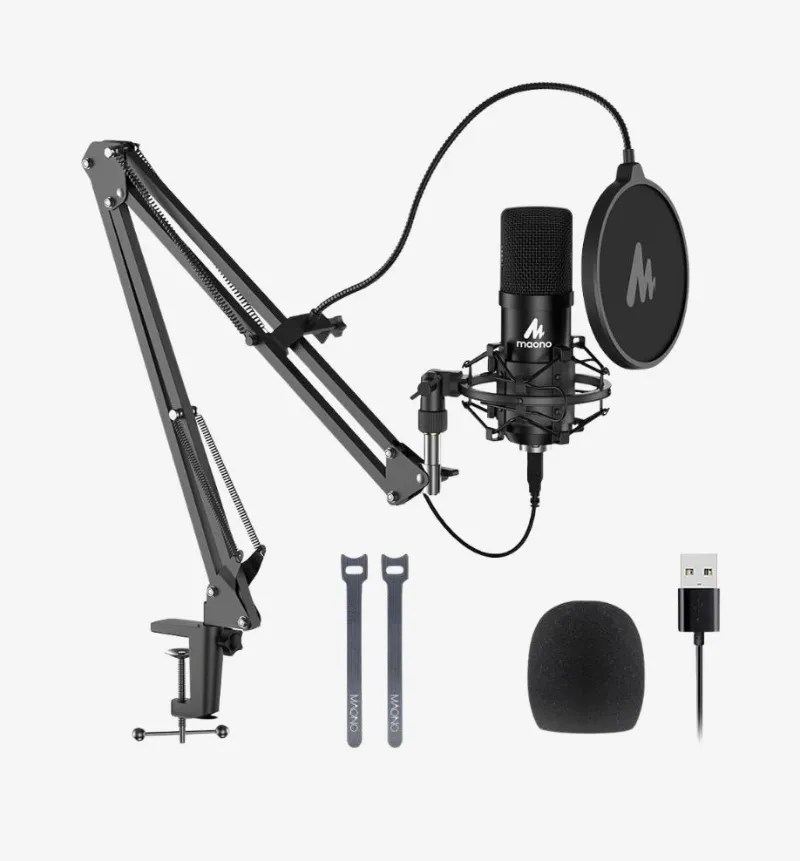
The AU-A04 arrives as a complete bundle designed for immediate use. You receive a large-diaphragm condenser microphone with a cardioid pickup pattern, a sturdy metal scissor arm with desk clamp, an integrated shock mount, a double-layer pop filter, a foam windscreen, and a USB sound card adapter. The kit also includes all necessary cables: USB-A to the sound card and XLR from the microphone.
This plug-and-play design means you avoid shopping for individual accessories. The scissor arm adjusts smoothly and holds position without drooping, even after months of use. The shock mount isolates the mic from desk vibrations and keyboard noise, which matters for podcasters who type show notes or control recording software during sessions.
One limitation: the included USB sound card is basic. It provides 16-bit/48kHz audio, adequate for voice but not audiophile-grade. The maono au-a04 mic performs well within these specs, but if you later upgrade to an audio interface with phantom power, you can bypass the USB adapter entirely and run the mic via XLR for slightly better dynamic range.
Sound Quality and Vocal Performance
The AU-A04 captures vocals with clarity and warmth in the midrange frequencies where human speech lives. We recorded test sessions with male and female voices at conversational volume and found minimal coloration. The cardioid pattern rejects sound from the sides and rear effectively, so a co-host sitting two feet away or a window-unit air conditioner behind you stays mostly off-mic.
Background noise handling is good but not exceptional. The mic will pick up mechanical keyboard clicks, chair squeaks, and nearby traffic if your recording space lacks basic treatment. A carpeted room with curtains or foam panels makes a noticeable difference. For maono au a04 reddit users, the consensus is that proximity matters: speaking 4 to 6 inches from the capsule gives the best balance of presence and room-noise rejection.
Compared to Maono's newer USB models like the maono pd200x or maono pd400x, the AU-A04 lacks onboard gain control and a mute button. Those conveniences are valuable during live recordings, but the AU-A04 remains a strong choice if you control levels in software and your budget is tight. Check the latest price to see how the AU-A04 compares to the PD series.
How to Set Up the Maono AU-A04 for Podcasting
Setup takes under ten minutes. Mount the scissor arm to your desk using the included C-clamp, attach the shock mount to the arm's threaded end, and slide the microphone into the elastic bands. Connect the XLR cable from the mic to the USB sound card, then plug the USB cable into your computer.
Driver installation: Windows and macOS recognize the USB sound card immediately as a standard audio input device. No proprietary driver or maono au-a04 driver download is required for basic operation. Select the USB audio device in your recording software (Audacity, Adobe Audition, Riverside, or your DAW of choice) and set the sample rate to 48 kHz.
Positioning tips:
- Place the mic slightly off-axis (not directly in front of your mouth) to reduce plosives
- Angle the pop filter one inch from the capsule
- Keep the gain on your recording software around 70 to 80 percent to avoid clipping on louder syllables
If you later add a maonocaster g1 neo audio mixer or maono caster e2, you can route the AU-A04 through the mixer's XLR input for hardware-level compression and EQ. This hybrid setup gives you tactile control without abandoning the AU-A04's proven capsule.
Maono AU-A04 vs. Newer Maono Models
Maono has released several USB and XLR microphones since the AU-A04 launched. Here is how the AU-A04 compares to three popular successors:
| Feature | AU-A04 | PD200X | PD400X |
|---|---|---|---|
| Connectivity | XLR + USB adapter | USB-C & XLR | USB-C & XLR |
| Onboard Controls | None | Gain, mute, monitor | Gain, mute, monitor, RGB |
| Bit Depth | 16-bit/48kHz | 24-bit/96kHz | 24-bit/96kHz |
| Price Tier | Entry | Mid | Mid-high |
The maono pd200x microphone and maono pd400x offer dual connectivity, meaning you can switch between USB and XLR without re-cabling. They also include zero-latency headphone monitoring, which eliminates the slight delay you hear when monitoring through your computer. If you record long-form interviews or co-hosted shows, that feature reduces fatigue.
However, the AU-A04 remains relevant for two reasons: lower cost and a proven capsule design. Many podcasters prefer the AU-A04's slightly warmer tone over the crisper, more neutral sound of the PD series. If you already own an audio interface or plan to invest in one, the AU-A04's XLR-first design integrates seamlessly.
For creators who need portability and software integration, the maono link software pairs with newer Maono USB mics to unlock noise suppression and EQ presets. The AU-A04 does not support this ecosystem, so you will handle effects in your DAW or use third-party plugins.
Who Should Choose the Maono AU-A04 for Podcasts?
The AU-A04 suits podcasters who prioritize audio quality over convenience features and who record in semi-treated spaces. It works well for:
- Solo narrative or interview podcasts where you control pacing and can monitor levels in real time
- Budget-conscious creators who want a complete kit without piecing together components
- Beginners learning microphone technique, since the cardioid pattern forgives minor positioning errors
- Podcasters planning to upgrade to an audio interface later, since the XLR connection future-proofs your investment
Skip the AU-A04 if you need:
- Onboard mute and gain controls for live-streaming or remote interviews
- USB-C connectivity for newer laptops without USB-A ports (though adapters work fine)
- 24-bit recording for music production or high-fidelity voice work
For multi-person setups, consider pairing the AU-A04 with a second maono microphone and a small mixer like the maono caster g1 neo, which provides two XLR inputs and dedicated faders. This combination costs less than two high-end USB mics and gives you analog control over each voice.
Maintenance and Long-Term Performance
The AU-A04 holds up well over months of regular use. The metal scissor arm and shock mount show minimal wear, though the elastic bands in the shock mount may loosen after a year of frequent adjustments. Replacement shock mounts are inexpensive and widely compatible with standard 48–52mm diameter condensers.
Clean the pop filter every few weeks by removing it from the gooseneck and rinsing it under warm water. Let it air-dry completely before reattaching. The foam windscreen traps dust and should be replaced every six months if you record daily.
Troubleshooting common issues:
- Low volume in recordings: Increase input gain in your operating system's sound settings or your DAW. The USB adapter has fixed gain, so software is your only adjustment point.
- Hiss or hum: The USB sound card can introduce slight noise on cheaper USB hubs. Plug directly into your computer's USB port for the cleanest signal.
- Intermittent dropouts: Check that the XLR cable is firmly seated in both the mic and the sound card. The screw-lock on the sound card's XLR input should be finger-tight.
If you want to dive deeper into maono au a04 review details or explore the maono au-a04h variant (which uses a slightly different shock mount), third-party tests confirm consistent performance across batches. The AU-A04 does not suffer from the quality-control issues that plague some ultra-budget condenser mics.
Where to Buy and Current Discounts
We recommend purchasing the AU-A04 directly from authorized retailers to ensure you receive the full kit and valid warranty. Grab the code for 10% off sitewide, which applies to the AU-A04 and accessories like replacement pop filters or upgraded shock mounts.
Prices fluctuate seasonally, so checking the current offer before you buy can save you 15 to 20 dollars. The AU-A04 frequently appears in bundle deals with the maono wave t5 or other Maono products, which is worth considering if you plan to outfit a small studio or record with a co-host.
For official specifications and regional pricing, the Maono AU-A04 official page lists the mic's frequency response (20Hz–20kHz) and sensitivity (−38dB±2dB), though most podcasters will find the real-world vocal performance more useful than spec sheets. If you have questions about compatibility with specific recording software or mixers like the maono pd300x, customer support can confirm connectivity before you order.
Frequently asked questions
Does the Maono AU-A04 need phantom power to work?
No, the included USB sound card provides power to the microphone. If you connect the AU-A04 to an audio interface via XLR, you will need to enable 48V phantom power on that interface.
Can I use the Maono AU-A04 with a smartphone or tablet?
Yes, but you will need a USB OTG adapter for Android or a Lightning-to-USB adapter for iOS. The mic draws minimal power, so most mobile devices support it without issues.
How does the AU-A04 compare to the Blue Yeti for podcasting?
The AU-A04 offers warmer vocal tone and includes a boom arm and pop filter in the kit. The Blue Yeti has multiple pickup patterns and onboard controls. Both perform well for podcasts, but the AU-A04 provides better value if you need the full accessory bundle.
Is there a Gen 2 version of the Maono AU-A04?
Some retailers list a maono au a04 gen 2, but it is the same microphone with updated packaging. The capsule and specs remain identical to the original AU-A04.
Will the AU-A04 work with Discord or Zoom for remote podcast interviews?
Yes, the USB sound card appears as a standard microphone input in all conferencing apps. Select it in your app's audio settings, and your guests will hear clear audio.
Can I mount the Maono AU-A04 on a standard mic stand instead of the scissor arm?
Yes, the shock mount has a 5/8-inch threaded insert compatible with most microphone stands and boom arms. You can swap the included scissor arm for any standard stand.