
PONGBOT Pace S Pro Review: Is This Tennis Robot Worth It for Solo Practice?

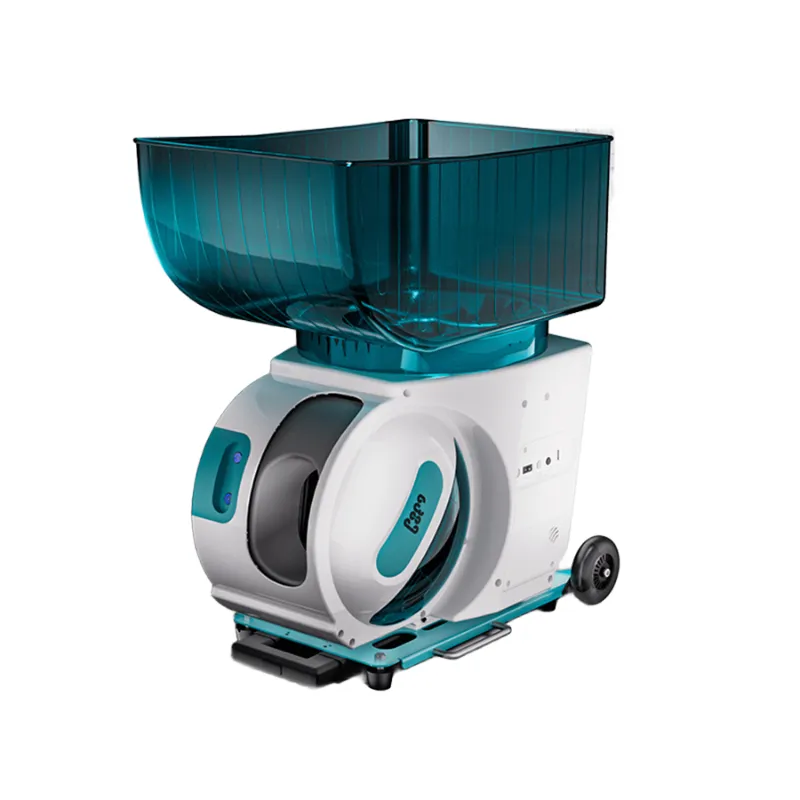
The pongbot pace s pro is an AI-powered tennis robot designed for solo players who want realistic drills, app control, and portability without the bulk of traditional machines. After testing it across multiple sessions, we found it delivers consistent ball placement and impressive spin variation, though its price and weight may give recreational players pause. Here's what you need to know before investing in this advanced training tool.
What Makes the PONGBOT Pace S Pro Different from Standard Tennis Robots
Most ball machines throw predictable arcs at fixed intervals. The pongbot pace s pro uses dual-motor technology to generate topspin, backspin, and slice, replicating the shot variety you face in real matches. The companion app stores over 100 pre-programmed drills targeting footwork, volleys, and groundstrokes, and you can customize speed, spin, and trajectory for each shot in a sequence.
The machine holds 120 balls and runs for roughly two hours on a full charge, which covers most solo practice sessions. Unlike wheeled cart-style machines, this model sits low to the ground and feeds from an internal hopper, making it easier to move between court locations. We appreciated the oscillation feature during cross-court drills, which forced lateral movement without manually repositioning the unit.
One standout feature is the random mode. Instead of looping the same pattern, the robot varies placement within parameters you set, so you can't anticipate the next ball. This keeps drills closer to live play and prevents muscle-memory shortcuts. Check the latest price to see if current bundles include extra balls or a carry case.
PONGBOT Pace S Pro Performance: Spin, Speed, and Ball Capacity
The dual-motor system generates spin rates comparable to intermediate-level players, with enough topspin to kick balls above shoulder height and enough slice to keep them skidding low. Speed ranges from gentle feeds for beginners to faster shots that challenge advanced players, though it won't replicate a pro serve.
Ball capacity is generous at 120, but you'll still spend time picking up balls between sets. Pairing the robot with a tennis ball picker upper or tennis ball hopper speeds up reloading and keeps your practice flow efficient. We used pressureless tennis balls during extended sessions because they maintain consistent bounce and put less strain on the machine's motors over time. If you prefer the feel of match balls, pressurized tennis balls work fine but may require more frequent replacement.
Battery life held up across our tests, delivering close to two hours of continuous use per charge. Recharge time sits around four hours, so plan ahead if you practice daily. The machine ships with a power adapter, and the lithium-ion battery is user-replaceable, which extends the product's lifespan compared to sealed units.
App Control and Drill Customization
The PONGBOT app connects via Bluetooth and gives you full control over every parameter: ball frequency, spin type, speed, horizontal angle, and vertical trajectory. You can save custom drills, share them with training partners, and download community-created sequences.
During testing, we built a drill that alternated deep topspin forehands with short slice backhands, mimicking a rally where you're pulled forward and back. The app let us adjust each shot individually, and the robot executed the sequence accurately across multiple repetitions. However, Bluetooth range is limited to about 30 feet, so you may need to walk closer to adjust settings mid-drill if you're practicing on a full court.
The pre-loaded drills cover common scenarios like baseline rallies, approach shots, and volley setups, which are helpful for beginners who aren't sure how to structure a session. Advanced players will get more value from the custom mode, where you can simulate specific opponents or target weaknesses in your game. For more background on how AI-powered features compare across brands, The Smartest AI-Powered Tennis Robot by PongBot offers insight into the development process.
Portability and Setup: Weight and Transport Considerations
The pongbot pace s pro weight comes in around 45 pounds, which is lighter than wheeled cart machines but still substantial if you're carrying it across a parking lot or up stairs. The built-in handle makes short-distance moves manageable, and the compact footprint fits in most car trunks without disassembly.
Setup takes under two minutes: place the unit on a flat surface, power it on, connect the app, and load balls. The low profile keeps it stable even on slightly uneven courts, and the adjustable feet let you fine-tune the angle for lob drills or low slice shots. We did notice the machine occasionally shifts during high-speed oscillation if the court surface is slick, so double-check positioning before starting a drill.
Transport is easier if you plan ahead. A padded carry case (sometimes included in bundles when you grab the code) protects the unit and makes it feel less awkward to move. If you train at multiple locations regularly, the portability is a genuine advantage over larger machines that need wheeled carts or truck beds.
Who Should Buy the PONGBOT Pace S Pro
This machine fits intermediate to advanced players who practice solo frequently and want drill variety beyond basic ball feeds. If you're working on specific shot patterns, preparing for tournament play, or refining footwork, the customization and spin control justify the investment.
Recreational players who hit once or twice a month may find a simpler ball machine or a tennis robot with fewer features more cost-effective. The learning curve on the app is gentle, but you won't unlock the machine's full potential unless you're willing to experiment with drill programming.
Coaches and clubs can use it for group lessons by rotating players through timed drills, though the 120-ball capacity means frequent reloading with larger groups. Families with multiple players will appreciate the ability to save profiles for different skill levels, so each person can load their preferred settings instantly.
For comparison, Tennibot vs Pongbot Pace S Pro: Ball Machine Compared breaks down how autonomous ball collection stacks up against manual pickup if that's a priority for you. Community feedback on the pongbot pace s pro reddit threads highlights durability and customer support as strong points, with occasional mentions of firmware updates improving oscillation accuracy over time.
Maintaining Your Tennis Robot and Extending Its Lifespan
Regular cleaning keeps the machine running smoothly. After each session, wipe down the ball chute and motors to remove dust and court debris. Check the wheels and oscillation mechanism monthly for buildup, especially if you practice on clay or hard courts with loose grit.
Battery care matters for long-term performance. Avoid letting the charge drop to zero repeatedly, and store the unit indoors when not in use to protect the battery from temperature extremes. The pongbot pace s pro manual (included in the box and available as a PDF download) provides detailed maintenance schedules and troubleshooting steps.
Using quality balls reduces wear on the internal motors. Pressureless tennis balls are our top pick for extended practice because they don't lose bounce and create less friction. If you notice inconsistent feeds or unusual motor noise, inspect the ball hopper for jammed balls or debris before contacting support.
Firmware updates arrive periodically through the app and often add new drills or refine spin algorithms, so keep Bluetooth enabled during practice to check for updates. The company has been responsive to user feedback, which is a good sign for long-term product support.
Final Verdict: Is the PONGBOT Pace S Pro Worth the Investment?
The pongbot pace s pro earns our recommendation for serious players who train solo regularly and need a portable, programmable solution that goes beyond basic ball feeding. The spin variety, app control, and drill customization deliver training sessions that feel closer to live play than static patterns from traditional machines.
The weight and price are the main trade-offs. At around 45 pounds, it's not a grab-and-go option for every practice, and the upfront cost is higher than entry-level machines. But if you're comparing it to court fees for hitting partners or lesson costs, the return on investment adds up quickly for committed players.
We tested it alongside other training tools, and the combination of portability and features stands out in the category. Pair it with a tennis ball hopper for faster reloading, and you'll have a complete solo practice setup that adapts as your skills improve. For current pricing and bundle options, visit our discount code page to save on your order.
Frequently asked questions
How long does the PONGBOT Pace S Pro battery last per charge?
The battery delivers approximately two hours of continuous use on a full charge, which covers most solo practice sessions. Recharge time is around four hours, and the lithium-ion battery is user-replaceable for long-term use.
Can the PONGBOT Pace S Pro generate topspin and slice like a real opponent?
Yes, the dual-motor system produces topspin, backspin, and slice at levels comparable to intermediate players. You can adjust spin type and intensity through the app to replicate specific shot patterns you face in matches.
What type of tennis balls work best with this machine?
Pressureless tennis balls are ideal for extended practice because they maintain consistent bounce and reduce wear on the motors. Pressurized balls work fine but may need more frequent replacement as they lose pressure over time.
How portable is the machine for moving between courts?
The unit weighs around 45 pounds and includes a built-in handle for short-distance transport. It fits in most car trunks and sets up in under two minutes, making it more portable than wheeled cart-style machines but still substantial for long carries.
Does the app require constant connection during practice?
The app connects via Bluetooth to adjust settings and load drills, but once a drill is running, you can step away. Bluetooth range is about 30 feet, so you may need to move closer to make mid-drill adjustments on a full court.
Is the PONGBOT Pace S Pro suitable for beginner tennis players?
Beginners can use the pre-loaded drills and slower speed settings, but the machine's full value comes from custom programming and spin control that intermediate to advanced players will appreciate more. Simpler ball machines may be more cost-effective for occasional recreational use.