
How to Set Up a Cellular Trail Camera for Remote Wildlife Monitoring

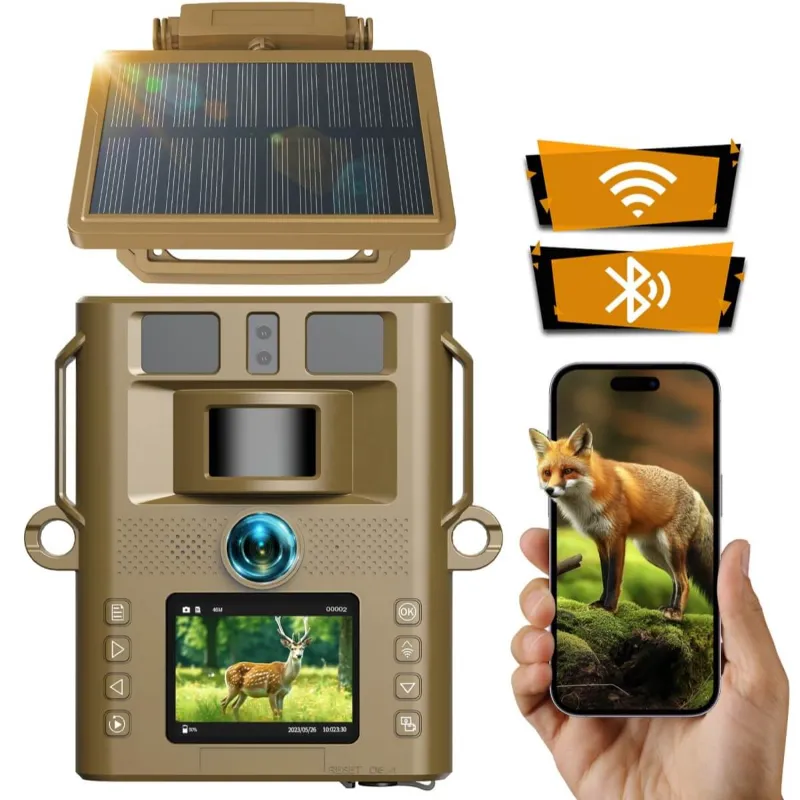
Setting up a cellular trail camera is simpler than you think: mount it at chest height facing north or south, activate your cellular plan, configure your detection settings, and start receiving photos on your phone. We tested the Voopeak trakivix and other models to walk you through the complete setup process for remote wildlife monitoring.
Unlike traditional trail cameras that store images locally, a cellular trail camera transmits photos and videos over cellular networks so you can check activity in real time from anywhere. This guide covers everything from choosing the right location to optimizing battery life and cellular connectivity.
Choosing the Best Location for Your Cellular Trail Camera
Placement makes or breaks your setup. We recommend scouting your property for high-traffic wildlife corridors, food sources, water holes, and bedding areas before mounting your camera.
Key placement factors:
- Signal strength – Test cellular reception with your phone at the exact mounting spot; even two bars is usually enough for a wireless cellular trail camera to transmit images
- Mounting height – Position the camera 3 to 4 feet off the ground, angled slightly downward to capture full-body shots of deer, turkey, and other game
- Sun direction – Face your trail cam north or south to avoid direct sunrise and sunset glare that washes out images
- Clear detection zone – Trim branches and tall grass within 15 feet of the lens so motion detection triggers on animals, not swaying vegetation
- Security – Mount on a sturdy tree at least 6 inches in diameter and use a lock box or cable lock to deter theft
Many hunters place cameras along field edges, near mineral licks, or on trails connecting bedding to feeding areas. We found success mounting our motion activated game camera at pinch points where multiple deer trails converge.
Setting Up Your Cellular Plan and Activation
Every cellular trail camera requires a data plan to transmit images. Most manufacturers offer their own subscription services, while some models work with standard carrier SIM cards.
Plan options typically include:
- Pay-per-transmission – Best for occasional use; you pay per photo sent
- Monthly unlimited – Fixed monthly fee for unlimited image transmission, ideal for high-traffic areas
- Annual plans – Discounted rate when you prepay for 12 months
The Voopeak models we tested use straightforward monthly plans that you activate through their mobile app. After inserting the included SIM card, download the manufacturer's app, create an account, scan the camera's QR code, and select your plan tier.
Before finalizing your plan, check which cellular networks the camera supports. AT&T and Verizon have the widest rural coverage, while T-Mobile continues expanding. If you are comparing cellular trail camera reviews, prioritize models that support multiple carriers or let you bring your own SIM for flexibility.
Looking to save on your setup? Grab the code for 10% off your camera and accessories.
Configuring Camera Settings for Optimal Performance
Once your cellular plan is active, dial in your camera settings to balance image quality with battery life and data usage.
| Setting | Recommended Value | Why It Matters |
|---|---|---|
| Image resolution | 12-20 MP | Higher resolution captures detail but uses more battery and data |
| Trigger speed | 0.3-0.5 seconds | Faster triggers catch moving animals before they leave the frame |
| Detection range | 60-80 feet | Match range to your specific setup; longer range drains battery faster |
| Photo burst | 3-5 images | Multiple shots increase odds of getting a clear, usable photo |
We recommend starting with medium resolution for daytime photos and testing how many images your plan allows. A live feed trail camera with video capabilities will consume significantly more data, so use video sparingly unless you have an unlimited plan.
Additional settings to optimize:
- Time-lapse mode – Schedule the camera to send images at set intervals (every 30 minutes, for example) to monitor field activity without relying solely on motion triggers
- Transmission schedule – Configure your voopeak trail camera to send images immediately or batch them during off-peak hours to conserve battery
- Detection sensitivity – Lower sensitivity in windy areas to reduce false triggers from moving branches; increase it in open fields where animals may pass at a distance
- Night mode – Choose between infrared (invisible to animals, black-and-white images) and low-glow LEDs (slight red glow, color night photos)
Most apps let you adjust settings remotely, so you can fine-tune performance without returning to the camera location.
Powering Your Setup with Batteries or Solar
Battery management is critical for long-term remote monitoring. Most cellular trail cameras run on 8 to 12 AA batteries, but transmission drains power faster than storing images locally.
Power options we tested:
- Lithium AA batteries – Last 2 to 4 times longer than alkaline in cold weather; essential for winter monitoring
- Rechargeable battery packs – External 12V packs extend runtime to several months between charges
- Solar panels – A solar panel for trail camera setups provides continuous trickle charging in sunny locations, virtually eliminating battery changes
We paired a solar panel with our test camera in an open field and went four months without touching the batteries. In dense forest with limited sunlight, lithium batteries proved more reliable.
To maximize battery life, reduce transmission frequency, lower image resolution slightly, and disable video unless you specifically need it. Check your app's battery status remotely so you can plan service trips before the camera goes offline.
Pairing with Motion Detection for Smarter Alerts
Modern cellular cameras use passive infrared (PIR) sensors to detect heat and motion. A motion detection game camera triggers when an animal's body heat crosses the detection zone, then captures and transmits images based on your settings.
Smart detection features to look for:
- Dual sensors – Two PIR sensors reduce false triggers and improve detection accuracy at various distances
- AI filtering – Some cameras use artificial intelligence to distinguish animals from vehicles or humans, sending you only relevant alerts
- Adjustable zones – Mask out high-traffic roads or areas where you do not want alerts
- Instant notifications – Push alerts to your phone within seconds of detection, letting you monitor activity in near real-time
We found that adjusting detection sensitivity based on season improved results dramatically. During summer when foliage is thick, we increased sensitivity. In winter with bare trees and snow reflection, we lowered it to avoid false triggers.
Maintenance and Troubleshooting Tips
Even the best cellular trail camera needs periodic attention to maintain performance.
Monthly maintenance checklist:
- Check battery voltage in your app and replace or recharge when it drops below 20%
- Clear spider webs, leaves, and debris from the lens and PIR sensor
- Verify cellular signal strength and reposition if connectivity has degraded
- Review a sample of transmitted images to ensure focus, exposure, and framing are correct
- Update camera firmware through the app when new versions are available
Common issues and fixes:
- No images transmitting – Verify your plan is active, check signal strength, and ensure the SIM card is properly seated
- Blurry night photos – Clean the lens and IR LEDs; moisture or dirt scatters infrared light
- Too many false triggers – Lower detection sensitivity, adjust mounting angle, or trim vegetation in the detection zone
- Battery draining quickly – Reduce transmission frequency, switch to lithium batteries, or add a solar panel
For current pricing on cameras and accessories, check the latest deals with our exclusive code.
Who Should Use a Cellular Trail Camera Setup
Cellular trail cameras excel when you need remote monitoring without frequent site visits. We recommend them for:
- Hunters scouting multiple properties who cannot check cameras weekly
- Wildlife researchers tracking animal populations and movement patterns over large areas
- Property owners monitoring remote land for trespassers or poaching
- Nature enthusiasts documenting wildlife activity without disturbing habitats
If you hunt close to home and can check cameras every few days, a traditional trail camera costs less and avoids subscription fees. But for serious hunters managing multiple stands across hundreds of acres, cellular connectivity is worth every penny. According to Field & Stream's roundup, cellular models have become the standard for dedicated hunters who want real-time intel.
The setup process takes less than an hour once you have chosen your location. Mount your camera, activate your plan through the app, configure your preferred settings, and start receiving wildlife photos directly to your phone. With proper placement and maintenance, your cellular setup will provide years of reliable remote monitoring.
Frequently asked questions
Do I need a separate data plan for each cellular trail camera?
Yes, each cellular trail camera requires its own data plan and SIM card. Some manufacturers offer multi-camera discounts if you are running several units on the same property, so check with your provider for bundle pricing.
How far can a cellular trail camera send images?
A cellular trail camera can transmit images from anywhere with cellular coverage, whether that is 100 yards or 100 miles from your home. The camera relies on carrier towers, not proximity to your phone, so signal strength at the camera location is what matters.
Can I use a cellular trail camera without a subscription?
No, you cannot transmit images without an active cellular plan. However, most cellular cameras can still function as standard trail cameras, storing photos locally on an SD card if you choose not to subscribe.
Will cold weather affect my cellular trail camera battery life?
Yes, alkaline batteries lose 50% or more of their capacity below freezing. Switch to lithium AA batteries for cold-weather use, as they maintain performance down to -40°F and last significantly longer in winter conditions.
How do I know if my location has good enough signal for a wireless cellular trail camera?
Walk to your intended mounting spot with your smartphone on the same carrier network your camera uses. If you get at least one to two bars of signal, that is typically sufficient for transmitting images, though speeds may be slower.
Can I view cellular trail camera images while hunting in the field?
Yes, you can view transmitted images on your phone through the manufacturer's app from anywhere with internet access. This lets you monitor multiple camera locations in real time and adjust your hunting strategy accordingly.