
How to Set Up a GardePro Solar Trail Camera for Year-Round Use

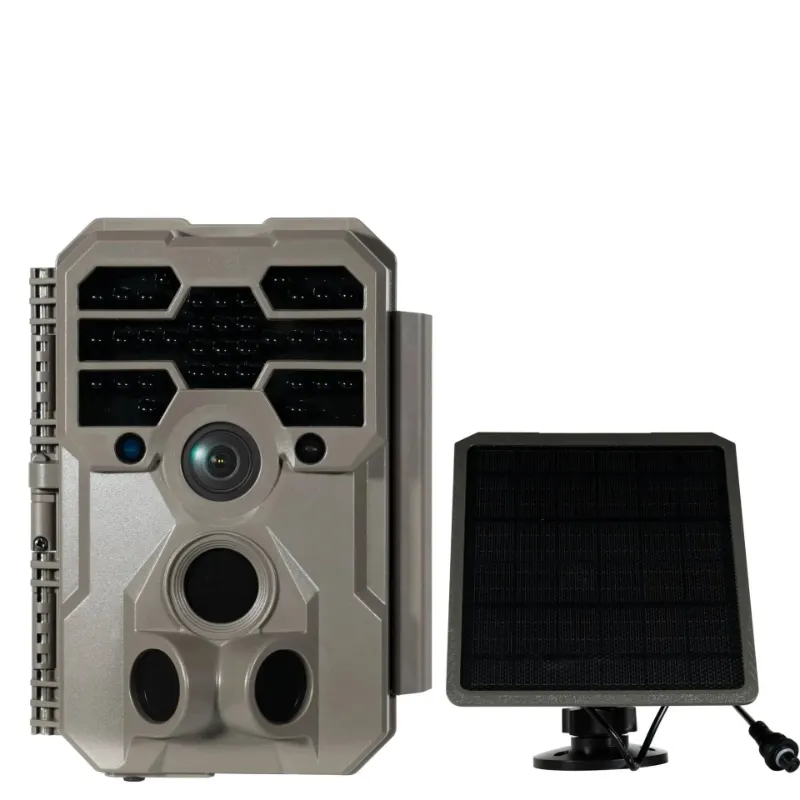
A gardepro trail camera paired with a solar panel runs indefinitely in the field, so you stop making battery runs every few weeks. GardePro builds several solar-ready models that suit everything from whitetail scouting to perimeter security, and getting the most from them comes down to placement, settings, and a handful of seasonal adjustments.
Which GardePro Trail Camera Works Best With Solar
Not every model ships with a built-in solar panel, but most accept an external solar charging cable. Here is how the main options compare:
| Model | Solar-Ready | Wi-Fi App | Best Use |
|---|---|---|---|
| gardepro e6+ wi-fi trail camera | Yes (external) | Yes | Remote scouting, live alerts |
| gardepro e5 2.0 trail camera | Yes (external) | No | Budget long-term deployment |
| gardepro a3s | Yes (external) | No | Dense cover, close-range |
| solar trail camera | Built-in panel | No | Minimal-maintenance sites |
The gardepro e6+ wi-fi trail camera is the standout pick if you want remote image delivery alongside solar charging. You check new captures from your phone through the GardePro app rather than hiking out to pull an SD card.
For buyers who simply need a dependable deer camera that keeps running without intervention, the dedicated solar trail camera with its built-in panel is the lowest-friction option.
Choosing the Right Mounting Spot
Placement drives 80 percent of your results. Solar charging and detection accuracy both depend on where the camera sits.
- Panel angle: Face the solar panel south (in the Northern Hemisphere) at a tilt that matches your latitude for maximum sun exposure year-round.
- Panel clearance: Canopy blocks more light than most hunters expect. Choose a spot where the panel gets at least 4-6 hours of direct sun daily.
- Camera angle: Mount 3-4 feet off the ground for deer-sized targets and aim slightly downward to keep animals in frame longer.
- Distance to trail: 15-20 feet gives the passive infrared (PIR) sensor time to trigger before an animal exits the frame.
- Avoid false triggers: Point away from branches that sway in wind and away from direct west-facing sun during golden hour, which can flood the sensor and drain storage.
A solid game camera mount or one of the adjustable game camera mounts makes fine-tuning the angle straightforward without re-strapping to a tree every time.
Step-by-Step Setup for Year-Round Solar Operation
- Insert batteries first. Even with solar, GardePro recommends starting with a full set of lithium AA batteries. Solar maintains the charge; it rarely fills a dead pack from zero quickly enough in low-sun conditions.
- Insert and format the SD card. Use a Class 10 card up to the maximum supported capacity. Format it inside the camera (not on a PC) to avoid file system conflicts.
- Connect the solar panel cable to the DC-in port on the camera body. Route the cable so water cannot pool at the connection point.
- Configure detection settings. Set the PIR sensitivity to medium for most open sites. High sensitivity triggers on heat shimmer; low sensitivity misses fast-moving small animals.
- Set capture mode. Photo burst (3-5 images) works well for identifying individual animals. Video mode consumes significantly more storage and battery.
- Set the time-lapse or scheduled shooting window if you only need coverage during specific hours, which reduces file volume and extends storage life.
- Pair with the app (E6+ users). Download the GardePro app, follow the in-camera Wi-Fi pairing steps described in the gardepro trail camera manual, and confirm images are syncing before leaving the site.
- Mount and lock. Secure the camera with your game camera mount, cable-lock the housing if theft is a concern, and note the GPS coordinates of the install.
For a broader look at how GardePro cameras stack up against other brands in the market, that independent overview is worth a read before you commit to a model.
Seasonal Adjustments That Keep Your Camera Running All Year
Spring and Summer
- Vegetation growth can block the PIR zone within weeks. Check the site monthly and clear foliage as needed.
- Longer days mean the panel tops off the battery early, so longer video clips or higher burst counts are fine.
- Use a lower ISO setting in the camera menu to reduce overexposed daytime images in bright conditions.
Fall
- Peak season for whitetail scouting. Increase PIR sensitivity slightly and switch to multi-shot burst to capture bucks that pass quickly.
- Confirm the solar panel is not shaded by newly bare but overhanging branches that catch snow.
Winter
- Cold reduces battery capacity significantly. Lithium batteries outperform alkaline in sub-freezing temperatures.
- Clear snow from the panel face after heavy storms.
- Shorten video clip length or switch to photo-only to compensate for reduced solar input during short, cloudy days.
- The gardepro trail camera e6 and similar models have a low-power standby mode; enable it during long stretches of overcast weather.
Using the GardePro App for Remote Monitoring
The Wi-Fi-enabled models turn your phone into a live dashboard. Setup follows three steps: power on the camera, connect your phone to the camera's broadcast Wi-Fi network in your phone's settings, then open the GardePro app. From there you can:
- Preview the live view and adjust framing without moving the camera physically
- Download the latest images directly to your phone
- Edit camera settings remotely (sensitivity, schedule, resolution)
- Review the gardepro trail camera app's notification log to see when motion events occurred
This workflow is especially useful at the start of season when you are still dialing in placement. Walk away from the tree, watch the live feed at 30 feet, and confirm the detection zone covers the trail before you leave the site.
Getting the Best Value on Your Setup
A complete solar trail camera setup, including camera, panel, SD card, and mount, represents a meaningful upfront investment, but the battery savings and reduced site visits pay back quickly over a full season. Before you order, check the latest price and grab the discount code to take 15% off sitewide, which stacks well when buying a camera and accessories together.
If you are still deciding between models, the trail cam product page lists full specs side by side. For a compact backup option at a secondary site, the mini cameras offer a discreet footprint that pairs well with a small external panel.
Once your solar setup is running, the maintenance rhythm becomes simple: clear the panel and lens face seasonally, format a fresh SD card every few months, and let the sun handle the rest.
See current pricing and our exclusive code before checking out.
Frequently asked questions
Can I use any solar panel with a GardePro trail camera, or does it need to be a GardePro panel?
GardePro cameras use a standard DC input port, so third-party solar panels with the correct voltage and connector type generally work. That said, using a panel from GardePro's own lineup ensures compatibility and does not risk voiding the warranty.
How long will a GardePro trail camera run on solar alone in winter?
Winter performance depends on your location, cloud cover, and camera settings. Running the camera in photo-burst mode with a low-power standby option enabled helps stretch reserves through overcast stretches. Starting with a full set of lithium batteries provides a backup buffer when solar input is limited.
What SD card size does the GardePro E6+ Wi-Fi trail camera support?
Check the current product listing or the gardepro trail camera manual for the exact maximum capacity, as it can vary by firmware version. A Class 10 card is recommended for reliable write speeds, especially in video mode.
Does the GardePro app work without a cellular connection at the camera site?
Yes. The GardePro app connects directly to the camera's local Wi-Fi signal, so you do not need cellular coverage at the install site. You do need to be within Wi-Fi range of the camera itself, typically within about 30 feet.
What is the best height to mount a GardePro trail camera for deer?
Most hunters mount their deer camera 3-4 feet off the ground and tilt it slightly downward. This keeps a deer's body and head in the frame and reduces sky background in images.
Is there a discount code available for GardePro cameras and accessories?
Yes, The Planet Deals maintains a live GardePro discount code page where you can find the current offer before you check out. The code applies sitewide, so it works across cameras, mounts, and accessories purchased together.