

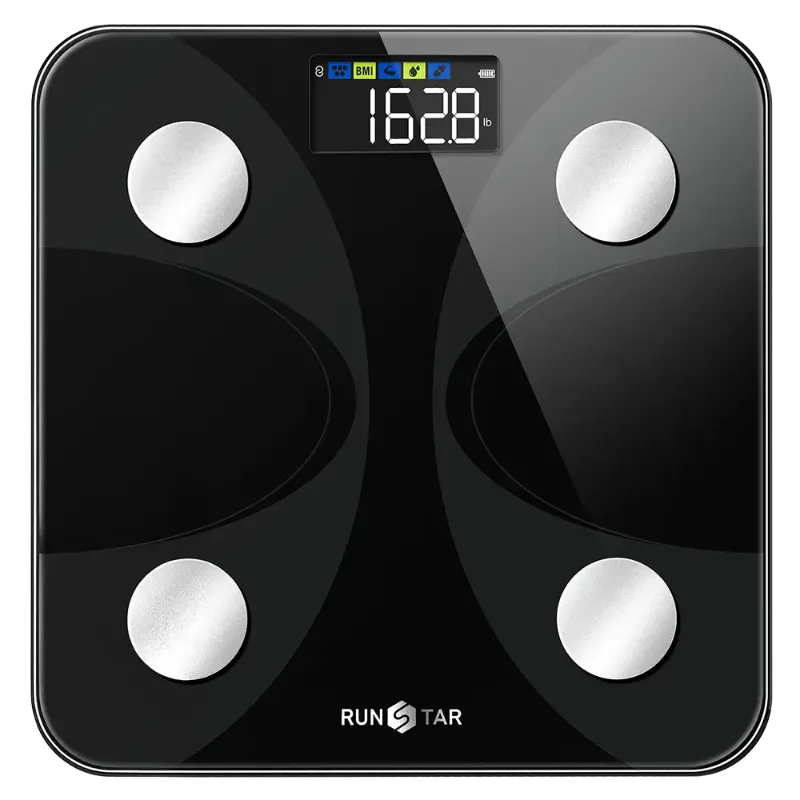
How to Set Up Your Runstar 8E SmartScan Pro and Sync It to Your Phone
The runstar 8e smartscan pro is a Bluetooth body-composition scale, so setup means downloading the RunStar app, pairing the scale over Bluetooth, and entering a profile with your height, age, and sex. Once that is done, every weigh-in syncs to your phone automatically and you get body composition metrics instead of just a weight number. The whole process takes about five minutes, and most of the troubleshooting people run into comes down to one of three things: the phone is not in pairing range, the app lacks the permissions it needs, or the scale is sitting on a surface that throws off the sensors.
Here is how we set ours up, plus the details that matter once you are past the first weigh-in.
What comes in the box
- The scale itself, with a glass or tempered platform and four electrode pads
- Batteries (most RunStar models ship with them installed or in the box)
- A quick-start card pointing to the app store listing
- No cable needed for the scale itself; it is battery powered
The runstar 8e smartscan pro is the model most people are searching for, but the same app and the same pairing flow apply across the family, including the runstar smart scale and the runstar scale.
Step-by-Step: Pairing the Scale With Your Phone
- Download the app first. Search the RunStar app in the App Store or Google Play. Install and open it before you touch the scale.
- Create an account and a profile. Height, age, sex, and activity level are required. Body composition math depends on them, so do not skip this or guess.
- Turn on Bluetooth and location. On Android, location permission is what lets the app scan for nearby devices. Grant it.
- Put the batteries in and let the scale wake up. Step on and off once so the display lights up and the scale enters pairing mode.
- Add a device in the app. Tap the add-device or pair option, wait for the scale to appear by name, and confirm.
- Step on barefoot. The four electrode pads need direct skin contact to pass a small, safe current through your body and estimate composition.
Keep the phone within a couple of meters for that first pairing. After the scale is registered to your account, the app picks it up in range without any manual step, which is when syncing starts to feel invisible.
If the app will not find the scale
- Check the batteries. Weak cells cause dropouts that look like pairing failures.
- Remove the scale from the app and re-add it. Duplicate device entries are a common cause of "connected but not syncing."
- Restart Bluetooth, then the app, in that order.
- On iPhone, confirm Bluetooth permission is on for the RunStar app specifically, not just globally.
- Take the scale off carpet. Soft, uneven flooring is the single most common cause of wild readings and failed syncs.
Phone Compatibility and App Requirements
The RunStar app runs on current iOS and Android versions, and the connection is standard Bluetooth Low Energy. That means it works with essentially any recent phone, including budget Android handsets. What trips people up is not the hardware but the settings layer:
| What you need | Why it matters |
|---|---|
| iOS or Android, recent version | Older OS builds may not support the app's current release |
| Bluetooth turned on | The scale has no Wi-Fi; BLE is the only path |
| Location permission (Android) | Required by the OS to scan for BLE devices |
| App background refresh allowed | Lets weigh-ins sync without opening the app first |
If you are buying for a household where one person has an iPhone and another has an Android, that is not a problem. Each person installs the app on their own phone and pairs the same scale.
Multiple User Profiles on One Scale
A smart scale is only useful as a household device if it knows who is standing on it. The RunStar app supports multiple user profiles, and the scale matches a weigh-in to a profile based on the recorded weight. Practical rules:
- Keep profiles at least a couple of kilos apart. Profiles that are nearly identical in weight can get matched to the wrong person.
- Set up every user in the app before the first shared weigh-in. Retrofitting profiles later means reassigning old entries manually.
- Weigh in at a similar time of day. Morning, post-bathroom, pre-food is the most consistent baseline for anyone tracking trends.
Guests can weigh in without an account for a plain weight reading, but they will not get composition data.
Reading the Body Composition Metrics
Once synced, the app breaks your weight into estimated components. What you will typically see:
- Body fat percentage, estimated from bioelectrical impedance
- Muscle mass and skeletal muscle
- Body water percentage
- Bone mass
- BMI, calculated from your profile height
- Visceral fat rating, a rough indicator of fat stored around the organs
- Basal metabolic rate, an estimate of daily resting burn
These are estimates, not lab measurements. Hydration, time of day, and recent exercise all shift impedance readings, which is why single weigh-ins are noisy and seven-day averages are not. If accuracy is your priority, read the trend line, not the individual number.
Why RunStar scale accuracy varies reading to reading
RunStar scale accuracy on the weight side is good: standard load cells, consistent readings on a hard floor. Body fat accuracy is a different conversation, because impedance scales infer composition from resistance rather than measuring it. Weigh under the same conditions and the trend becomes reliable within a week or two. That is also why the app lets you log context, which makes comparisons honest.
If you want a dedicated body-fat-focused model rather than a full smart scale, the good body fat scale covers the same metrics with a simpler app, and the most accurate weighing machine is the pick when plain, repeatable weight is all you need.
Where the RunStar Lineup Fits Together
A quick map so you buy once:
| Product | Best for |
|---|---|
| runstar 8e smartscan pro | Full body composition plus app tracking, the flagship pick |
| runstar smart scale | Same app ecosystem, simpler metric set |
| run star scale and runstar scale | Straightforward bathroom scale use |
| star4 | Compact, no-fuss daily weighing |
The RunStar range is not only scales. For blood pressure tracking alongside weight, the leader blood pressure monitor and the bp 205 are the two models to compare. Both are upper-arm cuff monitors: sit still, feet flat, arm at heart height, and take two readings a minute apart for a usable average. Log those in the same app and you get weight and blood pressure on one timeline, which is far more useful than either number alone. Do not adjust any medication based on home readings without your doctor.
Battery, Power, and Day-to-Day Care
- Batteries last months, not weeks. Replace them when the display dims or syncs get flaky.
- Wipe the platform with a damp cloth. No soaking, no harsh sprays near the electrode pads.
- Store flat, not on its edge. And never drop it; load cells are the part that fails first.
- Keep it on hard flooring. Tile, laminate, or wood. Carpet is the enemy.
- Re-zero it by stepping on and off once if readings drift after a move.
Buying, Shipping, Support, and Returns
Check the product page for current pricing and stock, and if you want to buy a scale and a blood pressure monitor together, grab the code first since the sitewide offer applies across the range. Shipping timelines, return windows, and warranty terms are listed on the store pages and vary by region, so read them before checkout rather than after a problem. Register the product once it arrives; warranty support usually asks for proof of purchase and a serial number.
Before you commit, check the latest price on the model you want, and if you are weighing up two options, compare the current offers side by side so you are not paying full price on one item and discounted on another.
Bottom line: pair the scale before your first real weigh-in, get every household member into the app on day one, and judge results by weekly trends rather than single readings. That routine gets you more out of the runstar 8e smartscan pro than any feature in the app.
 Shopping at RunStar? See today's verified RunStar discount code
Frequently asked questions
Why will my runstar 8e smartscan pro not connect to the app?
Usually it is a permissions or battery issue. Confirm Bluetooth is on, that the app has location permission on Android, and that the batteries are fresh. If the scale shows as already added in the app, remove the device entry and pair it again.
Do I need to be barefoot for the body composition metrics?
Yes. The four electrode pads need direct skin contact to send the small measurement current through your feet. Socks or shoes will give you a weight reading only, with no body fat or water estimates.
Can two people use the same RunStar smart scale?
Yes, the app supports multiple user profiles on one scale. Keep each profile's recorded weight at least a couple of kilos apart so the scale matches the right person automatically instead of guessing.
Is the RunStar scale accuracy good enough to track progress?
Weight readings are consistent on hard flooring, and body composition trends are reliable once you weigh under the same conditions most days. Treat single readings as noisy and weekly averages as the real signal.
Can I track blood pressure in the same app as my weight?
The leader blood pressure monitor and bp 205 are upper-arm cuff monitors that pair to the RunStar app, so weight and blood pressure can sit on one timeline. Take two readings a minute apart and log the average.
Where do I find the discount code for the runstar 8e smartscan pro?
The current sitewide offer is listed on our RunStar discount code page, linked above. Codes change, so check that page for the live offer before you check out rather than relying on a code from an older post.