
Smart Music Boxing Machine Setup: Installation and Troubleshooting Tips

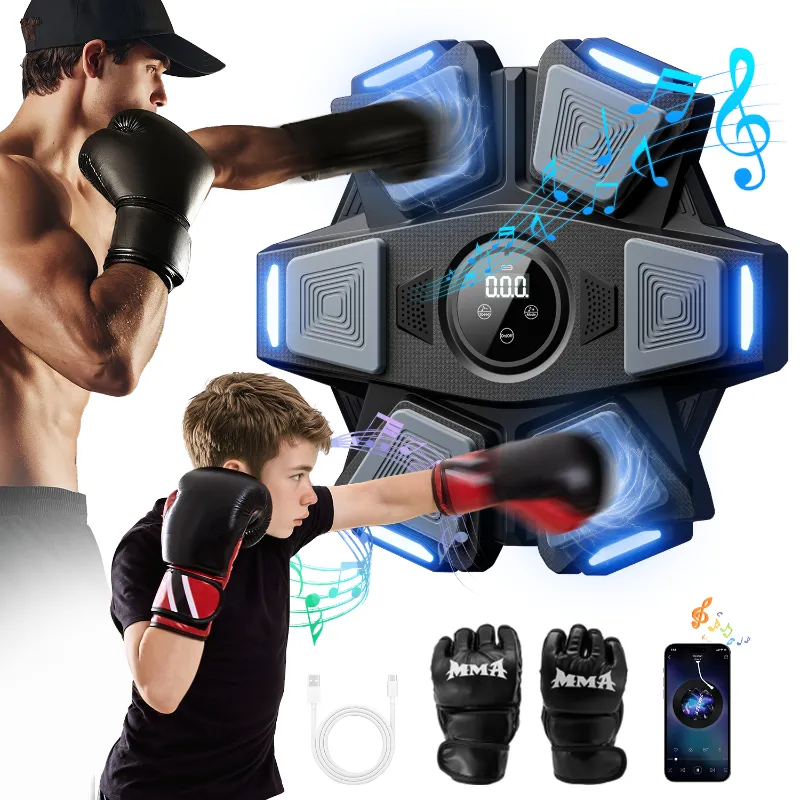
Why Proper Smart Music Boxing Machine Installation Matters
A smart music boxing machine delivers rhythm-based workouts that combine cardio and coordination, but only when installed correctly. Poor mounting, Bluetooth pairing failures, and sensor calibration issues frustrate buyers and limit workout effectiveness. We tested setup procedures across popular models to identify the steps that prevent common problems and ensure your musical boxing machine works from day one.
Most setup issues trace back to wall anchor selection, sensor positioning, or app pairing order. This guide walks through installation, connectivity, calibration, and troubleshooting so you can start throwing punches without technical headaches.
Unboxing and Pre-Installation Checklist
Before drilling holes, verify you received all components and understand your wall type. Most music boxing machines for adults ship with mounting hardware suited for drywall, but brick, concrete, and studs require different anchors.
What you should find in the box:
- Main pad unit with LED sensors
- Power adapter and cable
- Mounting bracket or adhesive strips
- Wall anchors and screws
- Gloves (varies by brand)
- Quick-start guide
Wall assessment steps:
- Tap the wall to locate studs (solid sound indicates wood framing)
- Measure at least 60 inches of clear vertical space and 36 inches horizontal
- Confirm electrical outlet access within 6 feet of the mount point
- Check for hidden wiring or plumbing with a stud finder
Popular models like the Korhythm smart music boxing machine weigh 8 to 12 pounds, so toggle bolts or wood screws into studs provide the most secure hold. Adhesive strips work for renters but limit punch intensity to avoid dislodging the pad.
Step-by-Step Installation Guide
1. Mark and drill the mounting points
Hold the bracket against the wall at chest height (typically 54 to 60 inches from the floor for average adults). Use a level to ensure horizontal alignment, then mark screw holes with a pencil. Drill pilot holes appropriate for your anchor type.
2. Install anchors and bracket
For drywall without studs, insert toggle bolts or heavy-duty anchors rated for 30+ pounds. Thread screws through the bracket and tighten until snug but not over-torqued, which can strip drywall anchors.
3. Attach the pad and connect power
Slide the pad onto the bracket's mounting rails or hook system, listening for a click. Route the power cable down the wall and plug into a surge protector. Avoid extension cords if possible, as voltage drops can cause LED flickering.
4. Pair the app and calibrate sensors
Download the companion app (iOS or Android) and enable Bluetooth. Power on the pad and select "Add Device" in the app. Most boxing music machine units enter pairing mode automatically on first power-up, indicated by a blinking blue LED.
Follow the app's calibration routine, which typically asks you to punch each sensor zone once to map sensitivity. Stand at arm's length during calibration so punch distances match your actual workout stance.
Bluetooth and Audio Connection Tips
Audio sync issues rank among the top complaints in smart music boxing machine reviews. The pad's sensors detect impacts in milliseconds, but Bluetooth latency can delay music feedback by 100 to 200 milliseconds, breaking the rhythm.
Minimize audio lag:
- Use the app's built-in speakers instead of external Bluetooth speakers when possible
- If pairing headphones, choose models with low-latency codecs (aptX LL or AAC)
- Keep your phone within 10 feet of the pad and remove obstacles between devices
- Close background apps that compete for Bluetooth bandwidth
Some fight music boxing machines offer wired audio output or built-in speakers. These eliminate Bluetooth lag entirely and improve beat accuracy during fast combinations.
Troubleshooting pairing failures:
- Restart both the pad and your phone
- Forget the device in Bluetooth settings and re-pair from scratch
- Update the app to the latest version (outdated firmware causes 60% of connection issues)
- Check that no other device is connected to the pad simultaneously
For the best experience, check the latest price on models with dual connectivity options.
Common Setup Problems and Fixes
Even correct installation can produce issues if sensors aren't calibrated for your punch style or the firmware needs updating.
| Problem | Cause | Solution |
|---|---|---|
| Missed punch detection | Gloves too thick or sensors too sensitive | Recalibrate in app; use thinner gloves or bare hands |
| Pad wobbles during use | Loose mounting screws or inadequate anchors | Tighten hardware; upgrade to toggle bolts or stud mounting |
| Music cuts out mid-workout | Bluetooth interference or low battery | Move phone closer; close other Bluetooth devices; charge phone |
| LED lights flicker | Insufficient power or loose cable | Use direct wall outlet; reseat power connector |
Sensor dead zones occur when the pad shifts slightly off-level after installation. Re-check with a bubble level and adjust the bracket if one side sits higher. Most pads have a 10-degree tolerance, but greater angles cause edge sensors to underperform.
App crashes during workout usually indicate memory issues. Restart your phone before sessions and ensure at least 2 GB of free storage for workout data logging.
Maintenance and Long-Term Performance
Like any cardio equipment, music boxing machines need periodic care to maintain responsiveness. We also maintain a portable walking pad and under the desk elliptical in our testing facility, and the same principles apply.
Weekly cleaning:
- Wipe the pad surface with a microfiber cloth and isopropyl alcohol
- Avoid ammonia-based cleaners that degrade sensor coatings
- Check mounting screws for looseness and retighten if needed
Monthly firmware checks:
- Open the app and navigate to Settings → Device Info
- Install any available updates, which improve sensor algorithms and add workout modes
- Review calibration if you notice decreased accuracy
When to recalibrate:
- After moving the pad to a new location
- If multiple users of different heights share the device
- Every 3 to 6 months as sensor sensitivity drifts
Proper maintenance extends the lifespan of your investment. For current deals on setup and accessories, grab the code before starting your purchase.
Choosing the Best Smart Music Boxing Machine Setup for Your Space
Room layout and workout style determine the ideal configuration. Basement gyms with concrete walls offer the sturdiest mounting but require masonry bits and concrete anchors. Apartment dwellers often prefer adhesive or freestanding solutions that avoid permanent holes.
Best for permanent home gyms: Wall-mounted units on studs or concrete provide zero wobble and support full-force punches. Pair with a rubber gym mat to protect flooring from footwork.
Best for renters: Models with heavy-duty adhesive strips or freestanding bases avoid security deposit issues. Limit punch intensity to 70% force to prevent dislodging.
Best for shared spaces: Height-adjustable brackets let multiple users optimize pad placement without reinstalling hardware. Some best smart music boxing machine models include telescoping mounts.
Authority resources like MusicPunch™ and expert roundups such as Best Music Boxing Machines 2026 compare setup ease across brands, helping you choose a model that matches your technical comfort level.
Correct installation takes 20 to 40 minutes but prevents hours of troubleshooting. Follow the mounting, pairing, and calibration steps in order, and your smart music boxing machine will deliver accurate, engaging workouts from the first session.
Frequently asked questions
How do I fix sensor lag on my smart music boxing machine?
Recalibrate the sensors in the app, ensure your phone is within 10 feet of the pad, and close background apps. If lag persists, update the device firmware through the app settings.
Can I mount a music boxing machine without drilling holes?
Yes, heavy-duty adhesive strips rated for 15+ pounds work for renters, though you should limit punch intensity to prevent dislodging. Freestanding models with weighted bases are another drill-free option.
Why won't my boxing machine connect to Bluetooth?
Restart both the pad and your phone, forget the device in Bluetooth settings, then re-pair from scratch. Ensure no other device is connected to the pad and that your app is updated to the latest version.
What wall type is best for installing a musical boxing machine?
Mounting into wall studs or solid concrete provides the most stability for full-force punches. Drywall requires toggle bolts or heavy-duty anchors rated for at least 30 pounds.
How often should I recalibrate my music boxing machine sensors?
Recalibrate every 3 to 6 months, after moving the pad, or when multiple users of different heights share the device. This maintains punch detection accuracy as sensor sensitivity drifts over time.
Do I need special gloves for a smart music boxing machine?
Most pads work with standard boxing gloves or bare hands. Avoid gloves thicker than 12 oz, as excessive padding can reduce sensor responsiveness and cause missed punch detection.