
How to Choose the Right Screen Protector for iPhone 16 Pro

How to Choose the Right Screen Protector for iPhone 16 Pro
The best iPhone 16 Pro screen protector depends on how you use your phone: whether you prioritize scratch resistance, privacy, or crystal-clear visuals. We tested multiple materials and styles to help you pick the right balance of protection, touch sensitivity, and installation ease. Here's what actually matters when shopping for screen protection.
Tempered Glass vs Film: Which Material Works Best
Tempered glass and TPU film represent two different approaches to screen protection, each with clear trade-offs.
Tempered glass protectors offer superior scratch resistance (typically 9H hardness) and absorb impact better than film. They feel nearly identical to your phone's original screen and resist fingerprints more effectively. The downside is thickness (usually 0.33mm) and the risk of edge chipping if you use a thick case. Most premium iphone 16 pro screen protector options use tempered glass with oleophobic coatings.
TPU or PET film protectors are thinner (0.1 to 0.2mm), more flexible, and work seamlessly with any case design. They prevent scratches from keys and coins but won't stop a direct drop as effectively as glass. Film also self-heals minor scratches over time. Choose film if you want an ultra-thin feel or already own a rugged case like an iphone 16e case that adds bulk.
| Feature | Tempered Glass | TPU Film |
|---|---|---|
| Scratch resistance | 9H hardness, excellent | Moderate, self-healing |
| Impact protection | Absorbs shock, may crack | Flexible, less impact absorption |
| Thickness | 0.33mm typical | 0.1-0.2mm |
| Touch feel | Like original screen | Slightly softer |
We recommend tempered glass for most users. The added protection justifies the minimal thickness, and modern versions sit flush with the screen edges.
Privacy Filters and Anti-Glare Coatings
Privacy screen protectors darken your display when viewed from angles beyond 30 to 45 degrees, blocking shoulder surfers on trains or in cafes. They work through micro-louver technology that directs light straight toward you. The trade-off is reduced brightness (usually 20 to 30 percent dimmer) and slightly muted colors, even when viewed head-on.
Choose an iPhone 16 Pro screen protector privacy option if you handle sensitive work emails, banking apps, or confidential documents in public spaces. Skip it if you watch videos, edit photos, or frequently show your screen to others, since the dimming effect impacts media quality.
Anti-glare (matte) coatings diffuse reflections and reduce eye strain in bright sunlight but introduce a subtle texture that softens fine details. They're ideal for outdoor use or reading-heavy tasks. Most anti-glare protectors use tempered glass with an etched surface rather than film.
Standard glossy protectors maintain the iPhone 16 Pro's vibrant OLED colors and 120Hz ProMotion smoothness without compromise. We prefer glossy for general use unless privacy or glare is a specific concern.
Installation Methods: Alignment Trays vs Liquid Application
Poor installation ruins even the best screen protector. Dust bubbles, misalignment, and edge gaps all stem from installation mistakes rather than product flaws.
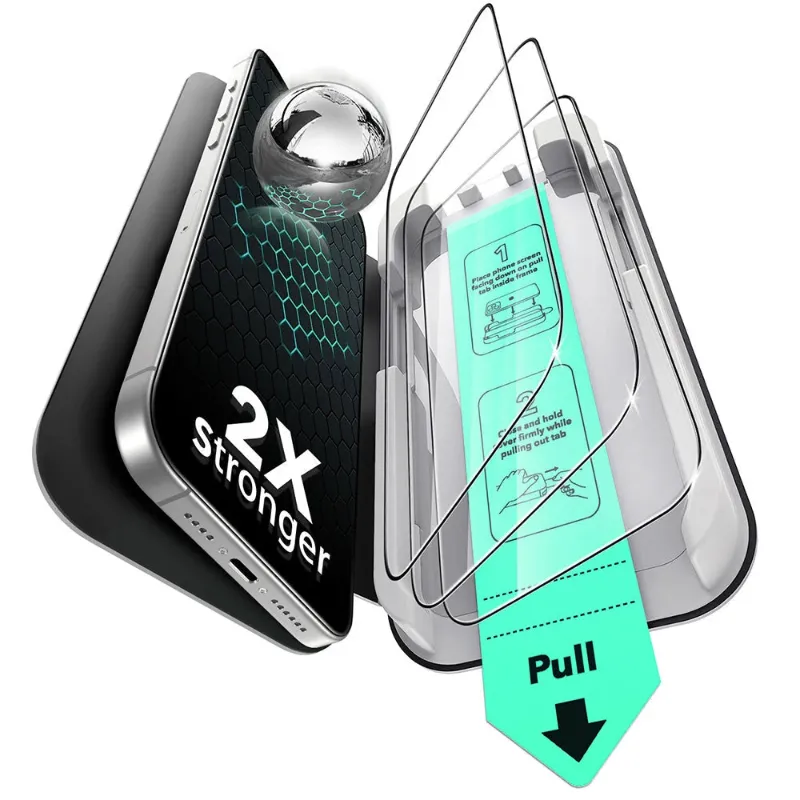
Alignment trays (also called installation frames) are included with most premium protectors. The tray clips onto your phone and holds the glass in perfect position while you lower it onto the screen. This method nearly guarantees a centered, bubble-free application on the first try. Clean your screen with the included wipes, remove dust with the sticker, then use the tray. It takes two minutes and requires no special skill.
Liquid or gel adhesive protectors apply a thin layer of solution to the screen before placing the glass. The liquid fills micro-gaps and pushes out air bubbles as it cures under UV light (some kits include a small UV lamp). This method works well for curved-edge protectors but adds complexity and curing time. Most flat-screen protectors for the iPhone 16 Pro use dry adhesive instead, which bonds instantly on contact.
We strongly recommend buying a protector with an alignment tray. The installation success rate jumps from about 60 percent (freehand) to over 95 percent with a tray, and you won't waste protectors on botched attempts. Check the latest price to see which models include trays.
Edge Coverage: Full Screen vs Case-Friendly Designs
The iPhone 16 Pro has a flat display with slightly curved edges where the screen meets the frame. Screen protectors handle this transition in two ways.
Full-coverage protectors extend to the very edge of the glass, maximizing protected area. They look seamless but can conflict with thicker cases, causing the protector to lift at the corners. If you use a slim case or go case-free, full coverage is ideal.
Case-friendly (or case-compatible) protectors stop 0.5 to 1mm short of the screen edge, leaving a small border. This design works with any case thickness, including rugged or leather options, without lifting. The exposed border is barely visible during use and doesn't compromise protection, since impacts typically hit the center of the screen or the case itself.
Most users should choose case-friendly designs. The tiny border is invisible during use, and compatibility with cases like the iphone 17 phone case (which also fits the 16 Pro due to identical dimensions) matters more than covering an extra millimeter of glass.
Durability Features: Oleophobic Coating and Shatter Resistance
All quality screen protectors include an oleophobic (oil-repellent) coating that resists fingerprints and smudges. This coating wears off over time, usually after 6 to 12 months of daily use, depending on how often you clean the screen. When the coating degrades, fingerprints become more visible and harder to wipe away. Budget protectors often skip this coating entirely, leaving you with a smudge-prone surface from day one.
Shatter resistance determines whether the protector cracks into large shards or stays intact after impact. Multi-layer tempered glass with reinforced edges distributes force better and often survives drops that would crack single-layer designs. Look for protectors advertised as "military-grade" or "reinforced," though these terms lack standardized definitions.
The protector's job is to crack instead of your actual screen. A shattered protector after a drop means it worked. Replace it immediately, since cracked glass loses structural integrity and won't protect against a second impact.
For maximum value, grab the code before buying. The current 18 percent sitewide discount applies to multi-packs, which drop the per-unit cost significantly if you replace protectors annually.
Where to Buy and What to Avoid
You'll find iPhone 16 Pro screen protectors at Amazon, Best Buy, Target, and direct from accessory brands. Amazon offers the widest selection and fast shipping, while Best Buy and Target let you inspect packaging and return locally if installation fails. Direct-from-brand purchases often include better warranties and installation support.
Avoid these red flags:
- Protectors without alignment tools (unless you have steady hands and patience)
- Listings with no mention of oleophobic coating
- Extremely cheap multi-packs (under $2 per protector) that use low-quality glass
- Privacy filters with no brightness rating or user reviews mentioning severe dimming
Check whether the protector is compatible with Face ID and the iPhone 16 Pro's earpiece cutout. Reputable brands design around these sensors, but off-brand imports occasionally block the proximity sensor or muffle call audio.
If you're also shopping for accessories, consider bundling your order with a magsafe charger or airpod pro case to maximize the current sitewide discount. Screen protectors pair well with cases in checkout, and buying together often qualifies for free shipping thresholds.
Frequently asked questions
Does tempered glass interfere with iPhone 16 Pro touch sensitivity?
High-quality tempered glass protectors (0.33mm or thinner) do not affect touch sensitivity or Face ID. Thicker or poorly designed protectors may reduce responsiveness, especially around screen edges.
Can I remove and reapply a screen protector if I get bubbles?
You can carefully lift and reapply most protectors within the first few minutes, but adhesive strength weakens with each attempt. Use the included dust removal sticker to clean the screen before reapplying, and avoid touching the adhesive side.
How often should I replace my screen protector?
Replace your protector when the oleophobic coating wears off (usually 6 to 12 months), when cracks appear, or if edge lifting creates gaps where dust collects. A cracked protector no longer provides impact protection.
Do privacy screen protectors work in landscape mode?
Yes, privacy filters block side viewing in both portrait and landscape orientations. The viewing angle remains consistent regardless of how you hold your phone.
Will a screen protector fit with a MagSafe case?
Case-friendly screen protectors work perfectly with MagSafe cases. Full-coverage protectors may lift at the edges with thicker MagSafe cases, so check the protector's case-compatibility specifications before buying.
Are Amazon and Best Buy screen protectors the same quality as brand-direct?
Quality varies by manufacturer, not retailer. The same brand product sold on Amazon, Best Buy, or Target is identical, but check seller ratings on Amazon to avoid counterfeit versions of popular brands.