
iPad Air 11 Inch Case Buying Guide: Folio, Keyboard, or Rugged?

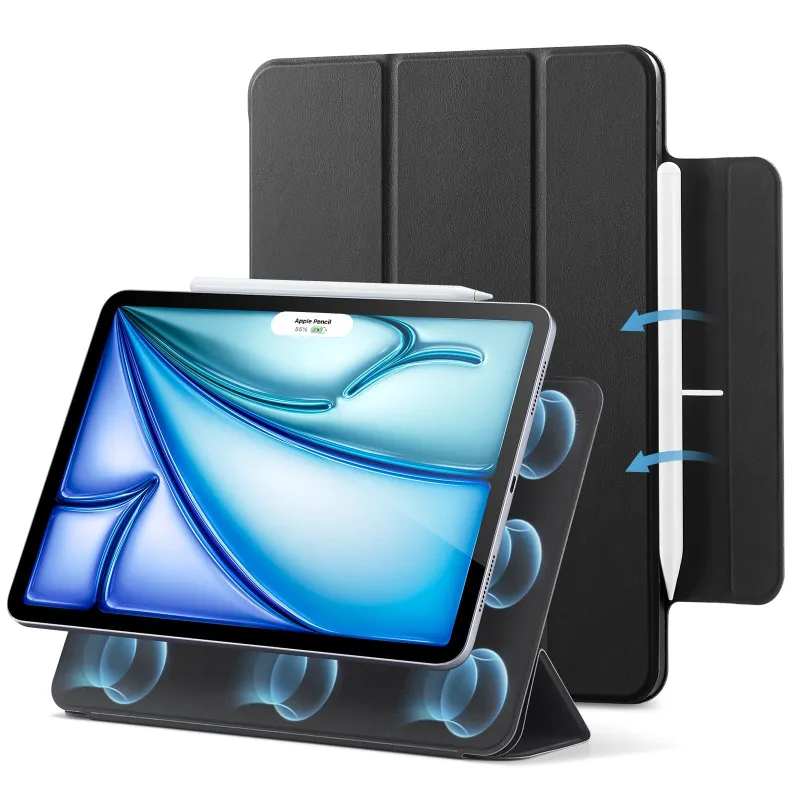
The best iPad Air 11 inch case for you depends on whether you prioritize portability, typing, or drop protection. We tested folio, keyboard, and rugged cases to help you pick the right style for your workflow, budget, and how much bulk you're willing to carry.
Why Your iPad Air 11 Inch Case Style Matters
Not every case serves the same purpose. A slim folio keeps your tablet light for commuting, a keyboard case transforms it into a laptop replacement, and a rugged shell protects it on job sites or in a backpack full of gear. The iPad Air 11 inch case you choose shapes how you use the device every day.
Material and construction also affect longevity. Polycarbonate shells resist scratches but add weight, while TPU bumpers absorb shock without rigidity. We recommend matching the case type to your primary use case rather than trying to find one design that does everything.
Folio Cases: Slim Protection and Auto Wake
Folio-style cases wrap the front and back in a thin shell, usually with a magnetic closure and auto sleep/wake. They add minimal bulk, slip into most bags, and offer basic scratch and corner protection.
What folios do well:
- Lightweight enough for daily carry
- Magnetic stand angles for media and reading
- Easy access to ports and buttons
- Budget-friendly compared to keyboard cases
What they lack:
- Limited drop protection (no raised edges on all sides)
- No typing advantage over the on-screen keyboard
- Magnetic closures can open in a bag if jostled
We see folios recommended most often for students, travelers, and anyone who switches between handheld and desk use. If you sketch or take notes with Apple Pencil, look for an iPad Air 11 inch case with pencil holder built into the spine or flap so the stylus stays attached.
Keyboard Cases: Typing and Trackpad Integration
A keyboard case adds physical keys, usually in a clamshell or folio-with-dock layout. Many now include a trackpad, backlighting, and pairing via Smart Connector so you skip Bluetooth lag and charging.
| Feature | Smart Connector Keyboard | Bluetooth Keyboard Case |
|---|---|---|
| Pairing | Instant, no charging | Requires pairing and USB-C charge |
| Thickness | Moderate (10–12 mm added) | Slim to moderate |
| Price | Higher | Mid-range |
An iPad Air 11-inch case with keyboard suits writers, students typing essays, and professionals who answer email on the go. The trade-off is weight: most keyboard cases double the tablet's heft, and the rigid shell takes up more space in a bag than a folio.
Key considerations:
- Key travel and spacing (cramped layouts slow typing)
- Detachable keyboard vs. fixed hinge
- Viewing angles (some lock into two positions, others adjust freely)
- Function-row shortcuts for brightness, volume, and media
Check the latest price on keyboard options before committing. Prices vary widely, and our exclusive code saves you 18% sitewide at ESR Tech.
Rugged Cases: Drop Protection and Outdoor Durability
Rugged cases layer shock-absorbing TPU, a hard polycarbonate shell, and often a built-in screen cover or kickstand. They're engineered for MIL-STD-810G drop ratings, dust ingress, and rough handling.
When a rugged case makes sense:
- Construction, field work, or warehouse environments
- Kids who toss tablets into backpacks
- Outdoor navigation and GPS use
- Frequent travel with checked luggage
Downsides:
- Bulky and heavy (often 300–400 g added)
- Recessed ports may require adapters
- Muffled speaker sound in some models
- Limited color and style options
Independent testing by experts at ZDNET confirms that ruggedized designs do survive drops from desk height, but they won't eliminate screen cracks if the tablet lands face-down on gravel. Pair any rugged case with a tempered-glass screen protector for complete coverage.
Material Breakdown: TPU, Polycarbonate, and Leather
Understanding materials helps you predict durability and feel.
- TPU (thermoplastic polyurethane): Flexible, shock-absorbing, grippy. Yellows over time and attracts lint.
- Polycarbonate (hard plastic): Rigid, scratch-resistant, lightweight. Cracks under extreme impact.
- Vegan leather or PU: Premium look, easy to wipe clean. Wears at corners after 12–18 months.
- Silicone: Maximum grip and shock absorption. Collects dust and feels sticky in warm weather.
Many premium iPad Air case designs layer two or more materials for balanced protection and aesthetics. We prefer TPU bumpers with a polycarbonate back for daily use, reserving all-silicone cases for kids or high-risk environments.
Pencil Holder and Charging Compatibility
Apple Pencil (2nd generation) attaches magnetically to the iPad Air's edge for wireless charging. Many cases cut out the magnetic strip, but cheaper shells block it entirely, forcing you to remove the case every time you charge the stylus.
Look for these Pencil-friendly features:
- Cutout or recess along the top edge for magnetic attachment
- Elastic loop or slot as a backup holder (prevents loss)
- Raised lip that doesn't interfere with Pencil palm rejection
If you also use a magsafe charger for your iPhone or accessories, check whether your case supports Qi wireless charging passthrough—some thick rugged cases interfere with induction.
Sizing Across iPad Air Generations
The 11-inch iPad Air debuted in 2024 with the M2 chip, and Apple has maintained nearly identical dimensions through M3 and M4 updates. An iPad Air 11 inch case M2, M3, or M4 label usually refers to the same physical fit, though you should verify button and camera cutouts if mixing generations.
Model compatibility checklist:
- Confirm the case lists your iPad model year explicitly
- Check camera-bump clearance (later models may have thicker lenses)
- Verify that volume and power buttons align with cutouts
- Ensure USB-C port access (some cases have recessed openings)
Many manufacturers sell universal "iPad Air 11-inch" cases that span multiple generations. Cross-reference the product description or grab the code and contact ESR Tech support if compatibility is unclear.
Where to Buy and Current Discounts
We track pricing and promo codes for ESR Tech year-round. Right now, you can save 18% sitewide with our exclusive ESR Tech discount code, which stacks with existing sale prices on folio, keyboard, and rugged cases.
Online marketplaces carry a wide range of iPad Air 11 inch case Amazon listings, but verify seller ratings and return policies—counterfeit or mislabeled cases waste time and leave your tablet exposed. Buying directly from ESR Tech or reputable retailers like ZAGG ensures genuine materials and warranty coverage.
Matching Case Style to Your Workflow
Choose a folio if you carry your iPad daily, use it for media and light browsing, and want minimal added weight. Pick a keyboard case if you type for more than an hour per day, need a laptop substitute, or work in coffee shops and coworking spaces. Go rugged if your tablet faces job-site dust, kids, or frequent drops.
Most users benefit from owning two cases: a slim folio for travel and a keyboard or rugged shell for specific tasks. Swapping takes seconds, and the versatility is worth the modest investment. Before you buy, measure your bag's tablet compartment and confirm that the case (especially keyboard models) will fit when closed.
Frequently asked questions
Does the iPad Air 11 inch case fit the M2, M3, and M4 models?
Most cases designed for the iPad Air 11-inch fit M2, M3, and M4 models because Apple kept the dimensions nearly identical across generations. Always verify camera cutout and button alignment in the product description to be sure.
Can I charge my Apple Pencil while the case is on?
Yes, if the case has a cutout or recess along the magnetic charging strip on the iPad's edge. Cheaper cases sometimes cover this strip, forcing you to remove the case to charge the Pencil.
Are keyboard cases heavier than folio cases?
Yes, keyboard cases typically double the iPad Air's weight and add 10 to 12 mm of thickness due to the keys, battery (if Bluetooth), and hinge mechanism. Folios add only 2 to 4 mm and stay much lighter.
Will a rugged case muffle my iPad speakers?
Some rugged cases do muffle sound if the speaker cutouts are recessed or covered by thick bumpers. Check user reviews or product specs for acoustic performance if you watch videos frequently.
Do I need a screen protector with a folio case?
A folio's front cover protects against scratches in a bag, but it won't stop the screen from cracking in a drop. Pair any case with a tempered-glass screen protector for complete coverage.
Where can I find the best discount on ESR Tech cases?
We maintain an exclusive 18% off sitewide code on our ESR Tech discount page. It works on folio, keyboard, and rugged cases and stacks with sale pricing.