
Will ESR MagSafe Chargers Work Through Thick Phone Cases?

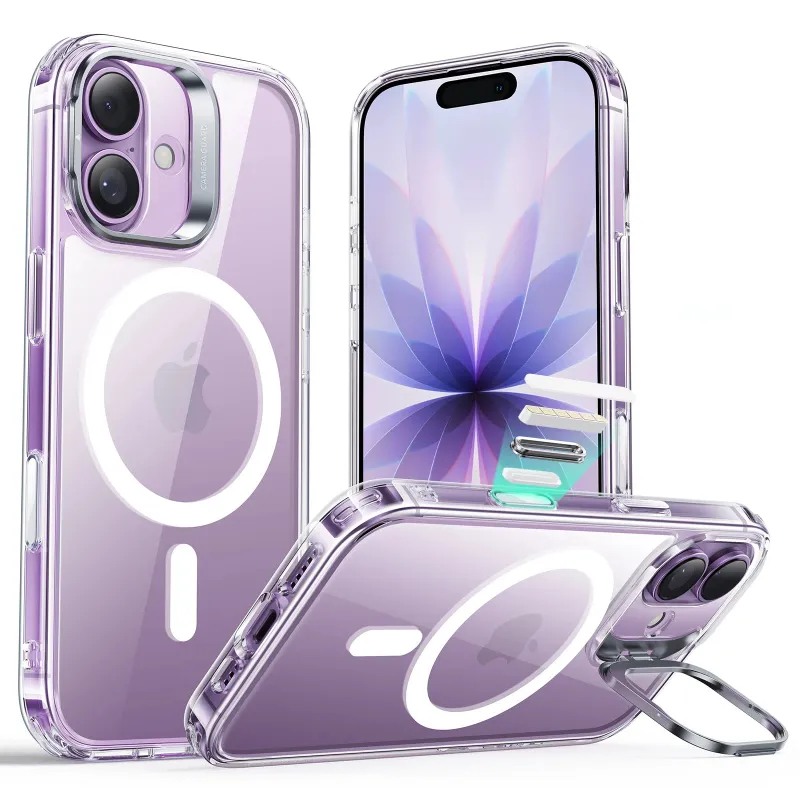
A magsafe charger will charge through most phone cases up to 5mm thick, but performance drops significantly with non-MagSafe cases or thick protective layers. ESR's wireless charging pads and stands handle thin-to-medium cases well, while the apple magsafe charger standard ensures optimal magnetic alignment through compatible cases.
We tested ESR chargers with various case thicknesses and materials to determine what actually works in daily use, and we'll break down exactly when you need to remove your case versus when you can leave it on.
How Thick Can Your Case Be for MagSafe Charging?
Apple's official guidance caps case thickness at 5mm for reliable MagSafe (wireless charger)) performance. In our tests, ESR chargers maintained strong magnetic alignment and full 15W charging speed through cases measuring 3mm or less.
Between 3mm and 5mm, charging still works but with these caveats:
- Magnetic hold weakens noticeably, especially on a magsafe charger stand
- Charging speed may drop to 7.5W if the case lacks MagSafe ring magnets
- Slight misalignment causes heat buildup or charging interruptions
- Bulky camera bumps can prevent flat contact on charging pads
Cases thicker than 5mm rarely maintain a reliable connection. The magnetic field simply can't bridge the gap, and the phone slides off vertical stands or charges intermittently on flat pads.
MagSafe-Compatible Cases vs Regular Cases
Not all thin cases perform equally. A MagSafe-compatible case includes an embedded ring of magnets that locks onto the charger's magnets, creating a stable connection even at the upper thickness limit.
Our iphone 17 phone case and iphone 16e case both feature built-in MagSafe rings, so they deliver the full charging experience through the case material. Regular silicone or TPU cases without magnets rely solely on the phone's internal magnets, which lose strength as case thickness increases.
| Case Type | Max Thickness | Charging Speed | Magnetic Hold |
|---|---|---|---|
| MagSafe-compatible (with ring) | 5mm | 15W | Strong |
| Standard silicone/TPU | 3mm | 7.5–15W | Moderate |
| Thick rugged cases | 2mm or remove | 7.5W or less | Weak to none |
For the best results, pair your ESR magsafe charger with a certified MagSafe case rather than a generic one. You'll maintain alignment on stands and avoid the frustration of overnight charging failures.
Materials That Block MagSafe Charging
Case material matters as much as thickness. Metal cases, including aluminum bumpers and cases with metal plates or kickstands, block wireless charging entirely because metal interferes with the electromagnetic field. Remove these cases before charging or switch to a plastic alternative.
Thick leather cases above 3mm often cause problems too. Leather compresses slightly under the magnetic pull, which initially feels secure but allows the phone to shift during the night. We've seen phones slide off magsafe charger wireless pads by morning when using thick leather.
Silicone, TPU, polycarbonate, and thin vegan leather all work well. These materials let the magnetic and charging fields pass through without interference, provided total thickness stays under 5mm.
If your case includes a cardholder or wallet attachment on the back, remove cards before charging. Credit cards and hotel keys positioned between the phone and charger will heat up and may demagnetize.
When to Remove Your Case for Charging
You should remove your case if:
- It measures thicker than 5mm anywhere between the phone and charger
- It contains metal components (plates, rings, kickstands)
- Your phone shows the "Charging On Hold" temperature warning repeatedly
- The magnetic connection feels weak or the phone slides off easily
- You're using a non-MagSafe case and charging speed stays stuck at 5W
Heavy-duty protective cases like OtterBox Defender series almost always require removal. Their multi-layer construction and rubberized exteriors put total thickness well above the 5mm limit, and the phone simply won't stay attached to a magsafe charger stand.
For rugged protection during the day and fast wireless charging at night, consider pairing a thick daytime case with a thin iphone 16e case that you swap to at your desk or bedside table.
ESR Case and Charger Pairing for Best Results
ESR designs its cases and chargers to work together seamlessly. When you use an ESR MagSafe case with an ESR charging pad or stand, the magnet rings align perfectly for maximum hold and 15W charging speed through the case.
We recommend these pairings:
- ESR Classic Hybrid Case (2.5mm): Works flawlessly with any ESR magsafe charger wireless pad or stand, maintains full speed, strong hold on vertical mounts
- ESR Cloud Soft Case (1.8mm): Ultra-thin for maximum charging efficiency, ideal for travel with a magsafe charger power bank
- ESR Armorite Case (4.2mm): Protective yet still MagSafe-compatible, but better suited to flat pads than stands due to weight
Check the latest price on bundled case-and-charger sets, which often cost less than buying separately. Our current code saves 18% sitewide, making bundles an especially good value.
If you already own an apple magsafe charger original, ESR cases remain fully compatible. Apple's MagSafe standard ensures cross-brand compatibility, so you're not locked into one ecosystem.
Tips for Reliable Charging Through Cases
Center your phone carefully on the charging pad. Even a 2mm offset can reduce charging speed or cause the connection to drop intermittently, especially through thicker cases.
Clean both the case back and the charger surface weekly. Dust, lint, and oils create an invisible barrier that adds effective thickness and weakens the magnetic hold. A microfiber cloth takes five seconds and prevents most alignment issues.
Avoid stacking a magsafe charger case on top of a secondary skin or bumper. We've seen users combine a slim case with stick-on grips or pop sockets positioned between the phone and case, pushing total thickness past the working limit.
If you use accessories like our airpods pro 3 case or airpod 4 case that also support wireless charging, the same 5mm rule applies. Keep protective cases thin to maintain Qi compatibility.
For travelers using a magsafe charger power bank in a bag, a thinner case reduces the risk of disconnection from bumps and movement. Consider a 2mm case for mobile charging and save your rugged case for when you're not actively charging.
Grab the code to save on your next ESR purchase, whether you're upgrading your charger, adding a compatible case, or bundling both for maximum savings.
Frequently asked questions
Will a MagSafe charger work through an OtterBox case?
Most OtterBox cases are too thick for reliable MagSafe charging. The Defender and Commuter series typically exceed 5mm, causing weak magnetic hold and slow or interrupted charging. You'll need to remove the case or switch to a thinner MagSafe-compatible option.
Can I charge my iPhone wirelessly with a PopSocket on the case?
A PopSocket or similar grip on the back of your case will block MagSafe charging if it sits between the phone and charger. Remove it, use a PopSocket with a removable top, or position it lower on the case to avoid the charging area.
Do ESR MagSafe chargers work with non-Apple phones?
ESR MagSafe chargers work with any Qi-compatible phone, including Samsung and Google models, but the magnetic alignment only functions with MagSafe-enabled iPhones (12 and newer) or Android phones in a MagSafe-compatible case. Other phones will charge but won't snap into place.
Why does my phone get hot when charging through a thick case?
Thick cases trap heat generated during wireless charging and can cause the phone to throttle charging speed or pause with an 'On Hold' warning. Use a case under 3mm or remove it during charging to improve airflow and keep temperatures safe.
What's the difference between a 15W and 7.5W MagSafe charger?
A 15W MagSafe charger delivers full-speed charging to iPhone 12 and newer through thin compatible cases, while 7.5W chargers or non-MagSafe wireless pads charge more slowly. Case thickness above 3mm often forces even 15W chargers to drop to 7.5W speed.
Can I use my credit card wallet case with a MagSafe charger?
Remove credit cards and hotel keys from wallet cases before charging. The magnetic field and heat can demagnetize cards, and the extra thickness of cards between phone and charger disrupts the connection and slows charging significantly.