

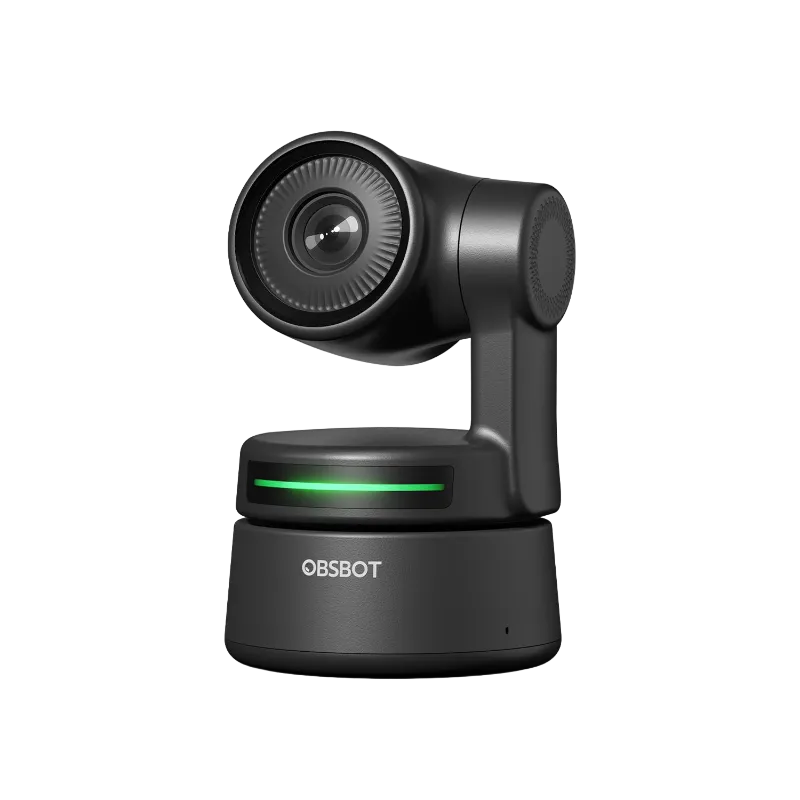
Cleaning your obsbot tiny 2 comes down to three rules: no liquid on the body, no fingers on the lens, and never force the gimbal by hand. Follow those and a motorised webcam stays smooth for years instead of developing a grinding tilt motor or a smeared front element.
We test OBSBOT gear on desks, in small studios, and in bags that get thrown around, and the failures we see are almost never electronic. They are dust, fingerprints, and cables pulled at an angle. This is the routine we use, and how it changes across the rest of the OBSBOT product lineup.
What You Need Before You Touch the Lens
Most camera damage happens in the first thirty seconds of cleaning, usually because someone reached for the nearest tissue. Put these on the desk first.
- A clean microfibre cloth, washed without fabric softener
- A rubber blower bulb for loose dust
- Dry cotton swabs for the gimbal seam and ports
- A soft brush (a clean makeup brush works) for vents and grilles
- Isopropyl alcohol at around 70%, applied to a cloth, never poured
- The hard case or padded pouch the camera lives in
What to leave in the drawer: canned air, paper towels, ammonia-based glass cleaner, and pre-moistened wipes. Canned air can spit propellant onto the lens and spin a free gimbal faster than the motors like. Paper towels leave micro-scratches that show up as haze in backlit shots.
How to Clean the obsbot tiny 2 Step by Step
The obsbot tiny 2 is the fussiest of the range to clean because the lens sits on a moving head. Work in this order and you will not chase dust into the mechanism.
- Open the OBSBOT app and power the camera down properly so the head parks. Unplug the USB-C cable after it stops moving.
- Hold the body, never the head. If you need to move the lens to reach a corner, do it only when the camera is off and only with light fingertip pressure.
- Squeeze the blower bulb across the lens and the gap around the gimbal. Loose grit lifted now is grit you are not grinding in later.
- Wipe the lens in small circles with a dry microfibre cloth. Breathe on the glass if something is stuck, then wipe again.
- Run a dry swab along the seam where the head meets the body, and around the recessed USB-C port.
- Dampen a corner of the cloth with isopropyl alcohol and wipe the housing, avoiding the lens and any rubberised surface.
- Leave it 10 to 15 minutes before powering on so any residue evaporates.
If your lens has a fingerprint that will not lift, stop scrubbing. Repeated hard polishing removes coatings faster than any amount of dust.
Lens, Motors, and Ports: A Three-Part Habit
- Lens: check it every time you sit down to record, and clean it properly once a week if you use the camera daily.
- Gimbal and motors: a blower pass and a dry swab along the seam every couple of weeks. Dust is what makes a PTZ head feel notchy.
- Ports and cable: inspect the USB-C connector for lint, and stop yanking the cable sideways. Most "dead camera" reports are a tired port or a frayed lead.
- Housing and grilles: a soft brush once a month keeps microphones and vents clear.
Which Camera Needs What: Tiny 2 vs Meet 2 vs Tail 2
Not every OBSBOT camera has a gimbal, so the routine shortens or lengthens depending on what is on your desk. Here is how we treat each one.
| Camera | Cleaning focus | Storage note |
|---|---|---|
| obsbot tiny 2 | Lens plus the gimbal seam, weekly | Park the head, use a padded case |
| obsbot meet 2 | Fixed lens and housing, no gimbal to protect | Simple lens wipe, store flat |
| obsbot tail 2 | Larger front element and the motorised PTZ head | Centre the head, keep the supplied lens cover on |
The fixed-lens obsbot meet 2 is the easy one. The obsbot tail 2, being a bigger motorised PTZ camera, rewards a slightly slower routine: more surface area, more gaps for dust, and a heavier head that should never be carried by the lens end.
Storing Your Camera Between Shoots
Storage is where most longevity is won or lost, and it takes seconds.
- Park or centre the head before switching off, then leave it parked.
- Keep the lens cover or case closed when the camera is not in use, especially in rooms with pets or ceiling work going on.
- Drop a silica gel sachet in the case if you live somewhere humid. Swap it every few months.
- Coil cables loosely at the connector end rather than wrapping them tight around the body.
- Keep the camera out of direct sun, off radiator tops, and away from windows where temperatures swing.
- Do not store it loose in a laptop bag with grit and keys.
Software Care: Updates, Presets, and the obsbot tiny 3 software
Mechanical care is only half the job. The companion app handles firmware, tracking behaviour, and presets, and a camera that is being told to fight its own limits will wear faster. Use obsbot tiny 3 software to apply firmware updates when they appear, then recalibrate the gimbal if the head ever drifts off centre on its own.
Two habits worth forming: save your framing as a preset so you are not hand-nudging the head every session, and check tracking sensitivity after any update. A camera that is constantly hunting for a face is working harder than it needs to.
Accessories, Codes, and After-Sales
A remote controller is the single best protection for a PTZ head, because you stop touching the camera to reframe. It also makes presets usable during a live session. If you are adding one, grab the code first so the accessory and camera come from the same order and the same support record. Our OBSBOT discount page is the honest source for genuine discount sources, seasonal sales and offers, student and bulk discounts, and payment methods, and we list shipping regions and delivery windows there too.
A few practical notes before you buy:
- Read the warranty and customer support terms for your region before ordering, not after something breaks.
- Keep the box and serial number. Returns and refunds are far simpler with both.
- Save your order tracking number and screenshot the confirmation page, then re-check the store page before checkout in case the offer changed.
- If a code refuses to apply, check for a minimum spend or a sale item exclusion before contacting support.
- Never use a code sourced from a comment thread. Expired codes are the most common cause of a failed checkout.
Then check the latest price and confirm the code at checkout before you pay.
Care is cumulative. A two-minute clean and a proper case cost less than a replacement motor, and they are the difference between a camera that tracks cleanly in year three and one that lives in a drawer.
 Shopping at OBSBOT? See today's verified OBSBOT discount code
Frequently asked questions
Can I clean the obsbot tiny 2 lens with alcohol wipes?
Avoid alcohol on the glass itself. Wipe the lens with a dry microfibre cloth and save the isopropyl alcohol for the plastic housing, applied to the cloth rather than the camera.
Should I move the gimbal by hand to clean it?
Only when the camera is powered off, and only with very light pressure. Powering on with the head held, or forcing it while the motors are active, is the quickest way to damage the gimbal.
How often should I clean a PTZ camera like the obsbot tail 2?
Check the lens before every session and do a blower and dry-swab pass along the head seam every couple of weeks. Dust is the main cause of a notchy motor feel.
Does the obsbot tiny 3 software affect how long the camera lasts?
Yes, indirectly. Firmware updates, saved presets, and sensible tracking settings mean you stop nudging the head by hand and stop the camera hunting constantly, both of which reduce wear.
Where do I find a genuine OBSBOT discount code?
Check our store coupon page for the current code and price rather than relying on codes from comment threads, which are usually expired. Apply it at checkout before you pay.
Is the obsbot meet 2 easier to maintain than the Tiny 2?
Yes. The Meet 2 is a fixed-lens webcam with no gimbal, so a lens wipe and a case are usually enough, while the Tiny 2 needs care around the moving head.