

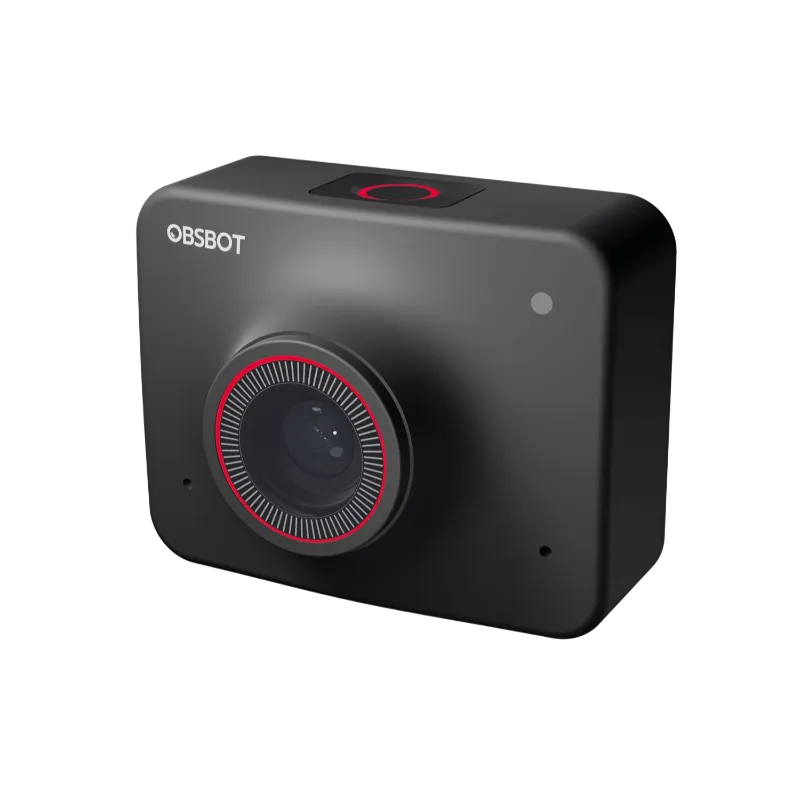
On a genuinely small desk, we would pick the OBSBOT Tiny 2 over the Meet 2, because its motorized gimbal lets you reframe without touching the camera or giving up surface space. The OBSBOT Meet 2 is still a strong, simpler webcam, and it wins on a couple of specific points that matter if your chair never moves. Here is how the two compare on footprint, mounting, framing, and the add-ons worth budgeting for.
OBSBOT Tiny 2 vs Meet 2 at a Glance
Both cameras are built for people who do not want a tripod arm clamped to the back of the desk. The difference is how much of your setup each one takes over.
| What matters | OBSBOT Tiny 2 | OBSBOT Meet 2 |
|---|---|---|
| Mounting | Monitor clip or small tripod, aims independently of the screen | Low-profile magnetic mount, sits flush against the display |
| Movement | Motorized 2-axis gimbal with pan and tilt | Fixed lens, aimed by hand |
| Auto-framing | Built-in AI tracking keeps you centered as you move | Best when you sit in one spot |
| Best for | Shared desks, demos, changing framing | One person, one chair, minimal setup |
If your desk is shared, or if you switch between talking head, whiteboard, and product close-ups during the same call, that movement row is the whole decision.
Desk Footprint: What Each Camera Really Takes Up
Neither camera eats desk surface, which is the point of buying either one. Both are designed to live on top of the monitor or on a short stand, so your keyboard, mouse pad, and notebook keep their territory.
- The obsbot tiny 2 sits on a base that you can point at a different angle than the screen, so you can frame yourself without swinging the monitor.
- The obsbot meet 2 is the lower-profile of the two. It hugs the display and barely changes your sightline.
- Cable routing matters more than size here. Both need a USB-C run back to your machine, so plan a clip or a short velcro tie so the cable does not drape across the desk.
We would also check your monitor's top edge. Very thin panels and curved screens are where small magnetic or clip mounts get fussy, and it is worth testing the fit before you commit.
Why the OBSBOT Tiny 2 Handles a Tight Desk Better
The gimbal is the reason. With the OBSBOT Tiny 2 clipped to a monitor on a narrow desk, you get pan, tilt, and subject tracking without adding an arm, a boom, or a second surface. In practice that means:
- You can point the camera at a whiteboard behind you and back again without standing up.
- Auto-framing keeps you centered when you lean out of frame to grab something.
- Gesture control means you can start tracking or recenter without opening software mid-call.
- It doubles as a small PTZ camera for product shots on the same desk, so you do not need a second device.
For a desk that has to serve as an office, a shooting table, and a video call station in the same afternoon, that flexibility is worth more than the extra simplicity of a fixed lens.
Where the OBSBOT Meet 2 Wins
The Meet 2 wins on simplicity, and simplicity is not a small thing. A fixed lens means no motor noise, no gimbal to bump, and nothing to recalibrate after you move a monitor. If you always sit in the same chair, in the same spot, with the same background, the Meet 2 does the job with fewer moving parts and less tinkering.
It also mounts lower and flatter, which some people prefer for a clean desk look or for a laptop riser where a taller camera would block part of the screen. Choose it if your priority is a set-and-forget camera and you rarely need to change framing.
Remote Controller, Software, and Other Add-Ons
Two extras are worth knowing about before you order, because they change how the camera feels day to day.
- The remote controller is the practical answer for anyone who presents a lot. Presets, framing, and mute from a puck on the desk beat alt-tabbing into an app while you are live.
- The obsbot tiny 3 software is where tracking sensitivity, framing presets, and image settings live. Install it once, set your preferences, and the camera remembers them.
If you are browsing the wider OBSBOT product lineup, note that the PTZ cameras in the range are a different class of device. They suit a studio or a meeting room, not a narrow desk, so do not size up just because the spec sheet looks bigger.
Codes, Delivery, and Support Before You Buy
Pricing on these cameras moves with sales, so we do not print numbers that go stale. Check the latest price and current offer on our OBSBOT page, where the code sits alongside the live deal.
A few things we check before ordering from any camera store:
- Applying a code at checkout should show the discount in the order summary, not just the cart.
- Confirm shipping regions and delivery estimates for your address before you pay.
- Save the order tracking link, since small camera gear often ships in separate parcels.
- Read the returns and refunds window and the warranty and customer support terms, especially for the mount, which is the part most likely to not fit.
- Stick to genuine discount sources. Seasonal sales and offers, and student and bulk discounts when the store runs them, come from the retailer, not from coupon aggregators.
- Check which payment methods are accepted if you want card protection or a local wallet.
We would rather send you to the store page with our code than quote a price that changed last week.
Which Webcam Fits Your Small Desk?
Go with the OBSBOT Tiny 2 if your desk is shared, you present or demo often, or you want one camera to cover calls and product shots. Go with the Meet 2 if you sit in one place, want the flattest mount possible, and prefer a camera you never have to think about. Either way, budget for the remote controller only if you actually present, and set your framing in the software once so you never fiddle with it mid-meeting.
 Shopping at OBSBOT? See today's verified OBSBOT discount code
Frequently asked questions
Is the OBSBOT Tiny 2 too big for a narrow desk?
No. It is designed to sit on the monitor or a short tripod rather than on the desk surface, so it takes up almost no working space. The base is small enough that it never crowds a keyboard and mouse, which is why we recommend it for tight setups.
Does the OBSBOT Meet 2 need a tripod?
It does not. The Meet 2 uses a low-profile mount that sits against the display, so you can skip a tripod arm entirely. Check your monitor's top edge first if it is very thin or curved, since that is where small mounts get tricky.
Do I need the remote controller with the OBSBOT Tiny 2?
Only if you present or switch framing often. The remote controller lets you trigger presets, recenter the gimbal, and mute without touching a laptop, which matters during a live call. For everyday solo calls, the software is enough.
What does the OBSBOT Tiny 3 software actually control?
It is the desktop app for tracking sensitivity, framing presets, and image settings. You set your preferences once and the camera keeps them, which is why we suggest installing it before your first meeting rather than mid-call.
Where do I apply the OBSBOT discount code?
Enter it at checkout, not in the cart, and confirm the discount appears in the order summary before you pay. Our store page lists the current offer and links straight to the checkout.
Can I return the camera if the mount does not fit my monitor?
That depends on the store's returns and refunds window, so read the policy before ordering and keep the packaging until you have tested the fit. Our store page links to the current terms so you can check before you buy.