

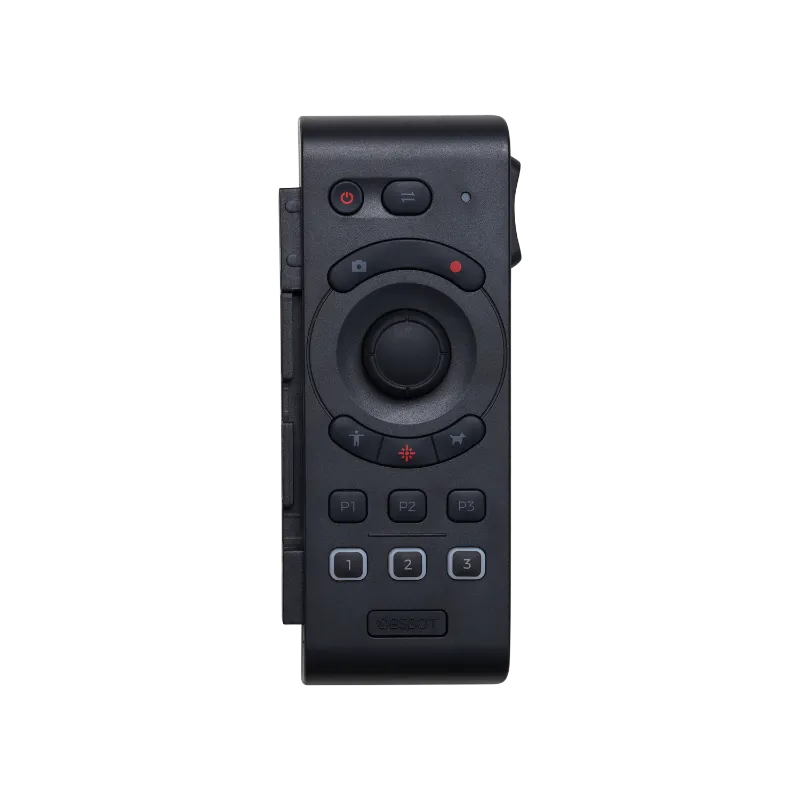
The OBSBOT Remote Controller gives the obsbot tiny 2 physical control over presets, zoom and gimbal movement, so you can reframe a shot without touching your phone, and it does the same job for the OBSBOT Tail 2 PTZ camera on a tripod or long desk arm. In practice it moves both cameras from app-driven gadgets to gear you can run one-handed while you are talking to lens. This guide covers what the controller actually changes, how to pair it, where the obsbot tiny 2 sits next to the OBSBOT Meet 2 and the obsbot tiny 3 software, and how to buy with our discount code.
What the remote controller actually does with the obsbot tiny 2
The controller exists to remove the second device from your workflow. Instead of propping a phone next to the camera and tapping a screen mid-sentence, you keep the shot in your hand.
- Saved framing. The controller is built around preset positions, so you jump between the angles you use most instead of dragging the frame back by hand.
- Zoom and pan/tilt movement. Fine adjustments happen on a button or rocker rather than a touchscreen, which matters when your fingers are cold, sweaty or covered in flour.
- Mode switching without a screen. Wake, sleep and shot changes sit on the controller, so you are not unlocking a phone to stop the camera looking at the ceiling.
- A stable hand-off. Presenters and guests can be handed the controller instead of your unlocked phone.
- Fewer cables and fewer taps. One pairing replaces a lot of on-screen fiddling on set.
Exact button layout, supported presets and firmware behaviour vary, so read the spec list on the remote controller page before ordering, and check the latest price and code while you are there.
Pairing the controller: the realistic setup
Setup is short, but order matters.
- Charge and power the camera first, then let it finish its startup sweep before you pair anything.
- Put the camera into pairing mode from the app or its on-screen menu, then hold the controller's pair button until it confirms.
- Test one preset at a time and label it in the app straight away, otherwise two identical saved angles will confuse you within a week.
- Re-check the presets after any firmware update, since a reset can wipe positions you were relying on.
- Keep the controller in the same room as the camera. Walls and distance both cost you reliability.
Remote controller vs app vs desktop software
| Job | Remote controller | App or obsbot tiny 3 software |
|---|---|---|
| Reframing mid-sentence | One press, no screen | Tap and drag, needs a second device |
| Zoom and tilt tweaks | Physical controls | On-screen sliders |
| Tracking setup and toggles | Limited, better in app | Full control |
| Firmware updates | Not the place to do it | Required |
| Handing control to a guest | Simple | You hand over an unlocked phone |
The honest answer is that you want both. The controller runs the room, the obsbot tiny 3 software handles setup, tracking behaviour and updates. Buy the controller to make the camera usable, not to replace the app.
Where the Tail 2 and Meet 2 fit
The controller is most useful when you run more than one camera, or when your camera is somewhere you cannot easily reach.
| Product | What it is | How the controller helps |
|---|---|---|
| obsbot tiny 2 | Webcam on a gimbal | Preset angles and zoom without opening an app |
| obsbot tail 2 | PTZ camera | Repeated shots across a long desk or studio |
| obsbot meet 2 | Compact webcam | Simple framing for meetings and one-person streams |
On a fixed webcam like the Meet 2 you gain convenience. On the Tail 2 you gain a lot more, because a PTZ camera with saved positions is a different tool from one you nudge around a screen.
Also worth knowing: the controller does not change image quality on any of these cameras. It changes how quickly you get the frame you want, which on a live stream is the thing viewers actually notice.
Who it suits, and who can skip it
- Buy it if you stream solo from a desk, you present to camera while typing, or your camera sits above a monitor where reaching it is awkward.
- Buy it if you run the Tail 2 and need the same three or four shots every session.
- Skip it if you record short clips on a laptop with the camera pointed one way the whole time.
- Skip it if you have not set up tracking and framing in the app yet. Learn the software first, then add hardware.
Buying it with our code
Ordering is straightforward once you know where to look.
- Use the store coupon page for the current offer, which is 5% OFF while it runs.
- Apply the code in the cart during checkout, before you pay, since most carts will not take a code after the order is placed.
- Check the page for shipping regions and delivery windows, because delivery times differ by destination.
- Payment methods listed at checkout are the ones that will actually clear.
- Keep the order confirmation email, as it carries the order tracking details you will need.
- Returns and refunds, warranty and customer support are all handled through the store, and the terms are listed on the product pages rather than guessed at here.
- For seasonal sales and offers, genuine discount sources are worth waiting for. Skip coupon sites that promise far more than the store itself advertises.
- Students and bulk buyers should ask about student and bulk discounts directly, and compare that against the code before choosing one route.
Everything above applies whether you are buying the controller on its own or pairing it with the obsbot tail 2. If you are still deciding between cameras, read the tracking notes on the obsbot meet 2 and tiny 3 software pages first, then buy the controller last. It is the piece that makes an already-good setup quicker to run.
 Shopping at OBSBOT? See today's verified OBSBOT discount code
Frequently asked questions
Does the OBSBOT remote controller work with the obsbot tiny 2?
Yes, it is designed to pair with the Tiny 2 and give you preset positions, zoom and gimbal movement without the app. Check the current compatibility list on the product page, since firmware updates can change which cameras and features are supported.
Can I use the remote controller with the Tail 2 and Meet 2?
The controller is most useful on gimbal and PTZ cameras, so the Tail 2 benefits the most from saved positions. Support on compact webcams like the Meet 2 varies, so confirm the model list before you order.
Do I still need the app if I have the controller?
Yes. You need the app or the obsbot tiny 3 software for firmware updates, tracking setup and customising what the preset buttons do. The controller is for running the shot, not for configuring the camera.
Where do I apply the OBSBOT discount code?
Enter it in the cart or at checkout before you pay, using the code from our store coupon page. Codes are generally applied before the order is placed, not after.
Are there student or bulk discounts on OBSBOT gear?
Student and bulk discounts are worth asking the store about directly, especially for classroom or multi-camera orders. Compare that price against the current code before you commit.
What are the returns and warranty terms?
Returns and refunds, warranty cover and customer support are handled by the store, and the exact windows are listed on the product pages. Keep your order confirmation email, as it holds the tracking and order details support will ask for.